
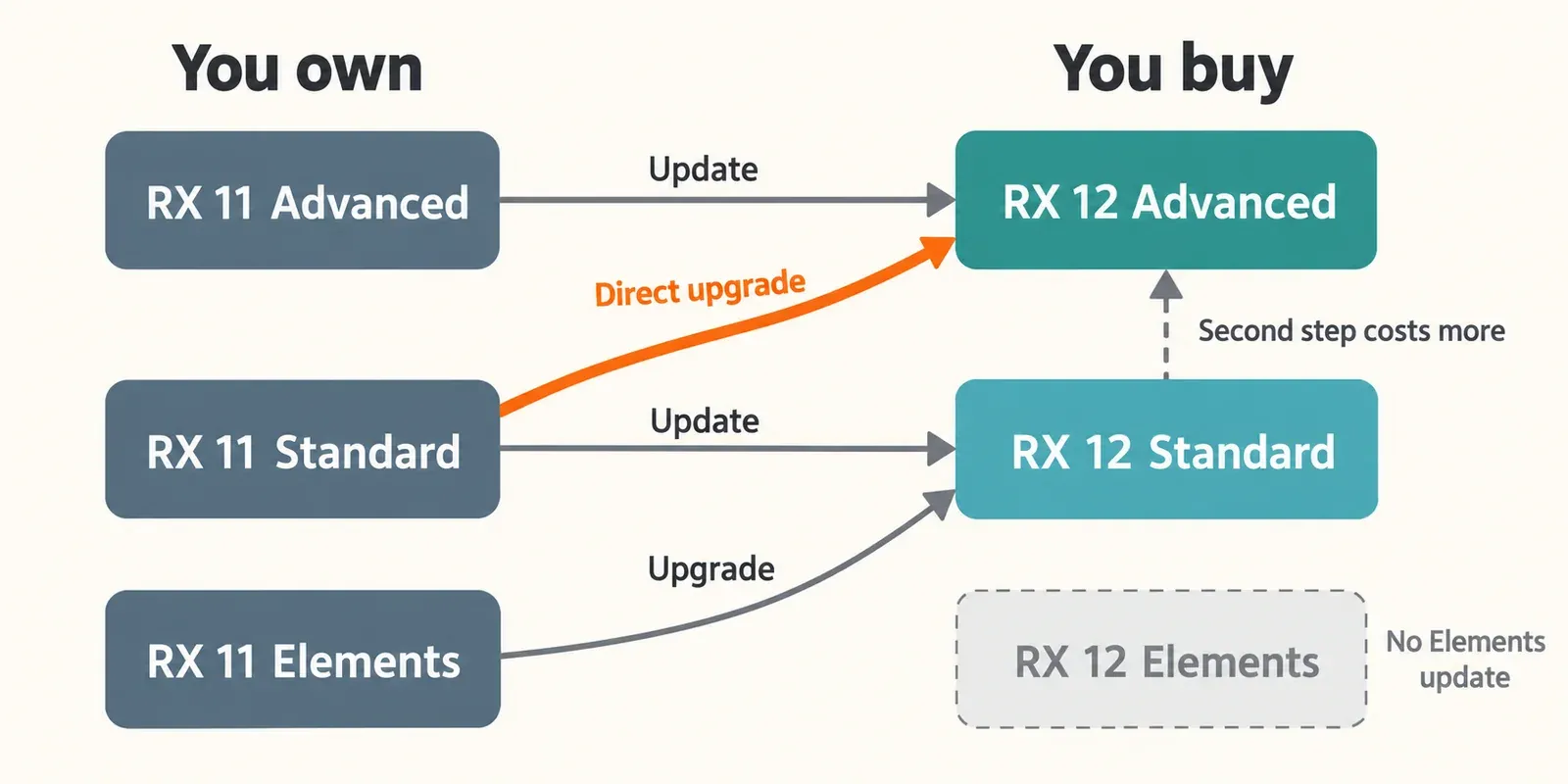
RX 12 is a paid update, and what it is worth depends on the edition you own. RX 11 Advanced owners pay $269 for Scene Rebalance, Trim Silence and every Standard change. RX 11 Standard owners pay $129 for Stems View, machine-learning De-bleed and Breath Control, and better separation models, but not the post-production tools. Going straight from RX 11 Standard to RX 12 Advanced costs $799, which is cheaper than updating first and upgrading later. RX 11 Elements has no Elements-to-Elements update at all. Prices are US iZotope store list prices observed on October 20, 2026. Most published comparisons hear cleaner separation and a faster workflow, but they disagree on how big the quality jump is.
I judge this update the way I judge any RX purchase: by the tools I would open every week, not by the version number. iZotope's release notes date RX 12.0.0 to April 28, 2026, almost two years after RX 11.0.0 arrived on May 14, 2024, and list 12.1.0 from October 15, 2026 as the current build. Below I go through what changed in each edition, what RX 11 already did, what the published tests found and which route costs least. For the rest of the family, from editions to plug-in fixes, start at the iZotope RX hub.
Quick answer: the RX 12 route for each edition
Find the edition you own, then read across. Every price is a US iZotope store list price in USD, logged out, observed October 20, 2026, before tax.
| You own | Best RX 12 route | Price | What you gain | My call |
|---|---|---|---|---|
| RX 11 Advanced | Update to RX 12 Advanced | $269 | Scene Rebalance, Trim Silence and every Standard change | Update if you cut dialogue, film or broadcast audio |
| RX 11 Standard, music and vocal work | Update to RX 12 Standard | $129 | Stems View, ML De-bleed, ML Breath Control, better Music Rebalance and Dialogue Isolate models | Update if bleed, breaths or stems are weekly work |
| RX 11 Standard, moving into post | Direct upgrade to RX 12 Advanced | $799 | Everything above plus the Advanced-only modules | Take this instead of two steps costing $1,128 |
| RX 11 Elements | Upgrade to RX 12 Standard | $299 | Standard's tools; Elements itself only gets a better Repair Assistant | Stay unless you need Standard's tools |
| RX 10 Standard or Advanced | Update to the same RX 12 edition | $199 / $399 | The RX 11 and RX 12 changes together | The strongest value of any update |
The test consensus in one line: four of six published assessments hear cleaner separation than in RX 11, and three of six call the gain modest for most existing modules. The details are in the test results below.
What changed in RX 12: new features by edition
Most of the new value sits in Standard and Advanced, and the post-production tools are Advanced-only. The table follows iZotope's official edition comparison chart and the RX 12 manual.
| RX 12 change | Elements | Standard | Advanced | What RX 11 had instead |
|---|---|---|---|---|
| Scene Rebalance (voice, music, effects) | No | No | Yes | No such module; Dialogue Isolate and Music Rebalance were the nearest tools |
| Stems View | No | Yes | Yes | Each separated stem opened in its own tab |
| Trim Silence | No | No | Yes | No Trim Silence module |
| ML De-bleed, no reference track | No | Yes | Yes | Reference-track De-bleed with a Learn pass, now kept as Classic |
| ML Breath Control | No | Yes | Yes | The algorithm now labeled Classic |
| Music Rebalance real-time plug-in | No | Yes | Yes | Real-time AAX plug-in in Pro Tools, plus VST3 and AU ARA versions |
| Improved Music Rebalance models | No | Yes | Yes | Earlier models with Vocal, Bass, Percussion and Other stems |
| Improved Dialogue Isolate models | No | Yes | Yes | Real-time Dialogue Isolate, already new in RX 11.0 |
| Improved Repair Assistant models | Yes | Yes | Yes | Earlier Repair Assistant models |
Scene Rebalance (Advanced)
Scene Rebalance is the headline addition. The RX 12 Scene Rebalance manual page describes a module that splits a finished soundtrack into Voice, Music and Effects, each with independent gain. That is the job for a mixed program with no stems: dipping music under a line, lifting dialogue or pulling effects for a trailer. Outside the RX editor it exists only as an AAX AudioSuite plug-in for Pro Tools, which cannot preview the processing before you render. RX 11 had nothing like it. Dialogue Isolate and Music Rebalance were the closest tools, and neither treats effects as their own stem.
Stems View (Standard and Advanced)
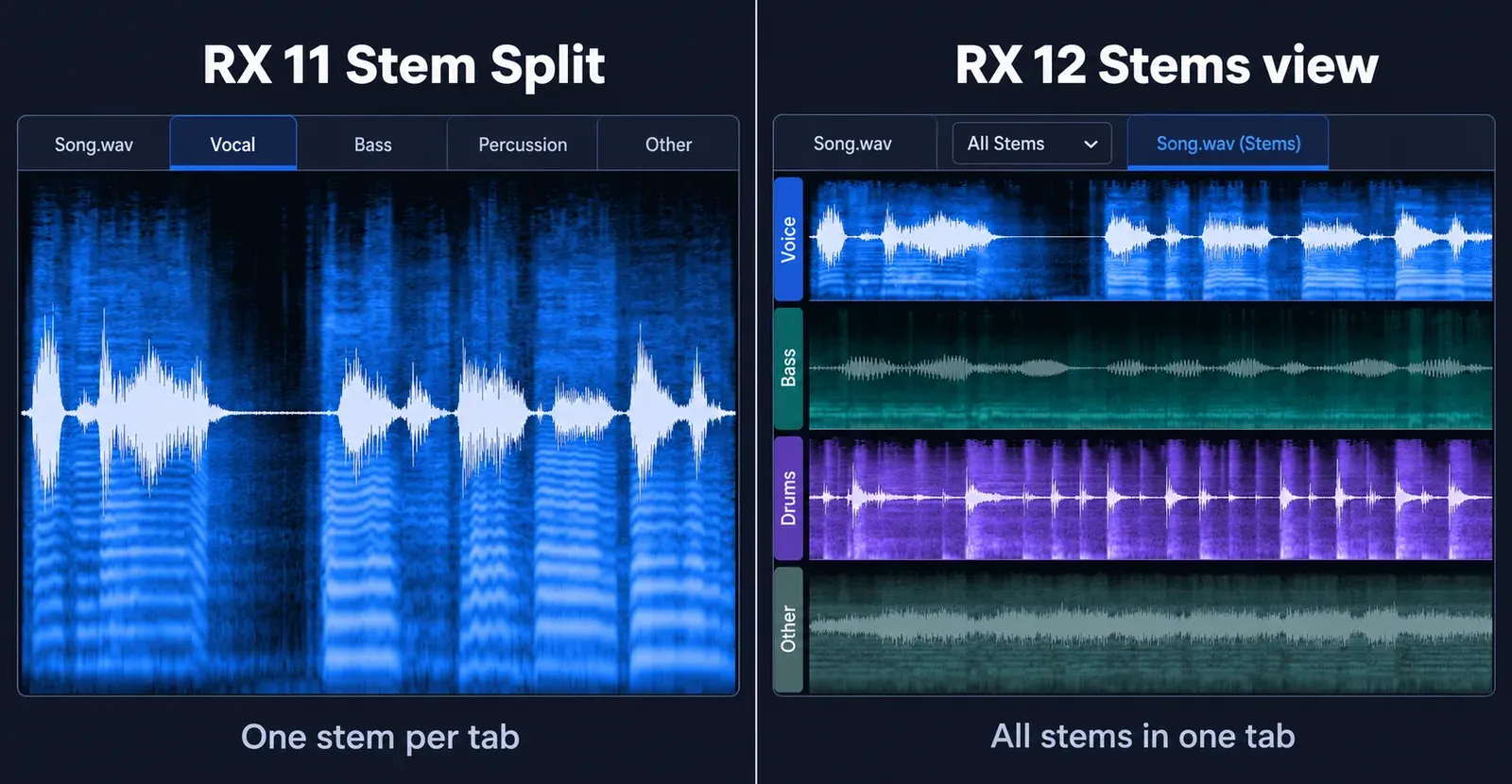
Stems View is the change you notice most in daily use. When Music Rebalance, Dialogue Isolate or Scene Rebalance splits a file, RX 12 opens the result as one tab named after the file plus "(Stems)". With All Stems selected, each stem sits on its own time-aligned lane. Lane selectors switch stems on and off, edits touch only the active stems, and the Stem Split pane documentation lists Export… for separate files and Export as Single File… for their sum. In RX 11's Music Rebalance, Stem Split sent Vocal, Bass, Percussion and Other to four separate tabs. Sound On Sound's Hugh Robjohns calls the new view "a very big workflow improvement".
Trim Silence (Advanced)
Trim Silence is a new Advanced module for trimming silent gaps. Per the Trim Silence manual page, it has four controls: Threshold, Post-roll, Silence and Crossfade. Post-roll can keep reverb tails. It is a module, not a plug-in, and it always processes the whole file, whatever you have selected. RX 11 had no equivalent module.
De-bleed (Standard and Advanced)
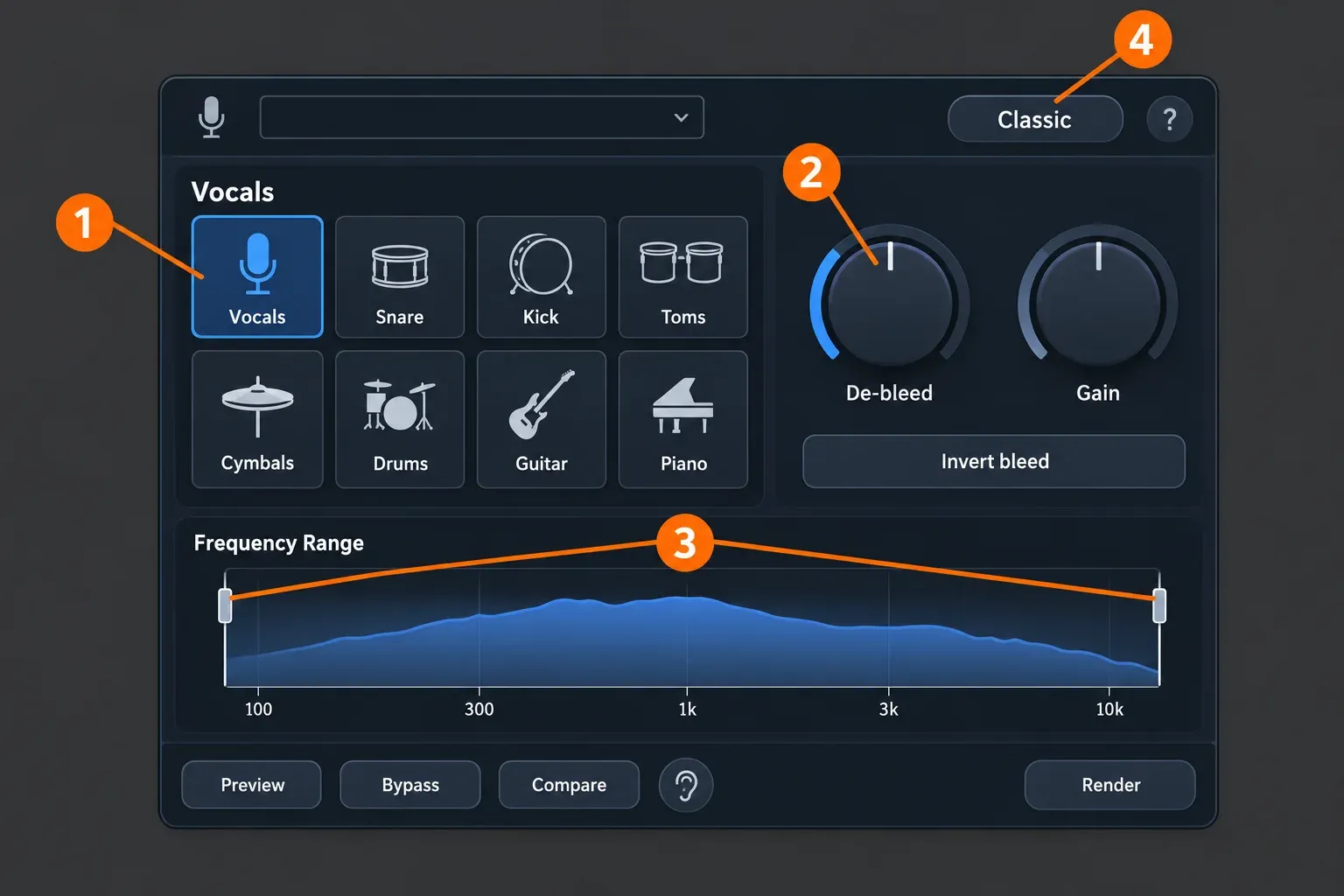
De-bleed is the biggest Standard-edition change. The RX 12 De-bleed page describes a machine-learning module and plug-in with a Signal Type selector covering Vocals, Snare, Kick, Toms, Cymbals, Drums, Guitar and Piano. It sits alongside De-bleed and Gain controls, an Invert bleed switch and a frequency range. iZotope's RX 12 announcement stresses that the real-time plug-in needs no reference track. RX 11's De-bleed needed a separate bleed-source track at a matching sample rate, time alignment and a Learn pass. A Classic button keeps the RX 11 algorithm for jobs where you do have that reference. Arefyev Studio's review notes that accuracy drops in dense arrangements, so treat the new mode as a fast first pass on busy multitracks.
Fixing bleed at the source still beats repairing it. The guide on reducing headphone bleed in vocal recordings covers the tracking side.
Breath Control (Standard and Advanced)
Breath Control now uses ML detection. Per the Breath Control manual page, its Algorithm menu offers Real-time, Offline and Classic, where Classic is the RX 11 legacy algorithm. The Natural/Gated switch is unavailable in Classic, and detection works best on selections of at least three seconds. If you work in Sound Forge instead, editing breaths by hand on the waveform remains a precise alternative.
Music Rebalance (Standard and Advanced)
Music Rebalance gets better neural networks and a real-time plug-in that iZotope lists as new in RX 12. The RX 12 Music Rebalance page names the stems Voice, Bass, Drums and Other, with Good/Real-time, Better/Offline and Best/Offline quality modes. MusicTech points out that it still recognizes only those four stem types. One correction to a common claim: the RX 11 manual already listed Music Rebalance as a real-time AAX plug-in in Pro Tools, plus VST3 and AU ARA versions, so Pro Tools users had a real-time route before RX 12. For getting clean stems out of the new models, see the Music Rebalance guide.
Dialogue Isolate (Standard and Advanced)
Dialogue Isolate gets improved neural networks in both editions. The edition split does not move. The RX 12 Dialogue Isolate page, like its RX 11 counterpart, keeps Best/Offline quality and four-band multiband processing in Advanced, while Standard runs it in Good/Real-time quality. The real-time plug-in itself is not new: RX 11.0 introduced it, with Dialogue De-reverb. Settings for both modes are in the Dialogue Isolate guide.
Repair Assistant (all editions)
Repair Assistant gets improved neural networks in Elements, Standard and Advanced. For Elements owners, this is the only RX 12 change on iZotope's chart.
Design updates and delta monitoring
iZotope lists a larger spectrogram, module search and a resizable history panel. Sound On Sound found the larger spectrogram barely noticeable but quickly spotted a new monitor volume slider at the top right of the editor. MusicTech reports difference (delta) processing and monitoring in most modules, and Sound On Sound describes the control: a button with an ear symbol next to Preview, Bypass and Compare that, while previewing, plays only what is being removed. The iZotope pages used for this comparison do not list it, so it rests on those two reviews.
What RX 11 already had
Several features that RX 12 coverage presents as new were already in RX 11, so they are not reasons for RX 11 owners to pay. Going by the RX 11 entries in iZotope's release notes and the RX 11 manual, RX 11 already had:
- Real-time Dialogue Isolate, with Dialogue De-reverb, from RX 11.0.
- Loudness Optimize, Streaming Preview and Mid/Side channel mode, also from RX 11.0.
- Spectral Editor ARA, with Studio One 6 and Pro Tools support added in 11.1.0 and Logic support under Rosetta.
- Music Rebalance as a real-time AAX plug-in in Pro Tools.
- The reference-track De-bleed algorithm, which survives in RX 12 as the Classic mode.
If your RX 11 work is mostly dialogue cleanup in real time, the new Dialogue Isolate models are the main improvement you would be paying for.
Test results: what published comparisons show
The composite result is clear on direction and mixed on size. Six independent assessments were counted: MusicTech, ProVideo Coalition, Sound On Sound, Arefyev Studio, Creative Field Recording and one owner report on The Gear Forum. Only one of them published a number. The rest are listening comparisons and verdicts, so the table counts how many assessments reached each finding rather than averaging scores.
| Finding about RX 12 against RX 11 | Assessments (of 6) | Reached by |
|---|---|---|
| Scene Rebalance is the headline new tool, aimed at post more than music | 5 | MusicTech, ProVideo Coalition, Sound On Sound, Arefyev Studio, Gear Forum owner |
| Separation or isolation is clearly better | 4 | MusicTech, ProVideo Coalition, Sound On Sound, Gear Forum owner |
| The quality gain is modest for most existing modules | 3 | ProVideo Coalition, Arefyev Studio, Creative Field Recording |
| Processing or iteration is faster | 3 | MusicTech, Arefyev Studio, Sound On Sound |
| Stems View is a real workflow gain | 3 | MusicTech, Sound On Sound, ProVideo Coalition |
| Reference-free De-bleed is a useful change | 3 | MusicTech, ProVideo Coalition, Arefyev Studio |
| Value depends on how often you do repair or post work | 3 | ProVideo Coalition, Arefyev Studio, Gear Forum owner |
| Artifacts remain on hard material | 2 | ProVideo Coalition, Arefyev Studio |
Speed. MusicTech's RX 12 review timed a full stem split of the same 4:30 mix at the highest quality level: about 2:30 in RX 11 and about 1:45 in RX 12. That is roughly 30% less time in that one test, on a computer the review does not name. MusicTech also judged that Music Rebalance and Dialogue Isolate "now deliver markedly higher quality than previously" and called RX 12 "a big step up from its predecessor".
Dialogue. The ProVideo Coalition RX 12 shootout ran Dialogue Isolate in RX 12 and RX 11 with the same settings on three clips. With steady background noise, RX 12 was a "noticeable" but "not massive" improvement. On a poor phone recording with room reverb there was "not that much improvement if any". In heavy traffic RX 12 showed "significantly less artifacting", with an occasional reverb artifact. In a fourth test, Scene Rebalance separated the dialogue more cleanly than the UVR Bandit model, though it left some effects on the dialogue stem where nobody was speaking.
Workflow. Sound On Sound's RX 12 Advanced review found that many improved and rebuilt tools "seem to work faster and more precisely", and singled out Stems View.
The dissent. Arefyev Studio's review concluded that RX 12 "improves workflow and speed" but "does not meaningfully improve separation quality", and that for effective RX 11 users "the upgrade adds speed, not a major quality jump". Creative Field Recording, writing for sound-effects recordists without having used RX 12, saw little new "worth the upgrade price" for existing owners. On the musician side, one Advanced owner on The Gear Forum wrote that Advanced "isn't necessary for musicians" and bought it because he sometimes takes paid post work. Gearnews, in a review not counted above because it barely compares with RX 11, called the separated stems "not perfectly isolated, but often clean enough to work with".
What the tests show: RX 12 is a workflow release with a real but uneven quality gain. On hard material, such as ProVideo Coalition's heavy-traffic clip, the listening tests favour RX 12 clearly. On steady noise or a reverberant phone call, the gain shrinks to small or none. The update earns its price through what is genuinely new: Scene Rebalance, reference-free De-bleed and Stems View. For a module-by-module verdict on RX 12 itself rather than the jump from RX 11, see the RX 12 review.
RX 12 upgrade prices from RX 11, RX 10 and Elements
The RX 11 to RX 12 update is not free. The store sells dedicated "Update from RX 11" options, and the accepted answer in a Native Instruments community thread says the same. These are the logged-out list prices on the US iZotope store pages for RX 12 Standard, RX 12 Advanced and RX 12 Elements, in USD, observed October 20, 2026, before tax.
| From | To | US list price |
|---|---|---|
| RX 11 Standard | RX 12 Standard | $129 |
| RX 11 Advanced | RX 12 Advanced | $269 |
| RX 11 Standard | RX 12 Advanced | $799 |
| RX 12 Standard | RX 12 Advanced | $999 |
| RX 10 Standard | RX 12 Standard | $199 |
| RX 10 Advanced | RX 12 Advanced | $399 |
| RX Elements or Elements Suite | RX 12 Standard | $299 |
| RX Elements or Elements Suite | RX 12 Advanced | $1,199 |
| Any paid iZotope product (crossgrade) | RX 12 Standard | $349 |
| New licence | RX 12 Elements / Standard / Advanced | $99 / $399 / $1,399 |
iZotope asks existing owners to log in for loyalty pricing, so the offer in your account can differ from these list prices. The launch prices in the April and May reviews match today's US list, so there is no price change to report. For loyalty, crossgrade and bundle routes across other iZotope products, see the iZotope upgrade pricing guide.
RX 11 Standard owners: update, or jump to Advanced?
If you will want Advanced within the RX 12 cycle, jump now. The direct RX 11 Standard to RX 12 Advanced upgrade is $799. Updating to RX 12 Standard for $129 and later upgrading to Advanced for $999 totals $1,128, which is $329 more for the same result.
Advanced adds Ambience Match, Azimuth, Center Extract, De-rustle, De-wind, Deconstruct, Dialogue Contour, EQ Match, Leveler, Scene Rebalance, Spectral Recovery, Trim Silence and Wow & Flutter, plus Multichannel Processing and Multiple Speaker Detection. It also keeps Dialogue Isolate's Best/Offline quality and multiband mode, as it did in RX 11. Dialogue Isolate itself is in both editions, even though one line in the product page FAQ reads as if it needed Advanced; the official chart and manual put it in Standard.
If your work is music, I would stay on Standard. ProVideo Coalition calls Advanced a "fairly compelling case" for professionals and "more of a judgement call" for editors who mainly use Dialogue Isolate and basic noise reduction, and Gearnews concludes that "for most producers, Standard hits the sweet spot". Before deciding, the full Elements, Standard and Advanced comparison lists every module by edition.
RX 11 Elements and RX 10 owners
RX 11 Elements owners have no RX 12 Elements update. The US store sells RX 12 Elements only as a new license ($99) or an education license ($49.50). The only RX 12 change for Elements is the improved Repair Assistant, so I would not buy RX 12 Elements to replace RX 11 Elements. The paid step that changes your toolkit is Elements to RX 12 Standard for $299. It brings De-bleed, Breath Control, Music Rebalance, Dialogue Isolate and Stems View.
RX 10 owners get the best deal of the version cycle: $199 from RX 10 Standard to RX 12 Standard, or $399 from RX 10 Advanced to RX 12 Advanced. You skip RX 11 but collect its changes as well, including real-time Dialogue Isolate, Loudness Optimize, Streaming Preview and Mid/Side mode. Owners of another paid iZotope product can crossgrade to RX 12 Standard for $349.
Before you update: system, formats, hosts and trial
Check your computer and host before paying, because RX 12 drops older macOS versions. The RX 12.0.0 release notes set the system, format and host requirements:
- Operating system. Mac needs macOS Sonoma 14.7 or later, on Intel or Apple silicon. Windows needs Windows 10 22H2 or Windows 11 24H2. RX 11.0.0 still listed macOS Monterey 12.7.4 and Ventura 13.6.6, so a Mac on either needs an OS update before RX 12.
- Formats. RX 12 ships as AU, AAX, AAX AudioSuite, VST3, AU ARA and VST3 ARA, all 64-bit only. There is no VST2 version. If the plug-ins do not appear after installing, work through RX plug-ins not showing in your DAW.
- AudioSuite-only tools. Scene Rebalance, Ambience Match and De-rustle exist as plug-ins only in AAX AudioSuite format, so Pro Tools is the one DAW that can host them; elsewhere, use them as modules in the RX editor. The Scene Rebalance AudioSuite plug-in cannot preview before rendering.
- ARA. Spectral Editor AU ARA works in Logic Pro 10.7 or later only under Rosetta, which RX 12 did not change. VST3 ARA works in Studio One 7 and Fender Studio Pro 8.
- Hosts. The supported list is Logic Pro 12, Pro Tools 2025, Ableton Live 12, Cubase 15, Nuendo 15, Fender Studio Pro 8 (Studio One 7), Reaper 7, FL Studio 25, Adobe Audition 2026, Premiere Pro 2026, DaVinci Resolve 19 and Reason 13.
- Trial. iZotope's RX 12 trial terms allow a 10-day trial with export disabled. It starts the first time you open the editor or a plug-in, and afterwards RX runs in a limited Demo mode. The page on RX price, trial and licence terms covers what changes after day 10.
- Authorization. RX 12 authorization works Online, Offline or with iLok. If activation fails, the Product Portal and authorization fixes cover the common errors.
One version note: RX 12.1.0, released October 15, 2026, added support for the Boris FX license activation method and changed the branding in the product and installer.
Is RX 12 worth upgrading? My verdict by user
Yes for post-production owners of Advanced, usually yes for music producers on Standard, and not yet for occasional users.
- Dialogue, film and broadcast editors on RX 11 Advanced: update for $269. Scene Rebalance is the one new tool that five of six assessments single out, it fixes a problem RX 11 could not, and Trim Silence speeds up long spoken-word files.
- Music and vocal producers on RX 11 Standard: update for $129 if headphone bleed, breaths or stem edits come up every week. Reference-free De-bleed and Stems View cut setup time on exactly those sessions. If you would buy Advanced later anyway, take the $799 direct route now.
- Occasional repair users, Elements owners and older Macs: wait, or run the 10-day trial on your own material first. Arefyev Studio and Creative Field Recording see little reason for existing owners to pay, and a Mac on Monterey or Ventura cannot run RX 12 without an OS update.
If the update price is the sticking point, compare SpectraLayers and the other RX alternatives before paying. If you are weighing a different editor altogether, the Sound Forge Pro vs iZotope RX comparison sets out where each one fits.