

iZotope Equinox is worth buying if you mix in surround or Dolby Atmos, or if you own Stratus or Symphony and qualify for the $49 or $99 crossgrade; stereo-only music producers can skip it. It costs $249 (iZotope US store price on October 23, 2026), or $149 as a crossgrade from any paid iZotope product. Inside are Exponential Audio's Stratus and Symphony engines in one plugin, running every format from mono to 9.1.6. MusicRadar's 4 out of 5 is the only published score; across seven readable reviews and owner posts, four praise the sound and three tie its value to a discount or crossgrade.
My rule is simple: pay for Equinox when the channel count is the reason. Stereo music reverb costs far less in iZotope's own catalog, with Neoverb at $99 and Aurora at $49, and MusicRadar's main con is that the price factors in multichannel features a lot of music makers won't use. Before you buy, check what you already own: Music Production Suite 9, RX Post Production Suite 9, the Everything Bundle and an iZotope Pro subscription all include Equinox, while iZotope Plus and Mix & Master Bundle Advanced don't.
What iZotope Equinox is
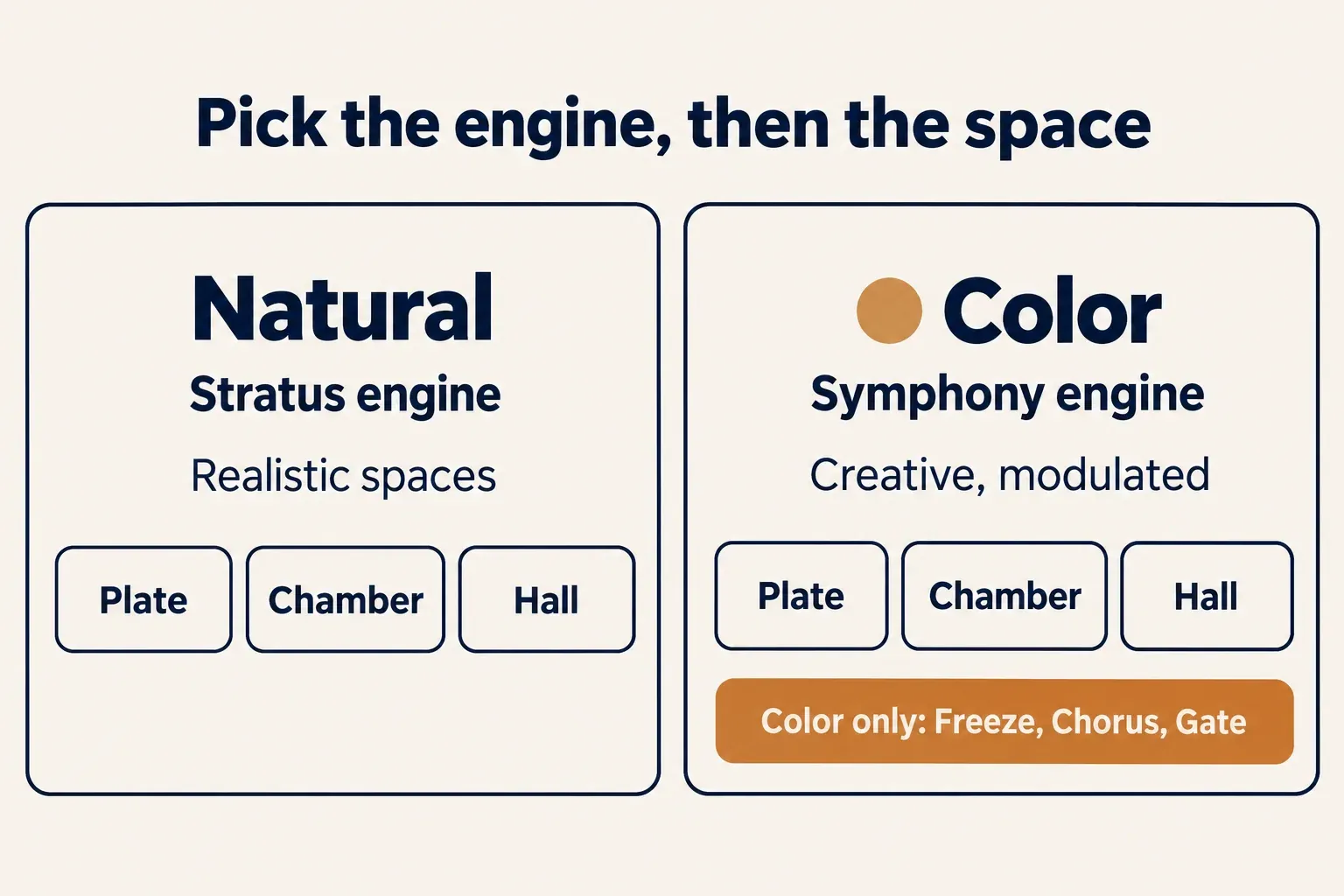
Equinox is an algorithmic reverb with two engines in one plugin. The Equinox user guide assigns the Natural reverb types to the Stratus engine, built for realistic spaces, and the Color types to the Symphony engine, built for creative and experimental sound. The Reverb Type menu offers Plate, Chamber and Hall in both versions, so the first decision is the engine and the second is the space.
iZotope released Equinox on April 16, 2025. The current version is 1.2.0, released November 3, 2026. It fixes loud bursts after inactivity or parameter changes during playback, corrupted-preset crashes and legacy preset loading. It also adds Boris FX licensing support and revises OS and host support. The March 2026 1.1.0 update, according to Rekkerd's report on the 1.1.0 update, added 7.1.4 for AU instances in Logic and 7.x.4 and 9.1.6 for VST3, and fixed preset keyword handling when legacy presets are imported. Equinox sits at the top of the reverb shelf in the iZotope plugin lineup, above Neoverb and Aurora, and iZotope's reverb guide calls it "the high-end choice" for precision, realism and immersive formats. Boris FX announced its acquisition of iZotope in July 2026, and MusicTech's report on the acquisition says existing iZotope licenses and subscriptions remain active.
From Exponential Audio's Stratus and Symphony to Equinox
Equinox continues Exponential Audio rather than starting a new reverb family. MusicRadar's review traces the company to former Lexicon DSP engineer Michael Carnes and notes that iZotope bought it in 2019, then dropped most of the line in 2022, which left Stratus and Symphony. iZotope's product FAQ states that Equinox mirrors those two engines 1-to-1.
Stratus, Symphony and their 3D versions are no longer sold. The same FAQ promised full support for one year after the April 2025 launch and keeps the installers on iZotope's Legacy Products downloads page. Owners get the cheapest way in: a $99 crossgrade from Stratus 3D or Symphony 3D, or $49 if you own both or the 3D Reverb Bundle.
Moving a library across takes two steps in the browser. A Legacy switch shows the original Stratus and Symphony preset names, and Options > Migrate Legacy User Presets imports your own presets. At launch, The Podcast Host's preview, written on a review build, reported that Equinox could replace Stratus and Symphony instances in a Pro Tools session with their settings, but without automation or aux-output information.
Owners disagree on whether the old presets sound the same. In the KVR Audio forum thread on Equinox (22 posts, April 2025 to March 2026), three posters said the legacy presets differ from the originals: one called them worse, one said the change was "in a good way", and one found the gate switched on in Equinox where Symphony had it off, with the Symphony decay still "longer and smoother" after he turned it off. The same poster suggested keeping Symphony and Stratus installed for old projects. I'd follow that advice, because owners hear differences: swapping Equinox into a finished mix is a remix decision, not a file conversion.
Equinox controls: what to set first
Set the main column in the order the user guide suggests for a reverb built from scratch: Reverb Type, Time, Size, Pre-delay, then Tone. Those five settings decide the space; the panels to the right refine how it starts, reflects and decays. Time approximates RT60, Size is set in meters, and Tone is a global tilt EQ that makes the whole reverb darker or brighter.
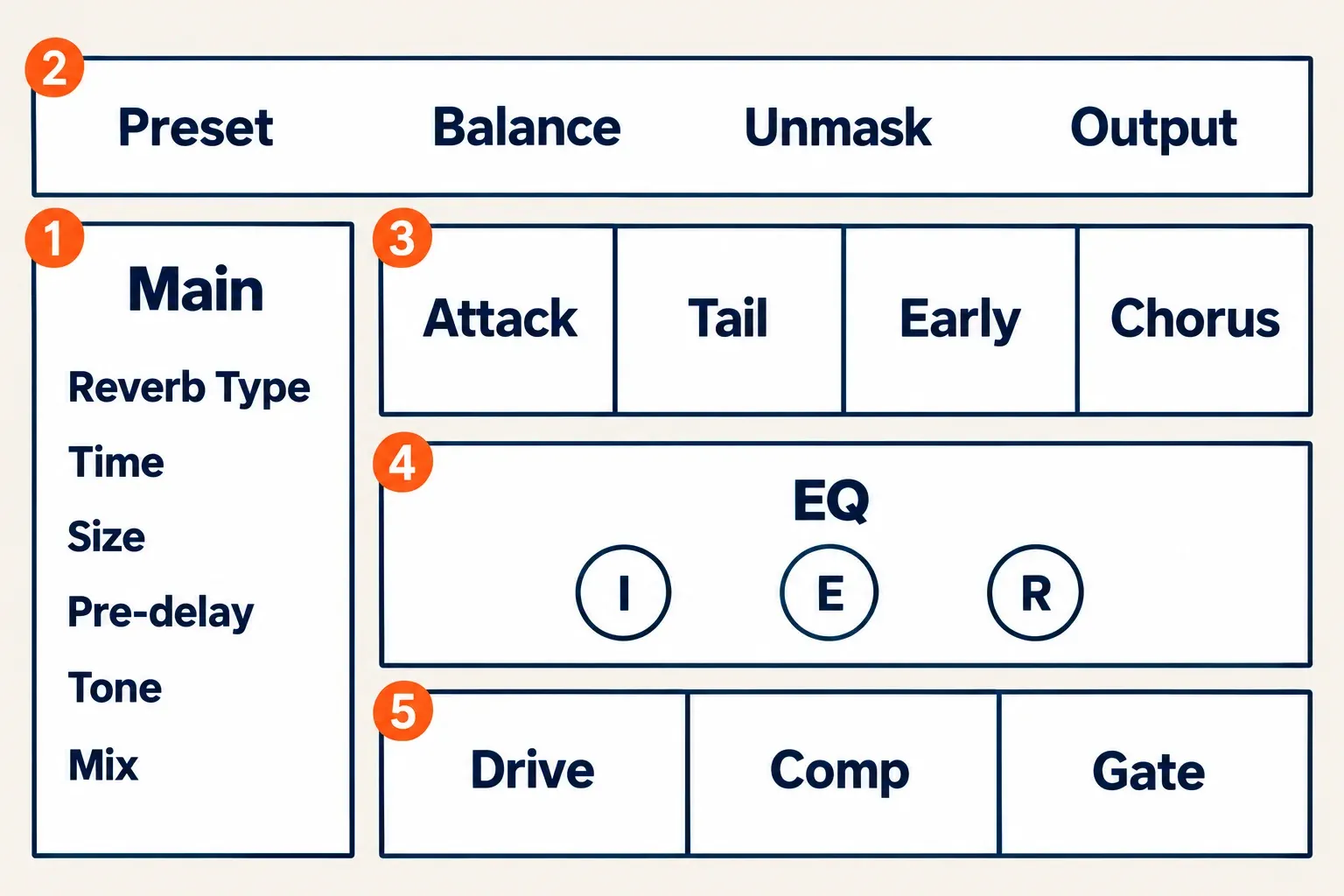
The rest of the main column is quick to read. Freeze works only with a Color type. Pre-Delay Sync switches pre-delay between Off, Note and Ratio; for hosts and editors without sync, the BPM delay and reverb time guide has the millisecond math. Early Gain and Reverb Gain set the two parts separately, and Mix is the wet/dry blend. The guide reserves Mix for inline use; on an aux return it recommends setting the level with the track fader instead.
The header holds the Preset selector, Balance, Unmask, Output, Reset, Options and Help. Unmask is the iZotope addition worth learning first: it dynamically ducks the reverb frequencies that mask the source, with Unmask Amount, Sensitivity, Attack, Release and a Delta listen switch. MusicRadar says it derives from Neutron's unmasking and calls it particularly useful on vocals and percussion.
| Panel | Controls, as the guide names them | What it shapes |
|---|---|---|
| Attack | Env Attack, LP Filter, Diffusion, Env Time; Advanced: Diffuser Size, Link | How the reverb builds up |
| Tail | Damping, Damping Freq, Width, Balance; Advanced: Delay, Tail Delay Sync, Suppression, Recovery, Suppress Early, Crossover, Tail Suppression Source | The decay; tail suppression ducks the tail according to the input level |
| Early | Early Attack, LP Filter, Width, Early Time; Advanced: Pattern, Pass Early, Density, Distribution, 3D Dist | The early reflections |
| Chorus (Color only) | Chorus Type, Density Rate, Density Mod, Rate, Depth | Modulation inside the reverb |
| EQ | Filters on the Input, Early and Reverb signals (nodes I, E, R): high-pass 6 and 12 dB/oct, band-pass, notch, low-pass 12 and 6 dB/oct | Each signal path, filtered separately |
| Drive | Drive, Drive Type, Crossover, Pass Highs, Character | Saturation and word-size character at the input |
| Comp | Threshold, Comp, Knee, Attack, Release, Cut, Gain, Limiter | A compander at the input: positive Comp values compress, negative values expand downward |
| Gate (Color types) | Threshold, Range, Attack, Release, Hold | Gated reverb; the guide cites a gated snare and ADR matching |
I'd leave the panels alone until the main column is right. Presets store every setting except Mix and Freeze, so a preset already sets the panels, and the guide's own order puts the space before the detail.
1,250+ presets and the tag browser
More than 1,250 factory presets ship with Equinox, and the Preset Browser filters them by tags in five categories: Space, Size, Effect, Instrument and Reverb Type, plus a search field. Because presets leave Mix and Freeze alone, your wet/dry balance stays put while you audition. User presets live in Documents/iZotope/Equinox/Presets on both macOS and Windows.
Opinions on the library split. An owner of Stratus 3D and Symphony 3D on TheSoundBoard welcomed the tag browser, while one KVR poster still found browsing poor. MusicRadar felt the factory presets don't show off how much fun Equinox can be, compared with Valhalla DSP's presets. Tagging also had a launch problem: one KVR owner wrote in March 2026 that version 1.1 fixed lost preset tagging, his biggest issue.
My advice is to filter by Space first and Reverb Type second. The room decides whether a preset can work at all; the Instrument tags only narrow a list that is already in the right space.
Surround and Dolby Atmos: formats by host
Equinox covers every common format from mono to 9.1.6, but the immersive formats depend on your host, so check the table before you buy for an Atmos bed. Mono, stereo, LRC, LCR, LRS, Quad, LCRS, 5.0, 5.1, 7.0, 7.1 and the SDDS 7.0 and 7.1 layouts carry no host note in iZotope's channel-format list; the immersive rows do.
| Format | Where iZotope lists it |
|---|---|
| 7.0.2 | VST3, Pro Tools |
| 7.1.2 | Listed without a host note |
| 7.0.4 | VST3, Pro Tools |
| 7.1.4 | VST3, Logic, Pro Tools |
| 9.0.6 | VST3 and Pro Tools; not currently in Fender Studio Pro 8, Cubase or Nuendo |
| 9.1.6 | VST3 and Pro Tools; not currently in Fender Studio Pro 8, Cubase or Nuendo |
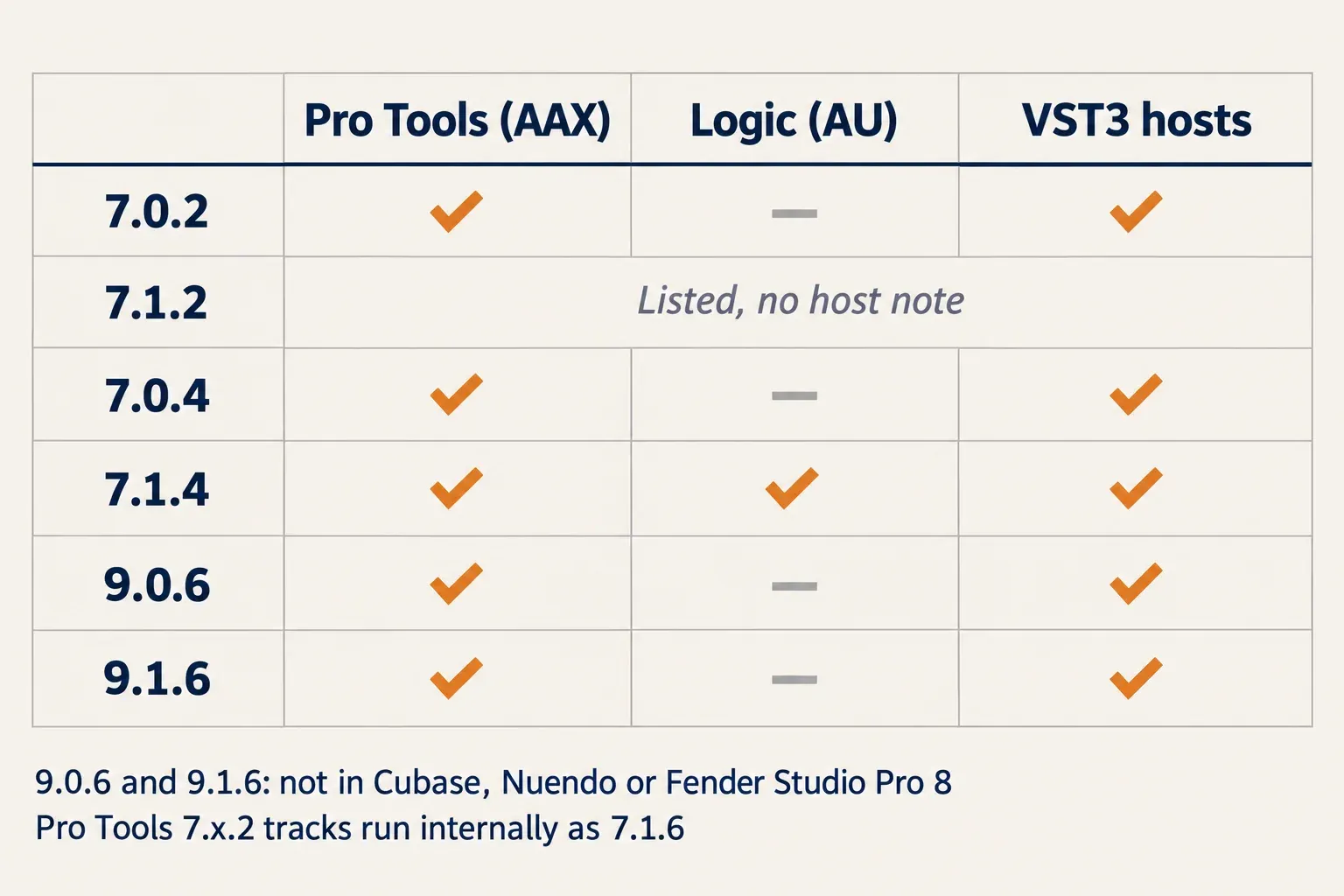
Pro Tools gets one extra route. On a 7.1.2 or 7.0.2 track, the guide says Equinox runs internally as 7.1.6 and exposes Top Front and Top Rear on plugin aux outputs, so the extra height reverb can go to objects. This works only on 7.x.2 tracks in Pro Tools.
The Balance tab handles placement: per-channel Early, Tail and Delay, plus Rvb Time Balance, Extend Height and High and Low Filter, on a Main page and a Top page for the height channels. Unmask runs on surround and Atmos as well as mono and stereo. iZotope markets the package as "an industry first in immersive and surround reverb"; that's the vendor's claim, not an independent finding.
Equinox comes as AAX, AU and VST3, all 64-bit, with no VST2. The current system requirements list macOS Sequoia 15.8, Tahoe 26.x or Golden Gate 27.2 on Intel and Apple silicon Macs, or Windows 10 22H2 and Windows 11 24H2. The 1.2.0 release removes Sonoma from the supported list. Tested hosts are Logic Pro 11–12, Pro Tools 2025–2026, Ableton Live 12, Cubase 15, Nuendo 15, Studio One 7, Studio Pro 8, REAPER 7, FL Studio 2026, Audition 2026, Premiere 2026 and DaVinci Resolve 21. The current product page still excludes 9.x.6 configurations in Fender Studio Pro 8, Cubase and Nuendo.
CPU and latency: what is known
No published CPU or latency figure exists for Equinox: iZotope publishes none, and no review in the composite measured one. The single load note comes from The Podcast Host's April 2025 preview on a review build: in a 100-track Windows session with several instances on aux sends, Equinox "wasn't a glutton on CPU/RAM" and ran smoothly. That's one hands-on impression without a percentage or a hardware list.
Two owners in the KVR thread describe the opposite: a very slow launch in REAPER on Windows in April 2025, and in March 2026 "a noticeably laggy GUI and quite high latency (much higher than Stratus and Symphony)". Neither gave a figure, a version or a buffer setting. iZotope's reverb guide recommends Neoverb for "minimal CPU load" when CPU or track count is limited, a comparison between its own reverbs with no figure attached.
I'd run Equinox on one or two reverb returns rather than one instance per track, then check load and latency on your heaviest session during the 10-day trial. Interface lag of the kind reported on KVR is a reason to keep using Stratus and Symphony for now if you own them.
Test results: what seven reviews and owner posts report
This is a summary of verdicts with counts, because no published source measured Equinox: across seven readable sources from April to June 2025, the only score is MusicRadar's 4 out of 5 from April 17, 2025. The seven are one scored review, one hands-on preview, one bundle review, two launch reports and two owner posts. The sound, the two engines in one plugin and the Atmos support each draw praise from four of the seven; value is the recurring reservation.
| Finding | Sources (of 7) | Who reports it |
|---|---|---|
| The Exponential Audio sound is praised | 4 | MusicRadar, Rekkerd, The Podcast Host, a Cakewalk forum owner |
| Stratus and Symphony in one plugin is welcomed | 4 | MusicRadar, Rekkerd, Production Expert, a TheSoundBoard owner |
| Surround and Atmos up to 9.1.6 is a defining strength | 4 | MusicRadar, Production Expert, The Podcast Host, a Cakewalk forum owner |
| Value depends on a discount, crossgrade or loyalty price | 3 | MusicRadar, a TheSoundBoard owner, a Cakewalk forum owner |
| Unmask keeps the source clear | 3 | MusicRadar, The Podcast Host ("not always" 100%), a Cakewalk forum owner |
| Freeze, chorus, gate and drive work as creative tools | 3 | MusicRadar, Rekkerd, a Cakewalk forum owner |
| The tag browser and presets speed up the start | 3 | A TheSoundBoard owner, The Podcast Host, a Cakewalk forum owner |
| The interface stays approachable despite its depth | 3 | Gearnews, The Podcast Host, a TheSoundBoard owner |
| The price pays for multichannel features; no cheaper stereo version | 1 | MusicRadar |
| Factory presets show its range less well than Valhalla DSP's | 1 | MusicRadar |
| Early-reflection and tail levels are small numeric fields | 1 | A TheSoundBoard owner |
| CPU and RAM load stayed light in a 100-track session (review build) | 1 | The Podcast Host |
The praise is specific. Rekkerd's Music Production Suite 7.1 review called Equinox "a brilliant addition" that modernizes and streamlines the older Exponential Audio reverbs, Production Expert's launch report framed it as giving Stratus and Symphony "a second life", and Gearnews found that, despite extensive controls, it "doesn't come across as an overwhelmingly technical plugin". A Cakewalk forum buyer made it his "anchor" reverb for its Atmos support up to 9.1.6, Apple silicon support, interface and presets, after a loyalty discount.
In this composite the reservations are about money and fit rather than sound. MusicRadar calls Equinox expensive for a reverb plugin, says the price factors in multichannel functionality a lot of music makers won't use, and suggests iZotope may be missing a trick by not offering a cheaper stereo version. The Podcast Host found Unmask helpful but "not always" 100% effective, and the TheSoundBoard owner wanted big knobs instead of "small clumsy digits" for the separate early-reflection and tail levels.
Owners in the one forum thread readable in full are more divided. The KVR thread has four posters who are positive overall, mostly as a faster, simpler and more flexible Stratus plus Symphony, one who calls it "a clear downgrade", three who hear the legacy presets differ from the originals, and two who report a slow launch or a laggy interface with higher latency than the old plugins, without figures.
For a buyer, the praise centers on the engines and the format coverage, so the decision rests on price and on whether you need more than stereo. The KVR split is the one warning: owners of the old plugins should compare their own legacy presets in the trial before replacing anything.
Equinox vs Neoverb
For stereo music production, Neoverb at $99 is the better buy; Equinox earns its extra $150 only when you need surround and Atmos or want the Exponential Audio engines specifically. Neoverb is built around a blend pad that combines three spaces and a Reverb Assistant with inter-plugin unmasking EQs, while Equinox gives you two complete engines with separate Attack, Early and Tail panels. iZotope's reverb guide positions Neoverb for "creative efficiency" and Equinox as "the high-end choice".
Neoverb is still sold alongside Equinox. It's also the reverb inside Mix & Master Bundle Advanced ($599), which doesn't include Equinox, and it's the plugin iZotope points CPU-limited sessions to. For a vocal chain built from iZotope tools, the best iZotope plugins for vocals shows where a reverb fits.
Equinox vs Aurora
Aurora at $49 is the cheaper route to the same unmasking idea. iZotope's reverb guide describes it as a more stripped-down selection of algorithms that introduced dynamic spectral unmasking, ducking the reverb's frequencies in real time, and iZotope's Equinox launch post says Equinox shares that adaptive unmasking with Aurora and Cascadia. Aurora also comes with both subscription tiers in iZotope's Plus and Pro product list, while Equinox needs Pro.
| Equinox | Aurora | |
|---|---|---|
| iZotope US store price | $249 | $49 |
| Engines | Stratus (Natural) and Symphony (Color) from Exponential Audio | A stripped-down selection of algorithms |
| Unmasking | Adaptive unmasking with a Delta listen switch | Dynamic spectral unmasking |
| iZotope Plus | Not included | Included |
| iZotope Pro | Included | Included |
| iZotope's positioning | "The high-end choice" | "Intuitive clarity" |
| Best fit | Surround, Atmos, post, Stratus and Symphony owners | Stereo music on a budget |
I'd pick Aurora over Equinox for stereo music on a budget, because the unmasking is shared and the $200 difference buys formats and controls a stereo mix may never need.
Price, crossgrades, bundles and trial
Pay full price only when no cheaper route applies, and log in to your iZotope account before you buy, because the store tells existing owners they may see a better price after signing in.
| Route | iZotope US store price | Includes Equinox |
|---|---|---|
| Equinox | $249 | Yes |
| Crossgrade from any paid iZotope product | $149 | Yes |
| Crossgrade from Stratus 3D or Symphony 3D | $99 | Yes |
| Crossgrade from both, or the 3D Reverb Bundle | $49 | Yes |
| Equinox EDU | $124.50 | Yes |
| Music Production Suite 9 | $799 | Yes |
| RX Post Production Suite 9 | $1,799 | Yes |
| Everything Bundle | $2,999 | Yes |
| Mix & Master Bundle Advanced | $599 | No (Neoverb instead) |
| iZotope Pro | $25 a month or $250 a year | Yes |
| iZotope Plus | $15 a month or $150 a year | No |
The subscription math is close: a year of iZotope Pro costs $250, a dollar more than Equinox alone, and includes it with the rest of the Pro catalog. That only makes sense if you'd use the other plugins during the year. The bundles follow the same logic at a larger scale; iZotope bundles compared does the full math, and the iZotope upgrade price guide lists the crossgrades for other products.
Timing matters too. iZotope has discounted Equinox before, with a 40% Reverb Season sale on Equinox, Neoverb and Aurora that ran until October 31, 2025, and the iZotope Black Friday price history tracks past sale prices.
Try it before paying. Under iZotope's demo rules, an unauthorized plug-in runs in full Trial mode for 10 days after installation, started from the Try button on the product page with an iZotope account; after that it runs in Demo mode, which inserts silence at regular intervals. Subscriptions start with a 7-day free trial instead. When sign-in or authorization fails, the iZotope Product Portal install and authorization fixes cover the usual causes.
Using Equinox in Sound Forge
Equinox loads as a VST3 in Sound Forge on Windows, but Sound Forge isn't on iZotope's host list, so confirm it in the 10-day trial before you pay. Both Sound Forge 2026 editions host third-party VST2, VST3 and ARA plug-ins, and Sound Forge runs on Windows only, which leaves the Mac versions of Equinox out of this workflow.
- Install Equinox and start the trial with your iZotope account.
- In Sound Forge, open Options > Preferences > VST Effects, make sure the folder holding the Equinox VST3 is listed, and click Refresh to rescan, as the Sound Forge VST Effects preferences page describes.
- Apply Equinox from the Plug-In Chain and set Mix there. Sound Forge renders the effect into the file, so the guide's advice to set an aux return's level with the track fader doesn't apply.
- Pick a preset, then adjust Mix. Presets don't store Mix, so your balance survives preset changes.
When Equinox doesn't appear after a rescan, work through the Sound Forge VST plugins not showing checklist before reinstalling anything.
You may not need Equinox for Sound Forge work at all. A room on a voice file is within reach of Sound Forge's own reverb workflow, and Sound Forge Plus already includes VariVerb II and 3D Reverb, which handles up to 10 audio channels, as the Sound Forge plugins guide shows. Equinox adds space; when a dialogue recording already has too much room, removing it is a job for RX De-reverb.
Verdict: who should buy iZotope Equinox
My verdict: buy Equinox for surround and Atmos work, where the mono-to-9.1.6 coverage, the Balance tab and the Pro Tools height routing justify $249, and buy it as a $49 or $99 crossgrade if you own Stratus or Symphony. Skip it for stereo-only music. Neoverb at $99 or Aurora at $49 covers that job, and the main reservation in the reviews is exactly that the price pays for channels a stereo mix never uses.
| Your situation | What to do |
|---|---|
| Surround or Atmos mixing in Pro Tools, Logic or a VST3 host | Buy at $249 after checking your bed format against the host table |
| Own Stratus 3D and Symphony 3D, or the 3D Reverb Bundle | Crossgrade at $49; compare your legacy presets in the trial first |
| Own Stratus 3D or Symphony 3D | Crossgrade at $99 |
| Own any paid iZotope product | Log in and check the $149 crossgrade or a loyalty price |
| Stereo-only music | Neoverb ($99) or Aurora ($49) |
| Own Music Production Suite 9, RX Post Production Suite 9, the Everything Bundle or iZotope Pro | You already have it |
| Sound Forge editing on Windows | Trial first; Sound Forge's own reverbs may be enough |
Start with the 10-day trial on your heaviest session. The latency reports on KVR and the Sound Forge host question are both things only your own system can settle.