

CrumplePop is worth buying if you edit video or podcasts and want dialogue cleanup on the timeline from one Strength control rather than a spectral editor. All six hands-on reviews published between 2023 and 2025 recommend it. The trade-offs are just as consistent: it is built around voice, with no hum, de-ess, de-click or loudness tool; it sounds processed when pushed; and hard clips need several plugins stacked. Since CrumplePop 2026.5 there is one Multi-Host license, priced at $25 a month, $175 a year or $345 perpetual in the US store on October 20, 2026.
My pick for an editor who cleans dialogue every week is the annual plan. Two years of it cost $350 at list price, five dollars more than a perpetual license, so perpetual only wins if you will keep one version well past that point. Before paying anything, check two things. If your only problems are plosives or lavalier rustle, the free PopRemover and RustleRemover may be all you need. If you own VEGAS Pro Plus, VEGAS Pro Ultimate or a Boris FX Suite membership, you already have the plugins.
CrumplePop review: the short verdict
Yes, CrumplePop is good at the job it was built for: making speech recorded in bad places usable without leaving your editor. The reviews agree on that, and they agree on where it stops. Here is the whole review on one screen.
| Question | Short answer |
|---|---|
| Best for | Dialogue cleanup inside Premiere Pro, DaVinci Resolve, Final Cut Pro, Media Composer, VEGAS Pro, Audition, Pro Tools, Logic and other VST3, AU or AAX hosts |
| Main strength | Strength-first controls: five of six reviews got usable results from the defaults or the Strength control alone, with no noise print to capture |
| Main weakness | No hum, de-ess, de-click or de-breath plugin and no loudness meter; three of six reviews heard artifacts when the effect was pushed or before rendering |
| SoundApp | Standalone app and ARA2 plugin with Denoise and Demix stem separation, processed locally; on a Mac it needs Apple Silicon |
| Price (US store, October 20, 2026) | $25 a month, $175 a year, $345 perpetual, $195 a year for Upgrade & Support |
| Free route | Full trial with an audio watermark; PopRemover and RustleRemover free with a Boris FX account; 15-day money-back guarantee |
| Skip it if | You need spectral repair, hum or click removal, Linux support, or SoundApp on an Intel Mac |
If you came for unvarnished opinion rather than marketing, the most useful material is the dated hands-on reviews summarized in the test results section. RedShark News answered its own headline question with "Short answer: yes," and Larry Jordan called it not perfect but recommended. None of those reviews covers the rebuilt SoundApp, so I treat that part separately below.
What CrumplePop includes now
CrumplePop is a bundle of nine timeline plugins plus the SoundApp standalone, and you buy it as a bundle: Boris FX does not sell the plugins one by one. Boris FX bought CrumplePop in 2023, and it now sits in the Boris FX audio lineup. According to the CrumplePop 2026.5 announcement, a single license covers the ARA, VST, AU and AAX plugins and SoundApp.
| Plugin | Job, as Boris FX describes it | What to know |
|---|---|---|
| Voice Enhance | Clearer, warmer, richer voice | Added in 2025; runs locally, in real time |
| AudioDenoise | Hiss and background noise | The vendor blurb also mentions hum; reviewers disagree (see limits) |
| EchoRemover | Echo and reverb | Dryness, Body and Tone knobs instead of frequency bands |
| WindRemover | Wind noise | Modeled around speech; a wind-only clip may not clear fully |
| TrafficRemover | Car traffic noise | Same Strength-first layout |
| ClipRemover | Restoring clipped audio | Uses a Threshold dial |
| Levelmatic | Automatic leveling | Strength plus a Target set in dB |
| PopRemover | Plosives | Free with a Boris FX account |
| RustleRemover | Lavalier microphone noise | Free with a Boris FX account |
The official CrumplePop product page lists the nine above, with SoundApp as a separate application. Boris FX deliberately gives each noise type its own tool instead of one fix-everything plugin, which is why the reviews keep stacking two of them on a single clip. For echo in particular, the guide to removing echo from audio without wrecking speech covers the methods that work without CrumplePop.
SoundApp: standalone cleanup, Demix and ARA
SoundApp is the part of CrumplePop that has changed most since the reviews were written, and it has the strictest requirements. CrumplePop 2025.5 rebuilt it from the ground up as a standalone app for Mac and Windows. You add a clip, choose a scenario and adjust Strength. It opens .wav, .aiff, .mp3, .flac, .aac, .mp4, .mov, .mkv, .mpg, .mpeg and .mxf files.
- Denoise applies the cleanup models outside an editor.
- Demix splits a finished mix into stems with three models: Music 4 Stems (Voice, Drums, Bass, Other), Voice 2 Stems (voice and music) and Cinema 4 Stems (Voice, Music, Sound Effects, Other). Cinema 4 Stems matters most to video editors, because it turns a finished export back into editable dialogue, music and effects tracks.
- Model Manager lets you discover and download additional models as Boris FX releases them.
- Local processing. SoundApp runs on your own GPU, with no cloud upload and no credits. Processing starts wherever you put the playhead, so you can hear a result before the whole file is done.
The 2026.5 release, announced on May 7, 2026, turned SoundApp into an ARA2 plugin as well. Inside Pro Tools, Sequoia, Samplitude, Reaper, Cubase and other ARA2 hosts, it processes the full clip instead of working in real time, which gives the models the whole file as context. A Processed Audio Cache keeps earlier results, so switching models is instant. Boris FX also says models now load faster.
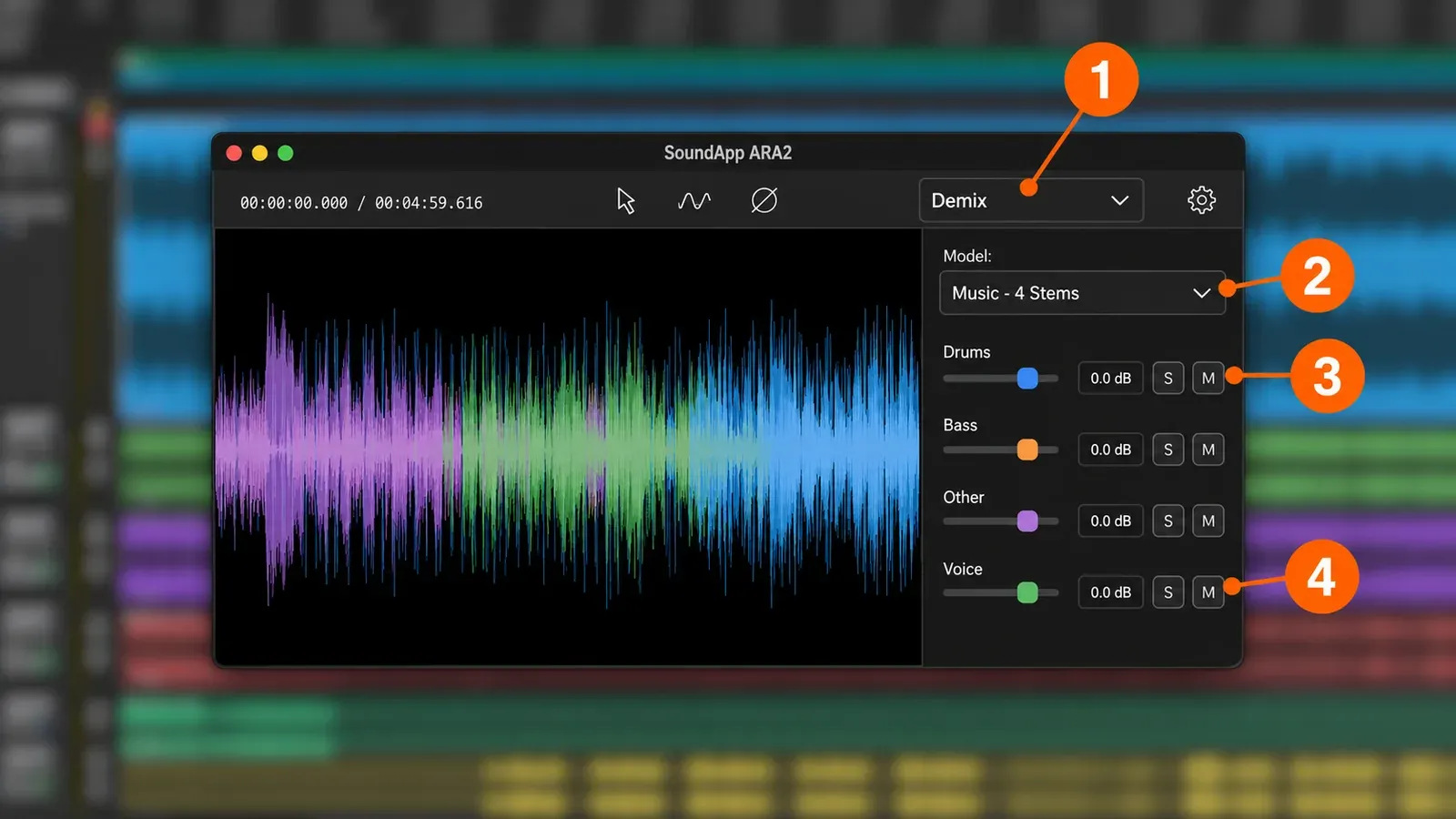
Keep two cautions in mind. First, stem separation is a model's estimate. Digital Production's look at the ARA release points out that ARA does not remove the need to listen critically and does not guarantee clean separations. The guide to what AI audio restoration fixes and what it invents explains why. Second, SoundApp needs macOS 14 or later, Apple Silicon (M1 or newer) and 16 GB of RAM. An Intel Mac still runs the plugins but not SoundApp.
How the controls work
Every CrumplePop plugin is built around one central Strength control plus an output level, and that is the whole learning curve for most clips. Larry Jordan's April 2023 review found that Strength defaults to 80% and that at 100% the speaker may sound "weird."
- Noise plugins such as AudioDenoise and WindRemover add Low, Mid and High knobs for finer adjustment.
- EchoRemover replaces the bands with Dryness, Body and Tone.
- Levelmatic pairs Strength with a Target set in dB.
- ClipRemover works from a Threshold dial.
- Voice Enhance works differently: choose a model preset such as Indoor or Outdoor, set Strength, then refine with the sliders. The Voice Enhance product page says it runs in real time on your own machine.
Help overlays label the controls the first time you open a plugin, and the "i" icon toggles them off once you know the layout.
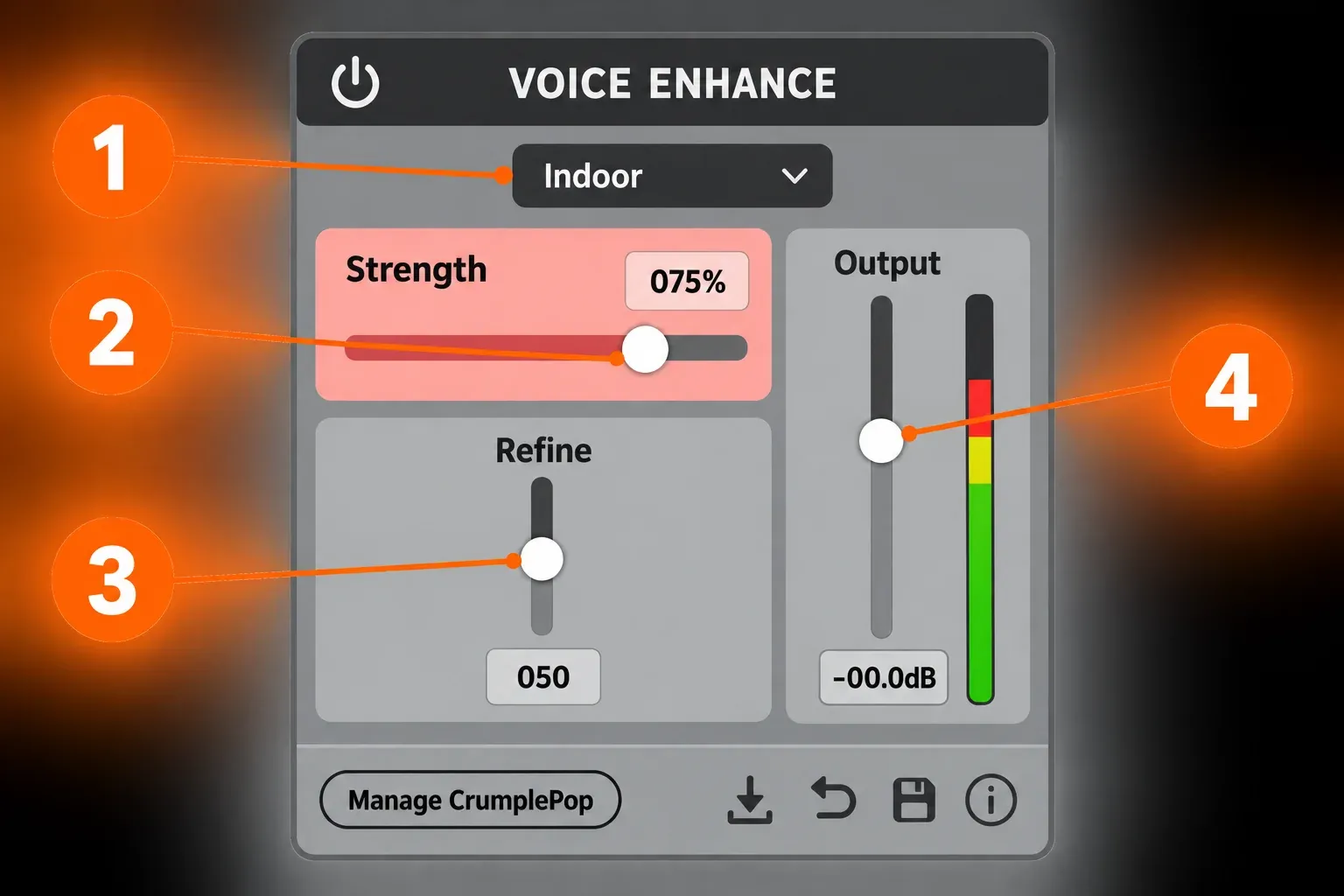
Boris FX recommends using Voice Enhance on its own. It adds another CrumplePop plugin before Voice Enhance only when a clip has a specific or difficult noise. For podcasts and interviews, this is the order I would follow:
- Put Voice Enhance on the clip by itself and pick the model that matches where it was recorded.
- Start from the default Strength and back off as soon as word endings soften or the voice turns thin.
- If one problem survives, such as wind, traffic or room echo, insert the matching plugin before Voice Enhance rather than pushing Strength harder.
- On long clips in Final Cut Pro, render before you judge playback.
- Check loudness with a separate meter before export, because CrumplePop does not measure it.
Test results: what six hands-on reviews found
The composite result is clearly positive, but it is a count of reviewer verdicts rather than lab numbers. CrumplePop was not among the contenders in Production Expert's 2024 blind dialogue test or its 2025 dialogue noise-reduction shootout. None of the six reviews publishes signal-to-noise, latency or CPU figures. What they do publish are dated listening verdicts on real clips, and those line up well.
| Review | Date | Setup | Verdict |
|---|---|---|---|
| Larry Jordan | April 28, 2023 | Mac; plugins and the old SoundApp; dialogue clips | Not perfect, but recommended |
| Oliver Peters | June 30, 2023 | 2020 Intel iMac; real-world tracks including boat, conference-room and wind clips | Positive; ran smoothly in real time |
| RedShark News (Ned Soltz) | July 5, 2023 | Windy beach clip compared with Resolve's voice isolation | "Short answer: yes" |
| Music Radio Creative | June 3, 2024 | Voice and podcast production; links to CrumplePop through an affiliate-style redirect | Easy for beginners, strongly positive |
| Pro Video Coalition (Kevin P. McAuliffe) | March 30, 2025 | DaVinci Resolve; deliberately bad outdoor clip; WindRemover then Voice Enhance at defaults | "Worlds better" |
| Stonetree Creative | April 4, 2025 | M2 Mac mini, 32 GB RAM; Final Cut Pro; long interview and podcast clips | The better choice for Final Cut Pro editors who want control, despite the cost |
| Recurring finding | Reviews | Which ones |
|---|---|---|
| Positive overall verdict for dialogue cleanup in an editor | 6 of 6 | All six |
| Usable from the defaults or Strength alone, with no noise print | 5 of 6 | Pro Video Coalition, Jordan, Peters, RedShark, Music Radio Creative |
| Artifacts when pushed or before rendering | 3 of 6 | Jordan, Peters, Stonetree |
| Missing tools for common fixes | 3 of 6 | Jordan, Peters, RedShark |
| Several plugins stacked on one clip | 3 of 6 | Pro Video Coalition, Peters, Stonetree |
| Built-in help overlays noted | 3 of 6 | Pro Video Coalition, Peters, RedShark |
| Sounded better than Resolve's Voice Isolation on the reviewer's clip | 2 of 6 | Peters, RedShark |
| Cost or packaging complaint | 2 of 6 | Stonetree, Pro Video Coalition |
| Covers SoundApp 2025.5 or later, Demix or ARA | 0 of 6 | None |
Ease of use is the headline. Five of six reviewers got results from the defaults or the Strength control alone. Pro Video Coalition put WindRemover and Voice Enhance on a deliberately bad outdoor clip in Resolve, left both at their defaults, and judged the result "worlds better." The one counterpoint comes from Stonetree Creative. It says good results come when the plugins are used correctly, and that the learning curve is steeper than Adobe Podcast's one-button cleanup.
The quality ceiling shows up when you push. Three reviews describe artifacts:
- Jordan heard a "weird" voice at 100% Strength.
- Peters heard AudioDenoise clip soft word endings, so "lounge" became "loun." His fix was to cut back to the original audio for a few frames.
- Stonetree heard clicking on unrendered stretches of very long clips on an M2 Mac mini with 32 GB of RAM, and nothing after rendering.
Boris FX's own CrumplePop vs RX comparison guide admits that CrumplePop can be high on CPU resources. Peters, on a 2020 Intel iMac, found the plugins ran smoothly in real time, so performance clearly depends on the machine and the clip length.
Head-to-head wins are narrow but real. On a reverberant conference-room recording, Peters preferred EchoRemover to DaVinci Resolve's Voice Isolation. On a windy beach, RedShark found Resolve left the voice flat and in need of EQ and compression. CrumplePop's reduction was easy to control and the voice sounded more natural. Those are single clips judged by ear, not a ranking.
Weigh the sources. Music Radio Creative links to CrumplePop through an affiliate-style redirect. The comparison guide is vendor content, and Boris FX has owned iZotope as well since its July 2, 2026 acquisition announcement, so neither is neutral. The four independent editorial reviews (Jordan, Peters, RedShark and Pro Video Coalition) carry the same verdict without those ties. Pro Video Coalition adds a useful rule of thumb: repair gets broken audio back to roughly 80 to 90 percent, never all the way to 100. If you want tools that did sit in blind tests, the roundup of audio noise reduction software by job covers them.
My verdict: the evidence supports CrumplePop as the fastest way to make location dialogue usable inside an editor. Expect to stack two plugins on hard clips and back off Strength before the voice turns synthetic. Keep a separate tool for hum, clicks, sibilance and loudness. SoundApp's Demix and ARA features have no independent review yet, so judge them on the trial rather than on the reviews above.
What changed since the older reviews
Most reviews that rank for "CrumplePop review" describe a product that has since changed in features, licensing and price. The reviews from 2023 to 2025 quote a $599 perpetual price that is no longer current. Here is what moved.
| When | Change | Why it matters now |
|---|---|---|
| 2023 | Boris FX bought CrumplePop. Version 2023.5 added AAX for Media Composer and Pro Tools, sales on borisfx.com, RLM floating licenses and offline activation. On October 19, 2023 it joined the Boris FX Suite. | Media Composer and Pro Tools users are covered; purchases moved to borisfx.com |
| 2024 | New AI models; Boris FX says higher-pitched voices and non-English speakers sound clearer | Reviews from 2023 predate these models |
| 2025 | Voice Enhance arrived, running locally | Pro Video Coalition's 2025 review used it |
| 2025.5 | SoundApp rebuilt as a standalone app for Mac and Windows | No independent review yet |
| Before 2026.5 | SoundApp added GPU processing and the Demix stem models | Stem separation is now part of the bundle |
| November 2025 | CrumplePop grouped with Sequoia, Samplitude and Music Studio in the Suite's Pro Audio division | Suite members get it as part of the audio tools |
| 2026.5 (May 7, 2026) | SoundApp ARA2 plugin, Processed Audio Cache, one Multi-Host plan at lower prices | Current prices are $25, $175 and $345, not $599 |
| July 2026 | PopRemover and RustleRemover became free with a Boris FX account; Boris FX acquired iZotope | A free route exists; vendor comparisons are no longer arm's-length |
The old crumplepop.com pricing page now redirects to Boris FX. If you bought there years ago, see the FAQ on migrating your account.
Hosts, formats and system requirements
The plugins need macOS 12 or later on a Mac and 64-bit Windows 10 or 11 on a PC. SoundApp is the demanding part. The requirements below come from the official product page.
| Requirement | Mac | Windows |
|---|---|---|
| Operating system | Plugins: macOS 12 Monterey or later. SoundApp: macOS 14 or later | Windows 10 or 11, 64-bit only |
| Processor | Plugins: 2.7 GHz Intel Core i5 or better. SoundApp: Apple Silicon (M1 or newer) | 2.7 GHz Intel Core i5 or better |
| Memory | 8 GB for the plugins, 16 GB for SoundApp | 8 GB for the plugins, 16 GB for SoundApp |
| Disk | 450 MB for the plugins; 10 GB or more free recommended for SoundApp | 450 MB for the plugins; 10 GB or more free recommended for SoundApp |
| Plugin formats | AU, VST3, AAX | VST3, AAX |
| Not supported | Linux and 32-bit systems | |
Plugin hosts include Premiere Pro, Audition, DaVinci Resolve, Final Cut Pro, Media Composer, VEGAS Pro, Pro Tools, Logic, GarageBand and Audacity, plus other VST3, AU and AAX hosts. The SoundApp ARA2 plugin needs an ARA2 host such as Pro Tools, Sequoia, Samplitude, Reaper or Cubase. Where to find the plugins:
- Premiere Pro, Audition, Audacity and Resolve: Audio Effects > VST3 > Restoration > CrumplePop Complete.
- Final Cut Pro, GarageBand and Logic: Audio Effects > AU > CrumplePop Complete.
- Media Composer and Pro Tools: the AudioSuite menu; in Pro Tools most of the plugins sit under AudioSuite > Noise Reduction.
Price and licensing
CrumplePop has one plan, Multi-Host, which works in every supported host. Every new purchase uses it. These are the list prices in the Boris FX store on October 20, 2026, before tax.
| Plan | US | UK | Euro |
|---|---|---|---|
| Monthly subscription | $25 | £19 | €22 |
| Annual subscription | $175 | £135 | €155 |
| Perpetual license | $345 | £265 | €305 |
| Upgrade & Support renewal (per year) | $195 | £150 | €170 |
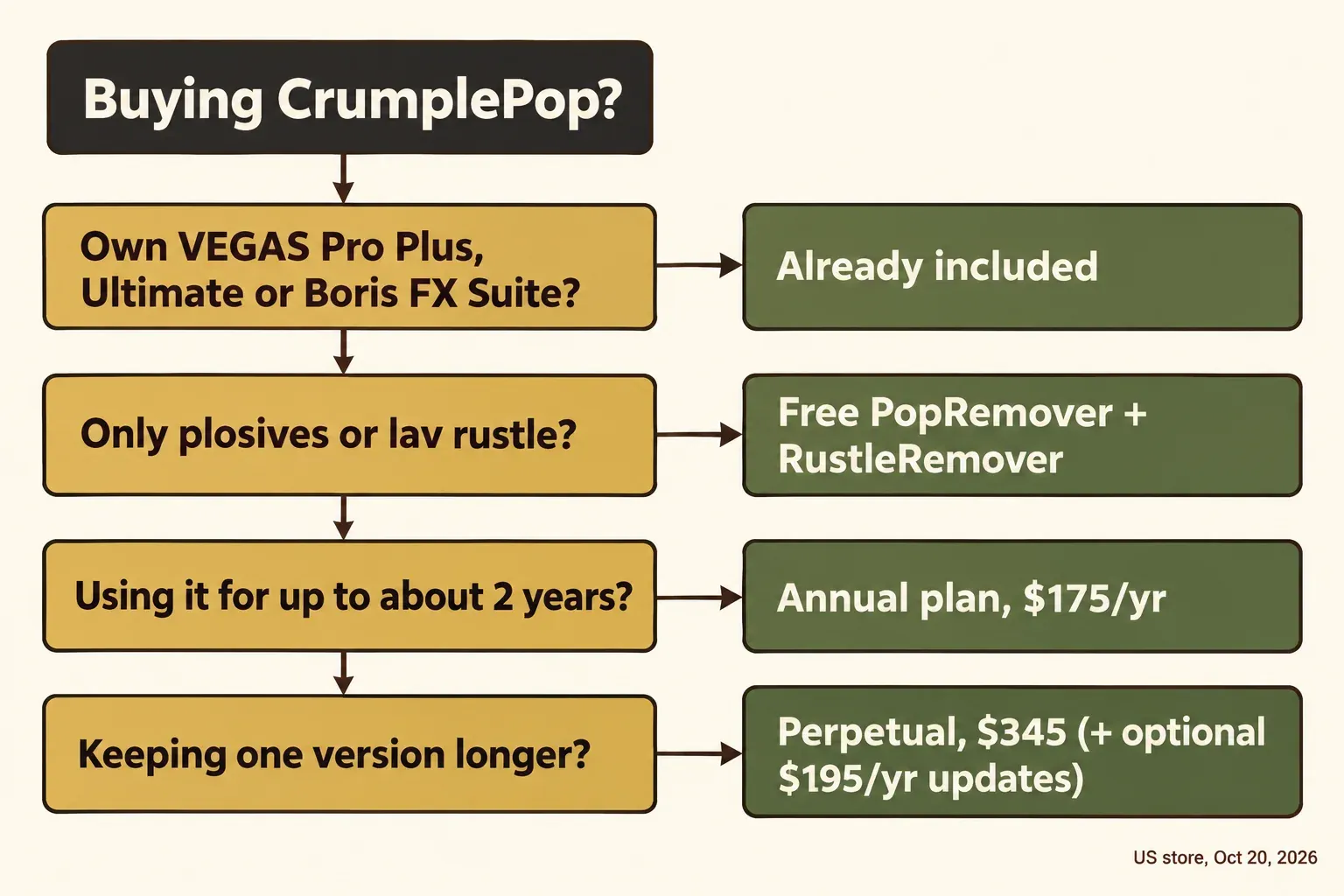
Here is how the plans compare on list prices:
- Monthly vs annual. Seven months of monthly billing cost the same as a full year, so monthly only makes sense for a job of six months or less.
- Annual vs perpetual. Two years of annual billing come to $350, just above the $345 perpetual price.
- Upgrade & Support. Each renewal costs $195, which is $20 more than a year of subscription. Perpetual is cheaper only if you are happy to stay on one version for a while. A lapsed plan has a separate reinstatement price of $225 in the US store.
Before you buy, check whether you already have it:
- VEGAS Pro. According to VEGAS plans and pricing, VEGAS Pro Plus and VEGAS Pro Ultimate include the CrumplePop plugins, but base VEGAS Pro does not. Only Ultimate adds SoundApp. The VEGAS Pro plugins guide lists what else each edition includes.
- Boris FX Suite. A Boris FX Suite membership includes CrumplePop as well.
Before paying list price, check the audio software deals page for current Boris FX offers.
Existing customers have two transition rules. If you hold a Multi-Host monthly or annual subscription, your future charges drop to the current prices. If you are on an older Single-Host plan, it keeps working, and you can switch to Multi-Host whenever you like.
Free plugins, trial and refunds
There is no free version of the full bundle, but there are three ways to try it at no cost:
- Plugin trial. The CrumplePop free trial is fully functional but adds an audio watermark.
- Two free plugins. PopRemover and RustleRemover are free for good. As Production Expert reported in July 2026, you install the full bundle and sign up for a free Boris FX account. Those two then work fully while the other seven stay in trial mode. Both belong on the shortlist of free plugins and trials worth installing.
- SoundApp trial. SoundApp has its own 15-day trial with every feature and no credit card required.
After purchase, open the Boris FX Hub, choose License activation from the gear icon and enter the activation key from your receipt. That activates the installed plugins and removes the beeping watermark.
If CrumplePop turns out to be wrong for your material, the Boris FX money-back guarantee gives a full refund within 15 days on subscriptions and perpetual licenses alike. Refunds take 14 to 21 business days to arrive. Canceling after the first 15 days is not refundable, so put your worst clips through the trial in the first week.
Where CrumplePop falls short
CrumplePop removes noise around a voice; it does not repair everything else that goes wrong with speech. These are the gaps the reviews and the vendor itself name, with the fix I would use instead.
- Hum. Boris FX's blurb for AudioDenoise mentions hum, but Larry Jordan found no tool that removes 50 or 60 Hz AC hum, and at best AudioDenoise slightly reduces it. Peters also listed no de-hum filter. For mains hum, remove hiss and hum in Sound Forge instead.
- Sibilance. There is no de-esser; see how to reduce sibilance without dulling the voice.
- Mouth clicks. There is no de-click plugin either. A dedicated method to remove mouth clicks without damaging speech works better.
- Breaths. No de-breath tool exists, so edit breaths in Sound Forge by hand when they distract.
- Loudness. Jordan found no way to measure loudness (LKFS) in the 2023 SoundApp. Levelmatic evens out level toward a dB target, but you still need a meter for delivery specs. Check them with a free LUFS and true peak meter before export.
- Wind with no voice. Peters found WindRemover does not fully clear a clip that contains only wind, because the models are built around speech. For B-roll wind, reducing wind noise in Sound Forge is the manual route.
- Sirens and loud exterior noise. Jordan found the noise remover does not remove them.
- EQ and compression. RedShark wanted them added. You still finish the voice with your editor's own EQ and dynamics.
- Tweakers and some systems. Boris FX itself says CrumplePop may feel limited if you like to adjust parameters and EQ bands by hand. It also notes that CPU use can be high. There is no Linux or 32-bit version, and no single-plugin purchase.
Who should buy it, and who should not
Buy CrumplePop if most of your audio problems are noise, wind, echo or rustle around dialogue, and you fix them inside a video editor or DAW on a deadline. Stonetree Creative calls it the better choice for Final Cut Pro editors who want control and timeline integration, despite the cost. For podcasters, it handles the cleanup stage; editing and loudness still need other tools, as the guide to Sound Forge Pro for podcast editing lays out. Editors who finish audio in a separate editor can keep CrumplePop on the timeline and follow the Sound Forge and VEGAS Pro workflow for video editors.
Look elsewhere in these cases:
- Spectral repair. Your material needs targeted work on hum, clicks, sibilance or music under dialogue. The CrumplePop vs iZotope RX comparison covers editions, prices and which tool fixes what. Other one-knob and spectral options are in the best iZotope RX alternatives.
- Platform. You work on Linux, or you want SoundApp on an Intel Mac.
- Budget quick fixes. You only need a cheap one-click fix now and then. Stonetree suggests trying Adobe Podcast Enhance Speech first.
If you are still unsure, run your three worst clips through the trial and listen for word endings and the voice's tone at your usual Strength setting. That decides it faster than any review.
FAQ
Why don't my CrumplePop plugins show up, or why do they stop working?
The fix depends on the host, according to the official CrumplePop FAQ.
- Premiere Pro and Audition. Open Preferences > Audio > Audio Plugin Manager, press Scan, make sure the plugins are enabled, then search "CrumplePop Complete" in the Effects browser.
- DaVinci Resolve. Wait on the Project Browser while it scans. If the plugins are still missing, enable them under Preferences > Audio Plugins.
- Final Cut Pro. If a plugin becomes disabled, click "Validate on Next Launch" for Audio Units in Preferences > General and restart. To prevent a repeat, Boris FX suggests fewer instances, or one instance on a compound clip.
I bought CrumplePop on crumplepop.com. What happens now?
Your plugins keep working. To receive future updates and new plugins, migrate your account to borisfx.com, which Boris FX says takes about two minutes. If you cancel an old crumplepop.com subscription, the plugins work until the renewal date and then revert to trial mode.
Did existing owners get CrumplePop 2026.5 free?
Yes, if they had an active CrumplePop subscription, a Boris FX Suite or VEGAS Pro Ultimate subscription, or a current Upgrade & Support plan.
Can I buy just one CrumplePop plugin?
No. CrumplePop is sold only as the full bundle. The exceptions are PopRemover and RustleRemover, which are free with a Boris FX account.