
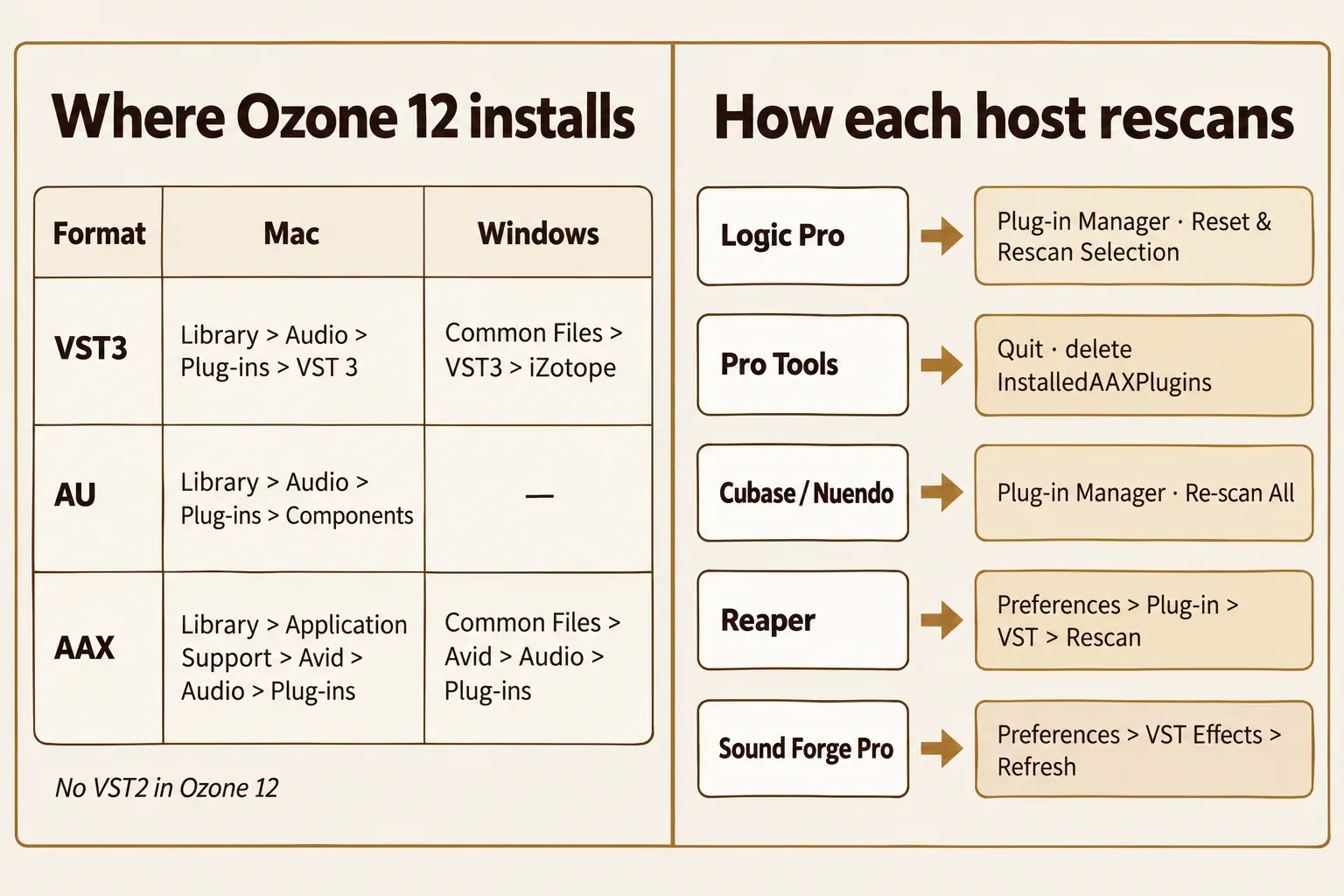
When Ozone 12 stops working, check the version first: it's printed at the bottom of Ozone's Options window, and anything older than 12.2.0 still carries bugs iZotope has already fixed. Then confirm that your operating system and your DAW are on iZotope's supported list. After those two checks, go straight to your symptom: the plug-in is missing, it crashes or hangs, it keeps asking for activation, Master Assistant misbehaves, or the CPU load makes it unusable. Each section below gives iZotope's documented fix first and the user-reported fixes after it.
My rule is simple: update and fix the host side before you reinstall anything. In the 17 Ozone 12 user threads counted in the test section, a reinstall changed nothing in all four cases where people tried it on a failing plug-in, one of them after a full reformat, and it helped once, to bring back missing presets. The fixes that held came from the version, the system, the host or the way the track was played.
First check: version, system and host
Start with the version, because iZotope's article on why its products crash names compatibility as the most common reason. Open Ozone's Options with the gear icon in the top toolbar; the version number sits at the bottom of the Options window, as iZotope's Assistant FAQ points out. Update through the installer you used, Native Access or iZotope Product Portal. If the update itself fails, the install-error fixes in the Product Portal guide handle that part.
| Version | Released | Fixes that match the symptoms in this guide |
|---|---|---|
| 12.0.2 | September 11, 2025 | Component plug-ins ignoring a valid license during the 10-day trial; a possible crash after running Master Assistant; first version supported on macOS Tahoe |
| 12.1.0 | December 1, 2025 | Slow UI loading and slow instantiation |
| 12.2.0 | October 20, 2026 | A hang in the full Ozone plug-in in Pro Tools when copy/pasting certain settings or loading certain host presets; a Master Assistant crash in 192 kHz sessions; obscured text in inline edit fields on macOS Tahoe; broken graphics when reopening a resized plug-in window in Logic Pro (native) |
Those rows come from iZotope's Ozone Advanced release notes, and the Tahoe line matches iZotope's Tahoe compatibility statement. The Elements notes repeat their 12.1.0 text under the 12.2.0 heading, so the 12.2.0 fixes above are stated for Advanced and Standard. The same release added the Boris FX licensing method, new branding, a subscription-only chat assistant and a changed list of supported DAW versions. Few user reports from 12.2.0 exist yet, so the user cases in this guide come from earlier builds.
Next, the system. The Ozone 12 product page lists macOS Sonoma (14.8), Sequoia (15.8) and Tahoe (26.x), Windows 10 (22H2) and Windows 11 (24H2), and Intel or Apple silicon Macs running natively or under Rosetta. Other iZotope pages give slightly different macOS point versions, so I'd keep the Mac on one of the product page's listed systems with every update installed rather than chase a single minimum. iZotope's macOS 27 statement says macOS 27 Golden Gate isn't officially supported yet, and on Apple silicon the Product Portal itself needs Rosetta 2, per iZotope's macOS compatibility article.
Then the host and format. The product page lists Logic Pro 11–12, Pro Tools 2025–2026, Ableton Live 12, Cubase 15, Nuendo 15, Fender Studio Pro 8, Studio One 7, Reaper 7, FL Studio 26, Reason 13, Audition CC 2026 and Premiere Pro CC 2026. Sound Forge and WaveLab aren't on it, which is why Sound Forge gets its own section below. The formats are AAX, AU and VST3, 64-bit only; VST2 is no longer supported.
| Symptom | First documented fix | Section |
|---|---|---|
| Missing from the plug-in list | Use the VST3, AU or AAX copy, check the default folder, rescan | Not showing up |
| Crash, hang, blank or garbled window | Supported system and current version, then Full Disk Access on a Mac | Crashes and hangs |
| Activation or trial prompt | 12.0.2 or later, then Options > General > License | Activation prompts |
| Master Assistant crash or wrong loudness | Full plug-in on the master, at least 8 seconds of playback | Master Assistant |
| High CPU, dropouts or latency | Remove unused modules, raise the buffer, lighter Maximizer mode | CPU and latency |
| Sound Forge doesn't list it | VST Effects folder, then Refresh | Sound Forge |
Ozone 12 not showing up in your DAW
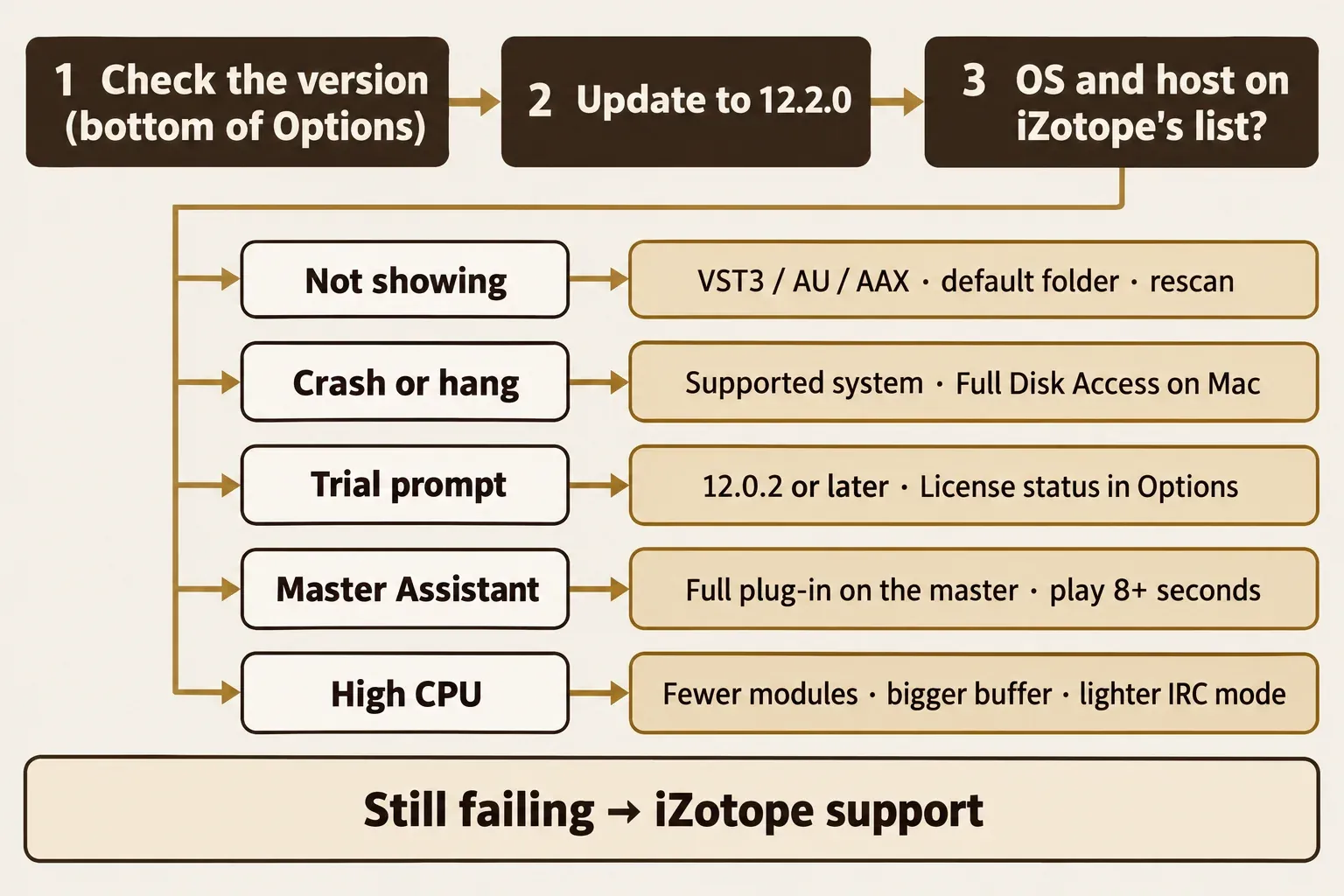
Ozone 12 installs only VST3, AU and AAX plug-ins, so the fix runs in this order: the format your host scans, the folder, then a rescan. A host that only reads VST2 won't see Ozone 12 at all, and iZotope's Cubase and Nuendo plug-in article adds that Cubase 10 and later block VST2 and 32-bit versions, so the 64-bit VST3 is the one to load. Sessions that used an old VST2 Ozone need a manual move: iZotope's VST2 migration steps are to save a custom preset in the old instance, replace the plug-in with the VST3 version and load that preset. The VST plug-in explainer covers what separates the formats.
These are the default install folders from iZotope's host articles. If your host reads a custom plug-in folder instead, iZotope says to run its installer in Custom Install mode with that folder selected.
| Format | Mac | Windows |
|---|---|---|
| VST3 | Mac HD > Library > Audio > Plug-ins > VST 3 | C: > Program Files > Common Files > VST3 > iZotope |
| AU | Mac HD > Library > Audio > Plug-ins > Components | Not used on Windows |
| AAX | Mac HD > Library > Application Support > Avid > Audio > Plug-ins | C: > Program Files > Common Files > Avid > Audio > Plug-ins |
On a Mac, permissions come next. iZotope's Full Disk Access article says iZotope products and the audio software they run in both need Full Disk Access. Without it the DAW can blacklist iZotope plug-ins, Logic's plug-in validation can fail, and a project can crash while loading or playing. The setting sits under Apple menu > System Settings > Privacy & Security, as Apple's guide to file and folder access describes; open Full Disk Access in that pane and allow your DAW there. The full click path, with every app to add, is in the iZotope plug-ins guide.
Then make the host look again. iZotope's Product Portal guide gives the same instruction for every product: open your supported host and rescan. Each host does it differently:
- Logic Pro. Open the Plug-in Manager from Preferences, select the plug-ins that failed validation and click Reset & Rescan Selection. If that doesn't take, iZotope's Logic article has you move the files in ~/Library/Caches/AudioUnitCache to the Desktop and restart, which rescans every installed AU.
- Pro Tools. Quit Pro Tools and delete the InstalledAAXPlugins file: on a Mac it's in Preferences/Avid/Pro Tools inside your user Library, on Windows in AppData\Avid\Pro Tools. iZotope's Pro Tools article walks through both paths.
- Cubase and Nuendo. Open Studio > Plug-in Manager, click the gear icon, add the VST3 folder with + in VST Plug-In Path Settings and click Re-scan All.
- Reaper. iZotope's Reaper article uses Options > Preferences > Plug-in > VST > Rescan.
- Sound Forge Pro. Options > Preferences > VST Effects > Refresh, covered in the Sound Forge section.
If Cubase has moved Ozone to its blocklist or Logic keeps failing validation, the blocklist and failed-validation fixes for iZotope plug-ins handle that next step.
Five of the 17 user threads were about Ozone 12 not showing up, and four ended with a fix the poster confirmed. Only one of the four came down to the install itself, and that was missing presets, not a missing plug-in:
- In a Native Instruments Community thread about Reaper 7 and Ozone 12 Elements, the poster had reinstalled several times through Product Portal. The plug-in was working all along; its window was opening on a second display that was switched off.
- A Pro Tools user on macOS Monterey marked their post solved once the cause was clear. Monterey was never a supported system: the 12.0.0 release notes started the Mac list at Ventura 13.7.
- After a Cubase 15 install, a user missing the Ozone 12 Standard presets found the preset folder empty. Uninstalling Ozone 12 in Windows and reinstalling it brought the presets back.
- The fourth, a Sound Forge Audio Studio case, is in the Sound Forge section.
The fifth, a Reddit r/protools post, found that typing "OZ" in the Pro Tools plug-in search didn't bring up Ozone 12 while typing "12" did. The replies weren't readable, so the cause is open; search for "12" before you decide the plug-in is gone.
Ozone 12 crashes, hangs or shows a broken window
Treat a crash as a compatibility problem first: confirm the version, the system and the host from the first check. Several crash and display faults are already fixed in the release notes. 12.1.0 fixed slow UI loading and instantiation, and 12.2.0 fixed a hang in the full plug-in in Pro Tools when copy/pasting settings or loading host presets, plus broken graphics when reopening a resized window in native Logic Pro. On a Mac, a crash while a project loads or starts playing is also one of the symptoms iZotope lists for missing Full Disk Access, so check that setting next.
Boxes or question marks instead of text (Mac)
iZotope's font article blames corrupted or outdated font files. Open Font Book, choose Edit > Select All, then File > Validate Selection, and remove or replace any font it flags; File > Restore Standard Fonts is the broader reset. In a thread about the free Ozone EQ on Tahoe, support suggested the same font restore and the poster never reported back. Overlapping text in inline edit fields on Tahoe is a separate bug, fixed in 12.2.0.
A blank plug-in window (Windows)
On Windows, iZotope's blank-window article names display-hooking apps such as Bandicam, Playstv and Duet Display as causes it has seen, and it advises installing the latest driver from your graphics card maker. Close those apps and update the driver before you touch Ozone itself. There's no GPU switch to try instead: the Graphics options in the Options page of the Ozone 12 manual are Show Tooltips, Dim Controls When Bypassed and Window Opacity.
The full plug-in fails while the modules load
One poster in a thread about the main Ozone 12 plug-in not loading could open separate modules such as Clarity and Dynamics but not the full plug-in, and a reinstall changed nothing. No documented fix exists for this pattern; the only reply pointed to iZotope's own support, so open a ticket there. Owners of Advanced can keep working meanwhile: Ozone 12 Advanced is the only edition that makes the modules available as separate component plug-ins, and the Elements vs Standard vs Advanced comparison shows what each edition includes.
Crashes in hosts iZotope doesn't list
WaveLab is outside the host list too. In a Steinberg forum thread about WaveLab 13, loading Ozone 12's Low End Focus slowed playback and caused continuous crackling. Playback improved with Resampling turned off in WaveLab's Master Section, but the crashes continued. Outside the supported list there's no vendor fix to apply.
When it's RX rather than Ozone that crashes, the causes and their order differ; the RX crash guide sorts them by when the crash happens.
Ozone 12 keeps asking for activation
Update to 12.0.2 or later first: that release fixed Ozone component plug-ins ignoring a valid license during the 10-day trial. Before the fix, Native Instruments staff told owners to click Continue in Trial Mode each time the prompt appeared, and the plug-ins then ran without limits. On September 12, 2025, staff confirmed in the Ozone 12 activation thread that 12.0.2 fixed it. The free Ozone 12 Equalizer showed the same prompt in its own activation thread; it installs through Komplete Start and Native Access, as iZotope's free Equalizer article explains, and the Ozone EQ free guide covers claiming it.
To see where you stand, open Options > General > License; the Ozone 12 manual says that section shows your current license status and lets you manage the license. Three messages have a documented meaning:
- "No purchase matched this authorization request." iZotope's authorization troubleshooting article calls this cosmetic for Ozone 12 owners; the plug-in still works in the DAW.
- "Unable to connect to the license server." The same article points to a firewall or antivirus blocking the outgoing connection. Allow the connection, then authorize again.
- "Full Trial" next to Ozone Standard from a Komplete bundle. In Product Portal that label doesn't affect anything as long as Native Access shows the product activated, according to iZotope's Komplete Full Trial article.
Sign-in failures, offline authorization, iLok and moving to a new computer aren't Ozone-specific. The Product Portal authorization fixes cover them, and the Native Access and subscription section handles wrong-account cases. For a clean start, the install-and-authorize sequence on the Ozone hub runs it step by step.
Master Assistant not working or missing the loudness target
Master Assistant lives only in the full Ozone 12 plug-in, so it won't appear when you've loaded a single module. Ozone 12's getting-started page lists Master Assistant, Stem Focus, Signal Chain, Referencing and Codec Preview as mothership-only. The Master Assistant chapter of the manual then asks for two things: Ozone on the Master channel or Stereo Output of your DAW, and at least 8 seconds of playback, looped if your selection is shorter.
A loudness result that misses the target has a documented reason. The manual says Analysis Time sets how long Master Assistant analyzes the track, up to 60 seconds, and recommends the loudest, fullest section, such as a final chorus. Because only that part is analyzed, the final integrated LUFS of the master can differ from the target, and iZotope points to RX Loudness Control for exact compliance. Measure the finished master from start to finish on a LUFS meter before you trust the number. That's what happened in a thread about Ozone 12 loudness: the poster set -14, saw -12 on a loudness meter while the loudest part looped, and found the track stayed at -14 when it played from start to end.
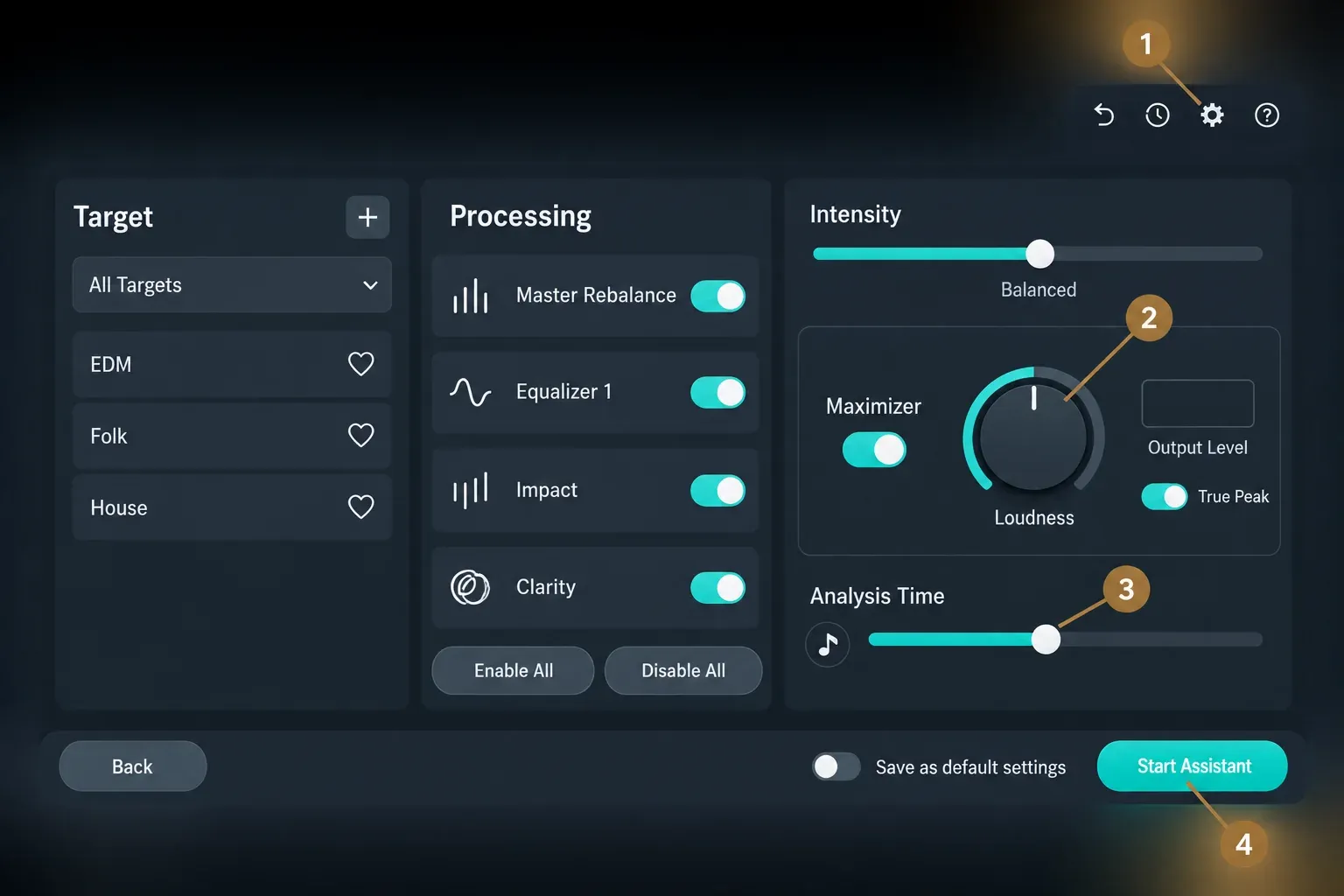
Two Master Assistant crashes are fixed in the release notes: a possible crash after running it, fixed in 12.0.2, and a crash in 192 kHz sessions, fixed in 12.2.0. Another report is still open. In a thread about Ozone crashing in Pro Tools, the Master Assistant scan kept crashing after a reformat and a fresh install, and the only reply asked about Full Disk Access, which is the check I'd make next on a Mac.
Referencing sits in the same full plug-in. In one Cubase report, a reference track played correctly when first loaded into a 48 kHz project, then played faster and higher after the project was closed and reopened. It drew no replies.
The Assistant chat button is missing
This is a different feature from Master Assistant. 12.2.0 added a subscription-only chat assistant, and iZotope's Assistant FAQ describes it as a limited-seat beta for iZotope Pro subscribers. When the button doesn't appear, the FAQ's first check is which account you're signed into in Native Access. Ozone also checks access online each time it opens, so an ad blocker, network filter, firewall app or VPN can hide the button without any error message.
High CPU, dropouts or latency in Ozone 12
Remove the modules you aren't using and raise your DAW's buffer size: those are the first two performance tips on the getting-started page, and neither changes the processing you keep. After that, work through the heavier settings:
- Digital EQ and Digital crossovers. With the Equalizer in Digital mode or a Digital crossover in a multiband module, adjust the EQ buffer size or Crossover buffer size in Options. iZotope's CPU and latency article adds that both cost more CPU at very small buffers.
- Multiband modules. Enable fewer bands, and use Stereo processing rather than Mid/Side, Left/Right or Transient/Sustain where the master allows it.
- Meters. Right-click a meter to open its options and switch it off; Options also has Enable I/O meters for the master section.
- Maximizer mode. The Maximizer chapter of the manual rates IRC Low Latency as the lightest mode, warns that IRC 3 may not run in real time above 48 kHz, and calls IRC 5 the most CPU-intensive mode with the most latency. True Peak detection adds a small CPU increase.
The Maximizer guide's CPU and latency section weighs the IRC modes against each other. Two user threads put numbers on the load, each from a single machine. In a Windows 11 thread, Ozone 12 as the only plug-in in a Nuendo 15 session on an Intel Core i9-10940X at 2048 samples showed 51% overall CPU; replies suggested the component plug-ins and bigger buffers, and the thread stayed unresolved. On an M4 Max, an IRC 5 thread reported 22% CPU in Bitwig at 2048 samples and 26% at 256, where Bitwig's DSP meter sat near 100% with dropouts during playback.
I'd mix with a lighter IRC mode, or with Advanced's component plug-ins, and switch to IRC 5 only for the final bounce, because iZotope itself rates it the heaviest mode.
Ozone 12 in Sound Forge
Sound Forge isn't on iZotope's supported-host list for Ozone 12, so there's no iZotope fix to apply; what works is Sound Forge's own plug-in controls. In Sound Forge Pro, open Options > Preferences, choose the VST Effects tab, add the folder that holds the Ozone 12 VST3 files and click Refresh so the plug-in appears in the list. On Windows, iZotope's default for that folder is C: > Program Files > Common Files > VST3 > iZotope. When Ozone loads but its window misbehaves, the Generic VST editor option in the same tab switches it to a generic VST editor. Sound Forge's VST Effects preferences page documents all three controls.
One user report goes further. In a magix.info thread, Sound Forge Audio Studio 17 never listed Ozone 12 after scanning its install folder, while another poster in the thread had Reaper load it without trouble. The poster bought the upgrade to Sound Forge Pro 18, and Ozone 12 opened. That's one user's result, not a documented fix. I'd run Ozone 12's 10-day trial inside your own Sound Forge version before paying, because iZotope doesn't list Sound Forge as a host.
When other VSTs are missing in Sound Forge too, the scan is the problem rather than Ozone, and the Sound Forge VST troubleshooting guide covers it. If Sound Forge itself won't start after you add the folder, the startup-crash guide is the next stop, and Sound Forge Pro's system requirements list its own OS minimums. Once Ozone loads, the Ozone hub's Sound Forge section shows where it sits in a mastering chain, and the Plug-In Chainer walkthrough covers stacking it with other effects.
Test results: what 17 Ozone 12 user threads show
For a fault like this, the composite that matters is a count of outcomes. Across 17 Ozone 12 user threads from September 2025 to October 2026, 13 read in full and 4 visible only as search snippets, 5 ended with a fix the poster confirmed, 2 trial-prompt threads were covered by the documented 12.0.2 fix, and 10 stayed unresolved or unreadable.
| Symptom | Threads (of 17) | Ended with a fix | What fixed it |
|---|---|---|---|
| Not showing up | 5 | 4, confirmed by the poster | A switched-off second display; an unsupported macOS; a reinstall that restored presets; the upgrade to Sound Forge Pro 18 |
| Crash, hang or broken window | 5 | 0 | Font restore suggested with no follow-up; WaveLab partly better with Resampling off |
| Activation or trial prompt | 2 | 2, covered by the documented fix | The 12.0.2 update |
| Master Assistant or Referencing | 3 | 1, confirmed by the poster | Full-length playback instead of a looped section |
| High CPU | 2 | 0 | Component plug-ins and bigger buffers suggested |
Each symptom has only two to five threads, so read the counts as a map of where people get stuck, not as how often each fault happens. Two results still stand out. Four of the five confirmed fixes changed the host, the system or the way the track was played; the fifth was a reinstall that brought back missing presets, while reinstalls aimed at a missing or failing plug-in changed nothing in four threads. No thread in the count reports running 12.2.0, so its fixes are documented but not yet visible in user reports.
Verdict: the order that fixes Ozone 12
My verdict: update Ozone 12 to 12.2.0, confirm the system and host, fix the symptom on the host side, and reinstall only when everything else is clean. That order matches both iZotope's own crash guidance and the threads, where the version, the system and the host settled the cases that ended well. For daily mixing, the component plug-ins or a lighter Maximizer mode keep the load down, and the full plug-in with Master Assistant and IRC 5 belongs to the final master. I wouldn't put paid work on macOS 27 or in a host iZotope doesn't list, Sound Forge included, until iZotope lists it; use the trial to prove your own setup first. The Ozone 12 hub lays out where each edition fits, and the Ozone 12 review gives the full verdict on the release.
FAQ
Is there a VST2 version of Ozone 12?
No. Ozone 12 comes as AAX, AU and VST3, 64-bit only. Move old VST2 sessions by saving a preset, swapping in the VST3 version and loading the preset.
Does Ozone 12 work on macOS 27?
iZotope says macOS 27 isn't officially supported yet. Keep work that matters on Tahoe, Sequoia or Sonoma until iZotope's statement changes.
Why does the free Ozone 12 EQ say it's a trial?
That was an early Ozone 12 bug in the component plug-ins, fixed in 12.0.2. Update through Native Access, then confirm the status in Options > General > License.
Can Ozone 12 run in Sound Forge?
Sound Forge isn't on iZotope's host list. Point Sound Forge Pro's VST Effects folder at the Ozone 12 VST3 folder and click Refresh; one user got it working only after moving from Sound Forge Audio Studio 17 to Sound Forge Pro 18.
Why does Master Assistant miss my LUFS target?
It sets loudness from the section it analyzed, so the integrated LUFS of the whole track can land elsewhere. Measure the full track, then adjust the Maximizer, or use RX Loudness Control when you need exact compliance.