

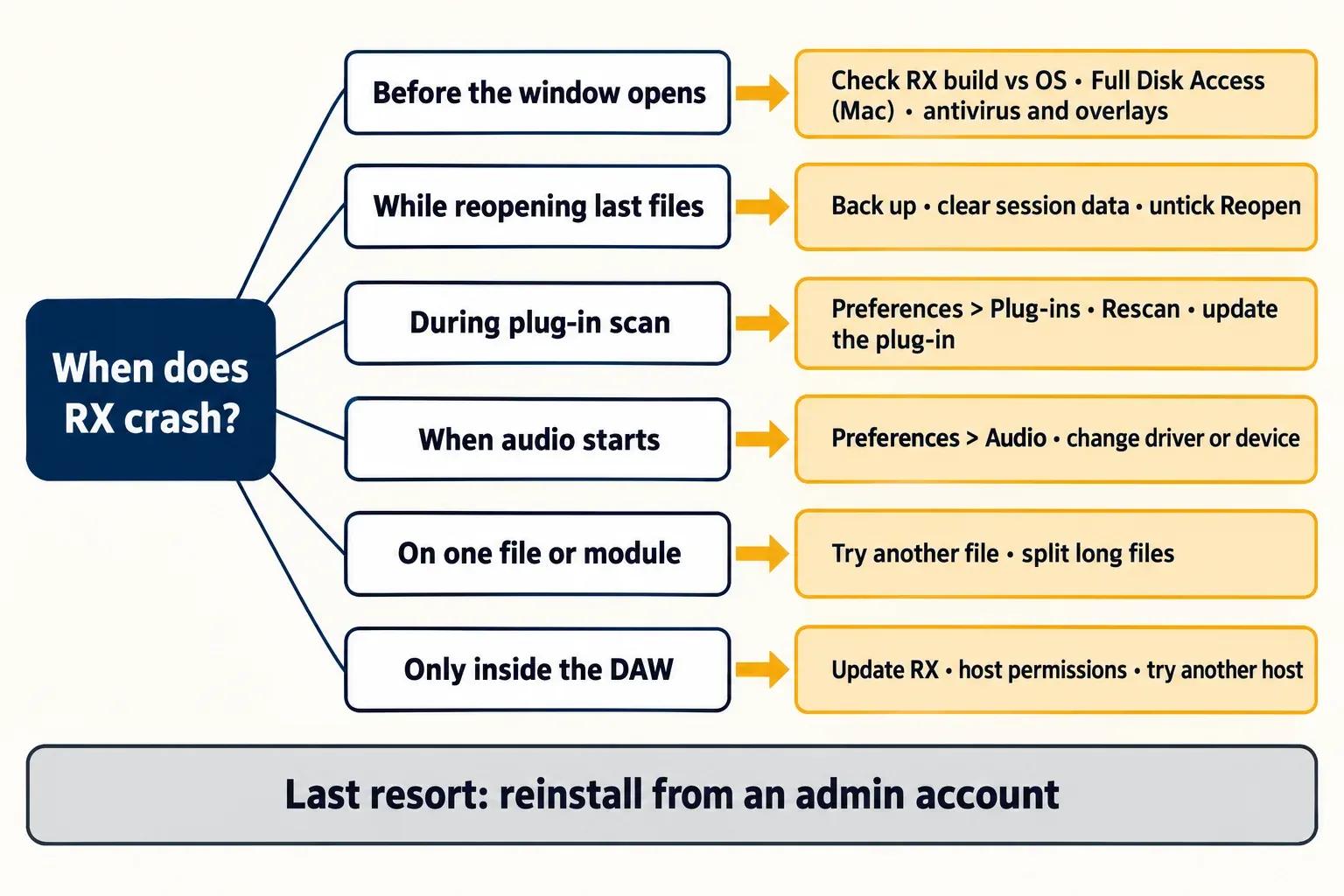
Fix iZotope RX crashes by the moment they happen. If RX quits before its window appears, check that your RX build supports your OS and, on a Mac, give RX and your DAW Full Disk Access. If it dies while reopening your last files, stop the session restore, after backing up, because clearing session data deletes unsaved RX work. If it crashes scanning plug-ins, update the plug-in RX tags as [Crashed] or [Failed], then press Rescan in Preferences > Plug-ins. If it crashes when audio starts, change the driver or device in Preferences > Audio. Reinstall last, from an administrator account.
That order is deliberate. iZotope names compatibility as the most common reason its products crash, and in the seven readable RX crash threads summarized in the test section below, reinstalling RX or even the whole OS failed to stop the crash in five. So I look at the environment around RX, and at what RX restores when it starts, long before I touch the installer. I also protect unsaved work first: RX keeps in-progress edits in its session data, and one of the fixes below erases it.
Start with when RX crashes
"RX keeps crashing" covers several different failures. Pin down the moment, then go straight to the matching section.
| When it fails | Most likely area | First move |
|---|---|---|
| Quits before or as the window appears | OS support, Mac permissions, security or overlay software | Check your RX build against your OS, then Full Disk Access |
| Crashes while reopening your last files | Session restore | Back up, then clear session data and untick Reopen |
| Crashes during a plug-in scan or when a third-party plug-in opens | A plug-in hosted inside RX | Rescan in Preferences > Plug-ins and update the plug-in |
| Crashes when playback or recording starts | Audio driver or device | Change Driver Type or device in Preferences > Audio |
| Deleted or killed on first launch | Antivirus or a GPU overlay | Check quarantine and close overlays |
| Crashes on one file, one module or one export | That file or module | Try another file and split long ones |
| Only your DAW crashes when RX loads | Plug-in format, host permissions, host compatibility | Update RX and test a second host |
A window that opens blank is a different symptom from a crash. On Windows, iZotope's blank-window article ties it to apps that hook into display settings, naming Bandicam, Playstv and Duet Display, and to out-of-date graphics drivers. Close those apps and update the driver before anything else.
Some neighboring problems need different fixes: RX that opens but plays no audio, RX that slows down or freezes without quitting, RX Connect round trips that fail, and ARA editing that misbehaves in a DAW. This guide stays with crashes and launch failures.
Check your RX build against your OS
RX 12.0.0 shipped on April 28, 2026, and the current build is 12.1.0 from October 15, 2026, which fixes obscured or overlapping text in inline edit fields on macOS Tahoe. The RX 12 system requirements list macOS Sonoma 14.7, Sequoia 15.7 or Tahoe 26.4 on Intel and Apple silicon, native or under Rosetta, and Windows 10 22H2 or Windows 11 24H2. The current RX product pages list Sequoia 15.8 and Tahoe 26.x instead. Those are point releases. A Mac on an earlier Sonoma update sits below the listed minimum even though it says "Sonoma".
Older RX versions need a minimum build for each macOS. Here is what iZotope's macOS compatibility list shows:
| macOS | RX 12 minimum | RX 11 minimum | RX 10 minimum |
|---|---|---|---|
| Tahoe (macOS 26) | 12.0.0 | 11.3.0 | Not on the list |
| Sequoia (macOS 15) | 12.0.0 | 11.2.0 | Not on the list |
| Sonoma (macOS 14) | 12.0.0 | 11.0.1 | 10.4.2 |
The last RX 11 update is 11.4.0, released February 13, 2026. If you are on RX 11 below the minimum for your macOS, the update is the first fix to try. On Windows, iZotope says its Windows 11 compatibility checks found current products working without specific issues, on the condition that Windows and the iZotope products are fully updated. Run Windows Update and the RX update together.
To read your build, open the About screen. iZotope's version-number guide puts it under the Help menu on Windows and under the iZotope RX menu on a Mac.
Updates can cause the crash too. In a historical case, iZotope documented RX 10 crashing after an update on macOS 10.13 and 10.14, systems the new build no longer supported. The fix was updating macOS, or reinstalling the last compatible build (RX 10.3.0) and staying on it. Those systems are long gone, but the pattern still applies. If the crashes began right after an RX update on an older OS, compare the new build's requirements with your system before you change anything else.
If you are on RX 11 and wondering whether RX 12 is worth it beyond compatibility, the RX 12 vs RX 11 comparison covers what changed.
On a Mac, give RX and your DAW Full Disk Access
This is the cheapest fix on a Mac, and iZotope treats it as a requirement. Its Full Disk Access article says iZotope products and the audio software they run in need it. Without it, iZotope lists these failures:
- the standalone app crashes
- the DAW crashes while loading or playing a project
- exports or renders fail
- presets load slowly
- the DAW blacklists iZotope plug-ins
- plug-in validation fails in Logic Pro
iZotope's article still uses the old System Preferences wording. On current macOS, Apple's Privacy & Security guide gives this route:
- Choose Apple menu > System Settings, then click Privacy & Security in the sidebar. You may need to scroll down.
- Open Full Disk Access.
- Click the Add button, choose the RX Audio Editor app, then click Open.
- Repeat for every host you use RX in, such as Pro Tools, Logic Pro, Nuendo or Sound Forge.
- Quit and reopen RX and the host, then test again.
Adding only RX is the usual mistake. The host needs the permission as well, because the plug-in runs inside the host's process.
Still crashing at launch on a Mac? Two more checks come from an iZotope support reply that a Pro Tools user shared on the Avid forum after RX 5 began crashing on open. iZotope said RX can crash while it builds its fonts at startup. In Font Book, select every font, choose File > Validate Selection, and remove any font that fails; Apple's Font Book guide marks a failed font with a red icon and removes it with Remove Checked. The same reply named a known conflict with certain Accessibility features and utilities. In System Settings > Privacy & Security > Accessibility, turn off permission for the apps listed there, launch RX, then turn them back on one at a time until the crash returns. That reply was written for RX 5, so I would run both checks after the OS check and Full Disk Access, not before them.
If RX dies while reopening your last session
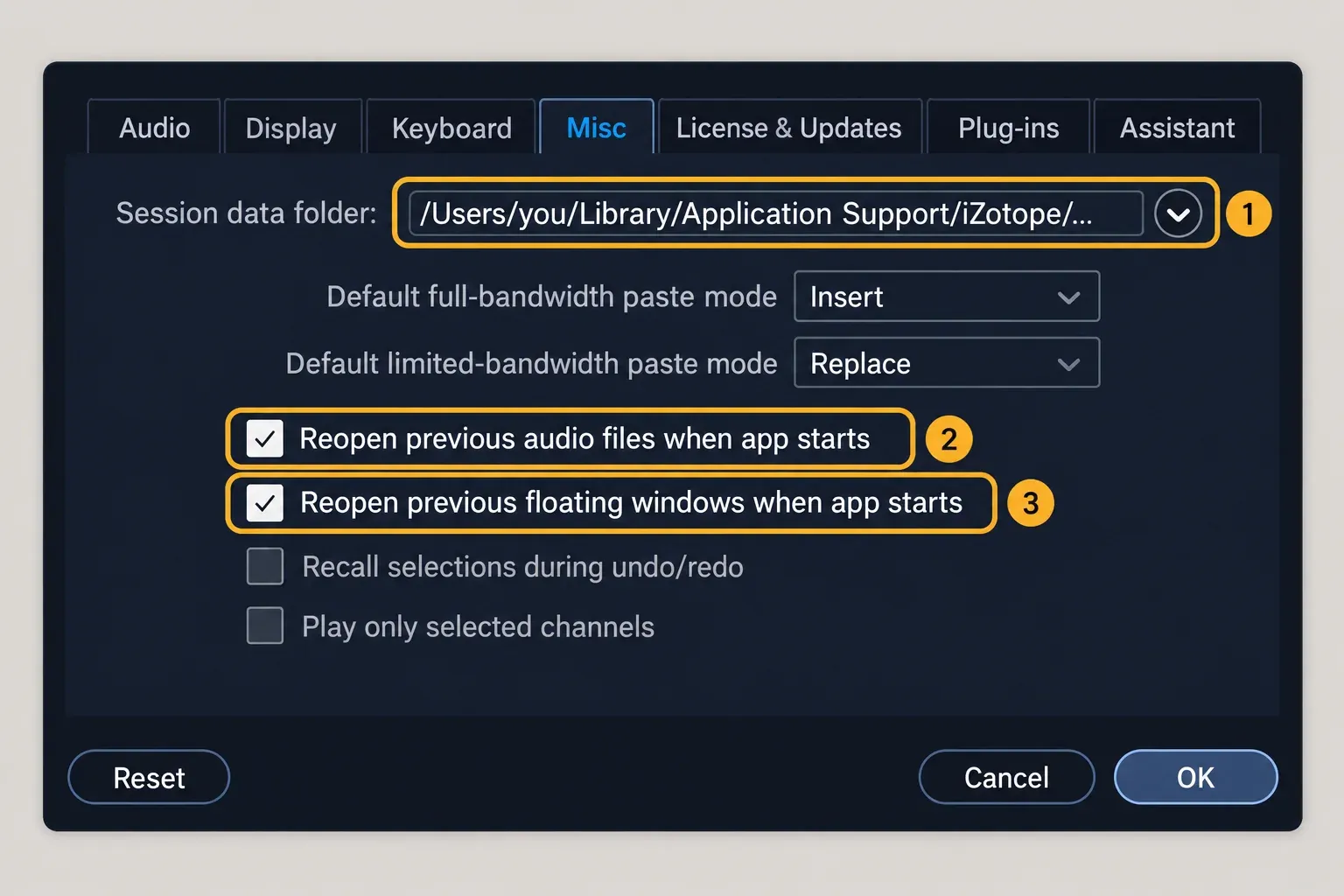
RX remembers more than a file list. According to the RX 12 Misc tab options, the session data folder holds the temporary files that let RX undo actions and recall sessions. With "Reopen previous audio files when app starts" turned on, RX reloads every file that was open at the last close, including edits, processing and undo history. If that restore is what fails, RX will fail the same way at every launch.
iZotope's session data instructions recommend clearing this cache when an existing session throws errors or RX Connect keeps looping. They also warn that clearing it deletes all in-progress or unsaved RX work. So export or save anything you can first. I would move the files to a backup folder rather than delete them. Moving clears the restore just the same, and you keep a way back.
If RX opens long enough to reach Preferences:
- Open Preferences > Misc.
- Click the small arrow next to "Session data folder" and choose Show in Finder on a Mac or Explore on Windows.
- Quit RX, then move everything in that folder to a backup location, including the "RX Connect" folder.
- Relaunch RX. In Preferences > Misc, untick "Reopen previous audio files when app starts" and "Reopen previous floating windows when app starts". RX then opens with no files loaded.
If RX quits before you can reach Preferences, the folder still has to be found by hand. On a Mac, look under ~/Library/Application Support/iZotope/. An RX 11 user in a Steinberg forum thread found it there as "RX 11 Audio Editor Session Data". iZotope doesn't document the RX 12 folder name, so look for the folder with your RX version in its name, back it up, and move it out before relaunching. On Windows, iZotope doesn't publish a default path. Ask iZotope support for the location rather than deleting folders you guessed in AppData.
Once RX is stable, check where that folder lives. The manual recommends putting session data on the drive with the most free space, because the files can be very large.
If RX crashes scanning or loading plug-ins
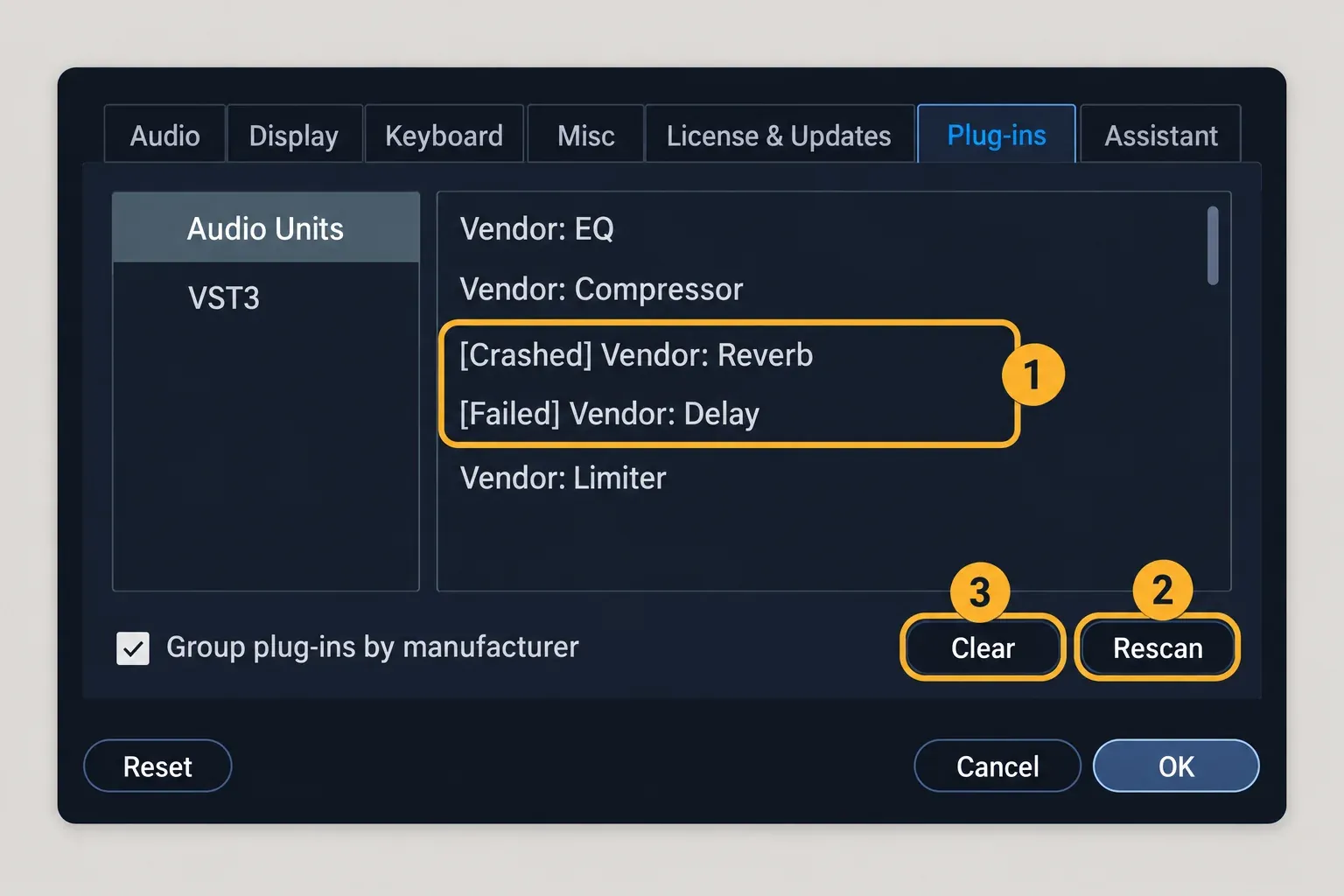
RX hosts third-party plug-ins in its editor, so someone else's code runs inside RX. The Plug-ins tab in the RX 12 manual spells out how RX protects itself:
- A plug-in that fails scanning gets an error tag in front of its name, such as [Crashed] or [Failed].
- RX blacklists any plug-in it detects as unstable and won't open it.
- Rescan clears that blacklist and rescans every installed plug-in, in case an RX update or a manufacturer update has solved the problem.
- Clear empties the plug-in list for one format.
Read the list for tags first. Update any tagged plug-in from its maker, then press Rescan. If the same one crashes again, keep it in your DAW and out of RX.
Third-party plug-ins carry no guarantee here. iZotope says it doesn't officially check third-party plug-ins in the RX application, warns that some can cause unexpected behavior, and says Waves plug-ins are not supported in the standalone RX editor. If Waves sits in your RX plug-in list, run those plug-ins in your DAW instead.
Format matters on Apple silicon. The same Plug-ins tab lists VST2 hosting only for Windows and for Intel Macs or Rosetta, and iZotope's macOS compatibility notes say its own VST2 plug-ins run in Rosetta only. A native Apple silicon RX needs the AU or VST3 version of each plug-in. If the VST2 and VST3 split is new to you, the guide to what a VST plug-in is explains the formats.
If RX crashes when it opens your audio device
A crash at the first press of play, or right after a driver or OS update, points to the audio path. The Audio tab settings in RX 12 give you four levers:
- Driver Type: for example ASIO, CoreAudio or RX Monitor.
- Input/Output Device: the interface RX plays and records through.
- Device Refresh: rescans for newly connected devices.
- Release when not in use: closes the audio device when RX playback stops, so other apps can use it.
Switch the driver type or choose another device, then play again. If the crash stops, the driver is your trigger, and that is the most useful detail you can give iZotope or your interface maker. If RX shares an interface with a DAW, turn on "Release when not in use" so the two apps aren't fighting over it. If RX crashes before you can reach Preferences, disconnect the interface and launch again. If RX now opens, the interface or its driver is the suspect.
Driver crashes can be stubborn. In one Native Instruments Community thread, RX 11 on Windows 11 crashed only with the Focusrite ASIO driver after a Windows update, while Ableton Live and Reaper ran fine on the same driver. A full reinstall, plug-in rescans and driver suggestions didn't resolve it in the thread.
One message looks like a crash but isn't: "The selected audio device cannot be opened". In Scott Troyer's write-up of that error, changing RX's Input device in Preferences > Audio, for example to "No audio device", fixed it for the author, and four of the eight comments under it confirm it worked, one of them on RX 11 for Mac.
Antivirus, overlays and other software that kill RX
When RX vanishes on its first run, look outside RX. In a Kaspersky support forum thread from May 2024, Kaspersky Total Security flagged and deleted the RX 11 Audio Editor executable on first launch. A moderator called the detection probably a false positive, and a later Kaspersky database update let the user install and edit normally. If your security tool shows RX in quarantine, update its definitions and report the false positive to the antivirus vendor. Don't leave protection switched off.
GPU overlays and screen hooks are the other outside cause. In a Steinberg forum thread on D3D9.dll crashes, the RX Audio Editor crashed on open in Windows 11, and iZotope plug-in windows crashed Nuendo. Trying to reinstall RX and DirectX didn't help. Removing the RivaTuner Statistics overlay did. Quit overlays, frame-rate counters, screen recorders and screen-sharing tools, then launch RX again.
The same logic explains iZotope's last reinstall step. Its reinstall guidance ends with Safe Mode precisely so that other applications and drivers cannot interfere.
Isolate the trigger: another file, user account or host
When the obvious fixes fail, change one thing at a time and watch whether the crash follows it.
- Another user account. In an Apple Community thread, RX 6 and RX 8 crashed at launch, both standalone and in Pro Tools. A reinstall and a Time Machine restore didn't help, but RX ran normally in a newly created macOS user account. The thread collected 41 "Me too" replies. If RX runs in a fresh account, the cause lives in your own account's settings, permissions or login items, and reinstalling won't reach it.
- Another file. In a Tom's Hardware thread, crashes and export failures followed one large project file. Clearing AppData and reinstalling didn't help, and the poster says working with shorter tracks stopped the crashing. Open a different, short file. If only one long file crashes, split it into shorter sections.
- Another host. In a KVR forum thread, RX 8 and RX 10 plug-ins crashed Acon Digital Acoustica on two Windows 11 machines, even after a fresh OS install, while the same plug-ins worked in Pro Tools. Load the same RX plug-in in a second host. If only one host crashes, report that to both vendors.
- Another module. One RX 11 user's Reddit post in the search results says module chains such as De-click work, but Dialogue Isolate or Breath Control crash. That is a single report with no visible fix. If one module is the trigger, note the module, your RX build and the file details, and check the release notes for a later fix. The Dialogue Isolate guide covers how that module is meant to be set up.
When RX crashes inside your DAW
Start with the format. RX 12 ships 64-bit AU, AAX, AAX AudioSuite, VST3, AU ARA and VST3 ARA plug-ins, according to the RX release notes, and VST2 is not on that list. Load the VST3, AU or AAX version in your host. On a Mac, the host also needs Full Disk Access.
ARA has one hard limit worth knowing. RX 12's Spectral Editor AU ARA runs in Logic Pro 10.7 or later, and on Apple silicon only when Logic runs under Rosetta.
Update RX before anything else. In an older case, iZotope's RX 7 and 8 crash article fixed crashes involving specific third-party plug-ins with RX 8.5 or newer. When no plug-in conflict was involved, it suspected installation permissions and advised reinstalling from the computer's Admin account. The versions are historical, but update first and check permissions second is still the right order.
Host-side failures can be partial. In an Adobe Community report, Audition crashed with RX 11 Elements and showed cropped RX windows. Reinstalling the related software didn't help, and a temporary display-resolution change was the only workaround another user confirmed.
If the host doesn't crash but RX simply isn't in its plug-in list, or fails Logic's validation, work through the RX plugins not showing guide. Hosting RX inside Sound Forge? If Sound Forge itself won't start, the Sound Forge startup crash fixes handle the host side. If RX's VST3 is missing from Sound Forge's list, see Sound Forge VST plugins not showing.
What about resetting preferences?
First undo the one setting you changed before the crashes began, such as a new driver, a moved session folder or a newly added plug-in. The RX 12 Preferences window has a Reset button at the bottom left, visible in the manual's Preferences pages. The manual doesn't say what it restores, and iZotope documents no RX startup safe mode and no preferences-file location. Treat advice to delete particular Library, AppData or Registry entries with caution, because iZotope doesn't document it. The session data folder is the only thing iZotope documents clearing.
Reinstall RX the right way, last
Reinstalling fixes permission problems. It rarely fixes anything else, which is why it comes last. iZotope's reinstall guidance gives a three-step sequence:
- Uninstall RX and install it again.
- If problems persist, reinstall from an administrator account.
- If they still persist, reinstall with the computer booted in Safe Mode, so other applications and drivers cannot interfere.
Use the right installer. iZotope subscriptions have installed through Native Access since April 30, 2025, and all current iZotope products can be downloaded there. If you still use Product Portal, note that it needs Rosetta 2 on Apple silicon. Apple has said macOS 27 is the last version with Rosetta 2. Per iZotope's macOS 27 note for Product Portal users, the Portal still runs there despite a warning. You can also skip it: sign in to your iZotope account, open My Products and use "Download the installer" under Install without Product Portal. If you're unsure which license you own, the RX price, trial and license guide explains the options.
A synced Documents folder can also get in the way. iCloud Drive's Desktop & Documents sync on a Mac, or OneDrive on Windows, can block iZotope installers or access to the Documents/iZotope folder. If Native Access or Product Portal won't install or authorize RX, the iZotope install and authorization fixes cover those errors.
Test results: what the crash reports show
There are no published crash-rate or stability measurements for RX 11 or RX 12. This composite result instead counts what happened in seven readable crash threads, one each from seven independent forums, dated January 2022 to November 2025, plus the causes named in five official iZotope crash articles: 12 sources in all.
| Finding | Count | Where it happened |
|---|---|---|
| Reinstalling RX, or a fresh OS, did not stop the crash | 5 of 7 threads | Tom's Hardware, Steinberg, Apple Community, KVR, Adobe Community |
| Crash tied to one context while RX worked elsewhere | 4 of 7 threads | One file (Tom's Hardware), one ASIO driver (NI Community), one macOS user account (Apple Community), one host (KVR) |
| RX crashed inside a host or took the host down | 4 of 7 threads | Nuendo, Pro Tools, Acoustica, Audition |
| Confirmed fix, found outside RX | 2 of 7 threads | GPU overlay removed (Steinberg), antivirus database update (Kaspersky) |
| Partial workaround only | 2 of 7 threads | Shorter files (Tom's Hardware), display-resolution change (Adobe Community) |
| Thread ended unresolved | 3 of 7 threads | NI Community, Apple Community, KVR |
The official side points the same way. Of the five iZotope crash articles, three name OS or version compatibility: the general crash article, the RX 7 and 8 article and the article on updates for macOS 10.13 and 10.14. Two name permissions: the admin-account reinstall and macOS Full Disk Access. One names third-party plug-in conflicts, and one names the session cache. Five more search results could be read only as snippets, and four of those five describe RX crashing or failing validation inside a host.
These are small, self-selected samples. The counts show patterns, not rates, and no RX 12-specific crash thread was readable on October 20, 2026. The pattern is still clear enough to act on. Reinstalling is the step people try first, and it is the one that most often changed nothing. Every confirmed fix came from the system around RX, and most crashes followed one specific file, driver, account or host.
My verdict: treat an RX crash as an environment problem until proven otherwise. Check the OS build, permissions, session restore, plug-ins and driver, in that order, and keep the reinstall for permission problems.
What to send iZotope support
If the crash survives everything above, a complete report saves a round of back-and-forth. Include:
- your RX version from the About screen, plus the edition: Elements, Standard or Advanced
- your OS version and, on a Mac, whether it's Intel or Apple silicon and whether RX runs natively or under Rosetta
- the host and plug-in format, if a DAW is involved
- your audio interface and the Driver Type selected in RX
- the exact error text, or any crash report your system offers
- what you've already isolated: no files reopened, another user account, another host, another driver
- whether the crashes began after an RX, OS or driver update
FAQ
Can I get my work back after RX crashes?
Often, yes. Relaunch before you clear anything. RX autosaves in-progress work to its session data, and with "Reopen previous audio files when app starts" enabled, it reloads your files with their edits and undo history. Save or export as soon as they open. Clear the session data only if the restore itself crashes every time, and back it up first.
Is RX 11 compatible with macOS Tahoe?
From RX 11.3.0 on. iZotope lists 11.3.0 as the minimum RX 11 build for Tahoe, and RX 12 is supported from 12.0.0. If an older RX 11 crashes on Tahoe, update it before trying anything else.
Does reinstalling RX fix crashes?
Sometimes, mostly when permissions are the cause, which is why iZotope's own sequence moves to an administrator account and then Safe Mode. In the crash threads counted above, reinstalling or a fresh OS failed to stop the crash in 5 of 7.
The order I would follow
Check the RX build against your OS, then give RX and your host Full Disk Access on a Mac. Next, stop the session restore once your unsaved work is backed up. Then rescan plug-ins, switch the audio driver and close any overlay or quarantine tool, and change one thing at a time until the crash follows something specific. Reinstall from an administrator account only after all that. More RX fixes, workflows and edition guides live in the iZotope RX hub. Once RX is stable again, the RX 12 beginner tutorial walks through the editor.