
To clear a Melodyne network error, activate from the stand-alone Melodyne on the computer you want to use, confirm that its browser opens celemony.com/login, and update to Melodyne 5.4.2. Activation checks your license with Celemony's server and works only from the computer being activated, so the fixes start with those two conditions. If Melodyne activated but asks again later, especially after joining a new Wi-Fi network, the cause Celemony documents is a randomized Wi-Fi hardware address.
I'd sort the problem by the moment it shows up before reinstalling anything. A failure on the Activate step is a hand-off problem between Melodyne, your browser and Celemony's site. A prompt that returns after a working activation is the hardware fingerprint. A crash at launch or a missing ARA entry in your DAW is an install or host problem, and reactivating won't touch it. Celemony's FAQ, manual and version history don't name a dialog called "network error," so this guide takes the phrase the way people search it and covers all three cases.
How Melodyne activation works and where it breaks
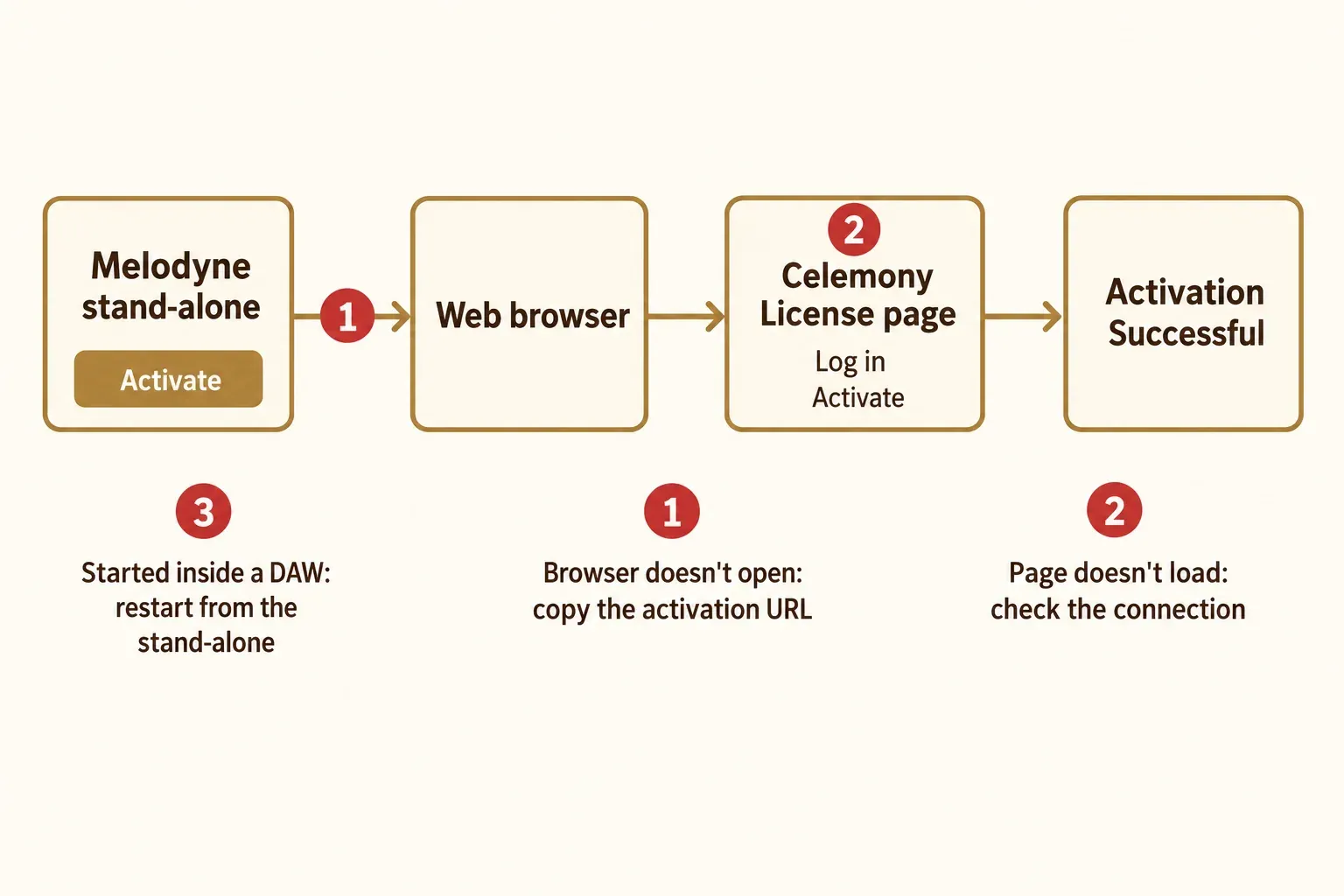
Melodyne asks for activation the first time it launches, as the Melodyne 5 installation and activation chapter explains. Clicking Activate in the stand-alone sends you to Celemony's registration page, where you create a user account if you don't have one yet, according to Celemony's activation FAQ. The rest of the route is spelled out in Fender's walk-through for bundled Melodyne Essential: the Celemony License page, an Activate button, your login, a second Activate, and an "Activation Successful" screen in the browser.
Two rules sit behind every activation dead end. During this process Melodyne checks your license data with Celemony's server, so it needs an Internet connection. And a computer can only be activated from that computer, not from your Celemony account on another machine. Deactivation works the other way around: you can release a computer from any machine after logging in, through the License options on the website or Help > License in Melodyne.
A standard license runs on one workstation at a time and includes two activations, the second being an emergency activation for a substitute computer. On a third computer, check the activation count in your account before blaming the connection.
Network error when you click Activate: 5 checks in order
Run these in order. The first three take a minute and need nothing installed, the fourth needs a download, and the fifth happens in your Celemony account.
- Open celemony.com/login in the browser on the same computer. Your License page and personal installer live in that account, as Celemony's installer FAQ notes, and the activation finishes there. If the page won't load in that browser, Melodyne can't finish either. Celemony doesn't list VPNs, proxies or firewalls as a cause, but whatever blocks the site in the browser can block the activation too, so I'd pause a VPN or proxy and try once more before touching the license.
- Start from the stand-alone Melodyne, not the plug-in in your DAW. PreSonus tells Studio One users to activate in the stand-alone rather than inside the DAW, and Celemony's own player-mode fix routes through the stand-alone too. On Windows it sits at C:\Program Files\Celemony\Melodyne 5\Melodyne.exe; on a Mac it's in Applications/Melodyne 5.
- If no browser opens, copy the activation URL into another browser. Fender's instructions say you can copy the activation URL and paste it into the browser of your choice. Celemony gives similar advice for a stuck installer download: try a different browser.
- Update to 5.4.2 and confirm the version in About Melodyne. The Melodyne 5 version history shows that 5.4 fixed a Windows crash that sometimes happened when the connection with Celemony's server was faulty, occasional crashes when activating the stand-alone, and crashes after an interrupted Windows trial activation. The newest Melodyne 5 version listed there is 5.4.2. About Melodyne in the main menu shows the edition and version you're running, and Preferences > Check for Updates has a Check Now button. The new installer comes from your Celemony account.
- Check that the serial is registered and an activation is free. A bundled serial only works after you register it at Celemony, and that registration creates the account you download from, per the Melodyne Essential manual. With both activations in use, deactivate the old computer from any machine first, then activate the new one from itself.
My rule is simple. If the login page loads and the stand-alone on 5.4.2 still fails, stop reactivating and write to Celemony support with the details listed at the end of this guide.
Melodyne keeps asking to activate or opens in player mode
When Melodyne isn't activated, it runs in player mode and the blobs are grayed out, as Celemony's player-mode FAQ describes. The fix is the route above: launch the stand-alone, click Activate and follow the browser steps.
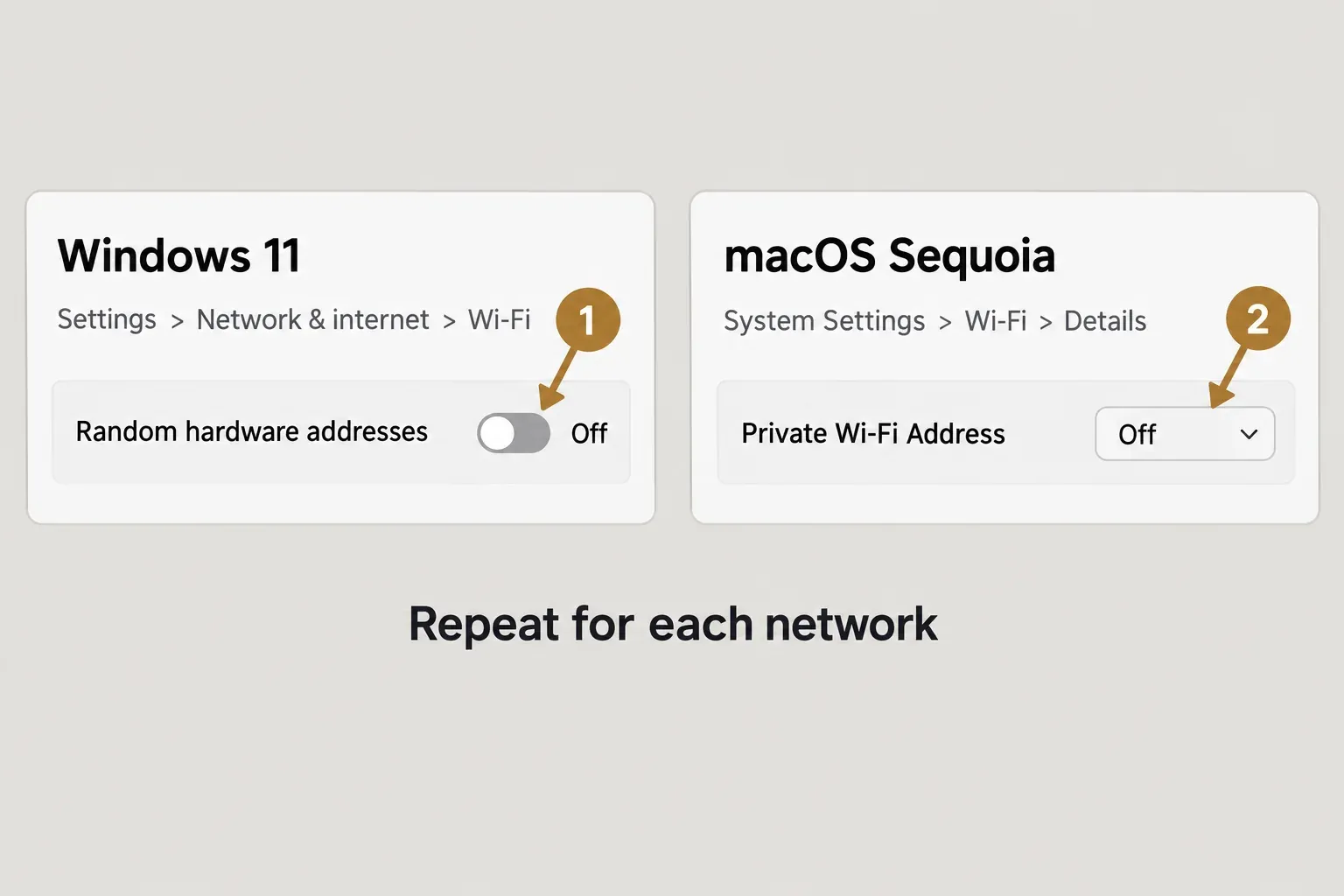
A prompt that comes back after a successful activation has a different cause. Melodyne fingerprints the computer's hardware, and Celemony's Wi-Fi address FAQ explains that random Wi-Fi hardware addresses in Windows 10 and 11 and macOS Sequoia look like a major hardware change, so every new address triggers another activation request. A Mac turns this on without asking: Apple's private Wi-Fi address page says macOS picks Fixed by default when it joins a new WPA2-or-stronger network.
- Windows 10 or 11: Settings > Network & internet > Wi-Fi > Random hardware addresses: Off. Repeat it for each saved network under Manage known networks, as Microsoft's Wi-Fi settings page shows, then shut the computer down so the change takes effect.
- macOS Sequoia 15 or later, on Melodyne older than 5.4.2: System Settings > Wi-Fi > Details next to the connected network > Private Wi-Fi Address: Off. Repeat it for each network you use.
Version 5.4.2 removes the reactivation problem caused by macOS Sequoia's Private Wi-Fi Address. The same version history lists no matching fix for Windows random hardware addresses, so I'd still switch them off on a Windows laptop after updating.
Owners of assistant, editor or studio who want to keep random addresses can move to iLok USB-dongle activation. Melodyne supports only the physical dongle, not computer-based iLok or iLok Cloud, and Essential can't use iLok at all. What else separates the editions is in the Melodyne Essential vs Assistant comparison.
GarageBand has one extra trap. It keeps a copy of the license file in its container, so if Melodyne stays in player mode there, delete that Celemony.license file, reinstall and activate the stand-alone before you start GarageBand again.
Melodyne not opening or crashing at launch
Celemony's order for a stand-alone that won't launch is short: restart the computer, delete the Melodyne preferences, then contact support@celemony.com. Deleting the preferences resets global settings such as your audio interface choice, so move the preference files to the desktop instead of trashing them and you keep a backup. On a Mac they're com.celemony.melodyne.pref.plist and com.celemony.melodyne.standalone.plist in ~/Library/Preferences; on Windows the preferences sit in a Celemony folder under AppData\Roaming.
The next step depends on what you see:
- The Windows installer won't start, sometimes with error -5001 : 0x80070002. Unzip the package and run setup.exe as administrator.
- Launch fails on a Japanese, Korean or Chinese Windows system. Version 5.4.1 fixed that, so update to 5.4.2.
- A crash after an upgrade. Leftovers from an older version can cause it. In one Audio Support case with Sonar, a leftover Melodyne 5.1 core bundle made Melodyne Essential 5.3 crash in the DAW and as a stand-alone; removing it, reinstalling 5.3 and relicensing fixed it.
- An older system. Melodyne 5 needs macOS 10.12 or later, with native Apple Silicon support from 5.2, or 64-bit Windows 10 or Windows 11, according to Celemony's technical requirements.
For a clean reinstall, PreSonus gives the clearest sequence, written for Studio One: uninstall, delete leftover Melodyne files from the plug-in folders, reinstall from the Celemony account, activate in the stand-alone, then rescan plug-ins in your DAW. On a Mac the uninstall is the Melodyne Uninstaller in Applications/Melodyne 5; on Windows it's the standard uninstall procedure. The default plug-in locations are C:\Program Files\Common Files\VST3\Celemony\Melodyne.vst3 on Windows, and /Library/Audio/Plug-Ins/VST3 plus /Library/Audio/Plug-Ins/Components/Melodyne.component on a Mac.
One Windows detail from the installation chapter: the installer adds a Microsoft Defender exclusion for Documents\Celemony\Separations, where Melodyne keeps temporary audio files. A different security suite won't get that exclusion automatically, and adding it there is my inference rather than a documented Celemony fix.
When Sound Forge itself is the program that won't start, the causes are different, and the Sound Forge Pro startup crash fixes cover them.
Melodyne plug-in or ARA not loading in your DAW
An empty Melodyne window isn't necessarily a fault. In hosts without ARA, the transfer plug-in stays empty until you click Transfer and play the passage in the DAW.
Sound Forge Pro
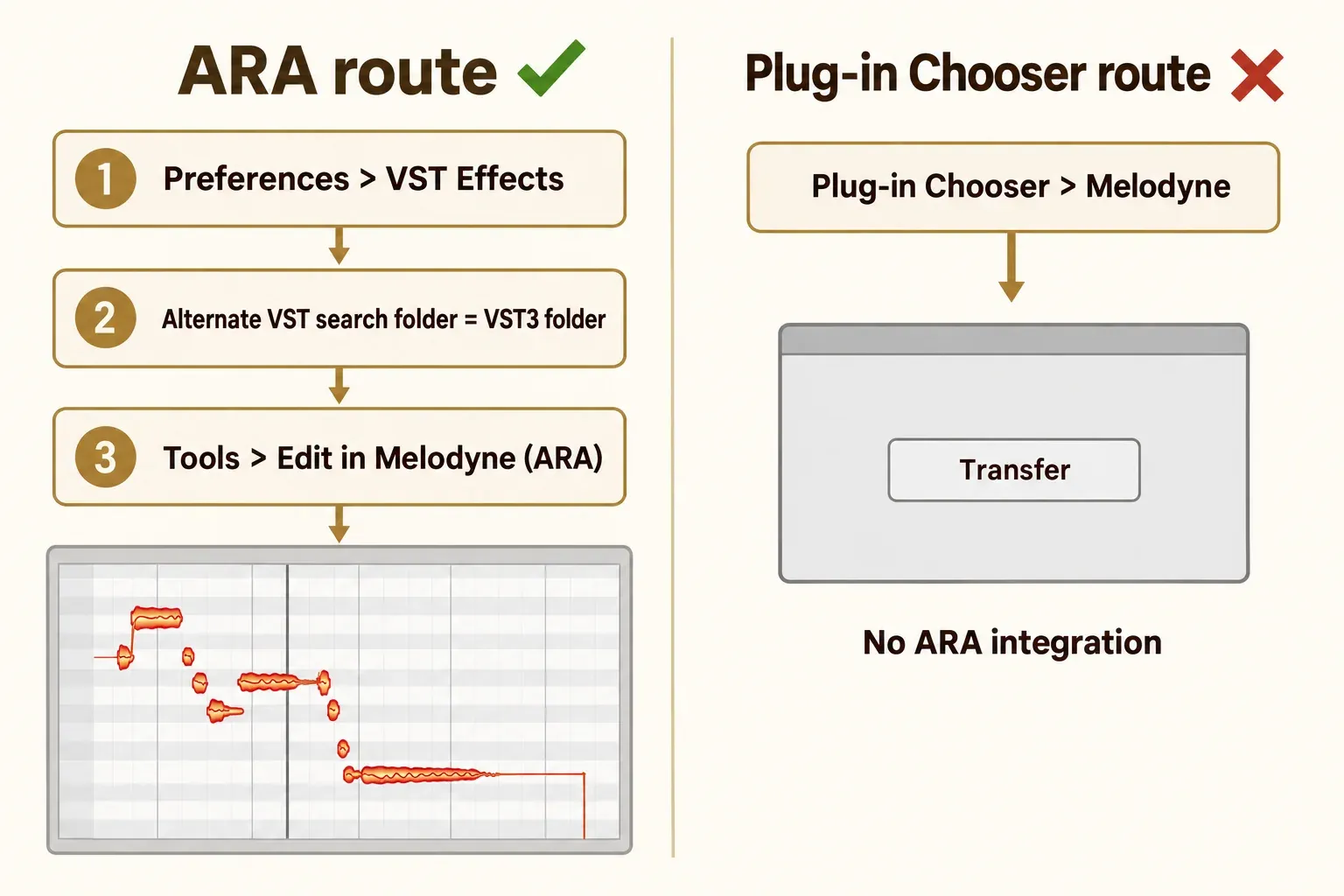
Sound Forge Pro has had ARA2 integration since version 13, and the Sound Forge Pro 2026 help on Melodyne integration gives the setup: install the Melodyne VST3 plug-in, set the VST3 folder (usually C:\Program Files\Common Files\VST3\) as the Alternate VST search folder in Preferences, VST Effects tab, then choose Tools > Edit in Melodyne (ARA). The same page warns against loading Melodyne through the Plug-in Chooser. That route gives you the transfer plug-in without integration, with a Transfer button in the Melodyne window.
Celemony's list of tested hosts doesn't include Sound Forge. That doesn't make it unsupported, but for this host I'd follow the Boris FX page over Celemony's DAW notes. The full plug-in setup is in the guide to loading VST3 and ARA plug-ins in Sound Forge Pro, and a VST3 folder Sound Forge doesn't scan is covered in Sound Forge VST plugins not showing.
Logic Pro, Studio One, Fender Studio Pro and Pro Tools
| Host | Symptom | Documented fix |
|---|---|---|
| Logic Pro on Apple Silicon | Melodyne opens as the transfer version | Logic running natively can't host Melodyne as ARA, so open Logic using Rosetta (Get Info > Open using Rosetta). If Logic can't find the ARA version, insert the transfer version once, quit and relaunch. |
| Studio One | Keeps asking to install Melodyne, or shows an incompatibility dialog | Reset the settings folder (Help > Open Settings Folder, back it up, close Studio One, delete everything except Extensions), or delete the Plugins-xx.settings files. Melodyne 5 needs Studio One 4.2 or later. |
| Fender Studio Pro | An older Melodyne 4 install | Fender requires Melodyne 5, and native Apple Silicon support needs 5.2 or later. |
| Pro Tools | No ARA integration | Pro Tools 2022.9 needs Melodyne 5.3 or later for ARA. |
Celemony's tested configurations for the latest Melodyne 5 include Pro Tools 2026.4, Cubase 15.0.30 and Studio Pro 8.1 on Windows 11 and macOS 26.7, plus Logic 11.2.2 on Apple Silicon under Rosetta. Celemony updates that list on its technical requirements page, so check your host version there before blaming the license.
Cubase crashes while scanning ARA services
Melodyne's name on an ARA-scan crash doesn't prove Melodyne caused it. In one Cubase 13 ARA-scan thread, the crash came from Novation Automap wrapper copies of ARA plug-ins, and deleting them fixed startup. In a Cubase 14 thread, the crash dump pointed at Auto-Tune Pro instead. I'd read the crash dump for the plug-in it names before reinstalling Melodyne.
A different case: Melodyne works as a stand-alone but never appears in the insert list. In a Cubase AI thread, copying Melodyne.vst3 into the folder the DAW scans made it show up.
Melodyne Essential from Sound Forge Plus or another bundle
Sound Forge Plus includes Celemony Melodyne 5 Essentials; base Sound Forge doesn't, according to the Sound Forge pricing page. The Sound Forge vs Sound Forge Plus comparison covers what else separates them.
For any bundle, Celemony's rule is the same. The bundle supplier gives you the serial, registering that serial at Celemony creates your user account, and the installers come from that account. Activation then runs exactly as above, from the stand-alone. Boris FX's third-party activation article covers Melodyne for Samplitude Suite and Sequoia, where the first plug-in use sends you to the Melodyne website to log in, enter the serial and choose Activate. It doesn't document a separate flow for Sound Forge Plus, so Celemony's general route is the one to follow there.
Serials that came with a third-party subscription such as PreSonus Sphere are a separate case: they stop being valid when the subscription ends and may be deactivated.
Your Melodyne license and your Sound Forge license are separate too. A Sound Forge sign-in or upgrade problem belongs in the Sound Forge activation failed fixes, and the rest of the Boris FX audio range is on the Boris FX audio hub.
What fixed it in 9 user reports
This composite result counts nine readable troubleshooting cases: eight Steinberg forum threads from February 2023 to October 2026 and one Audio Support write-up. Most involve Cubase on Windows, so they say more about ARA hosts than about Essential in Sound Forge, and none uses the literal phrase "network error." With nine cases, counts are more honest than percentages, and one case can appear in more than one row.
| Outcome | Cases (of 9) | Where it was reported |
|---|---|---|
| Starting activation or registration outside the DAW (stand-alone or Celemony account) fixed a loop or crash | 2 | Cubase 13 activation crash thread; Melodyne 5 Essentials redemption thread |
| Clean reinstall from the Celemony account or removing leftovers fixed it | 2 | The Essentials redemption thread; the Audio Support Sonar case |
| Reinstall tried and didn't help | 1 | Cubase 15 startup ARA-scan thread |
| Old Melodyne 4 on a new Windows 11 PC or new hardware was the cause | 2 (upgrading to 5 fixed one) | The Cubase 13 activation crash and ARA-scan threads |
| The ARA-scan crash dump pointed at another plug-in, not Melodyne | 2 | Novation Automap wrappers in Cubase 13; Auto-Tune Pro in Cubase 14 |
| The DAW wasn't scanning the VST3 folder | 1 | The Cubase AI insert-list thread |
| Unresolved | 4 | Cubase 14 and 15 ARA-scan threads, Cubase crash after installing Melodyne, Melodyne missing from Extensions |
The fixes that worked were mundane: activation moved out of the DAW, an old version or leftover files removed, another plug-in taken out of the scan, or the VST3 placed where the host looks. All four unresolved cases were Cubase crashes or a missing Extensions entry, which is where reinstalling stopped paying off.
My verdict: for an activation error, fix the route, not the install. The stand-alone on the same computer, a browser that opens celemony.com/login, and version 5.4.2 address the documented activation causes, and the Wi-Fi switch handles prompts that keep coming back. A reinstall earns its place only when Melodyne crashes or a host can't find it.
Still stuck: what to send Celemony support
Write to support@celemony.com and put everything in the first message, so nobody has to ask twice:
- the edition and version from About Melodyne
- your operating system and its version
- the host and its version, if the problem happens in a DAW
- the exact step that fails: Activate in the stand-alone, the browser hand-off, the License page or the first plug-in load
- whether celemony.com/login opens in that computer's browser
Copy any on-screen message word for word rather than paraphrasing it as a network error.
Melodyne activation FAQ
Does Melodyne need an Internet connection every time?
Celemony's technical requirements tie Internet access to the first activation. Melodyne also checks for updates over the Internet at every launch, and Preferences > Check for Updates has a manual Check Now option.
How do I move Melodyne to a new computer?
Deactivate the old computer first; you can do that from any machine after logging in to your Celemony account. Then activate the new computer from the stand-alone on that computer. If the old one is dead, the second activation in a standard license exists for exactly that substitute-computer case.