
Use the calculator to estimate a file, find recording time from available space, or count complete files that fit on a drive.
Audio file size calculator
Calculate size, time or file count
Choose what you know. The result updates as you type.
Calculation details
- Batch total
- 86.40 MB
- Per minute
- 17.28 MB
- Data rate
- 2,304 kbps
- Classic RIFF boundary
- about 4 h 8 min
PCM payload is deterministic. A container and its metadata sit outside this byte count.
300 s × 48,000 samples/s × 24 bits × 2 channels ÷ 8 = 86,400,000 bytes.
Five minutes of 48 kHz, packed 24-bit stereo audio contain 86.4 MB of PCM data. At an average stream bitrate of 320 kbps, five minutes contain about 12 MB before tags and wrappers.
Choose PCM for uncompressed sample data, WAV or AIFF to add a wrapper allowance, or average bitrate for MP3, AAC and Opus. FLAC needs a range because its compression depends on the audio.
PCM payload uses complete sample frames and the stored sample width, and fractional durations are rounded to the nearest frame. Here, 24-bit means packed three-byte samples, so select 32 if your WAV stores each sample in four bytes. WAV and AIFF add an editable wrapper allowance. FLAC stays a planning band; it can't be a guaranteed bound.
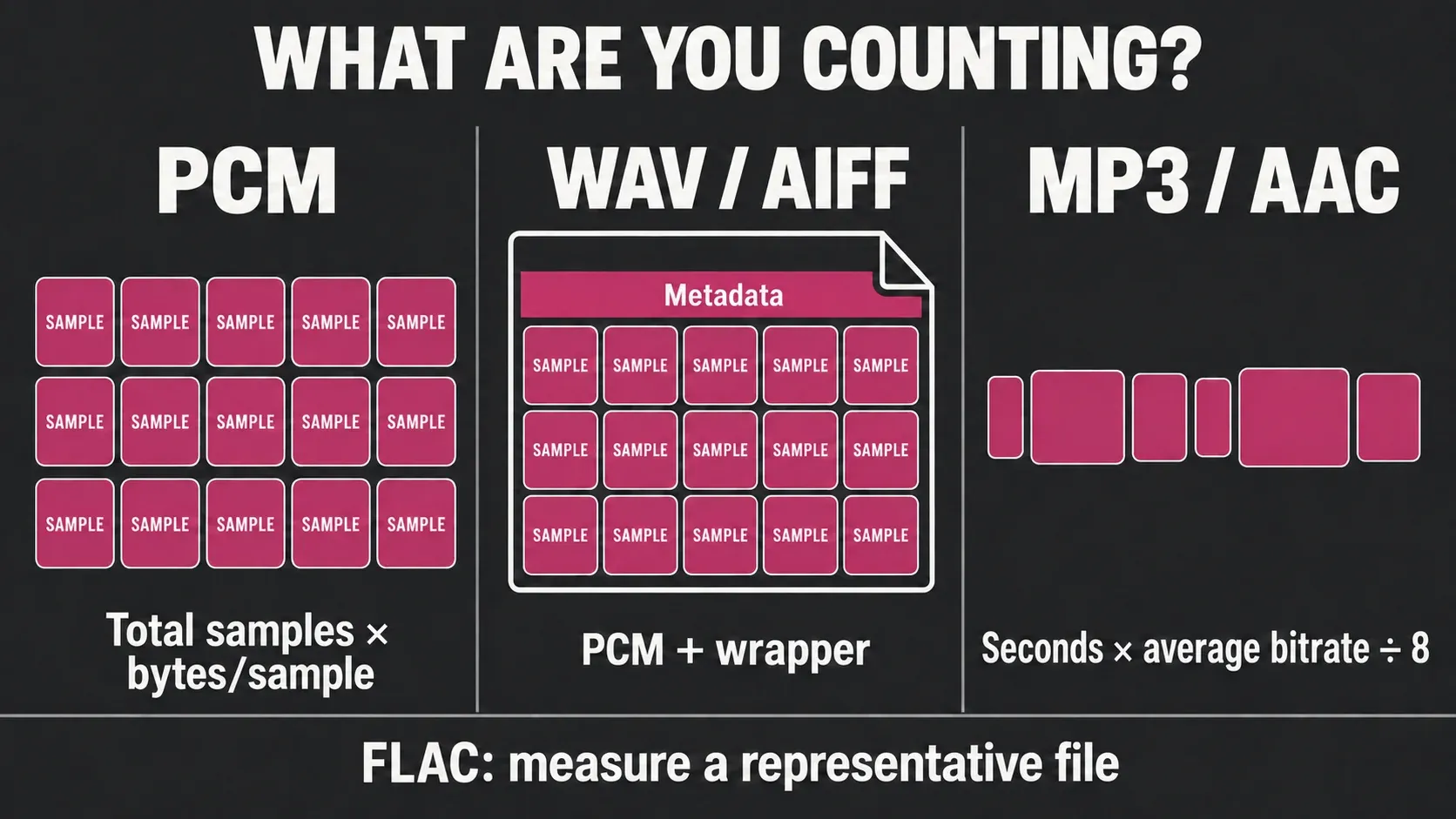
The audio file size formula
For uncompressed PCM, use bytes = seconds × sample rate × stored bits per sample × channels ÷ 8. A 60-second, 44.1 kHz, 16-bit stereo payload is 10,584,000 bytes: 10.584 MB or about 10.094 MiB. The selected width describes the bytes actually stored, which can be more than the converter’s useful precision.
The channel count multiplies complete sample frames. Mono has one sample per frame, stereo has two, and a six-channel recording has six. Microsoft’s current RIFF overview describes WAVE audio as chunks that include format information and the audio data itself. The PCM equation calculates the data; it doesn't account for every possible surrounding chunk.
Microsoft’s WAVEFORMATEXTENSIBLE definition distinguishes valid precision from stored sample width. For an existing PCM WAVE file, complete frame count multiplied by its block alignment gives the audio-data bytes without guessing that width. Other chunks still sit outside the payload.
For encoded audio, use estimated bytes = seconds × measured average bitrate in bits/s ÷ 8. A stream bitrate estimates the encoded payload, while an overall file bitrate worked out from complete file bytes and duration already includes metadata and container overhead, so don't add that overhead twice. Sample rate and PCM depth alone won't tell you an encoded file’s size.
How to interpret exact and estimated results
PCM payload is deterministic once duration, sample rate, stored bits per sample and channel count are known. WAV and AIFF add container chunks whose size depends on the writer and metadata. MP3, AAC and Opus should be planned from measured average bitrate, while FLAC needs a range calibrated with representative source audio.
| Model | What the calculator returns | What to confirm |
|---|---|---|
| PCM payload | Exact sample-data bytes from duration, sample rate, stored width and channels | The file’s stored sample width and channel count |
| WAV or AIFF estimate | PCM payload plus an editable wrapper allowance per file | Metadata, markers, padding and other chunks written by the application |
| Average bitrate | Duration multiplied by the bitrate entered | Use stream bitrate for payload, or whole-file bitrate without adding wrapper overhead again |
| FLAC range | A low-to-high percentage of the uncompressed PCM payload | Encode a representative passage and enter its measured ratio when the estimate matters |
A requested AAC bitrate doesn't always guarantee the finished size. Apple’s AAC rate-control note separates CBR, ABR, constrained VBR and quality-based VBR. For planning, enter a measured average bitrate from a representative finished file instead of treating a quality setting as a fixed data rate.
Three calculations, three planning questions
Duration to file size
Use this before recording, rendering stems, or preparing delivery copies. Enter the longest file duration and the number of files. If a project mixes mono and stereo stems, calculate each group separately instead of pretending every file has the same channel count.
Storage to maximum recording time
Enter writable space, not advertised drive capacity. The three-copy figure divides an aggregate storage budget between one working source and two copies, allowing a wrapper for each copy. It does not measure three destinations. For independent backups, calculate each destination separately and use the shortest resulting recording time as the limit.
Drive capacity to whole files
Use this for repeated interviews, podcast episodes, or delivery batches. The result rounds down to complete files and also shows three-copy sets. A partial final file is not counted.
MB, MiB, GB, and GiB are different units
The BIPM SI prefix table defines mega as 10⁶ and giga as 10⁹. That makes 1 MB equal to 1,000,000 bytes and 1 GB equal to 1,000,000,000 bytes. The NIST binary-prefix reference defines 1 MiB as 2²⁰ bytes and 1 GiB as 2³⁰ bytes.
The same 1,048,576 bytes appear as 1.05 MB or 1.00 MiB after rounding. Neither display means data has disappeared. Compare raw bytes when checking a storage specification against a file browser; the calculator displays both unit systems.
WAV, AIFF, RF64, and BW64: payload is not the container
WAV and AIFF can both carry uncompressed PCM, but they don't share one universal 44-byte wrapper. Each container has its own chunk structure, and real applications can write extra metadata. That's why the calculator offers separate WAV and AIFF choices and shows the wrapper allowance instead of quietly adding 44 bytes to every PCM result.
The familiar “4 GB WAV limit” comes from the 32-bit size fields in classic RIFF. Plan around 4 GiB, or 4.29 decimal GB, with a little less left for audio after headers. The ITU-R BS.2088-2 recommendation defines BW64 for long-form audio, and the EBU RF64 archive points to the ITU specification that replaced Tech 3306. For a long uninterrupted take, confirm that both the recorder and the receiving application support the large-file container you pick, because the extension alone doesn't prove compatibility.
If the recording gets close to that boundary, splitting at a safe edit point is often easier to exchange. The long-recording split guide covers the workflow. Don't drop sample rate or bit depth just to dodge a container limit without checking the delivery requirement. If conversion is needed, read the sample-rate workflow and the bit-depth and dither guide before you change a master.
MP3, AAC, and Opus need an average-bitrate estimate
One hour at 128 kbps holds a nominal 57.6 MB of encoded payload, and at 320 kbps it's 144 MB. Don't multiply by the channel count again when the selected bitrate already covers the complete stream, as it normally does in an export dialog.
CBR usually stays closest to the formula. ABR can miss the target, and a VBR quality setting may not expose a meaningful bitrate until after encoding. The safest workflow is to encode a representative passage, inspect its average, and use that measured value. The Sound Forge MP3 export guide explains the related export choices; the audio conversion guide covers format changes without overwriting the source.
Why FLAC must remain a range
FLAC saves storage without throwing away PCM information, but how much it saves depends on the signal. Silence, steady tones and correlated channels compress well, while noise-like audio leaves the predictor little redundancy to remove. Compression level changes encoder effort and can change the size; it never makes FLAC lossy.
The default 35–85% band is an editable planning assumption. It isn't a measured confidence interval or a guaranteed minimum and maximum. Source material, channel correlation, metadata and encoder settings can all move the result. When storage is tight, encode a representative passage and enter its measured percentage. The fields accept fractions below 1% and values above 100%, since short files or metadata can outweigh the compression savings.
The current FLAC specification in RFC 9639 supports integer PCM with one to eight channels and bit depths from 4 to 32 bits, but it doesn't directly keep floating-point samples. The calculator disables larger FLAC choices, and even a valid format ceiling doesn't guarantee every player accepts every combination.
Plan the project footprint, not the delivery file

A 128 kbps MP3 can be the smallest object in the job. The source recording, edit master, rendered stems, alternate mixes, cache, and revisions usually dominate storage. Keep the preservation or edit master lossless, calculate delivery versions separately, and place independent backups on separate storage targets. For multichannel sessions, calculate the recorded channel count first; use the channel-conversion guide only when the delivery specification actually calls for a downmix.
The “three-copy sets” result is meant literally: one working source and two extra copies. It says nothing about geographic separation, media health or whether you can restore from them. Check backups by opening or checksumming them, and try a restore before you wipe cards or source drives.
Leave headroom on every destination. Filesystems, catalog databases, peak files, checksums, and application caches consume space outside the audio calculation. A recorder may also reserve space or stop before the advertised capacity is fully consumed. For field work, calculate with the card size you can actually write, then run a timed test at the exact channel count and recording format.
Five mistakes that break an audio storage estimate
- Calling every uncompressed result “WAV plus 44 bytes.” Calculate PCM first, then use the selected container’s actual or measured overhead.
- Using a target bitrate as if it were measured. ABR and VBR can finish above or below the setting.
- Multiplying total MP3 bitrate by channel count. The export bitrate usually describes the complete encoded stream.
- Treating FLAC as a fixed 50% saving. Measure representative material or retain a wide band.
- Budgeting one copy. Source, work files, delivery versions, revisions, and independent backups all consume space.
For a deadline-critical recording, make a short test with the actual recorder, codec, metadata and destination filesystem, and compare its bytes and duration with this estimate before you record the full session. For other measurements, use the audio tools hub. This calculator plans storage and never looks at your audio.
Audio file size calculator FAQ
How do I calculate an audio file size?
For PCM, multiply seconds by sample rate, stored bits per sample and channels, then divide by eight. The 24-bit choice assumes packed three-byte samples; choose 32 if each sample occupies four bytes. For encoded audio, multiply seconds by the measured average bitrate in bits per second and divide by eight. An overall file bitrate already includes wrapper overhead.
How many MB is one minute of audio?
At 44.1 kHz/16-bit stereo, one minute contains 10.584 MB of PCM payload. At 48 kHz/24-bit stereo it contains 17.28 MB. A one-minute 128 kbps stream contains about 0.96 MB before tags and container overhead.
How many GB is a three-hour audio file?
It depends on the format. Three hours of 48 kHz/24-bit stereo PCM contain 3.1104 GB. At 128 kbps, the encoded payload is about 172.8 MB; at 320 kbps it is about 432 MB.
How many GB is one hour of MP3?
At a measured average of 128 kbps, one hour is about 57.6 MB or 0.0576 GB before tags and container overhead. At 320 kbps, it is about 144 MB or 0.144 GB.
Why is my WAV larger than the PCM calculation?
WAV may store each sample in more bits than its valid precision, such as 24 valid bits in a 32-bit container. It also adds RIFF chunks, metadata and padding. First match the stored sample width, then add measured wrapper overhead; do not treat sample padding as a fixed header.
Can I calculate FLAC size exactly before encoding?
No. FLAC size depends on the signal and encoder settings. Use a planning range, then encode a representative minute and measure its ratio to the PCM source.
Why do Finder and another tool show different file sizes?
They may be using decimal MB and GB versus binary MiB and GiB, or they may round differently. Compare the raw byte count before assuming either tool is wrong.
What happens when a WAV reaches the classic 4 GB boundary?
Classic RIFF/WAV has 32-bit size fields. Use a workflow that supports RF64 or BW64, or split the recording before the boundary, and verify compatibility at both ends.