
To remove clicks with iZotope RX De-click, pick the algorithm that matches the click, then move only three controls. Single Band suits very narrow digital ticks, Multi-band (Periodic Clicks) suits clicks that repeat at a regular rate, Multi-band (Random Clicks) suits irregular vinyl clicks and thumps, and Low Latency suits mouth clicks and real-time plug-in use. Raise Sensitivity only until the clicks stop, set Frequency Skew below zero for vinyl or generic clicks and at zero or above for mouth clicks, and add Click Widening when a click's tail survives. In the Audio Editor, switch on Listen and preview what De-click removes before you press Render. RX 12 Elements has De-click as a plug-in only; Standard and Advanced add the Audio Editor module, Instant Process, Interpolate, Mouth De-click and De-crackle.
In one line, De-click is the right first tool for isolated clicks as long as you hear what it takes out, but it is not a blanket cure for mouth noise, and the loudest clicks and clicks inside words still need a targeted repair. The RX 12 De-click manual page describes a module that analyzes amplitude irregularities and removes short impulse noise, from digital errors to mouth noises and cell-phone interference. It is one of the repair tools covered in the iZotope RX guides.
Everything below is written for RX 12. iZotope's RX release notes date version 12.1.0 to October 15, 2026 and 12.0.0 to April 28, 2026, and neither lists a De-click change. The manual's algorithm and control descriptions read word for word as they did in RX 6, so older advice on the controls still holds. Only the monitoring buttons have new names.
Where De-click sits in RX Elements, Standard and Advanced
Your edition decides how you reach De-click and which neighbors you can call when it falls short. The module and plug-in tables in the RX 12 overview give this split:
| Tool | RX 12 Elements | RX 12 Standard and Advanced | Job |
|---|---|---|---|
| De-click | Plug-in | Audio Editor module and plug-in | Short impulse clicks of most kinds |
| Mouth De-click | Not included | Module and plug-in | Clicks and lip smacks in speech |
| De-crackle | Not included | Module and plug-in | Many close, low-level clicks |
| Interpolate | Not included | Module only | One click shorter than 4000 samples |
| Instant Process | Not included | Audio Editor selection tool | Repairing each selection as you make it |
| Repair Assistant | Plug-in | Module and plug-in | Voice mode includes a De-click switch |
| Spectral Repair | Not included | Audio Editor module | Long or loud events that De-click cannot handle |
RX Elements is six plug-ins (De-click, De-clip, De-hum, De-reverb, Repair Assistant and Voice De-noise) with no Audio Editor, so an Elements owner works entirely inside a DAW or video editor. Standard and Advanced share every click tool in the table; the full module split is in the RX 12 edition comparison. US list prices on October 21, 2026 were $99 for Elements, $399 for Standard and $1,399 for Advanced on iZotope's RX Standard page, and upgrade paths and license rules are in the RX price and license guide.
If the clicks live in a Sound Forge Pro project and you would rather stay there, the DeClicker and Interpolate route is in the guide to removing clicks and pops in Sound Forge Pro.
Match the De-click algorithm to the click you hear
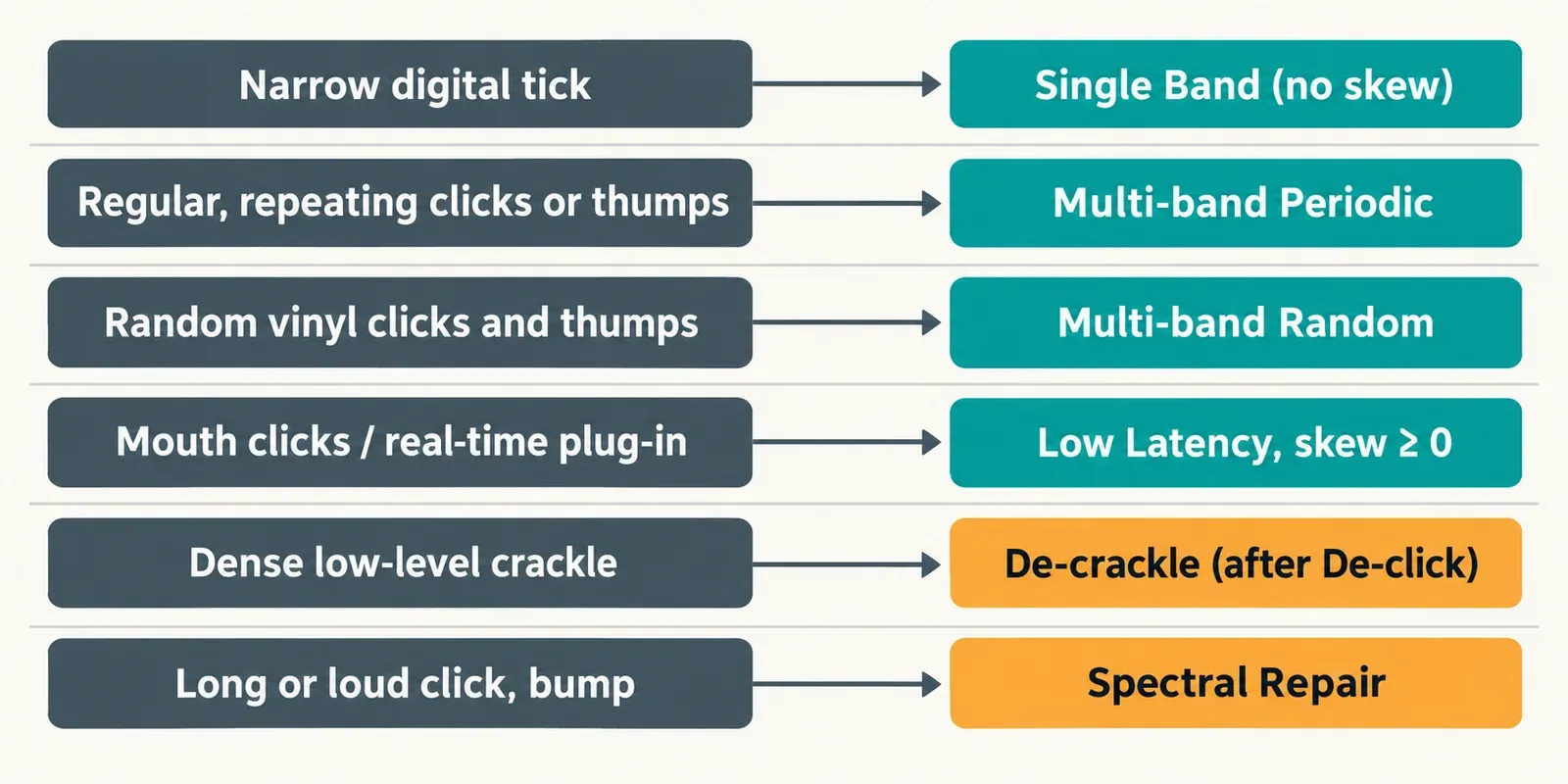
De-click offers four algorithms, and the choice does more work than any slider. Solo a few clicks and ask three questions: is the click narrow or wide, does it repeat at a steady rate, and does it sit inside speech? Then match it here.
| Click you hear | Typical cause | Algorithm | Frequency Skew |
|---|---|---|---|
| Very narrow, sharp tick | Digital error, edit glitch | Single Band | Not available in this mode |
| Wider clicks or thumps at a regular rate | Optical soundtrack perforation noise, a repeating thump | Multi-band (Periodic Clicks) | Toward the pitch of the click |
| Irregular wider clicks and thumps | Vinyl records | Multi-band (Random Clicks) | Below zero |
| Mouth clicks, or clicks the others miss | Voice-over, podcasts, real-time plug-in use | Low Latency | Zero or above |
Single Band is the quickest and handles very narrow "digital" clicks well, but it greys out Frequency Skew. Multi-band (Random Clicks) carries a protective algorithm for periodic elements such as brass or vocals, which is why I'd start there on music when you cannot tell what kind of click you are hearing. Low Latency catches mouth clicks and the clicks other algorithms miss, and it is the mode for real-time use in the plug-in. De-click is not only for digital errors either: iZotope's own tutorial applies it to string clicks on an electric bass.
Two kinds of noise fall outside the table. Dense, low-level crackle is De-crackle's job, and the manual says De-crackle works even better once De-click has taken out the worst clicks. Clicks that are too long or too loud, such as a bumped lavalier microphone, belong in Spectral Repair.
Sensitivity, Frequency Skew and Click Widening: what to move and when
All four algorithms share three controls, and I'd set them in a fixed order: Sensitivity, then Frequency Skew, then Click Widening. Each one answers a different question, so moving them out of order makes it hard to tell which change helped.
1. Sensitivity: how many clicks De-click finds
Sensitivity sets how many clicks are detected. Higher values catch more, and the manual warns that raising it can affect plosives and damage the original signal. Nick Messitte's 2022 iZotope tutorial on digital clicks and pops treats it like a compressor threshold: raise it until the voice or instrument starts to be affected, then back it off slightly. For podcast mouth noise in Elements, Mike Metlay's RX Elements tips suggest a medium Sensitivity of 5.5 as a starting point that avoids artifacts. Treat that number as a place to begin listening, not a setting to copy.
If the thump you are chasing is a breath blast on a P or a B, De-click is the wrong tool, and pushing Sensitivity will only dull the consonants around it. Plosive pops have their own fixes in the guide to removing plosives without thinning the voice.
2. Frequency Skew: aim at the pitch of the click
Frequency Skew tilts detection toward low- or high-frequency clicks. The manual recommends negative values for generic and vinyl clicks, and zero or above for mid-frequency mouth clicks. Messitte's rule of thumb is easy to remember: a digital tick sits high, a pop sits lower and a thump lower still, so move the skew toward where the click lives. With Single Band selected, the control stays greyed out.
3. Click Widening: catch the tail
Click Widening extends the repair area around each detected click. The manual ties it to mouth sounds such as lip smacks, which decay instead of stopping dead. Raise it when the sharp front of a click disappears but a short smear remains. In Messitte's example, a Click Widening adjustment cleared artifacts that his first settings had left behind.
| Control | Move it up when | Move it down when |
|---|---|---|
| Sensitivity | Clicks are still audible in Preview | Consonants, breaths or note attacks appear in the Listen signal |
| Frequency Skew | The clicks are mid-frequency mouth clicks | The clicks are vinyl or generic clicks, pops or thumps |
| Click Widening | A click's tail survives the repair | Leave it low until a tail actually survives |
Listen to the clicks before you render
The safest De-click habit is to audition what it removes, not only the cleaned result. The Audio Editor footer, described on the RX 12 common module controls page, gives you everything you need:
- Preview (Shift-Space) plays a pre-rendered preview of the current settings on your selection, using a buffer of about half a second for most modules. By default RX also plays one second of untouched audio before and after the selection.
- Listen (the ear button) switches Preview to the signal the module would remove. Only some modules have it, and De-click is one of them.
- Bypass (Shift-B) turns processing off during preview, so you can flip between before and after.
- Compare sends the current settings to the Compare Settings window, where you can audition alternatives.
- Render applies the processing to the file.
With Listen on, the removed signal should sound like a scatter of ticks over silence. If you can hear consonants, breaths or the attacks of notes in it, De-click is taking wanted audio: lower Sensitivity or change the algorithm before you render. The one hands-on test in the evidence below relied on exactly this check.
Older guides, including the RX 6 De-click manual page, mention an "Output Clicks Only" option and a "Process" button. In RX 12 those jobs belong to the Listen button and Render. If the footer is new to you, the RX 12 tutorial for beginners walks through Preview and Render on a first repair.
A De-click pass in the RX 12 Audio Editor
For a whole recording in Standard or Advanced, this is the order I would follow:
- Select a short passage where the clicks are obvious and the wanted sound is busy, such as a line with hard consonants or a phrase with sharp attacks. It is the hardest test your settings will face.
- Open De-click and pick the algorithm from the table above, or load a preset you saved for this kind of source.
- Press Preview and raise Sensitivity until the clicks stop.
- Turn on Listen and preview again. Back Sensitivity off if anything but clicks comes through.
- Move Frequency Skew toward the pitch of the clicks, then add Click Widening only if a tail remains.
- Send two or three candidate settings to Compare and keep the one that clears the clicks with the cleanest Listen signal.
- Select the full region you want to clean and press Render. The De-click panel includes a clicks-repaired counter, a quick sign that the pass did something.
- Spot-check the loudest clicks with Bypass. Where some remain, select that stretch and run a second pass, a step iZotope's tutorial also recommends.
- Save the settings as a preset. Presets saved in the Audio Editor open in the De-click plug-in too, and a preset can take a keyboard shortcut.
Fix one click with Instant Process or Interpolate
When a file has two or three clicks, I would not process all of it. Standard and Advanced offer two targeted routes in the Audio Editor.
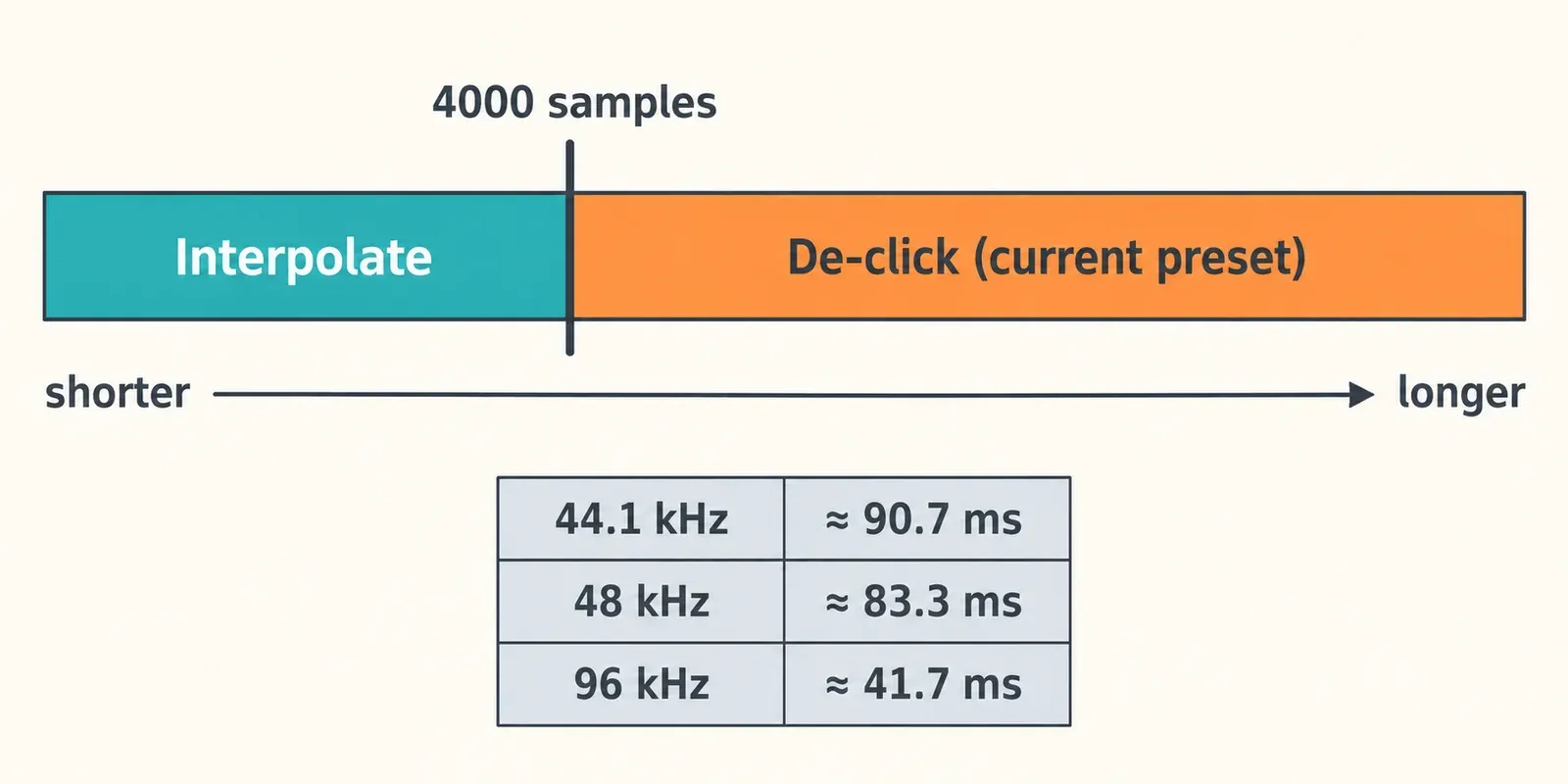
Instant Process (shortcut I) is a selection-tool modifier that processes each new selection with the module chosen in its drop-down. With De-click chosen, the De-click manual describes a split at 4000 samples: a shorter selection is repaired with Interpolate, and a longer one with the De-click settings currently loaded, such as the "Remove mouth clicks" preset. iZotope suggests this for dialogue editing, clicks from mismatched sample rates and vinyl clicks.
| Sample rate | 4000 samples lasts about |
|---|---|
| 44.1 kHz | 90.7 ms |
| 48 kHz | 83.3 ms |
| 96 kHz | 41.7 ms |
In practice, keep the selection tight around a single click and Interpolate does the work; select a longer stretch and your De-click settings take over. At 96 kHz the threshold is half as long in time, so a selection that went to Interpolate at 48 kHz can switch to De-click.
The Interpolate module is also available on its own, as a module only, for clicks under 4000 samples. It synthesizes a replacement from the selection's content, and its Quality control sets the interpolation order. Targeted repair is also what Messitte recommends: for one or two clicks, process the region instead of leaving De-click running over everything.
Using the De-click plug-in in a DAW or video editor
The De-click plug-in is the whole story for Elements owners and a quick route for everyone else. Four differences from the Audio Editor matter.
- Use Low Latency for real-time playback. The manual names it as the algorithm for real-time use in the plug-in.
- There is no Listen button. In RX plug-ins every footer control is absent except Bypass, so you judge the result by looping a passage and toggling Bypass. To hear what is being removed inside a host, Repair Assistant in Voice mode has a De-click switch and an Audition button for each section that plays only what that section removes. Music mode has no De-click switch. Repair Assistant learns while the track plays, and as AudioSuite it needs clips longer than 7 seconds.
- A constant insert is a blunt tool. Messitte compares running De-click across a whole track to "using a machete to do surgery instead of a scalpel": it can take out wanted audio or miss an occasional click. For one or two clicks, he processes just that region with AudioSuite or the standalone editor.
- Presets carry over. A preset built in the Audio Editor opens in the plug-in, so Standard owners can tune in the editor and reuse the settings in a session.
RX 12 plug-ins come in AU, AAX, AAX AudioSuite and VST3 formats, all 64-bit only; the ARA versions are for Spectral Editor, not De-click. The RX Elements product page lists macOS Sonoma 14.7, Sequoia 15.8 and Tahoe 26.x on Intel and Apple silicon, plus Windows 10 22H2 and Windows 11 24H2. Hosts named on the same page include Logic Pro 12, Pro Tools 2026, Ableton Live 12, Cubase and Nuendo 15, Fender Studio Pro 8, Reaper 7, FL Studio 26, Audition 2026, Premiere Pro 2026, DaVinci Resolve 19 and Reason 13.
Test results: what published tests and editors report about De-click
This composite result counts verdicts from seven published sources: one hands-on comparison (StreamingMedia, RX 3, 2013), two iZotope blog tutorials from 2022, one RX 12 review from June 2026 and three practitioner forum threads. Two of the seven are iZotope's own material, and the forum evidence is short practitioner comments rather than tests. None of the seven publishes a click count, null test or listening score for De-click, so the composite is a tally of findings rather than an average.
The only hands-on comparison is Jan Ozer's RX 3 versus Adobe Audition comparison for StreamingMedia, published October 12, 2013, on speech recorded to cassette with many tiny A-to-D clicks and several major pops. He judged RX's declicker more powerful and more functional than Audition's, and with Click Widening and Frequency Skew adjusted it removed all but the most severe audible clicks. The clicks-only preview let him confirm that no speech was being removed. Yet neither program's declicker removed the most noticeable clicks, which he had to repair by hand: clicks standing alone in the waveform were easy pickings, while pops built into the speech were the hardest. Read it as a dated result; the controls he adjusted are still the RX 12 controls, and the manual's descriptions of them have not changed since at least RX 6.
The two iZotope tutorials agree on method. Messitte's adds that a second pass or more Click Widening clears what the first settings miss, and sends clicks too long or too loud to Spectral Repair. Metlay's Elements tips clear podcast mouth noise with Low Latency and a medium Sensitivity, which matters because Elements has no Mouth De-click. The MixingGPT RX 12 review of June 19, 2026 positions De-click for large isolated pops from vinyl transfers, cell-phone interference and digital errors, sends dense crackle to De-crackle and calls Mouth De-click more surgical. The forum comments are mixed: one Pro Tools user calls the declicker "not very good" and values RX for Spectral Repair and the denoiser instead, a dialogue editor rates RX 11's Mouth De-click as the best dialogue declicker they have, another uses De-crackle rather than De-click, and an Elements user finds De-click more effective but more destructive.
| Finding | Sources reporting it | Where it comes from |
|---|---|---|
| Clears most small, isolated clicks, but the loudest clicks and clicks inside speech survive | 3 of 7 | StreamingMedia (2013), Messitte's iZotope tutorial (2022), a Pro Tools forum thread; MixingGPT (2026) counters that it handles large isolated pops |
| High Sensitivity or a blanket insert damages wanted audio | 3 of 7 | Both iZotope tutorials (2022), an Elements user on a forum; the RX 12 manual gives the same warning for plosives |
| Listening only to the removed signal is how you confirm speech is safe | 2 of 7 | StreamingMedia (2013), Messitte's tutorial (2022) |
| For dialogue mouth noise, Mouth De-click or De-crackle beats general De-click | 3 of 7 | Messitte's tutorial (2022), a dialogue-editing forum thread, MixingGPT (2026); Metlay's Elements tips use De-click on Low Latency instead |
| More Click Widening or a second pass recovers leftover clicks | 2 of 7 | Both iZotope tutorials (2022); the RX 12 Mouth De-click page gives the same two-pass advice |
My verdict: De-click is a strong first pass for isolated clicks in music, vinyl transfers and digital glitches, provided you listen to what it removes before rendering. Three of seven sources say the loudest clicks and clicks inside words get through, and three warn that high Sensitivity or a blanket insert costs wanted sound, so plan a targeted repair for the stubborn ones instead of pushing the slider. For dialogue it is not the blanket mouth-noise fix some users hope for: in Standard or Advanced, Mouth De-click is the dedicated tool, and in Elements, Low Latency with a moderate Sensitivity is the documented route. The iZotope RX 12 review weighs De-click alongside the rest of the package.
When to switch to Mouth De-click, De-crackle or Spectral Repair
Mouth De-click for voice. In Standard and Advanced, Mouth De-click detects clicks and lip smacks, is designed for longer selections and uses the same Sensitivity, Frequency Skew and Click Widening controls, so the habits above carry over. iZotope notes that two passes sometimes beat one, because louder clicks can mask quieter ones. For causes, prevention and repairs over speech, the broader guide to removing mouth clicks without damaging speech covers the whole task.
De-crackle for a dense bed of small clicks. The RX 12 manual describes De-crackle as the module for many close, low-level clicks; it works even better after De-click has removed the worst ones, so run them in that order. It is a Standard and Advanced module, and its controls are Quality (Low; Medium for periodic, rapidly repeating clicks; High to preserve tone), Strength, Amplitude Skew and Output Crackle Only. For a record, the full transfer chain from capture to archive is in the vinyl restoration guide.
Spectral Repair for long or loud events. A bumped lavalier, or a thump that lasts far longer than a click, is outside De-click's range. Spectral Repair in Standard or Advanced is where iZotope's own tutorial sends those.
Once the clicks are gone, steady hiss and room noise are a separate pass, and the guide to removing background noise in iZotope RX 12 picks up from there.
Clicks remain, or the voice sounds damaged
| Symptom | Likely cause | Fix |
|---|---|---|
| Clicks remain after Render | Repair area too narrow, or loud clicks masking quieter ones | Raise Click Widening, then run a second pass over that stretch |
| Frequency Skew is greyed out | Single Band is selected | Switch to a Multi-band algorithm or Low Latency |
| Consonants or plosives sound dull | Sensitivity set too high | Lower Sensitivity and check the Listen signal again |
| A click inside a word survives | The click is built into the speech | Repair it on a tight selection with Interpolate or Spectral Repair, or by hand |
| No Instant Process, Interpolate or Mouth De-click | You have RX Elements | Use the De-click plug-in or Repair Assistant, or move to Standard |
| De-click is missing from the host's plug-in list | Format, scan or authorization problem | Work through the fixes for RX plug-ins not showing up |
Frequently asked questions
Can I use De-click with RX Elements?
Yes. De-click is one of the six Elements plug-ins, so it runs in any supported DAW or video editor. What Elements lacks is the Audio Editor, which means no module version, no Instant Process, no Interpolate, no Mouth De-click and no De-crackle.
Which De-click algorithm suits mouth clicks?
Low Latency, with Frequency Skew at zero or above, since mouth clicks sit in the midrange. In Standard or Advanced I would move to Mouth De-click as soon as De-click starts touching consonants.
Where did Output Clicks Only go?
Its job moved to the Listen button, the ear icon in the module footer. With Listen on, Preview plays what De-click would remove. The old Process button is now Render.
Does Instant Process need RX Standard?
Yes. Instant Process works only in Standard and Advanced. In De-click mode it repairs selections under 4000 samples with Interpolate and longer ones with your current De-click settings.
Should I run De-click or De-crackle first?
De-click first. iZotope's manual says De-crackle is even more effective once De-click has removed the worst clicks.