
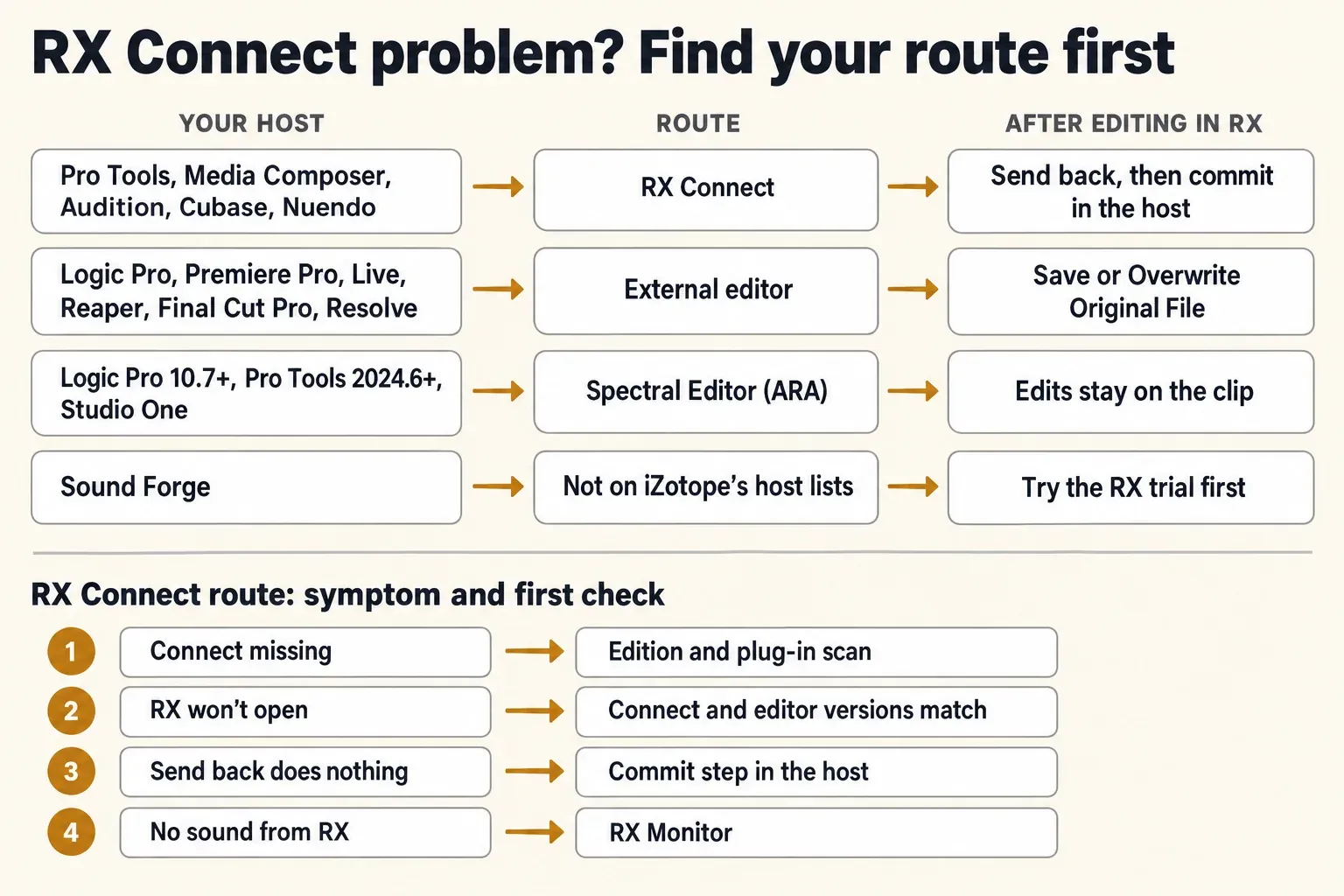
When RX Connect isn't working, first check that your RX edition and host use it at all: Connect ships only with RX Standard and Advanced, and iZotope lists just five hosts for it (Pro Tools, Media Composer, Audition, Cubase and Nuendo). If both check out, look at the commit step, because Send Back in RX only hands the audio over and the host still has to Render or Apply it. Across 9 readable forum threads, Send Back not landing in the host was the most reported failure, in 6 of the 9. Six checks follow in round-trip order: Connect missing, RX not opening, audio not arriving, Send Back, the host's own steps, then monitoring.
I'd confirm the route before reinstalling anything, because a reinstall can't add Connect to Elements or make Logic Pro offer it. Logic, Premiere Pro, Live, Reaper and Final Cut Pro send audio to RX as an external editor instead, so a missing Connect there is expected behavior, not a fault. Where RX fits in each of those hosts is mapped in the RX in your DAW overview.
Check that your host uses RX Connect at all
According to the RX Connect chapter of the RX 12 manual, Connect sends one or more clips from the host to the RX 12 Audio Editor. Pro Tools opens it from the AudioSuite menu; other hosts load it as an AU or VST3 plug-in. iZotope's RX Connect FAQ explains why it exists at all: most hosts don't let a plug-in process audio offline. The same FAQ splits hosts into two groups, and for anything on neither list it points you to the host's own manual for an external audio editor setting.
| Host | Route to RX | What puts the edit back |
|---|---|---|
| Pro Tools 10 and later | RX Connect in AudioSuite | Send back in RX, then Render in the RX Connect window |
| Cubase, Nuendo | RX Connect in Direct Offline Processing | Send back, Apply again, then Make Direct Offline Processing Permanent |
| Audition | RX Connect, VST3 only | Send Back, reload RX 12 Connect, then Apply |
| Media Composer | RX Connect in the AudioSuite window (not on the RX 12 host list) | SEND BACK, then OK and Render Effect |
| Logic Pro, Premiere Pro, Live, Reaper, Final Cut Pro | RX Audio Editor as an external editor | Save, or Overwrite Original File in RX |
| DaVinci Resolve | External Audio Processes on the Fairlight page | Saving in RX updates the clip |
| Sound Forge | On none of iZotope's host lists | No round trip; RX VST3 plug-ins only, trial first |
Two hosts sit outside those lists. The RX 12 manual documents DaVinci Resolve as an external process: set RX up in Preferences > Audio Plugins > Setup External Processes, then right-click a clip on the Fairlight page and choose External Audio Processes. Saving in RX updates the clip in Resolve at once, so duplicate the clip first if you want to keep the original. Fender Studio Pro 8 isn't on the FAQ's Connect list, yet the RX release notes show 12.1.0 fixing a Connect "Capturing audio" message in Fender Studio Pro 8 on Windows, which suggests Connect is in use there even without a listing.
RX Connect is missing from the plug-in list
Start with the edition. The RX 12 plug-in table puts Connect and Monitor under Standard and Advanced only. Elements is a set of six plug-ins with no RX Audio Editor, so there's nothing for Connect to send audio to. Only one edition can be installed at a time, and iZotope's edition-switching steps run through Preferences > Licenses & Updates in RX. If you're still deciding what to buy, the Elements, Standard and Advanced comparison shows what each tier adds.
Next, the format. The RX 12 product page lists the plug-ins as AU, AAX, AAX AudioSuite, VST3, AU ARA and VST3 ARA, all 64-bit only, and there has been no VST2 version since RX 11. A host that only scans VST2 folders won't list Connect at all. Audition is stricter still: it loads Connect only as VST3, and the AU version won't work there.
Then check where your host files it. The plug-in names carry a version number, so look for RX 12 Connect rather than a generic "RX Connect"; the RX 12 Connect plug-in sends audio to the RX 12 Audio Editor.
- Pro Tools: AudioSuite > Noise Reduction. iZotope's Pro Tools article also mentions an iZotope sub-menu.
- Cubase and Nuendo: the VST3 RX Connect, listed under Restoration in the Direct Offline Processing plug-in menu.
- Audition: Effects > VST3 > Restoration > iZotope.
When Pro Tools still can't see it, iZotope's plug-in locating steps for Pro Tools say to delete the InstalledAAXPlugins file to force a rescan and to check the AAX folder (on a Mac, Library > Application Support > Avid > Audio > Plug-ins). The scan and cache steps for other hosts are in the host rescan section of the missing plug-ins guide. If the RX installer itself failed, the Product Portal install-error fixes come before any of this.
Connect loads, but RX doesn't open
Four of the 9 forum threads describe Connect failing to open the RX Audio Editor at all. Two were on a Mac, where RX simply didn't come up. The other two were on Windows 10 with RX 10.4, where the host showed a launch error that ends in Error code 2.
That message is more useful than it looks, because it names the exact path Connect tried. In a 2023 Nuendo 12 thread, Connect looked for the editor in a win32 folder while the working editor sat somewhere else, and an Audition 2023 bug report shows the same mismatch. The dialog's own advice is to reinstall RX, and that's the first fix to try: uninstall RX completely, reinstall it, then reopen the host so it picks up the fresh copy of Connect.
I'd reinstall before trying the copy-files trick, because that trick comes from a single 2023 thread in the RX 10.4 era. If a clean reinstall still ends in Error code 2 on Windows, one user in that Nuendo thread created the win32 folder the message named and copied every file from the editor's real install folder (a win64 folder) into it. The original poster confirmed it worked, so that's 2 users in one thread. It's a forum workaround, not an iZotope fix, and the Audition report with the same message ended without any fix: replies suggested rescanning plug-ins, resetting Audition's preferences by holding Shift at launch and contacting iZotope.
Check the version pairing as well. Connect is numbered per release, so the RX 10 Connect in that error looked for the RX 10 editor, and RX 12 Connect opens RX 12. Older Connect plug-ins can stay installed next to newer ones, and in 4 of the 9 threads an older Connect (RX 8, 9 or 11) still worked where the newer one failed. That makes a handy stopgap, as long as the Connect you insert matches an editor that's installed.
RX opens, but your audio never arrives
Check the send mode first. The RX 12 manual describes two. Send For Reference is for analysis only: it imports the clips without opening the Audio Editor automatically, and it can never send them back. Send For Repair opens the editor and allows the return trip. In Pro Tools that means clicking Repair before Send; Reference is meant for loading a noise profile or analyzing audio.
Then look at how much you sent. In Pro Tools' Mono mode a stereo clip goes to RX as two mono files, and the manual warns that a large selection can push past RX Connect's maximum of 32 files. Multi-input mode treats stereo and dual-mono clips as one entity, so switching to it, or sending a smaller selection, keeps you under that limit. In the Nuendo threads, whether several clips at once work with RX 12 was still unanswered in 2026, and one RX 10 user avoided failures by sending one event at a time. I'd send one clip before a whole scene, because a single clip tells you whether Connect works at all before you stack more on it.
From Cubase or Nuendo, the clip lands in an RX tab named "Cubase 1" or "Nuendo 1". When RX already has files open, check the tab bar before you decide nothing arrived.
When Connect gets stuck in a loop, iZotope's guide to clearing RX's session data folder applies: Preferences > Misc, the arrow next to Session Data Folder, Show in Finder or Explore, then delete everything inside, including the "RX Connect" folder. That also deletes unsaved RX work, so save first. The session-restore steps in the crash guide show how to move the folder aside instead of deleting it. In one Nuendo 14 thread the reset helped only for a while, so treat it as a reset, not a cure.
Send Back does nothing: finish the commit step
Send Back is only half of the return trip. It hands the repaired audio back to the Connect plug-in, and the host then has to write it to the clip: Render in Pro Tools, Apply in the Direct Offline Processing window of Cubase and Nuendo, reload and Apply in Audition, OK and Render Effect in Media Composer. Across the 9 readable threads, Send Back not returning the edit came up in 6 of the 9, every one of them in Cubase or Nuendo. In 4 of the 9 it was intermittent: the same setup worked one session and failed the next.
Version history matters here. iZotope's RX release notes list RX 10.4.1 (September 22, 2023) fixing RX 10 Connect not receiving clips sent back to Cubase or Nuendo 12 when the RX app was already open at the moment the clip was sent. On an RX 10 build older than that, quit RX before you send. Connect fixes appear only in 10.1.0, 10.4.1, 10.5.0 and 12.1.0; no RX 11 release note mentions Connect, so an RX 11 update isn't a documented fix.
Restarts are the other pattern. In 3 of the 9 threads, restarting the host, reopening the project or closing and reopening the Direct Offline Processing window got Send Back working again for a while, each time for one user. It's worth a try because it costs a minute, but none of those reports describes a lasting fix.
The clip comes back silent or the wrong length
The evidence here is thin: one forum report plus the manual's mode descriptions. In Pro Tools, the shape of the returned audio follows the AudioSuite modes. Clip-by-clip recognizes individual clips and fades, Entire selection treats the whole selected area as one clip, and Create continuous files consolidates the result into one continuous clip. In one Nuendo 12 report, after earlier effects had been made permanent, RX opened a different range from the one selected, a single report with no confirmed cause. When a return looks wrong, undo it (a Connect render undoes like any AudioSuite process) and check the modes before you send again.
Pro Tools: Repair, Send, then Render
iZotope's documented Pro Tools route has five steps, and only the last one changes your session:
- Select the clips. Depending on the AudioSuite Selection Reference setting (Playlist or Clips List), that's in the Timeline, the Clips List or both.
- Open AudioSuite > Noise Reduction > RX 12 Connect.
- Click Repair, then Send. RX opens with your audio.
- On HDX systems, set up RX Monitor first so you can hear RX (see the RX Monitor section below).
- Edit in RX, click Send back at the top of the RX window, then click Render in the RX Connect window.
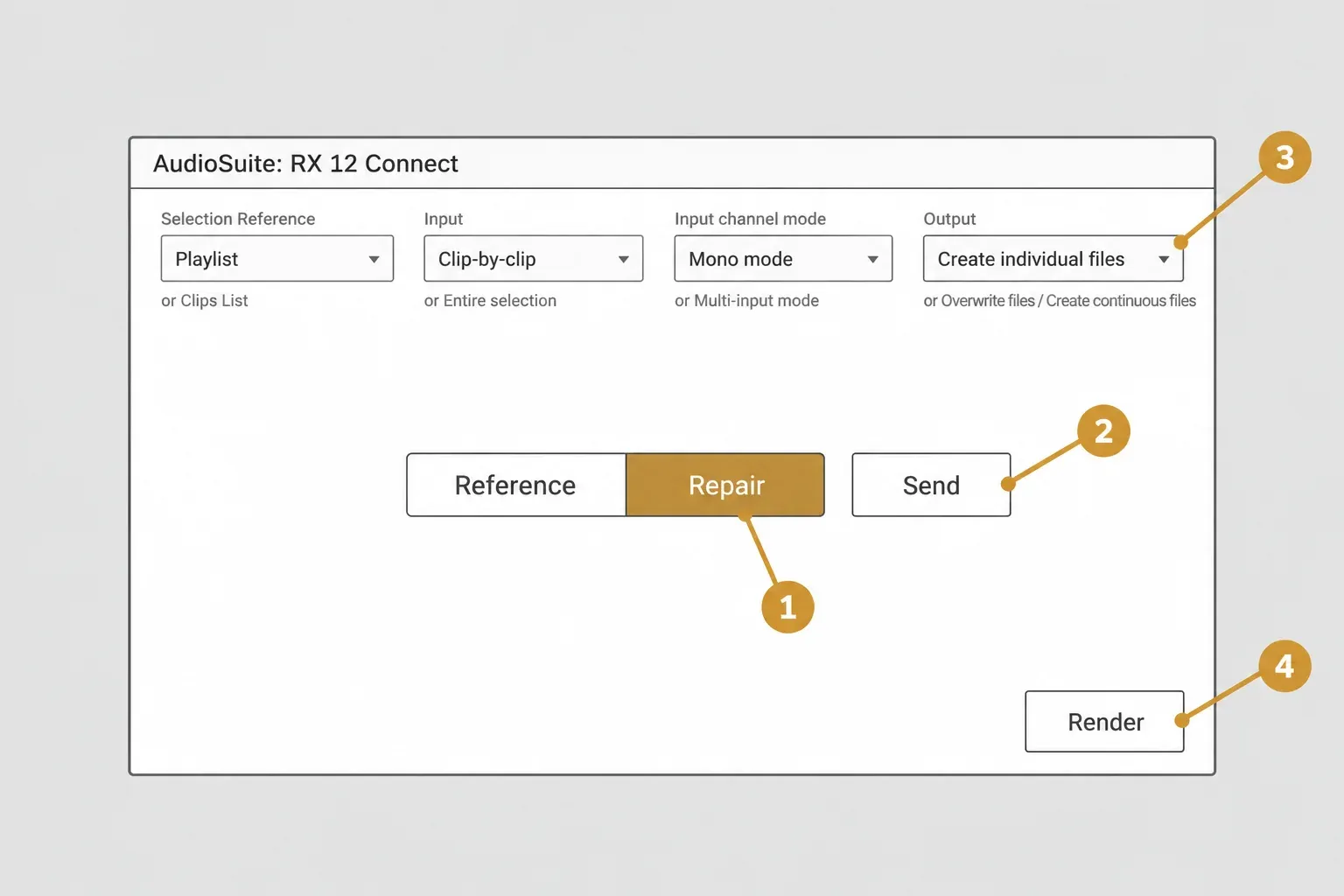
The output mode decides what Render does to your files. Overwrite files is destructive and replaces the original file. Create individual files is nondestructive and preserves individual clips and their fades or handles, while Create continuous files writes one new consolidated clip. I'd pick Create individual files for dialogue edits, because it leaves the original audio file alone and keeps each clip's fades intact. A Render can be undone like any AudioSuite process, and saving an .rxdoc in RX keeps your RX adjustments editable for later.
On Windows, greyed-out clip modes have a known cause. RX 10.5.0 (January 23, 2024) fixed RX 10 Connect's AudioSuite clip processing modes being inaccessible on Windows in Pro Tools 2023.12. None of the readable threads is from Pro Tools, but 3 of the 5 Pro Tools results available only as search snippets describe greyed-out or missing AudioSuite clip options in RX Connect, two of them on Windows. The current RX is 12.1.0, released October 15, 2026, and Pro Tools 2026 is on iZotope's RX 12 compatibility list, so an old RX 10 build is the first thing to replace.
Cubase and Nuendo: Auto Apply off, Apply twice, make it permanent
This is where all 6 reported Send Back failures sit, and the documented sequence has more steps than in any other host. iZotope's Cubase and Nuendo instructions run like this:
- Select the clip and choose Audio > Direct Offline Processing.
- Untick Auto Apply in the Direct Offline Processing window.
- Click + Plug-in and choose the VST3 RX 12 Connect, listed under Restoration.
- Press Apply. RX opens with the clip in a tab named "Cubase 1" or "Nuendo 1".
- Edit, then click Send back in the RX file tab display.
- Press Apply again in the Direct Offline Processing window.
- Choose Audio > Make Direct Offline Processing Permanent.
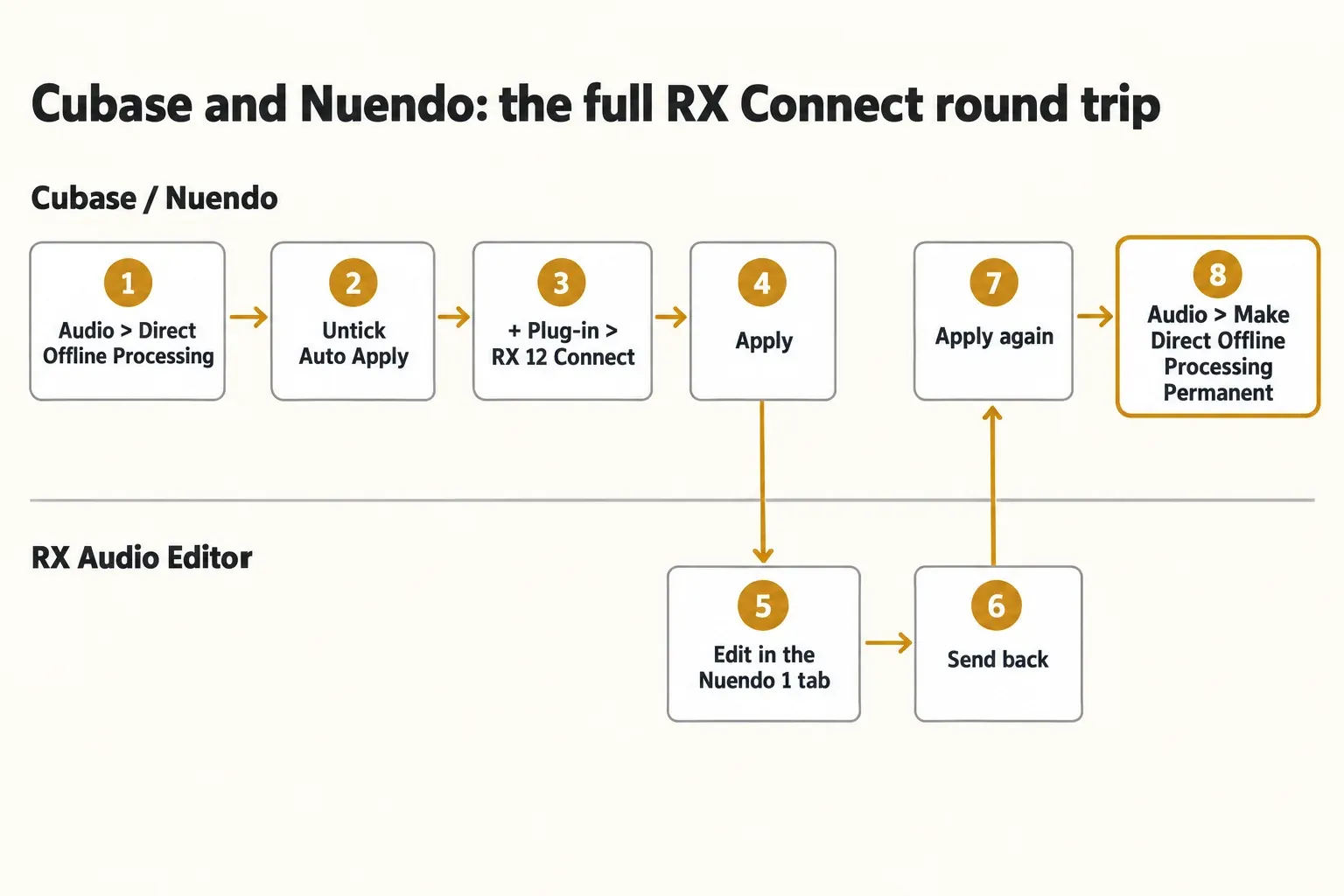
Auto Apply is the trap. With it on, there's no Apply button after Send Back, and iZotope's fix is to turn it off and start again with a new RX Connect instance. The last step matters too: until you make the processing permanent, the RX changes revert if that Connect instance is deleted or the clip is sent to RX again. In a 2024 Nuendo 13 thread, one user lost the result by bypassing Connect or stepping back in the Direct Offline Processing history, explained there as the host keeping only Connect's own settings, not the RX edits. I'd make the processing permanent right after each round trip that sounds right, because until then the edit depends on one plug-in instance staying untouched.
For RX 12 with Nuendo 15 the picture is mixed. In an April 2026 Nuendo 15 thread, one user reports RX 12 Connect working with Auto Apply off and the full Apply, Send back, Apply sequence. Another still couldn't send back and went back to RX 11 with a Nuendo restart, and whether several clips at once work went unanswered. In the same thread, iZotope support told a Nuendo user in April 2026 that "At the moment there is no planned ARA integration for RX 12 with Cubase & Nuendo", so Direct Offline Processing with Connect stays the route in Steinberg hosts.
When Send Back stays dead after the documented sequence, three forum workarounds have helped someone. None of them comes from iZotope:
- Copy, close, re-send, paste. In a Nuendo 13 and 14 thread about RX 11, one user posted this protocol and two others confirmed it: in RX, select all the audio and copy it, close the tab with its small cross, press the circular arrow on RX Connect in the Direct Offline Processing window and Apply to send the clip again, then use Paste Special > Replace in RX and Send back. That's 3 users in one thread.
- One event at a time. An RX 10 user in the same thread avoids the problem by sending single events, or by bouncing edited events into a new clip before sending (a single report).
- An older Connect. Users in Nuendo threads switched back to RX 8 or RX 9 Connect when the newer one failed. In a December 2024 thread, iZotope told a Nuendo 13 user it was aware of the RX 11 Connect issue and advised RX 9 for Connect in the meantime.
Audition and Media Composer
Audition loads Connect only as VST3. iZotope's Audition steps start in the Waveform view: select the audio, choose Effects > VST3 > Restoration > iZotope, load RX 12 Connect and click Apply. After editing, click Send Back in RX, and Audition shows "Waiting for Connect". Load RX 12 Connect again, and when it reads "Press Apply to commit changes", click Apply. If Connect isn't in the menu, run Scan for Plug-ins in Audition's Audio Plug-in Manager. The wider Audition workflow, including when plain RX plug-ins are enough, is in the guide to using RX inside Audition.
For Media Composer, iZotope's Media Composer route runs through Tools > AudioSuite Window: choose iZotope RX Connect, click Activate Current Plug-in, then SEND. Edit in RX, click SEND BACK, then OK and Render Effect to commit. Media Composer appears in the Connect FAQ but not on the RX 12 compatibility list, so RX 12 support there isn't confirmed by iZotope.
No sound while RX is open: RX Monitor
When you can edit in RX but hear nothing, the host has probably taken the audio driver. iZotope's RX Monitor article says this generally happens with Pro Tools HD hardware on any OS and with most audio drivers or interfaces on Windows. The fix routes RX through the host:
- In RX, open Edit > Preferences > Audio and set Driver Type to RX Monitor.
- In the host, insert iZotope RX Monitor on an aux track. In Pro Tools it's in the Noise Reduction or Sound Field menu; in Cubase and Nuendo it has to sit on an FX Track.
A different sound problem showed up in RX 10. In a long Nuendo 12 thread, opening RX through Connect switched the audio interface to 44.1 kHz in a 48 kHz project. iZotope support told a Nuendo user it affected 10.4.1 and 10.4.2 when RX was launched before audio was loaded, and the 10.5.0 notes list the fix for RX switching the driver to 44.1 kHz when opened manually or with Connect. Any later version, RX 12 included, is past that fix.
Mac and Windows specifics
The RX 12 product page lists macOS Sonoma 14.7, Sequoia 15.8 and Tahoe 26.x on Intel and Apple silicon, native or in Rosetta, plus Windows 10 22H2 and Windows 11 24H2. Platform shows up in the reports, too: of the 6 Send Back threads, 4 name a Mac, while both Error code 2 reports came from Windows 10.
On Apple silicon, iZotope's Apple silicon notes say RX 10 Standard and Advanced run natively as the app, AU and VST3 from 10.0.0 and as AAX from 10.4.0. Before RX 10.4.1, RX always opened in Rosetta when Connect launched it; since that fix, the app's Open using Rosetta checkbox is respected whether you open RX yourself or Connect opens it. iZotope's Rosetta instructions set it in Finder: Applications, right-click the app, Get Info, tick Open using Rosetta, then restart the app. For Full Disk Access and the other Mac permission checks, use the Mac section of the missing plug-ins guide.
On Windows, the problems on record are specific: the Error code 2 path message on RX 10.4, the greyed-out Pro Tools clip modes fixed in 10.5.0, and drivers held by the host, which RX Monitor works around. An RX 10 install older than 10.5.0 still has the Pro Tools clip-mode bug, so update before chasing anything else.
When to skip Connect: Spectral Editor ARA or the external editor
Some hosts give you a route with fewer moving parts. RX Spectral Editor is an ARA 2.0 plug-in in Standard and Advanced, and iZotope's Spectral Editor manual documents Pro Tools 2024.6 or later: open it from Clip > RX Spectral Editor > Edit or from the Elastic Audio/ARA selector, edit, then choose RX Spectral Editor > Render to commit the edits to a new file. On Pro Tools 2024.6 or later, I'd try the Spectral Editor before fighting Connect for a quick spectral fix, because there's no Send back hand-off to lose.
The same manual covers two more hosts. In Logic Pro 10.7 or later the Spectral Editor must be the first insert on an audio track, and on Apple silicon it runs only in Rosetta; the Logic Pro Spectral Editor walkthrough covers the setup. In Studio One 6.0 or later it runs as a VST3 ARA Event FX, and the AU version isn't supported on macOS. In every host it has to be the first plug-in, it needs playback to gather audio, and it outputs silence for stereo files on mono tracks or for regions whose sample rate differs from the session. If the plug-in itself doesn't appear, the Spectral Editor and Connect menu locations show where each host files it.
Hosts on the external-editor list never needed Connect. In Logic, turn on the Audio option under Preferences > Advanced, set the External Sample Editor to the RX 12 Audio Editor under Preferences > Audio > Audio File Editor, open a region with Edit > Open in iZotope RX 12 Audio Editor (Shift-W), and finish with Overwrite Original File in RX. In Premiere Pro, reveal the clip in Finder or Explorer, repair it in RX and choose File > Overwrite Original File, or send it through Edit Clip In Adobe Audition and use Connect there. The Premiere Pro round-trip guide shows how to do it on a copy so the original stays untouched.
Sound Forge and RX Connect
Sound Forge has no RX Connect route. It's on none of iZotope's lists: not the Connect host list, not the external-editor list and not the RX 12 compatibility list. Its own documented ARA integrations, per Sound Forge's ARA help page, are Melodyne and SpectraLayers, through Tools > Edit in Melodyne (ARA) and Tools > Edit in SpectraLayers (ARA), and RX isn't mentioned there. Both current editions list VST2, VST3 and ARA support on the Sound Forge pricing page, but that doesn't turn RX into an ARA option.
What you can try is RX's VST3 plug-ins as ordinary effects. Sound Forge's VST Effects preferences sit under Options > Preferences > VST Effects, where the VST3 folder has to be added as a search folder before a refresh finds the plug-ins. The third-party VST loading steps cover that in detail, and the Sound Forge VST troubleshooting guide helps when they still don't show. Neither vendor documents RX in Sound Forge, so it's an unlisted pairing. I'd run the RX trial in Sound Forge before paying, because no published notes cover how that pairing behaves; the pricing guide explains the two RX trial options.
For a spectral round trip that stays inside Sound Forge, SpectraLayers is the documented ARA editor, and the RX vs SpectraLayers comparison sets the two side by side.
Test results: what 9 forum threads report
No published benchmark measures RX Connect failures, so this section counts reported cases. Across 9 readable forum threads from 2022 to 2026, 8 on Steinberg's forum and 1 on Adobe's, Send Back not returning the edit was the most reported symptom, in 6 of the 9, all in Cubase or Nuendo Direct Offline Processing. RX not opening from the host came next, in 4 of the 9.
| Reported finding | Threads | Where it showed up |
|---|---|---|
| Send Back didn't return the edit | 6 of 9 | Cubase 14; Nuendo 12 to 15 |
| Same setup worked some sessions, failed others | 4 of 9 | Cubase, Nuendo |
| RX didn't open from the host | 4 of 9 | 2 on Mac; 2 on Windows 10 with Error code 2 |
| An older Connect (RX 8, 9 or 11) still worked | 4 of 9 | Nuendo 12 to 15 |
| Restart or reopen helped for a while | 3 of 9 | Cubase, Nuendo; one user per thread |
| Copy-files fix for Error code 2 | 1 thread, 2 users | Nuendo 12, RX 10.4, Windows 10 |
| Copy, close, re-send, paste-replace | 1 thread, 3 users | Nuendo 13 and 14, RX 11 |
| Session data reset helped briefly | 1 of 9 | Nuendo 14, RX 11 (single user) |
| No fix of any kind | 1 of 9 | Audition 2023, RX 10.4 |
Pro Tools is the gap. Five more Pro Tools results were readable only as search snippets, so they stay out of the count above; 3 of those 5 describe greyed-out or missing AudioSuite clip options, two of them with RX 10 and Pro Tools 2023.12, the pairing RX 10.5.0 fixed on Windows. The vendor side lines up with the forums. The release notes list Connect fixes in 10.4.1 (September 22, 2023) for Send Back into Cubase and Nuendo 12 and for Rosetta launches, in 10.5.0 (January 23, 2024) for the 44.1 kHz switch and the Pro Tools clip modes, and in 12.1.0 (October 15, 2026) for the Fender Studio Pro 8 message.
The pattern is clear enough to act on. Six of the 9 threads put the failure at the hand-off back into a Steinberg host, not in RX's processing, and only two workarounds have more than one confirming user, both of them forum fixes rather than iZotope advice. So for Cubase and Nuendo the commit sequence comes before any reinstall, and for Error code 2 a clean reinstall comes before any file copying.
Verdict: confirm the route, then the commit step
My verdict: RX Connect is still a current, supported part of RX Standard and Advanced, documented in the RX 12 manual and fixed again in 12.1.0, but it's the most fragile link between RX and a host. The fixes above come down to three checks: a host that really uses Connect, a Send Back that's committed with Render or Apply, and a Connect version that matches the installed editor. In Pro Tools, check Repair, Render and the output mode. In Cubase and Nuendo, keep Auto Apply off, press Apply after Send back and make the processing permanent.
My rule is simple: if the same clip fails twice after a clean restart of both RX and the host, export it, fix it in the RX Audio Editor and re-import it. That takes a few minutes, while chasing an intermittent Send Back can eat a session. On Pro Tools 2024.6 or later, Logic or Studio One, the Spectral Editor is the other way out.
FAQ
Does RX Elements include RX Connect?
No. Connect is a Standard and Advanced plug-in, and Elements has no RX Audio Editor for it to send audio to. Elements is six plug-ins and nothing else.
Is RX Connect still part of RX 12?
Yes. The RX 12 manual documents it for Pro Tools, Cubase, Nuendo and Audition, and RX 12.1.0, released October 15, 2026, includes a Connect fix.
Why doesn't RX Connect show up in Logic Pro?
Because Logic isn't a Connect host. iZotope lists it among the hosts that use RX as an external editor: set the RX 12 Audio Editor as the External Sample Editor and open regions with Shift-W. Logic 10.7 or later can also run the Spectral Editor through ARA.
Does RX Connect work with Sound Forge?
No. Sound Forge isn't on iZotope's Connect, external-editor or RX 12 compatibility lists, and its documented ARA editors are Melodyne and SpectraLayers. RX's VST3 plug-ins can still be tried as ordinary effects, ideally on the trial first.