
Boris FX Hub is the free installer and license manager for Boris FX software on Windows and macOS, and since the 2026 releases it's also how VEGAS Pro, Sound Forge and ACID Pro get installed and licensed. When it stops working, update the Hub before you touch the product.
I put the Hub update first because the forum record points there: in 19 Boris FX forum threads, an outdated Hub or app was one of the two most common causes.
I'd leave any reinstall for last. Most failures in those threads were state problems, such as an old Hub version, a stuck sign-in session or a status label that disagreed with the license, and each one has a faster fix than reinstalling VEGAS or Sound Forge. Even a server problem can pass for a broken install: on 26 October 2026, the day a forum user relayed a report that the Boris FX site was down, sudden sign-in failures looked exactly like one. After the Hub update, run four checks in this order:
- Sign out of the Hub and sign back in.
- Open the gear menu next to your email, remove the login license, restart the computer, then choose Use Login License again.
- Remove the stale computer from the computers list in your Boris FX account.
- Save the Hub log with Ctrl+Shift+L (Cmd+Shift+L on a Mac) and send it to Boris FX support with the exact steps.
What the Boris FX Hub does
The Hub is a desktop app that sits between your Boris FX account and the software on your computer. Boris FX's free-trial page describes it as a free installer and license manager for macOS and Windows: it installs trials, manages licenses, activates purchases and keeps products up to date. That makes it the front door to the whole Boris FX product family, from VEGAS Pro and Sound Forge to the CrumplePop audio plug-ins.
You get it from the official Boris FX downloads page, which lists the Hub as the place to download and license Boris FX software. The app itself isn't new. Boris FX introduced it in an October 2023 video, Get to know the Boris FX Hub, as the home for downloading, installing and licensing its tools. What changed in 2026 is the audience: VEGAS Pro, Sound Forge and ACID Pro owners met it for the first time when those products moved from MAGIX to Boris FX.
Boris FX Hub, VEGAS Hub and the old Application Manager
Three things carry a similar name, and only one of them licenses your software.
- Boris FX Hub is the installer and license manager this page covers.
- VEGAS Hub and Magix Hub belong to the MAGIX-era versions. The Boris FX staff FAQ on the move from MAGIX says they aren't part of the Boris FX releases (2026 and later) and that the older VEGAS Pro, Sound Forge and ACID Pro versions stay hosted by MAGIX, which would also have to supply any patches for them. The stock content that used to sit in the VEGAS Hub window is now Storyblocks, which Boris FX staff place in the Explorer window of VEGAS Pro 2026 and later.
- Boris FX Application Manager is the name you'll meet in forum threads from 2022, before the Hub arrived.
Photon is the first iZotope product installed through Boris FX Hub. Its purchase instructions use the Photon activation key and iZotope account sign-in. That does not move every older iZotope license into the Hub: for the established catalog, follow the product-specific installer and the iZotope authorization fixes.
Which products use the Hub, and which don't
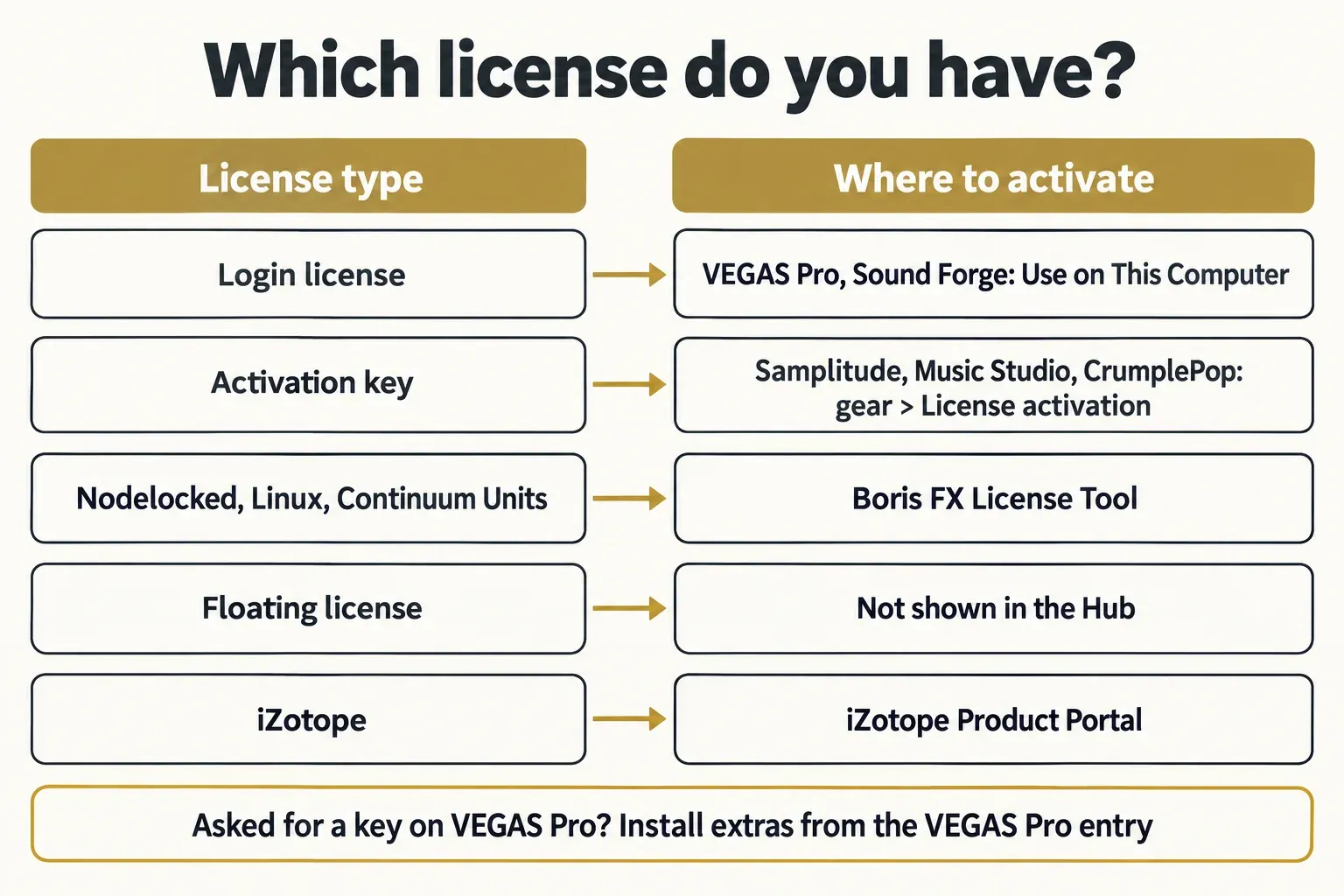
All Boris FX trials and the full versions of current Boris FX software run through the Hub, but the license type decides which button you press. VEGAS Pro and Sound Forge use a login license with no key. Samplitude, Music Studio and CrumplePop use an activation key that you enter in the Hub.
| Product | Platform | License in the Hub | Trial | What to know |
|---|---|---|---|---|
| VEGAS Pro 2026 and later | Windows only | Login license, no activation key | 15 days of VEGAS Pro Ultimate | Up to two computers; Ultimate extras install from the VEGAS Pro entry |
| Sound Forge 2026 and later | Windows only | Login license, no activation key | 15 days | Same two-computer login license as VEGAS Pro |
| ACID Pro 2026 and later | Windows only | Sign in with your Boris FX account | 15 days | Earlier MAGIX serials appear under the same email |
| Samplitude, Sequoia, Music Studio | Windows only | Activation key for Samplitude and Music Studio | 15 days: limited for Samplitude and Sequoia, unrestricted for Music Studio | Samplitude and Music Studio include two activations |
| CrumplePop | Windows, macOS | Activation key | 14 days, output carries an audio watermark | A beep during playback means trial mode |
| Sapphire, Continuum, Mocha Pro, Silhouette, SynthEyes, Particle Illusion, Optics | Windows, macOS; some also Linux, without the Hub | Installed and activated in the Hub | 14 days for most, 30 for Sapphire and Continuum | Full versions only |
All three Windows-only trials, for VEGAS Pro Ultimate, Sound Forge and ACID Pro, last 15 days, need no credit card and send you to the Hub to install. The official product pages list Windows 11 as the operating system and none of them mentions a Mac version, so those three trials are unavailable on Mac. Photon has separate Mac support for Apple silicon through the Hub. For Sound Forge specifically, what the Sound Forge trial includes covers the details.
On the audio side, the Boris FX audio software guide sorts Sound Forge, ACID Pro, Samplitude and CrumplePop by job. ACID Pro moved to the Hub with its 2026 Boris FX release, and the ACID Pro 2026 review covers what the current version includes.
What stays outside the Hub
- iZotope products: Photon uses Boris FX Hub; other iZotope products follow their own download and authorization instructions.
- Continuum Units and Premium Filters, including their Final Cut Pro versions, aren't in the Hub. Boris FX's support note on Units and Premium Filters says only full versions appear there, and these install from the downloads page and activate with the Boris FX License Tool. Treat Units as a legacy case: the Continuum 2026 release notes say Unit licenses are no longer supported in Continuum 2026 and can still be used in Continuum 2025.5 or earlier.
- Floating or Enterprise licenses aren't shown in the Hub.
- Linux has no Hub. Linux users take installers from the downloads page and activate with the License Tool. That installer route applies only to products with Linux builds; VEGAS Pro has no native Linux version.
Sign in to the Boris FX Hub
Sign in with a free Boris FX account, using the same email address as any earlier MAGIX purchase. The staff FAQ linked above says the account is required for the Boris FX versions of VEGAS Pro, Sound Forge and ACID Pro, and that the matching email makes your older serial numbers appear in the account, which is what upgrade eligibility looks for.
- Download the Hub installer from the Boris FX downloads page and run it from a local drive, not a network share.
- Open the Hub and sign in, or choose Create Account if you don't have one yet.
- Signing in with Google for the first time, expect the Hub to ask for your Boris FX account password, and type it in by hand.
- Find your product in the list and install it.
Sound Forge follows the same sign-in, install and Use on This Computer sequence, and the Sound Forge install walkthrough shows each screen. An endless "Signing in" spinner is a different story. In the forum threads it traced back to an old Hub or an apparent server outage rather than a wrong password, so it sits in the troubleshooting table below.
Activate a license: login license or activation key
Pick the route by license type, not by product name. A login license has no key at all: VEGAS Pro and Sound Forge from 2026 on license through your account, and the VEGAS Pro product page answers "Do I need an activation key?" with a plain no. A key-based product, such as Samplitude, Music Studio or CrumplePop, needs the key from your receipt email.
Login license: VEGAS Pro and Sound Forge
- Sign in to the Hub and install the product.
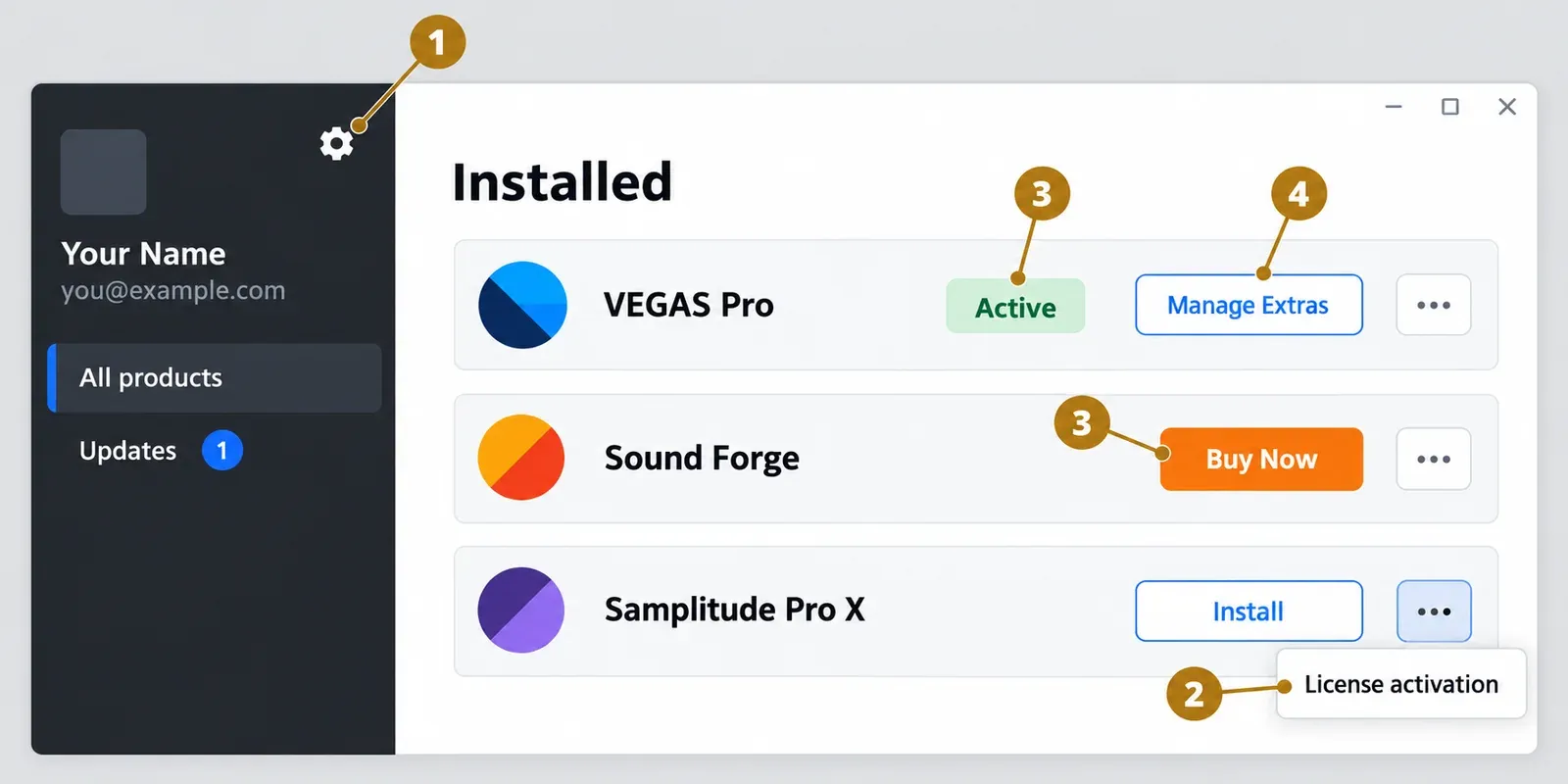
- At the license prompt, choose Use your Login License on this computer. Boris FX's support articles also call this step Use on This Computer.
- Missed the prompt? Open the gear menu next to your email and choose Use Login License.
Boris FX staff told one VEGAS owner that VEGAS Pro typically doesn't use activation keys, so the login license is the route to take. In the forum threads, a key request on a VEGAS Pro machine came from a component installed from the wrong place: a standalone plug-in that should have come from the VEGAS Pro entry.
Activation key: Samplitude, Music Studio and CrumplePop
- Click the gear icon next to your email in the top-left corner of the Hub.
- Choose License activation.
- Enter the key from your receipt email; it uses the ####-####-####-#### format.
A product's "..." menu offers the same License activation item, which is the shorter route for Samplitude and Music Studio. CrumplePop has one tell worth knowing: a beep during playback means the plug-in is still in trial mode, and entering the key this way removes it.
Trials and bundled extras
A trial uses the same app. Choose Request an Unrestricted Trial of Sound Forge after installation (or the VEGAS Pro or ACID Pro version of that line), install the product, then click Start Free Trial and, on the success page, Back to App. The official Sound Forge trial page spells out that sequence.
Bundles cause most of the "Not Licensed" surprises. VEGAS Pro Ultimate extras have to come from the VEGAS Pro entry in the Hub through Manage Extras; in a thread about an Ultimate subscription that licensed none of its add-ons, a forum moderator traced the activation prompts to standalone versions of the same products, installed for all OFX hosts instead of from the VEGAS Pro entry. Which extras come with which edition is covered in VEGAS Pro plug-ins by edition. Sound Forge bundled with Samplitude Suite or Sequoia works the same way: it installs from the host's Manage Extras and activates through the host, as Sound Forge in Samplitude Suite explains.
Move a license to a new computer
Free a slot before you activate the new machine. A VEGAS Pro license covers up to two computers, and Boris FX's answer on using a login license on more than one computer adds that it's meant for one user, not for both machines at the same time. Sound Forge's login license follows the same two-computer rule.
- Sign in to your Boris FX account and open the computers list.
- Remove the computer you've retired or replaced.
- On the new PC, sign in to the Hub and choose Use on This Computer.
A corrupted computer entry clears the same way. In a VEGAS Pro 2026 upgrade thread, one user's activation kept failing until the Hub said he was out of licenses and let him remove the broken workstation ID, which fixed it. When the error came back on his laptop, the same removal worked on the third attempt.
Samplitude and Music Studio count activations instead of computers. Each license includes two: deactivate on the old PC from the product's "..." menu in the Hub, then use "..." and License activation on the new one. Nodelocked keys in the License Tool follow an older rule. Deactivate on the current machine first, and if that machine is dead, Boris FX lets you reset a nodelocked license once per month per account from your account at borisfx.com.
Sound Forge adds legacy MAGIX and Sony serials to the picture, and Sound Forge activation errors covers those routes along with the "No available computers left" message.
Hub 2.0.9 and VEGAS Pro 2027: the October 2026 changes
Install the Hub update first, then the product update. Hub 2.0.9 (UI 5.3) was being offered at launch by mid-October 2026, with one user already running it on 19 October, and when the update came up in the Hub 2.0.9 thread on 21 October, a forum moderator's advice was short: "Yes. Install it." VEGAS Pro 2027.0.0 build 31 followed on 23 October 2026, according to the community-maintained VEGAS Pro release history, which lists VEGAS Pro 2026 build 66 from 28 March 2026 as the first Boris FX version.
VEGAS Pro 2027 installs alongside 2026 in its own versioned folder rather than patching it, so seeing both in the Hub is expected. Two side effects showed up in the forum after 2.0.9: a cut-off Hub window on some Windows PCs and one failed ACID Pro download inside the Hub. Both have rows in the table below.
Boris FX Hub not working: symptom-to-fix table
Match the symptom before you change anything. The fixes come from Boris FX staff and forum moderator answers, support articles and confirmed user fixes, and the last column shows how many of the 19 forum threads in the composite carried that cause.
| Symptom | Likely cause | First fix | Threads (of 19) |
|---|---|---|---|
| Endless "Signing in", or "no active license found" | Server outage or an outdated Hub | Reload the Hub and sign in again; if other users report it the same day, wait, then install the current Hub | 3 outage, 4 outdated |
| VEGAS says it isn't activated and its help sends you to the Boris FX Hub | Hub not installed or not signed in on this PC | Install the Hub from the Boris FX downloads page, sign in with your Boris FX account and choose Use on This Computer | 1 |
| "Unexpected Error" right after you enter your email | Hub installer run from a network drive | Copy the installer to a local drive and reinstall the Hub, as in this Hub login thread | 1 |
| Licensed VEGAS Pro shown as "Buy Now" | Status display error | Launch the product; if it runs licensed, save the Hub log and report the label | 4 |
| VEGAS Ultimate extras ask for a key or show "Not Licensed" | Standalone variant installed | Remove it and install the extras from the VEGAS Pro entry through Manage Extras | 3 |
| VEGAS needs activating after every restart | Stuck login session | Close VEGAS, gear > remove login license, restart, gear > Use Login License, relaunch VEGAS (the support procedure from this activation-loop thread) | 3 session or computer |
| Out of computers, or a corrupted computer entry | Stale computer in your account | Remove the old computer from the computers list, then Use on This Computer | Counted above |
| "Activation Incomplete" | Key typo, product not supported in the Hub, expired key, or key still active on another computer | Retype the key, check its expiry in your account, deactivate the other machine (Boris FX's Activation Incomplete article) | Support article |
| "UNEXPECTED ERROR: Contact Boris FX" on a product update | Download error inside the Hub | Install the update from an official Boris FX download link instead of the Hub button, which worked in this VEGAS update thread | 3 |
| Hub says the install failed, but the app is installed | Outdated Hub | Install the newer Hub version; running as administrator didn't help in this Sound Forge install thread | Counted in outdated |
| Hub window cut off after 2.0.9 | Windows text scaling | Windows Settings > Accessibility > Text size, slider to the left (or change and revert), Apply, per the interface scaling thread | 2 |
| "No Internet connection" | Firewall or network block | Allow the Boris FX domains by name, not by IP address (details below the table) | Support article |
| Hub update fails on a Mac | Damaged Hub install | Run Uninstall Boris FX Hub.app in /Applications/BorisFX/Boris FX Hub/, then rerun the Hub installer, as staff advised in an older Hub update thread | Counted in outdated |
| VEGAS won't activate on a Windows on ARM PC | Unsupported platform | Boris FX support told a user in this ARM thread that the Hub can't activate VEGAS on ARM until an ARM version of VEGAS exists | 2 |
| No Hub on a Linux machine | The Hub runs on macOS and Windows only | Downloads page plus the Boris FX License Tool | Support article |
| Beta license not recognized, or a wrong update offered | The Hub is approved for released software only | Don't rely on Hub prompts for a beta build | Support article |
| Newer version offered than your license covers | Perpetual license for an older version | Install the licensed version from your Boris FX account, the fix in this license-retention thread | Counted in wrong variant |
| Purchased VEGAS license blocked after an earlier Ultimate trial | Leftover trial license file | Staff workaround below, with its conditions | 2 |
Behind a corporate or school firewall, the Hub needs rules by domain name rather than by IP address, because the addresses change. Boris FX's article on using the Hub behind a firewall lists mostly TCP 443 plus activation.genarts.com on TCP 80. For the installer side of the same problem, Sound Forge installation fixes covers setup errors that start before the Hub can sign in.
The leftover trial file workaround
Use this only when you ran a VEGAS Pro Ultimate trial on the same PC before buying and the purchased license still won't take. In the Ultimate add-ons thread, Boris FX staff gave this workaround, and one of the users confirmed it worked:
- Close VEGAS Pro.
- Open the folder C:\ProgramData\GenArts\rlm (ProgramData is hidden by default in File Explorer).
- Rename rehost_vegasproultimate.lic to rehost_vegasproultimate.old, which keeps it as a backup.
- Leave every other .lic file in that folder untouched, then start VEGAS Pro again.
I wouldn't touch that folder for any other reason. The other license files belong to other products, and the rename only addresses a trial left behind before the purchase.
When the Hub shows the license as active and Sound Forge still closes on launch, the Hub has done its job and the problem sits in the app; Sound Forge startup crash fixes picks up from there.
Test results: what 19 Boris FX forum threads show
No published failure-rate data exists for the Boris FX Hub, so this composite counts causes and reported fixes in 19 readable Boris FX forum threads about Hub sign-in, install, update and license problems, from March 2022 to October 2026. Sixteen of the 19 date from 2026, after VEGAS Pro, Sound Forge and ACID Pro moved to Boris FX.
Two causes came up most often: an outdated Hub or app and a wrong status label, in 4 of the 19 threads each. An apparent server or network outage, a wrong product variant, a stuck login session and a download error inside the Hub followed at 3 each.
Two of the three outage threads landed on one day, 26 October 2026, when a forum user also relayed a report that the Boris FX site was down: one reported a sign-in spinner that never finished, the other VEGAS suddenly running unlicensed. A third VEGAS owner posted that day with an activation error and no idea what the Hub was. Replies pointed to the Hub on the Boris FX downloads page, and the thread doesn't say whether that fixed it.
| Cause | Threads (of 19) | Reported fix |
|---|---|---|
| Outdated Hub or app | 4 | Install the current Hub or product version |
| Wrong status in the Hub | 4 | None needed for the license; the product itself was licensed |
| Server or network outage | 3 | Cleared by itself, or after reloading or updating the Hub or the app |
| Wrong product variant | 3 | Install the licensed variant from the VEGAS Pro entry or the account |
| Stuck login session or stale computer | 3 | Gear menu remove and re-use, or remove the stale computer; fixed in 2 of the 3 |
| Download or update error inside the Hub | 3 | Official downloads page or a direct official download link |
| Leftover VEGAS Ultimate trial file | 2 | File renamed by the user or removed by Boris FX support |
| Cut-off Hub window | 2 | Windows Text size setting |
| Windows on ARM | 2 | Not supported for VEGAS activation |
| Installer run from a network drive | 1 | Local copy of the installer |
| Hub installer fails on a fresh PC | 1 | No fix in the thread |
| Hub unknown to the VEGAS owner | 1 | Hub download suggested; outcome not reported |
Threads can carry more than one cause, so the counts add up to more than 19. Staff asked for the Hub log or the exact steps in 4 of the 19, and the same number ended without a working fix in the thread, including an "existing session" activation error after a full Windows format where the old PC never showed up in the account list.
The pattern points one way. Most Hub failures are state problems: the wrong version, a stuck session or a status label that disagrees with the license. Only 1 of the 19 was a Hub installer that wouldn't install at all, which is why a reinstall sits at the end of the order at the top of this page.
When to send the Hub log to support
Send the log as soon as the first two checks fail, before you remove computers or reinstall anything. With the Hub window active, press Ctrl+Shift+L on Windows or Cmd+Shift+L on a Mac, and the Hub saves its log files to your desktop, as Boris FX's support article on Hub logs describes. Attach them to a support ticket together with the steps that led to the problem.
I'd save the log before changing anything else, because it records what the Hub saw. Boris FX staff pointed one VEGAS owner to the error line at the bottom of the log, and in a "Buy Now" thread the log showed a VEGAS Pro license valid until April 2027 while the Hub's own list said otherwise, and staff forwarded it to the Hub team as a display issue.
FAQ
Is Boris FX Hub free?
Yes. Boris FX offers the Hub as a free installer and license manager; you pay only for the products you license through it.
Do I need the Hub for VEGAS Pro 2026 or 2027?
Yes, in practice. The Boris FX versions need a Boris FX account and a login license activated on that computer, and the Hub is where you install VEGAS Pro and choose Use on This Computer.
Do MAGIX versions of VEGAS Pro or Sound Forge need the Boris FX Hub?
No. Versions released before the 2026 Boris FX releases stay hosted by MAGIX, any patches for them would have to come from MAGIX, and MAGIX keeps maintaining the VEGAS Hub and Magix Hub that came with them.
Can I activate VEGAS Pro or Sound Forge offline?
Only as a special case. Boris FX sales can issue an Activation Key for offline use, tied to one computer; the Sound Forge activation guide linked above covers when it applies.
Verdict: treat the Hub as a license manager first
My verdict: the Boris FX Hub is a license manager first and an installer second, so most of its failures are license-state problems, not broken software. My rule is simple. Update the Hub before you reinstall anything, sign out and back in before you remove a computer, and send the log before you format a drive. If a step asks for a key and you own VEGAS Pro or Sound Forge, you're on the wrong path; go back to the VEGAS Pro entry, Manage Extras or Use on This Computer.