
Sound Forge Pro and REAPER both edit audio, but they start from different objects. Sound Forge opens an audio file for direct waveform editing, restoration and mastering; its default workflow is destructive, with a separate event-based non-destructive mode. REAPER opens a project for multitrack recording, MIDI, routing, mixing and rendering. They overlap, but one is a file editor and the other is a DAW.
For other editor-versus-DAW choices, the Sound Forge Comparisons hub groups the relevant comparisons by application.
Quick answer: choose REAPER for multitrack recording, MIDI, routing and mix revisions. Consider Sound Forge when direct waveform repair is the recurring job and you prefer a dedicated file editor. REAPER can also master finished files and process batches, so owning both is optional. Try the same representative job in each before paying for a second application.
Comparison Table
The table compares the current Sound Forge 2026 feature set with REAPER 7.82. Feature counts matter less than one question: does the work need to stay an editable project, or be finished as an individual audio file?
| Task | Sound Forge 2026 | REAPER 7.82 |
|---|---|---|
| Primary role | Single-file waveform editing, repair, batch work and mastering | Full DAW for recording, MIDI, arranging, mixing and rendering |
| Multitrack project | No DAW-style arrangement; records and edits files with up to 32 channels | Yes; tracks, folders, buses, automation, takes and project recall |
| MIDI sequencing | No | Yes; MIDI editing, routing and virtual instruments |
| Waveform repair | Direct sample zoom, Pencil tool and Interpolate | Item and spectral editing; direct sample redraw is not the standard built-in workflow |
| Restoration | Click/crackle removal, clipping repair and broadband noise reduction | ReaFIR, spectral edits, stock FX and third-party plug-ins |
| Non-destructive work | Default destructive processing plus a separate event-based non-destructive mode | Non-destructive project workflow by default |
| Mastering and delivery | Statistics, loudness metering, file processing, batch export and dither workflow | Master FX, LUFS normalization, true-peak limiting, dither, DDP and render reports |
| Automation and scripting | Batch processing and file-oriented scripting | Batch conversion/rendering, actions, ReaScript and extensions |
| Platform | Windows | Windows, macOS and Linux |
| Price evidence: REAPER current; Sound Forge March 2026 launch | $299.95 perpetual / $24.95 monthly at launch | $60 discounted / $225 commercial |
| Evaluation | 15 days, fully functional | 60 days, fully functional |
Where Sound Forge Helps with File Repair
Sound Forge provides a built-in Pencil tool for redrawing samples at close zoom. Its Repair: Interpolate command rebuilds a short selection from its boundaries. Both can help with a small isolated click, though neither guarantees badly damaged audio comes back. REAPER offers item fades, take effects and spectral edits. The older community discussion linked below mentions sample-redraw scripts, but that doesn't show an included, documented pencil workflow. Don't assume a script from an old discussion works with your current installation.
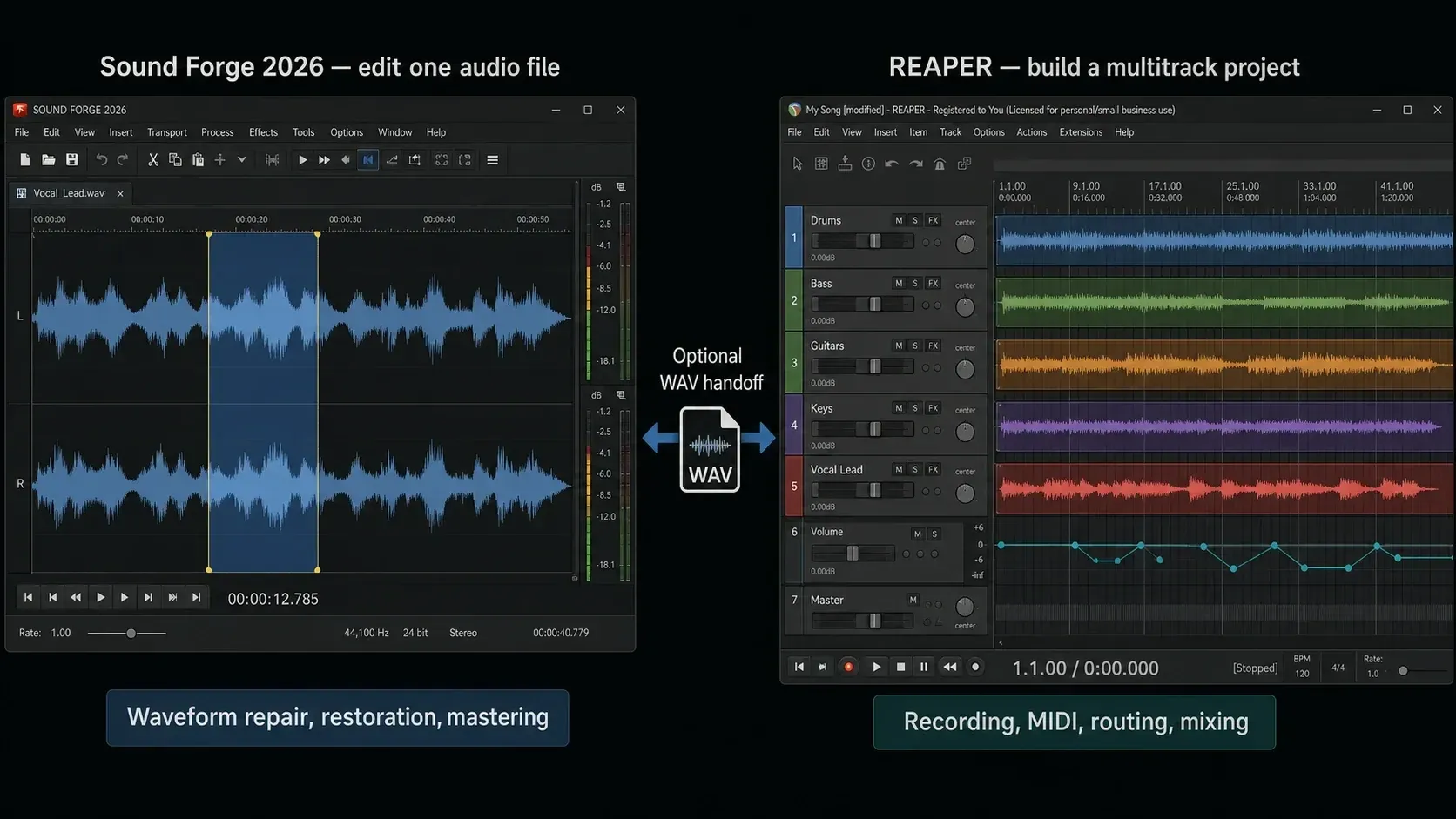
The current Sound Forge feature matrix promises click and crackle removal, clipping repair and broadband noise reduction in the base application. Those are safer buying criteria than old plug-in names, because bundles and menus changed across the Sony, MAGIX and Boris FX releases. REAPER can clean audio with ReaFIR, spectral edits, stock effects and third-party restoration plug-ins; Sound Forge remains more direct when the job is centered on repairing one file rather than building a project.
Sound Forge is built for a pass that starts and ends with one audio file: inspect it, process the waveform, check loudness and peaks, then export. REAPER has serious delivery tools too. Its render features include loudness normalization, true-peak limiting, dither and loudness reports, and the 7.81 User Guide’s output-format table explicitly lists DDP. When keeping the connection to the multitrack mix comes first, I'd keep mastering inside REAPER.
Batch work isn't exclusive to Sound Forge. REAPER has a batch file converter and queued renders, and Sound Forge has its own batch-processing workspace. Compare the operations you actually repeat (naming files, applying a chain, checking results, exporting variants) instead of assuming a DAW needs a new arrangement for every file.
What REAPER Does That Sound Forge Pro Doesn't
For a band session, REAPER keeps drums, bass, guitars and vocals on separate tracks, with takes, routing, automation and later mix revisions. Sound Forge can record and edit a file with up to 32 channels, but that's a different thing from arranging and mixing a DAW project. Its non-destructive event mode doesn't bring REAPER’s multitrack session structure with it.
Sound Forge isn't a MIDI sequencer. REAPER supports MIDI editing, routing and instrument plug-ins, which makes it my pick for arranging a song with MIDI parts. Its included basic synthesizer and sampler won't pass for a large orchestral or drum library, so budget separately for any instruments your production needs.
REAPER is non-destructive by design: cuts, fades, gain changes and plug-in decisions live in the project until render. Sound Forge still defaults to direct destructive processing, so saving over a source file commits those changes. That said, Sound Forge 2026 also includes an event-based mode that Boris FX describes as completely non-destructive. It helps with file-level revisions, but Sound Forge still doesn't become a multitrack DAW with REAPER's routing, arrangement and project recall.
REAPER can combine actions into custom commands and extend its behavior through scripts and plug-ins. ReaScript supports embedded EEL2 and Lua; Python needs a separate installation. Sound Forge supports scripting and batch operations as well. Decide by the automation you need, since neither application is simply the customizable one.
REAPER builds are available for Windows, macOS and Linux. The current Sound Forge requirements list Windows 11. For a current native application on macOS or Linux, REAPER is the option between these two.
Licenses, Trials and the Price Difference
Cockos lists one REAPER edition at $60 for qualifying discounted use or $225 for a commercial license (Cockos prices on October 9, 2026). Both licenses include updates through REAPER 8.99, and the current download is REAPER 7.82. Boris FX's 2026 launch pricing lists Sound Forge at $299.95 perpetual, $24.95 monthly or $149.95 annually.
The $60 license conditions include an individual’s personal-only use, commercial use by an individual or business with yearly gross revenue no higher than US $20,000, or an educational/non-profit organization. A professional can qualify; this is not a reduced-feature amateur edition. If you need the $225 license, the gap against the $299.95 Sound Forge launch price is $74.95 before tax, not $240.
Compare the price you actually qualify for, including tax and any instruments or restoration plug-ins you plan to add. The Sound Forge figures above are historical launch prices, not a checkout verified today. An existing Sound Forge license also changes the decision: keeping a tool you already own need not involve another purchase.
For a new studio, REAPER is the rational first purchase when recording and mixing are the immediate jobs. I'd add Sound Forge later only if direct waveform repair, batch file work or a dedicated file-mastering workflow saves enough time to justify a second application.
Using Both Together: The Case for the Combination
A combined workflow can work well: record and mix in REAPER, then send a copy of a file to Sound Forge only when a specific repair or finishing task calls for it. An older REAPER community discussion describes both approaches, keeping an external editor and staying inside REAPER with actions and plug-ins. Those reports describe preferences. They aren't a controlled comparison of the current versions.
The combination makes the most sense when multitrack production and archival file repair happen in the same job. REAPER keeps the session; Sound Forge handles the transfer or damaged file in a waveform-first workspace. Both applications read and write PCM WAV, so a handoff doesn't require a lossy conversion. Keep the project sample rate and choose suitable PCM or floating-point intermediate precision supported by both setups. Avoid lossy MP3 intermediates.
A 24-bit PCM WAV is one compatible handoff option. If more processing follows, a supported floating-point WAV can avoid another integer quantization; plan final dither and delivery depth separately. Keep that rendered file separate from the original mix, perform the repair or master in Sound Forge, and export a new delivery file. The vinyl restoration guide covers capture, click repair, noise reduction and verification when the source is a record transfer.
Open a copy in an external editor
The REAPER 7.81 guide, section 7.1 documents direct external-editor integration. In REAPER, open Options → Preferences → External Editors, add Sound Forge and select its installed executable. Right-click the audio item, open the external-editor submenu and choose the option to edit a copy. Save that copy in Sound Forge, close the editor and return to REAPER. The guide describes the copy being inserted into the track. Verify that the revised audio is the take you intend to use before continuing.
This route edits the item’s audio. A finished master of all tracks is a different job, so use a render when you want the mix bus and its effects included. Never overwrite your only source recording while experimenting.
Which One First?
Start with the next deliverable. Recording guitar and vocals into an arrangement points to REAPER. If an already recorded file needs repair, first check whether your existing editor can fix it. Sound Forge deserves a trial when its direct waveform tools solve a recurring problem.
For music production (recording instruments or vocals, arranging, MIDI and mixing), I'd start with REAPER. The qualifying $60 license covers the complete software, the 60-day evaluation is fully functional, and the official user guide plus active forum give you a documented path through the deep configuration options. Add Sound Forge only when file-level repair or batch finishing becomes a recurring job.
For stereo mastering or voice-over cleanup, neither application wins just because the source is one file. Try a representative recording in both. Compare the time needed to locate a defect, apply the right processing, revise the result and export the required format. The Sound Forge review explains the dedicated editor’s strengths and limits.
If you can buy only one application for a band or a music-production session, REAPER covers recording through delivery. Add Sound Forge only for a concrete advantage in your own file-editing work. You don't need a second application to make a professional master.
Frequently Asked Questions
Is Sound Forge Pro better than REAPER for mastering?
Not inherently. Both can process and deliver a finished stereo file. Sound Forge offers direct waveform repair and a file-focused workspace; REAPER offers master effects, loudness normalization, true-peak limiting, dither and render reports. Choose based on the repair and revision workflow you need, not a presumed difference in sound quality.
Can REAPER replace Sound Forge Pro for audio restoration?
For some jobs, yes. REAPER offers ReaFIR, spectral edits and other effects, with optional third-party restoration tools. Sound Forge’s built-in sample-pencil and repair commands may be more convenient for isolated waveform defects. Try the actual damaged material; a feature list cannot predict the quality of a repair.
Can Sound Forge Pro replace REAPER for recording sessions?
Sound Forge can capture multichannel audio, but it does not replace REAPER’s DAW arrangement, MIDI sequencing, track routing and mix recall. Choose REAPER for a production built from separate editable tracks. Sound Forge remains suitable for file-based capture, including narration or a stereo feed from a mixer.
What is the price difference between Sound Forge Pro and REAPER?
REAPER costs $60 for qualifying discounted users or $225 commercial; both licenses cover the same software and include updates through 8.99. REAPER's trial is fully functional for 60 days. Sound Forge was listed at $299.95 perpetual or $24.95 monthly in the Boris FX 2026 launch pricing, with a 15-day trial.
Can I use Sound Forge Pro and REAPER together?
Yes. You can render a compatible WAV mix or stem, or configure Sound Forge as an external editor in REAPER. Use a copy for destructive edits and retain the project and original media. A second editor is optional, not required for mastering or export.
Does REAPER run on Mac while Sound Forge Pro doesn't?
Yes. Current REAPER 7.82 builds are available for Windows, macOS and Linux. Sound Forge 2026 is a Windows application and its current requirements list Windows 11. On macOS or Linux, REAPER is the only current option of these two.
If you need the DAW route, compare this decision with the music-production workflow. If the work begins with finished files, use the Sound Forge beginner tutorial and the file-mastering workflow. For a broader shortlist, continue to the current Sound Forge alternatives.