
Acid Pro is for arranging and mixing music. Sound Forge is for editing the audio file. Choose Acid Pro when you need loops, MIDI, virtual instruments, tracks, buses, automation, and a multitrack mix. Choose Sound Forge when the recording or mix already exists and needs precise waveform editing, restoration, mastering, analysis, conversion, or batch processing. If the project is video-first rather than music-first, use the Sound Forge vs Vegas Pro comparison instead.
Both can record, edit, and export audio. The practical question is whether you still need to change individual tracks or whether you are working on a finished recording.
Acid Pro vs Sound Forge: feature comparison
| Capability | Acid Pro 2026 | Sound Forge 2026 |
|---|---|---|
| Main job | Create, arrange, record, and mix music | Edit, repair, master, and convert audio files |
| Project model | Multitrack DAW timeline | Specialist file editor; not a DAW-style song session |
| Loops | Core Acidized-loop workflow with project key and tempo matching | Edits loop audio and ACID metadata; does not arrange a loop-based song project |
| MIDI and VSTi | MIDI sequencing and virtual-instrument production | No DAW-style MIDI sequencing or instrument arrangement |
| Recording and mixing | Tracks, buses, routing, automation, plug-ins, and a master mix | Records and edits mono, stereo, or multichannel files up to 32 channels |
| Detailed waveform work | Clip/event editing inside the production | Sample-level selections and dedicated file tools |
| Restoration | Effects and third-party plug-ins in project context | Click, clipping, and broadband-noise tools for the file |
| Mastering and metering | Master-bus processing and current loudness meters | File-level processing, peak/loudness metering, and delivery preparation |
| Batch processing | Not the central workflow | Dedicated batch workflow for groups of files |
| Current minimum OS | Windows 11 | Windows 11 |
The simplest way to choose
Ask what must remain editable tomorrow.
- If the answer is tempo, key, loops, MIDI notes, instruments, track balance, routing, effects, or arrangement, use Acid Pro.
- If the answer is a selection inside one recording, an isolated defect, a final stereo file, a delivery format, or the same process across many files, use Sound Forge.
Sound Forge can process a rendered song, but it cannot restore the original tracks, instruments, and automation from that file. Acid Pro edits audio too. If the file is already in a project, a small repair there may be sufficient; repeated standalone repair and conversion jobs are a better reason to add a dedicated editor.
Changing a chorus length, replacing a synth, moving a kick, or lowering a reverb return is straightforward while the Acid project is intact. Once a stereo render reaches Sound Forge, those parts are combined. A file editor can shape the mix, but it can't independently turn down one instrument without a stem or another separation step.
For a different job, imagine a tape transfer with one click at 02:14.320: a Sound Forge selection can isolate the defect without asking you to create tracks, set a project tempo, or manage an arrangement. If a loop itself needs a new length or pitch before it enters Acid, the Sound Forge time-and-pitch workflow can prepare the asset; Acid then owns its musical placement.
What Acid Pro is for
The current Acid Pro product page describes a full DAW built around loop-based composition, multitrack audio, and MIDI. Correctly tagged Acidized loops can follow project tempo and, when enabled, project key. Live preview lets you audition them against the arrangement before placing them. The timeline also supports recorded audio, MIDI sequencing, VST instruments, routing, submixes, effects, and automation.
That makes Acid Pro the better first choice for beats, electronic music, songwriting demos, cues, and any production whose structure is still moving. Its current video workflow includes preview and hit-point tools for tempo maps, so it can also build music around picture.
The current package includes nearly 3 GB of royalty-free loop content. Check the included library before buying for particular sounds; a legacy Acid Pro 11 installation will not necessarily have the same content.
Use Acid Pro when you need to:
- build a song or cue from loops and one-shots;
- record and edit several tracks in one production;
- sequence MIDI and use VST instruments;
- arrange sections, draw automation, route buses, and mix;
- score to picture with video preview and tempo/hit-point control;
- keep every musical decision editable until the final render.
What Sound Forge is for
Sound Forge is useful when your main asset is a recording rather than a song arrangement. Open a mix, dialogue take, field recording, digitized tape, podcast episode, exported stem, or sample and work directly on that media. Boris FX's current Sound Forge feature page lists sample-level waveform editing, precise peak and loudness metering, VST2/VST3/ARA support, click and clipping repair, broadband noise reduction, automatic record start, multichannel support up to 32 channels, and batch processing.
The official FAQ explicitly says Sound Forge is not a DAW. That focus is useful when the job doesn't need instrument tracks, MIDI data, buses, or a song arrangement. Event-based non-destructive editing is available, but the application's main value remains precise work on files.
Use Sound Forge when you need to:
- reduce clicks, crackle, clipping distortion, or steady noise when the recording contains enough usable information;
- trim and assemble a completed recording at waveform level;
- inspect the rendered file rather than only the DAW master bus;
- prepare alternate sample rates, bit depths, or distribution formats;
- run one repeatable process across a folder;
- record or inspect a mono, stereo, or multichannel file without creating a DAW project.
The current Sound Forge review covers the whole application. For a defined repair, follow the clipped-audio workflow or the click-and-pop procedure.
Where the applications overlap
Acid Pro may be enough for a self-produced release that needs no detailed restoration or batch work, and an editor who never composes or mixes multitrack music may get by on Sound Forge alone. Buy the second tool only when the handoff becomes a real, repeated stage.
Metering is another overlap that needs context. Acid Pro's current loudness meters let you watch the project while changing tracks and buses. Sound Forge lets you inspect the rendered file that will actually leave the project. Neither view excuses checking the written delivery target, and a failed stereo master should return to Acid whenever the root cause is inside the mix.
Preparing a loop for Acid Pro
Sound Forge can also prepare the information Acid uses to play a sample. Open View → Metadata → ACID Properties. For a repeating clip, choose Loop and verify its beat count and root note. An incorrect beat count changes playback speed; test the saved sample in Acid at the intended tempo before adding it to a library.
A drum loop may need Don’t transpose instead of a pitched root note. One-Shot clips do not automatically follow the project’s tempo or key. For a longer Beatmapped file, the available properties include original tempo and downbeat offset. These tags describe playback behavior; they do not repair a click or change the waveform by themselves.
How Acid Pro and Sound Forge fit in one workflow
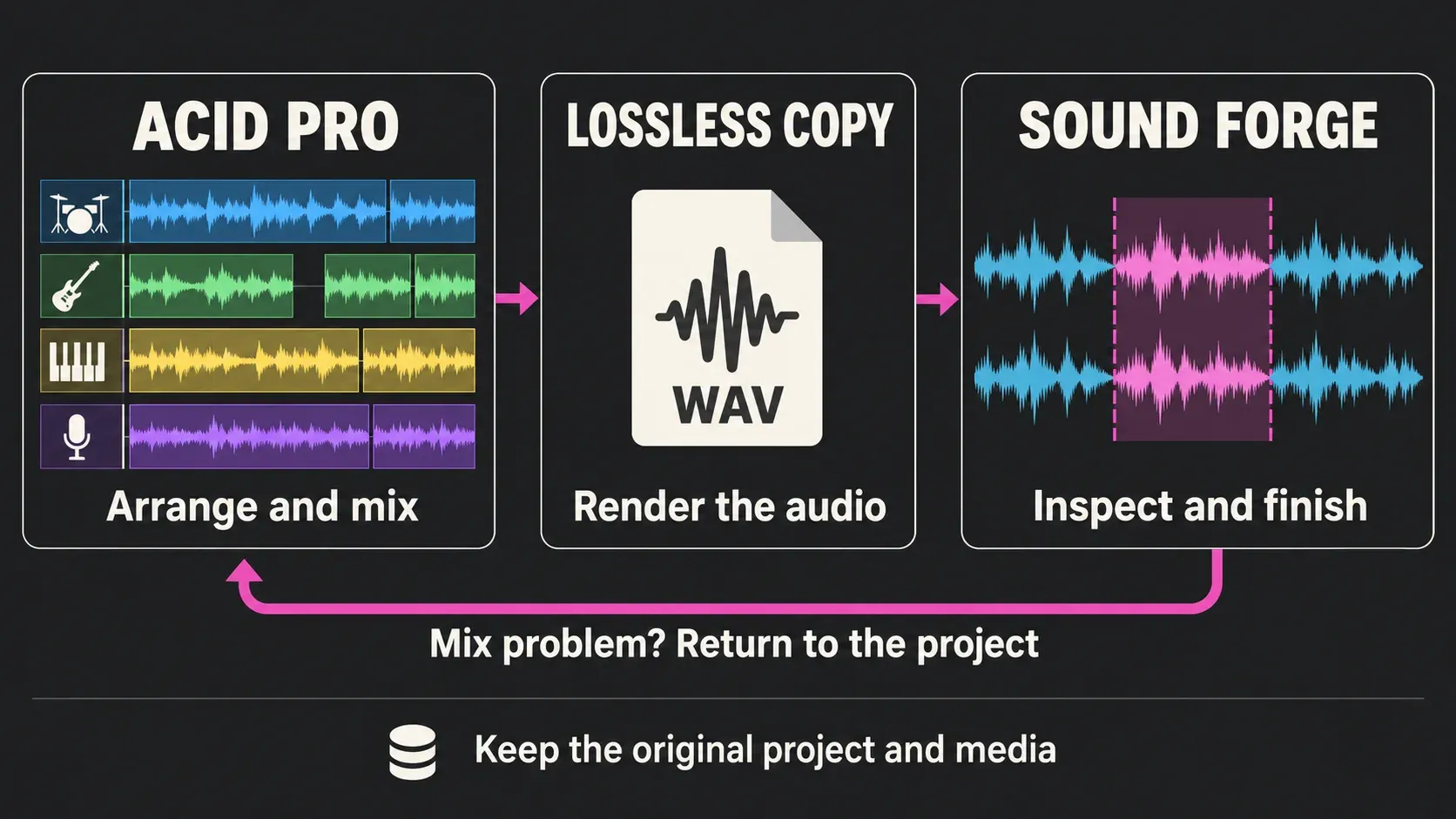
- Create and arrange in Acid Pro. Keep loops, recorded tracks, MIDI, instruments, tempo, and section changes inside the DAW.
- Mix in Acid Pro. Set track balance, automation, routing, effects, and the master chain in full project context.
- Render a compatible lossless working file. Use a format both applications and the next delivery stage support. WAV is the usual Windows interchange choice, but compatibility is the rule.
- Inspect the render in Sound Forge. Check boundaries, channels, sample rate, peaks, and the exact defects that justify a file-level pass.
- Repair or master deliberately. If the problem is track balance, automation, or arrangement, return to Acid Pro instead of hiding the mix decision in a stereo file.
- Create delivery copies last. Keep the approved high-quality master and derive distribution versions from it.
This is a file handoff, not a shared project. Sound Forge can't open an Acid project and continue editing its MIDI, loops, tracks, buses, or automation. Keep the Acid project and its media so the mix remains recoverable.
Before treating the render as a master, compare it with the Acid playback at matched monitoring level and listen across the beginning, transitions, and final decay. A missing tail, wrong solo/mute state, clipped bus, or incorrect channel layout belongs back in Acid. Once the render is approved, the file-level mastering workflow covers controlled processing and delivery checks in Sound Forge.
Choose the handoff format by compatibility
“Export 24-bit or 32-bit float WAV” is useful only when both applications and the downstream stage support that exact file. A safer rule is:
- choose a lossless format supported by Acid Pro, Sound Forge, and the recipient;
- preserve the project sample rate unless the delivery specification requires conversion;
- use a working bit depth that the full chain supports;
- keep the undithered working master when more processing may follow;
- plan dither at the final integer quantization, including after floating-point processing;
- verify channel layout and file duration after every render.
The official Acid Pro format table lists WAV, W64, FLAC, AIFF, MP3, OGG, and WMA among current audio formats. The Sound Forge format table is broader. Avoid another MP3 or OGG encode between production and mastering. Even when the only source is lossy, decode it and use a compatible lossless working file for the handoff. This prevents another lossy generation; it does not restore information already discarded.
Current Boris FX versions, licensing, and legacy downloads
Boris FX announced its acquisition of Acid Pro and Sound Forge from MAGIX on March 30, 2026. Current product pages use Acid Pro 2026 and Sound Forge 2026 branding, and current trials and purchases are presented through Boris FX.
The acquisition announcement listed March 2026 US launch prices for Acid Pro at $12.95 monthly, $69.95 annually, $89.95 for Upgrade & Support, and $149.95 perpetual. It listed Sound Forge at $24.95 monthly, $149.95 annually, $189.95 for Upgrade & Support, and $299.95 perpetual. These are dated launch amounts; the checkout price can differ. Use the live product/store page for region, tax, promotion, and current eligibility.
Don't assume a legacy serial has moved into a Boris FX account. Boris FX's legacy-download guidance updated March 29, 2026 says pre-2026 versions of Acid Pro and Sound Forge remain hosted by MAGIX. The July 20 upgrade guidance says an Acid Pro 11 purchase from MAGIX on or after January 1, 2026 qualifies for a complimentary upgrade with proof of purchase. Earlier Acid Pro 11 buyers have a paid upgrade route using the matching MAGIX purchase email and their Acid Pro 11 serial. Existing subscription users should ask support about their account; the page’s relative migration timeline is not a confirmed completion date.
The products share an owner, not a project format. The Sound Forge ownership history explains the legacy names you may see on older installers.
When to Use Acid Pro, When to Use Sound Forge
| Your task | Use | Why |
|---|---|---|
| Make a beat from loops | Acid Pro | Acidized-loop and arrangement workflow |
| Record and mix a song | Acid Pro | Multitrack recording, MIDI, instruments, buses, and automation |
| Compose to video | Acid Pro | Video preview, tempo mapping, and hit-point tools |
| Remove clicks from a transfer | Sound Forge | Focused restoration and precise selection |
| Repair a clipped word | Sound Forge | File-level repair routes; recovery is not guaranteed |
| Inspect or master one stereo mix | Sound Forge | Focused file metering, processing, and delivery |
| Convert a folder of files | Sound Forge | Batch processing |
| Create and finish a release | Both, when needed | Acid Pro owns production; Sound Forge handles the approved render |
Do you need both?
Most buyers should start with one. Buy Acid Pro first if the missing capability is composition, multitrack recording, MIDI, instruments, arrangement, or mixing. Buy Sound Forge first if work arrives as recorded or mixed audio and the missing capability is precise repair, mastering, analysis, conversion, or batch delivery.
If you only convert a couple of files occasionally, try the tools you already own first. A recurring folder workflow is a stronger reason to add Sound Forge. Sound Forge's Batch Converter guide shows what the second application adds when the same chain, naming rule, and output format must be applied repeatedly.
Both make sense when the same person owns production and final-file quality. They can also pay off when Acid Pro's loop workflow is valuable but a library of samples, field recordings, or transfers needs preparation outside the DAW. They don't make sense merely because the names share a product family.
If neither workflow matches your work, use the Sound Forge software comparisons to compare other editors and DAWs before buying.
Frequently Asked Questions
Is Acid Pro a DAW?
Yes. Acid Pro 2026 is a Windows 11 DAW for loop-based composition, multitrack recording, MIDI sequencing, VST instruments, arrangement, mixing, and export.
Can Sound Forge replace Acid Pro?
No for music production. Sound Forge does not provide Acid Pro's DAW-style loop arrangement, MIDI sequencing, virtual-instrument production, tracks, buses, and automation. It can replace Acid only for a task that already centers on one audio file.
Can Acid Pro replace Sound Forge?
Sometimes for simple editing and self-produced mixes. Acid Pro can edit audio, use effects, and meter a master bus, but it does not provide Sound Forge's focused sample-level repair and batch-processing workflow.
Are Acid Pro and Sound Forge owned by Boris FX?
Yes. Boris FX announced its acquisition of Acid Pro, Sound Forge, and Vegas Pro from MAGIX on March 30, 2026. Current 2026 product pages, trials, and purchases are presented through Boris FX.
Can I open an Acid project in Sound Forge?
Not as an editable multitrack Acid project. Render or export a supported lossless audio file from Acid Pro, open that file in Sound Forge, and keep the original Acid project for later changes to loops, MIDI, tracks, routing, or effects.
Which should I buy first: Acid Pro or Sound Forge?
Buy Acid Pro first when the missing stage is composition, MIDI, recording, arrangement, or mixing. Buy Sound Forge first when existing audio needs precise editing, restoration, mastering, analysis, format conversion, or batch processing.
Fact-checked September 12, 2026 against current product and system pages, the ACID Properties manual, March 2026 launch pricing, and July 2026 upgrade guidance. This comparison is documentation-based; it does not report a hands-on test of either current application.