
Browser tool · no listening
Tap the beat, read the BPM
This page times your button or key presses on this device. It doesn't use a microphone, read a file or upload any audio.
Two taps give the first estimate.
Use this tap tempo counter to find a song’s BPM in your browser. Play the track and tap the large pad on each beat, or press Space or T. Two taps give the first estimate; keep tapping for several beats and watch whether the number settles. This free BPM counter, sometimes called a BPM tapper, measures the timing of your input. It never listens to the recording.
How to get a stable tap-tempo reading
- Choose a pulse. Tap the beat you would count or nod to, not every drum hit. Keep the same counting level throughout the sequence.
- Tap and release consistently. Click or touch the TAP pad, or press Space/T. Keyboard taps register on keydown, and mouse, pen and touch taps register the moment you press, so hold length doesn't shift the timing. Release before the next beat.
- Build a short sequence. Try four to eight steady taps as a starting point, not an accuracy guarantee. The first tap starts the sequence; the second creates one interval.
- Check the result and stability. Steady describes similarity among retained intervals. It cannot tell whether you followed the right beat or tapped consistently early. Press Play click to hear a quiet click at the displayed tempo over the song. It starts when you press it, so listen for drift rather than downbeat alignment; tapping again stops it.
- Choose the counting interpretation. Half-time divides the estimate by two; Double-time multiplies it by two. Measured returns to the original tap rate. None of these controls changes the music.
- Copy or start again. Copy BPM copies the displayed one-decimal value and “BPM”. Record the beat unit separately. Use Reset before a new song or a deliberate tempo change.
Space and T work while the page is active and focus sits on the TAP pad or ordinary page content. They leave links, other buttons, form fields and editable text alone. Release the key between beats, because held-key repeats are ignored. Modified shortcuts such as Ctrl+T and Command+T still go to the browser.
Why the same beat can look half or double
A passage counted at 75 pulses per minute can also be counted at 150 if you tap twice as often, and neither number is automatically the right project tempo. I'd match the beat unit in your score, DAW or reference track, then stick with it. A syncopated kick or snare pattern may skip beats, so following every audible hit isn't always the same as following the pulse.
If you tap every other quarter-note beat and read 60 BPM, Double-time gives 120 quarter-note BPM. If you tap eighth notes at 240 BPM, Half-time gives 120 quarter-note BPM. These are counting conversions; playback speed doesn't change. A genre's usual BPM range can't tell you which reading is right.
How this BPM counter calculates the estimate
The counter uses a valid event.timeStamp when it is close to the performance.now() clock, and otherwise falls back to performance.now() when the input handler runs. This clock reports milliseconds and only moves forward, so ordinary system-clock changes can't reverse the intervals. Browser timer precision, event processing, device latency and your own tapping still affect the measurement. One decimal place is display resolution. It doesn't promise 0.1 BPM accuracy.
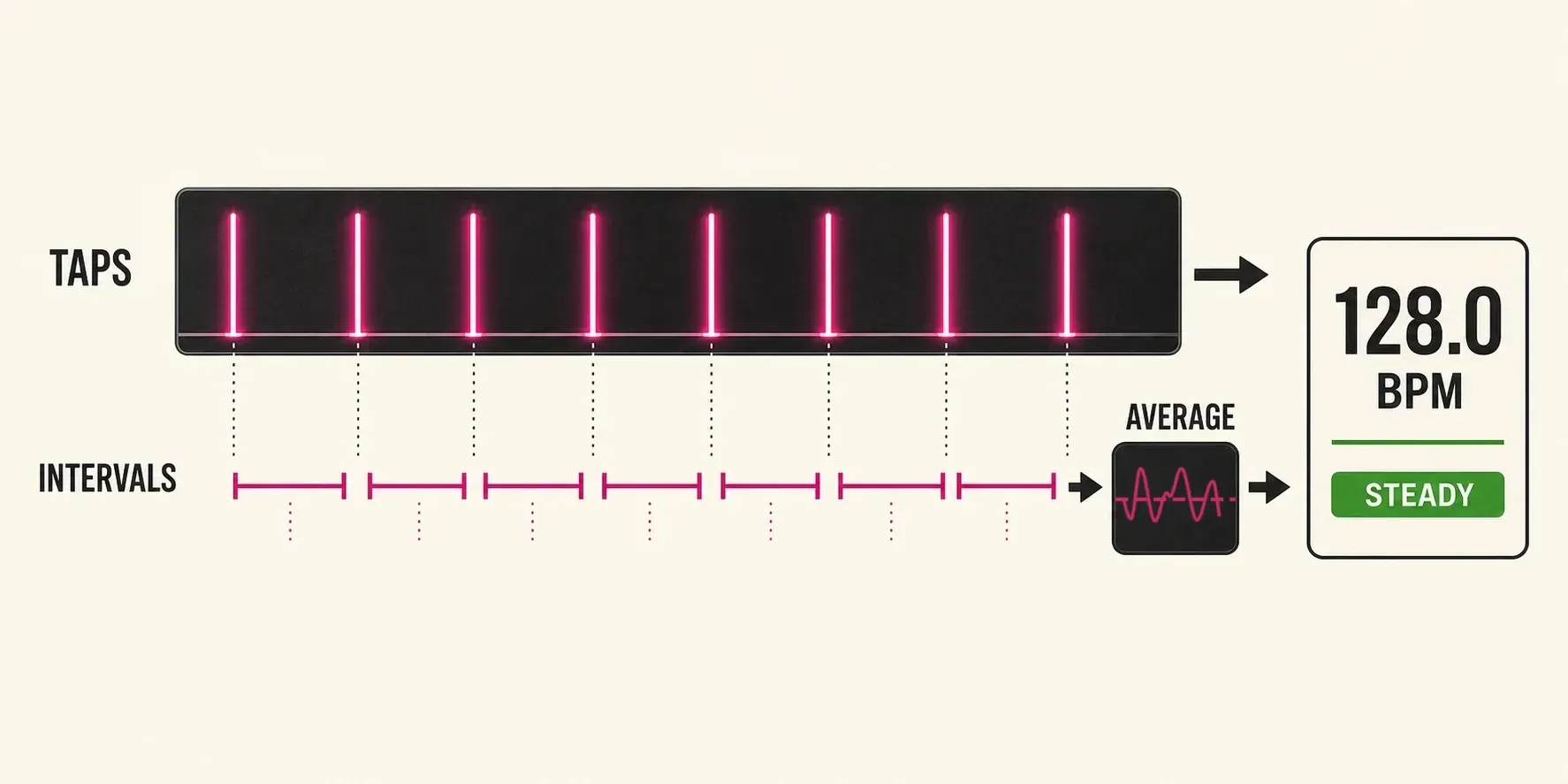
The formula is BPM = 60,000 ÷ average retained interval in milliseconds. Two timestamps 500 ms apart give 120 BPM. Intervals of 480, 500 and 520 ms average 500 ms, which also gives 120 BPM. The tool averages the intervals first; it doesn't average their individual BPM values.
Only the latest nine taps, which make up to eight intervals, stay in the calculation, so the Taps readout stops at nine instead of counting forever. Once three intervals exist, the tool finds their median and keeps intervals from 65% through 155% of it, endpoints included. Filtering only kicks in if at least two intervals remain; otherwise the whole window is used. A message tells you how many intervals were left out.
This filter can discard more than one interval, and it may mistake a real tempo change for a timing miss. It won't repair every accidental double tap either. Press Reset instead of trying to push a new tempo through an old window. With fewer than three retained intervals, stability reads Building. After that it's Steady when the mean absolute interval deviation is at most 2.5% of the mean, Close through 6%, and Uneven above 6%. Those are this tool's thresholds; they aren't measured confidence limits for a song's tempo.
Interval shows the retained average rounded to a whole millisecond. Half-time and Double-time change the BPM reading but leave this measured interval as it is. Rounded shows the selected BPM rounded to an integer; it doesn't guess a “standard” tempo. The main result and Copy BPM only appear when the selected, unrounded BPM falls between 20 and 400 inclusive.
Reset, copy and browser timing
A pause doesn't wipe the displayed result straight away. On the next tap, the sequence starts over if the gap is longer than the larger of 3,000 ms or 2.5 times the median interval in the current window. Before any interval exists, the threshold is 3,000 ms. The comparison is strict, so a gap exactly at the threshold stays in the sequence. A pulse slower than 20 taps per minute can't build a first sequence, because its first interval is longer than three seconds.
Manual Reset clears the taps and puts you back in Measured mode. Automatic pause resets keep the selected half/double reading. When the document becomes hidden, an active sequence is cleared and Measured mode comes back. Switching to another tab can therefore clear a result, while simply moving focus to another visible window doesn't count as hiding the document.
The pad listens for the browser's pointerdown event, which fires when a mouse button goes down or a finger or pen makes contact with the screen, so how long you hold each press doesn't change the intervals. Space and T count on keydown in the same way. The screen, keyboard and browser still add their own input delay, so I'd stick to one input method; these controls aren't a calibrated timing test.
Clipboard writing needs a secure context and can be blocked by browser policy or permissions. If Copy BPM fails, select the number and copy it by hand. Copying 120.0 BPM gives you only the number, with no beat unit, interval, time signature or audio file attached.
What tap tempo can and cannot tell you
The result is most useful for a passage with a pulse you can repeat. A single rolling average can't describe every part of a performance that speeds up, slows down or moves in free time. Reset at the new section and take another reading. If the Play click, a separate metronome or a project click drifts against the music, question both your estimate and whether the performance really changes tempo. A steady display proves neither.
Ableton's Tap Tempo instructions also start with one tap per beat. This counter doesn't control Ableton, start a DAW transport or send MIDI clock. Its optional Play click lets you check the estimate by ear. It gives you a number to check and enter somewhere else.
This tool never asks for a microphone, audio file or recording, and its timing calculation runs in the page. That doesn't mean the website as a whole sends no data: the tool can fire generic started/copied analytics events when site analytics is available. Those events carry neither the BPM nor the tap timestamps.
Beat units and your next step
BPM means beats per minute, but a beat isn't always a quarter note. In compound duple 6/8, the usual dotted-quarter beat holds three eighth notes, with two of those beats per bar. Six eighth-note divisions don't necessarily mean six main beats.
The BPM-to-milliseconds calculator expects quarter-note BPM. If you tap dotted-quarter beats at 80 BPM, multiply by 1.5 and enter 120 there. The dotted-quarter interval stays at 750 ms, while each quarter lasts 500 ms. Half-time and Double-time can't do that 1.5 conversion for you. If you tap all six eighth notes per bar at 240 BPM instead, halve it to 120 quarter-note BPM. Keep the note value next to the copied number.
A time signature on its own doesn't set the tempo. MuseScore's tempo documentation separates written metronome marks from its quarter-note-based playback BPM. Check what the destination field expects before you enter a tap result.
If your next job is changing a recording's duration rather than finding its beat rate, use the time-stretch and pitch-shift guide. For other browser measurements, return to Audio Tools. Manual tempo detection stays here; note-duration conversion stays in the calculator.
Tap tempo FAQ
How does tap tempo calculate BPM?
It divides 60,000 by the average retained interval in milliseconds. An average of 500 ms gives 120 BPM. The rolling window holds up to nine taps and eight intervals; it measures your input, not the song directly.
How many times should I tap?
Two taps provide the first interval. Try four to eight steady taps as a starting point, but no tap count guarantees accuracy. Keep the same beat unit, and reset if you lose the pulse or change sections.
Why is the result half or double the BPM I expected?
You may be counting a slower pulse or a faster subdivision. Half-time divides the estimate by two and Double-time multiplies it by two. Confirm the beat unit against your score or project; the controls do not analyze or change the audio.
Does the page listen to or upload my song?
No. This tool does not request a microphone or audio file. It calculates tap intervals in the page. Play click only generates a short sound in your browser; it records nothing. Generic started/copied analytics events may still be sent when site analytics is available, without BPM values or tap timestamps.
Why did the tap sequence reset?
Reset clears it manually. After a sufficiently long pause, the next tap starts a new sequence. The pause threshold is the larger of three seconds or 2.5 times the existing median interval. Hiding the document also clears an active sequence.
Does one decimal mean 0.1 BPM accuracy?
No. It is the output's display resolution. Your tapping, input latency and browser processing can all affect the estimate. Steady describes retained interval consistency, not certified tempo accuracy.
Can I use this in 6/8?
Yes. Choose the beat unit you intend to count. Tapping dotted-quarter beats at 80 BPM corresponds to 120 quarter-note BPM or 240 eighth-note BPM. The counter cannot infer that note value or the time signature from your taps.