
The short answer: Acoustica is the closest paid Sound Forge alternative for general file editing. Audacity is the best free option. RX 12 is the specialist for difficult repair, WaveLab Pro 13 is the mastering choice, Adobe Audition fits Premiere workflows, and REAPER is the better move when the missing feature is a full DAW.
No single alternative honestly wins across the board, because those applications replace different jobs. Sound Forge is a Windows file editor built around opening audio, selecting a region, processing it and delivering the file. A popular DAW can cut a WAV and still make a poor replacement for that daily rhythm.
Fast route: closest editor: Acoustica; free: Audacity; Mac voice work: TwistedWave; restoration: RX; album mastering: WaveLab; Adobe video work: Audition; multitrack production: REAPER.
Versions, platforms and vendor pricing references were checked on September 13, 2026. The table uses regular prices where they're shown and leaves temporary sale prices out. Tax, region and plan terms can change your total, and the WaveLab figures are the publisher’s announced suggested retail prices.
How I chose these Sound Forge alternatives
I treated Sound Forge as a file editor first. Each ranked product had to replace at least one practical job: precise waveform editing, restoration, mastering, repetitive file processing, or recording and finishing spoken-word audio. The order reflects how directly each product replaces that workflow; market share and the length of a feature list didn't factor in.
That rule keeps Pro Tools, Ableton Live and FL Studio off the direct shortlist. They're capable DAWs, and generic directories often surface them for this query, but their main job is session-based music or post production. REAPER appears because some Sound Forge users discover that tracks, MIDI, routing and automation are the capability they actually lack.
This shortlist comes from documentation; there was no controlled audio-quality shootout. The recommendations match published capabilities to file-editing jobs. Try your own recordings before treating a feature list as proof that anything sounds better.
Best Sound Forge alternatives by use case
| Alternative | Best job | Platforms | US reference price · Sep. 13, 2026 |
|---|---|---|---|
| Acoustica 8 | Closest all-around file editor | Windows, macOS | $149 Standard / $299 Premium / $449 Ultimate |
| Audacity 4.0.1 | Free recording and editing | Windows, macOS, Linux | Free, open source |
| Adobe Audition 26.5 | Premiere and Creative Cloud work | Windows, macOS | $22.99/mo on annual plan billed monthly |
| iZotope RX 12 | Dialogue and damaged-audio repair | Windows, macOS | $99 Elements / $399 Standard / $1,399 Advanced |
| WaveLab Pro 13 | Album and Dolby Atmos mastering | Windows, macOS | $499.99 Pro / $99.99 Elements |
| REAPER 7.82 | Full DAW and production | Windows, macOS, Linux | $60 discounted / $225 commercial |
| TwistedWave 33.7 | Mac voice-over and batch jobs | macOS, Windows | $9.99/mo or annual plan |
The price column gives context. It isn't a score. RX Advanced is aimed at demanding post-production repair, and Audacity is free. Acoustica 8 now comes in three editions, so an older comparison that covers only Standard and Premium misses both the new prices and the Ultimate tier.
What are you actually replacing?
A file editor, restoration suite, mastering environment and DAW overlap, but that overlap doesn't make them interchangeable. Decide which part of Sound Forge currently earns its place on your computer.
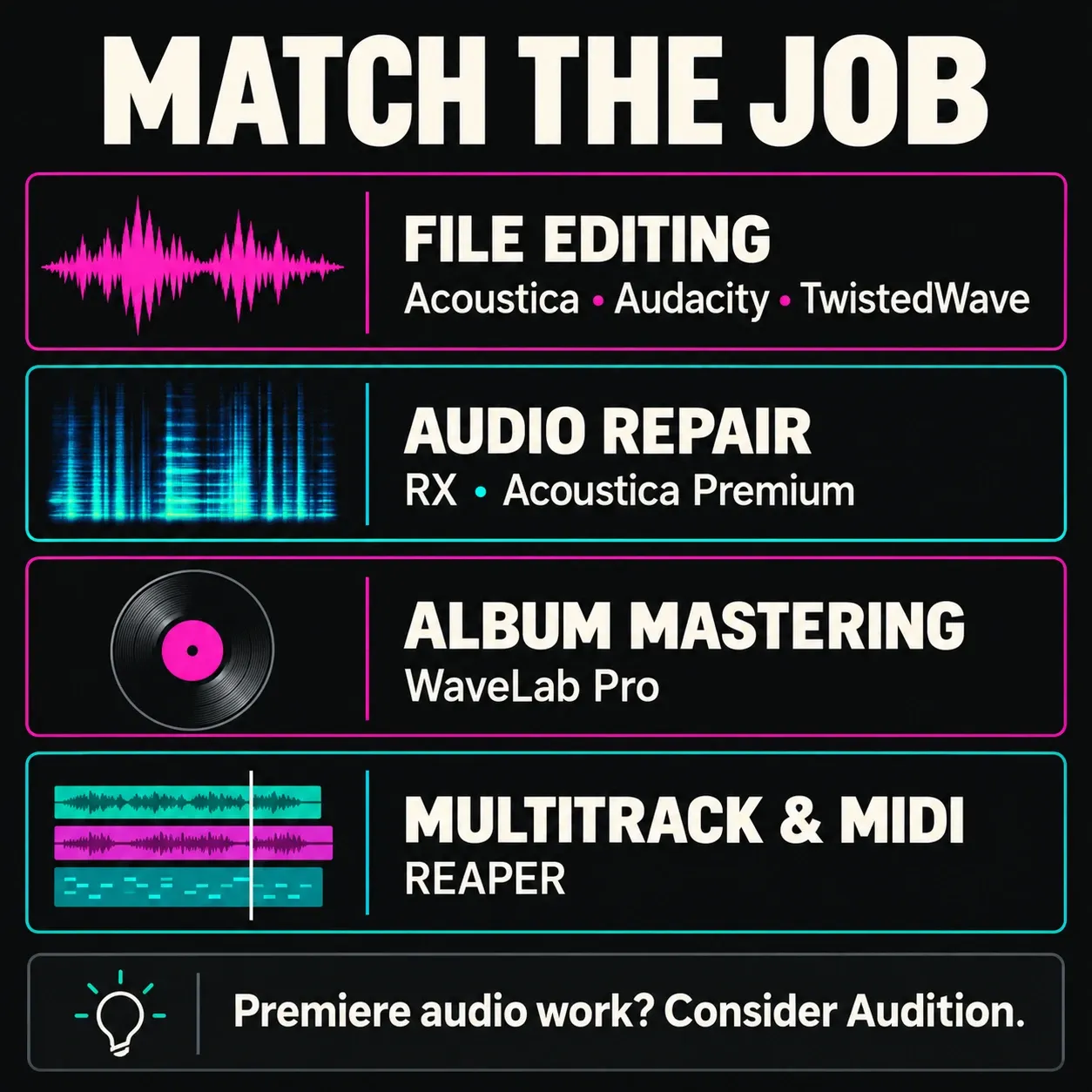
Choose a file editor if you repeatedly open individual recordings, make sample-accurate selections, run effects or chains, and save the result. Acoustica, Audacity and TwistedWave are the closest category matches.
Choose a restoration suite if hum, clipping, room noise, mouth clicks or damaged dialogue drive the purchase. RX 12 and Acoustica Premium put more of the budget into repair.
Choose a mastering application if a release, sequence or album is the unit of work. WaveLab's montage, metadata and delivery model matters more here than similarity to one Sound Forge window.
Choose a DAW if you need tracks, MIDI, instruments, routing and mix automation. REAPER fits that broader production job. Audition handles multitrack audio and video-related sound work, but if MIDI and instruments are what you need, it's the wrong pick.
Best Sound Forge alternative for Mac
Sound Forge 2026 is Windows software. For a Mac user who wants one current editor rather than a compatibility workaround, Acoustica is the closest overall match. It combines waveform and spectral editing, recording, processing chains, loudness tools, restoration and multitrack work in one Windows and macOS product.
TwistedWave is the quicker Mac choice for voice-over, audiobooks, metadata, silence splitting and large folder jobs. WaveLab Pro is stronger for mastering releases, RX for difficult restoration, Audacity for a free editor, and REAPER for a full DAW. The separate Sound Forge for Mac guide explains why the discontinued Sony Mac edition is no longer a route you can take.
1. Acon Digital Acoustica 8: closest overall paid alternative
Acon Digital Acoustica 8 is the closest paid replacement here for a file-first workflow. Its three editions share the core editor, spectral selection, recording and multitrack tools on Windows and macOS. Check the edition comparison for processing and channel limits rather than assuming every plug-in is included with Standard.
Acoustica 8 lists Standard at $149, Premium at $299 and Ultimate at $449. The September 13 storefront also showed a launch promotion, and those temporary amounts aren't the table’s reference prices. Standard handles stereo editing with in-app processing. Premium adds deeper dialogue tools and processing plug-ins for other hosts, with up to 7.1.2 channels, and Ultimate stretches that to 9.1.6 and adds processors including DeVerberate and DeFilter. The license is perpetual, and the trial runs 30 days with no card required.
Choose it when: you want a current Mac or Windows editor with spectral selection and a perpetual license. Look elsewhere when: you need WaveLab's release-oriented montage, RX Advanced's post modules, or production-supported Linux operation. Acoustica's Linux support is currently in public beta testing.
2. Audacity 4.0.1: best free Sound Forge alternative
Audacity 4.0.1 is the current stable free release for Windows, macOS and Linux. Version 4.0.1 shipped on September 30, 2026, after 4.0.0 on September 3 and the 3.7.9 maintenance release on September 1, so production users should review Audacity 4's project-format and feature-availability notes before migrating existing work.
Audacity records and edits multiple tracks and supports real-time and rendered effects, and you can still draw samples once you zoom in far enough. The first Audacity 4.0.0 release notes list Macro Manager and the scripting pipe as unavailable. Version 4.0.1 adds export of individual tracks and labeled regions; that is a separate feature from Macros or scripting. Don't swap a working batch setup for 4.0 expecting your old Macros workflow to carry over unchanged.
For ordinary recording and manual file editing, Audacity is a strong free starting point, especially on Linux. For repetitive exports, specific effects or existing projects, check the notes for your exact 4.0.x version and run a small trial job first. Audacity 4 converts .aup3 projects to .aup4 but can't save them back to .aup3, so keep the original projects. Our Sound Forge versus Audacity comparison covers that narrower decision.
3. Adobe Audition 26.5: best for Creative Cloud workflows
Adobe’s current release page identifies 26.5 as the September 2026 release. Audition combines a destructive Waveform Editor, spectral display, Multitrack sessions, restoration effects, Match Loudness and a Premiere Pro handoff. That combination is useful when dialogue editing and a video mix belong to the same job.
The current US single-app price on Adobe's Creative Cloud plans is $22.99 per month on an annual plan billed monthly. Regional pricing and tax vary. The subscription is the main long-term tradeoff.
Engineers who deliver physical discs should also know that Adobe removed built-in CD authoring in Audition 26.3. CD Layout, CD markers and CD-specific metadata authoring are gone, though you can still extract audio from CDs. Pick Audition for Premiere and Creative Cloud work, and WaveLab when album assembly, ISRC handling and delivery sit at the center of the job. Our Sound Forge versus Adobe Audition comparison covers the editor and subscription tradeoff in more detail.
4. iZotope RX 12: best for damaged audio and dialogue repair
iZotope RX 12 is the specialist choice for damaged recordings and difficult dialogue. Elements costs $99 and contains six plug-ins including Repair Assistant. Standard costs $399 and includes the standalone editor with deeper modules. Advanced costs $1,399 and expands the post-production toolkit. For a module-level look, see the RX 12 review on izotoperx.net.
Edition names matter. Spectral De-noise, Music Rebalance and the standalone editor aren't part of the Elements package, and RX is an expensive answer for routine trimming, recording and conversion. Choose Standard or Advanced when repair quality and module depth are the paid job. The Sound Forge versus RX comparison maps the editions to common failures.
5. WaveLab Pro 13: best for album mastering
Steinberg WaveLab is built around mastering and delivery and still keeps a dedicated Audio Editor. Steinberg’s WaveLab 13 launch announcement gives suggested US retail prices of $499.99 for Pro and $99.99 for Elements. Check the current regional shop price before you buy. Both run on Windows and macOS, and Elements leaves out some Pro montage, analysis and delivery features.
The current WaveLab 13 release notes list 13.0.30, released July 22, 2026. Its Audio Montage, album reports, metadata, batch processor and Dolby Atmos mastering tools make it the better choice when the release is the unit of work. Choose Sound Forge or Acoustica when most jobs remain isolated files. See the full Sound Forge versus WaveLab comparison.
6. REAPER 7.82: best-value full DAW
REAPER 7.82 was released October 4, 2026. It runs on Windows, macOS and Linux and provides multitrack recording, MIDI, instruments, routing, automation, mixing, scripting and custom actions. That is the right move when the missing feature is a production environment rather than a more elaborate file editor.
The full evaluation lasts 60 days. A discounted license is $60 for qualifying personal, educational, nonprofit and lower-revenue commercial use; the commercial license is $225. The REAPER license page states a $20,000 annual gross-revenue threshold for the discounted commercial route.
REAPER can process audio quickly, but opening a project and managing tracks may add friction to hundreds of small file jobs. Many editors keep both categories. Our Sound Forge versus REAPER guide focuses on that division.
7. TwistedWave 33.7: Mac voice-over and batch work
TwistedWave for Mac is well matched to voice-over and audiobook editing. Its batch engine handles files or folder hierarchies and can apply Audio Unit or VST effects. Silence splitting and metadata support help with repetitive delivery. Video synchronization and speech recognition are separate add-ons: check the selected plan if you need them. The fully functional demo lasts 30 days.
The TwistedWave release history lists Mac version 33.7 on August 31, 2026. The desktop subscription terms offer $9.99 monthly and declining annual pricing. Annual billing grants a fallback license right away, while monthly billing needs 12 consecutive payments first. The fallback covers one specific version and doesn't include unlimited future upgrades.
Other alternatives worth considering
WavePad
WavePad covers recording, effects, restoration, spectral tools, VST support and batch processing on Windows and Mac. Its free edition is restricted to non-commercial home use. Check the exact paid license and renewal terms before using it for client work.
Ocenaudio
Ocenaudio downloads cover Windows, macOS and Linux. It is a lightweight free option for opening, trimming and processing recordings. Check the current and legacy Mac builds against your OS. Choose it for simple file work rather than RX-style restoration or album mastering.
Logic Pro and GarageBand
Apple Logic Pro and GarageBand are Mac DAWs, the tools to pick for composing, instruments, multitrack recording and mixing. They solve a different job from a direct Sound Forge-style waveform editor.
Same owner, different jobs: VEGAS Pro and ACID Pro
Boris FX acquired Sound Forge, VEGAS Pro and ACID Pro in March 2026, but shared ownership doesn't make the applications substitutes. VEGAS Pro is video-first, and ACID Pro is a loop and music-production DAW. Both can send audio to a file editor, yet neither replaces the day-to-day Sound Forge workflow. Compare Sound Forge with VEGAS Pro or ACID Pro with Sound Forge when one of those wider jobs is the real requirement.
A practical switch test
Install the trial or free build, then use one real source file rather than a vendor demo. Time five tasks: open the file, make a sample-accurate repair, run your normal plug-in or chain, export to the required format, and repeat the process across a small folder. Also confirm the audio driver, metadata, channel layout and keyboard commands you rely on.
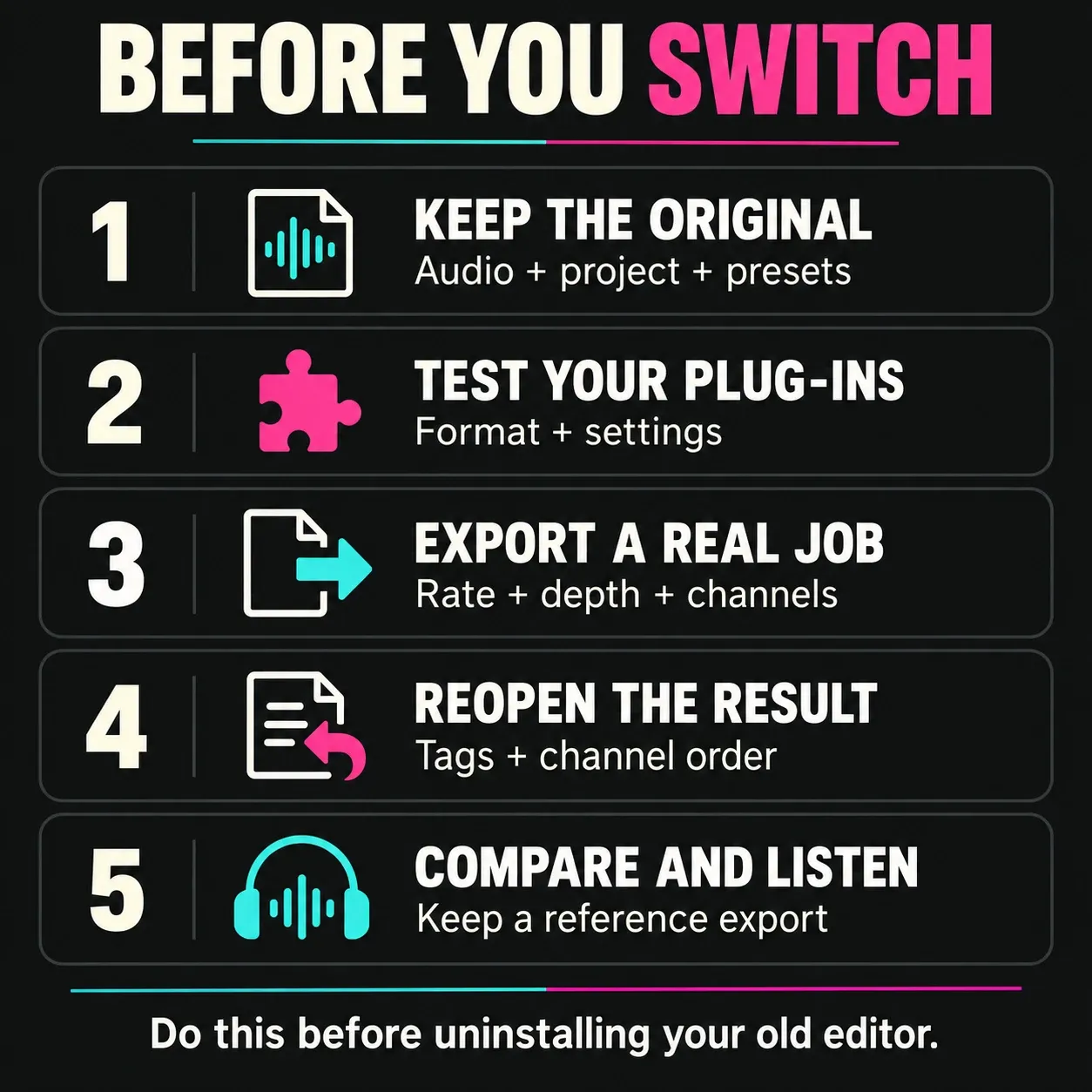
Before uninstalling anything, save one reference export and a copy of the original file. Record the plug-in format, preset names, sample rate, bit depth, channel layout and metadata fields. Then compare the replacement's render against the reference and reopen it in the destination application. This catches missing tags, channel-order mistakes and plug-in substitutions that a quick listening test can miss. Keep the old editor available until one real job has traveled through the complete replacement workflow.
A replacement wins when it removes your bottleneck without creating a larger one elsewhere. If the trial makes routine file work slower, keep Sound Forge and add a specialist only where needed. The current Sound Forge review explains the jobs it still handles well; the pricing guide gives the cost baseline. For a closer comparison of two candidates, use the editor comparisons hub.
Frequently Asked Questions
What is the best free Sound Forge alternative?
Audacity 4.0.1 is the current free general replacement for recording, editing, cleanup and export on Windows, macOS and Linux. Review the official Audacity 4 project-format and feature-availability notes before migrating production projects.
What is the closest paid equivalent to Sound Forge?
Acon Digital Acoustica is the closest all-around paid alternative on Windows and macOS. It combines waveform and spectral editing, restoration, processing chains, recording and mastering tools in a general file editor.
Can Audacity replace Sound Forge Pro?
Yes for many recording and manual editing jobs. Audacity 4.0.1 has sample drawing but omits Macro Manager and the scripting pipe. Audacity 4.0.1 adds export of individual tracks and labeled regions; check your exact version for the other workflow limits. Check the release notes and test your required effects and exports before replacing a production batch workflow.
What is the best Sound Forge alternative for Mac?
Acoustica is the closest overall Mac alternative. TwistedWave is strong for voice and batch work, WaveLab Pro 13 for album mastering, RX 12 for difficult restoration, and Audacity for a free editor.
Is REAPER a Sound Forge alternative?
REAPER is the better alternative when you need a DAW for tracks, MIDI, instruments, routing and mixing. It can edit audio, but it replaces a broader part of the workflow than a dedicated single-file editor.
Should I switch from Sound Forge?
Switch when a specific missing capability such as Mac support, advanced restoration, album mastering, Adobe integration or full DAW production costs more time than learning another application. Keep Sound Forge when routine file editing is still faster there.
Last fact-checked: September 13, 2026.