

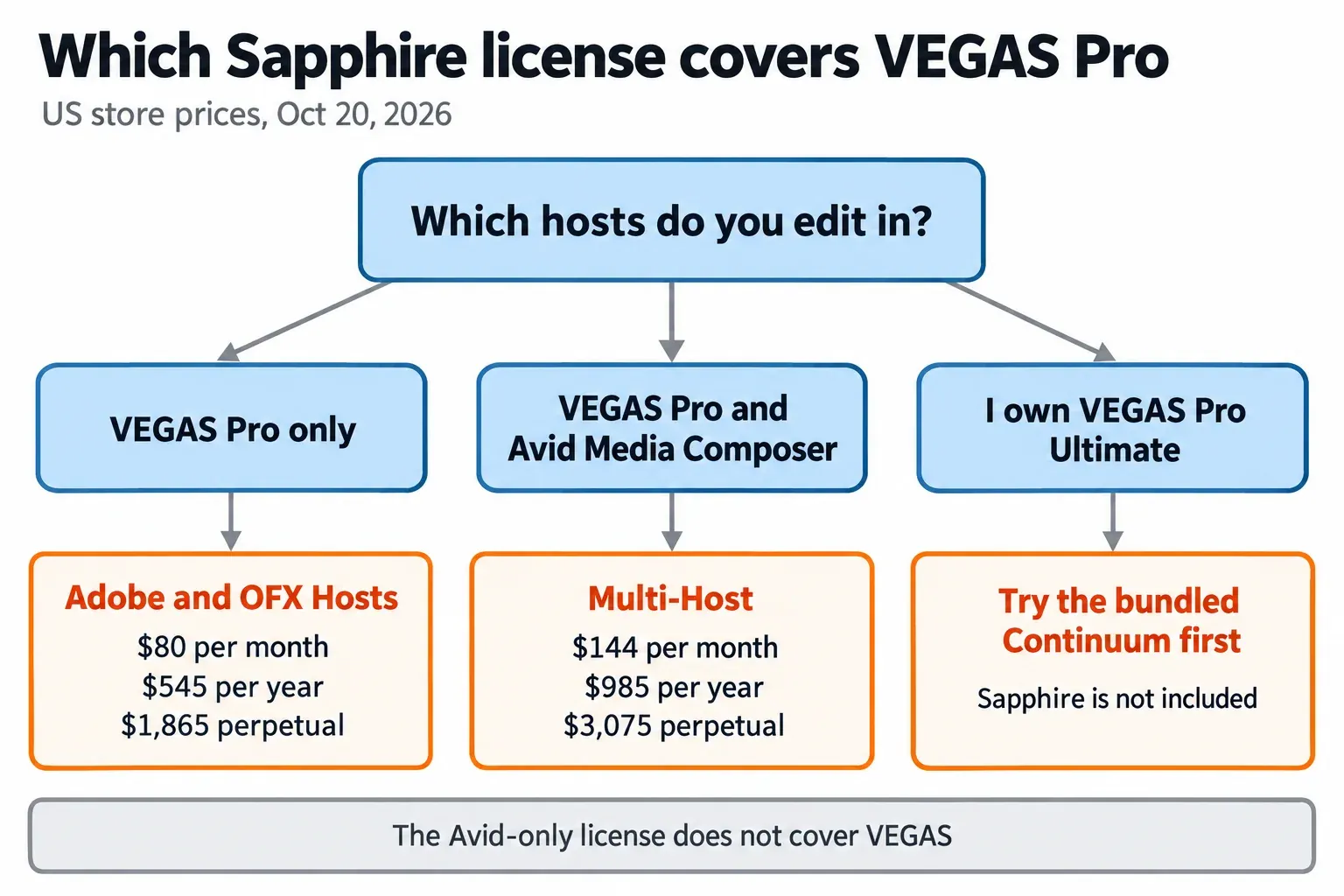
Yes, Boris FX Sapphire works in VEGAS Pro. It installs as an OFX plugin on Windows 10 or 11, its effects appear in the Video FX window under Third Party, and the license that covers VEGAS is Sapphire for Adobe and OFX Hosts: $80 a month, $545 a year or $1,865 perpetual in the US Boris FX store on October 20, 2026. No edition of VEGAS Pro 2026 includes Sapphire, and the Sapphire supported-hosts table has not added VEGAS Pro 2026 yet, so the free watermarked trial in your own VEGAS build is the right first step.
My recommendation comes down to two questions: which hosts you cut in, and how long you will keep Sapphire. If VEGAS is your only editor, I would run the trial on a real project, then take the annual plan. At $545 it costs exactly what a perpetual owner pays each year to stay current, without the $1,865 entry price. Perpetual only pays off if you expect to use one Sapphire version for more than about three and a half years. If you already own VEGAS Pro Ultimate, I would work through its bundled Continuum effects before adding Sapphire on top.
Does Sapphire work in VEGAS Pro?
It does, on Windows. The Boris FX Sapphire product page lists VEGAS Pro among Sapphire's hosts as an OFX host, and the same page gives the scale of the package: more than 270 effects and transitions and more than 3,000 presets. In VEGAS you meet them as S_ effects such as S_Glow, S_Shake, S_Flicker and S_Rays, and transitions such as S_CircleWipe.
Two parts of Sapphire matter more in VEGAS than the effect count. Sapphire Builder, which stacks effects into a single effect or builds new effects and transitions, has supported VEGAS since Sapphire 2020.5. S_Effect, the effect that carries Builder setups, keeps its custom parameters inside Builder in VEGAS, which the troubleshooting section covers.
The current release is Sapphire 2026.5. Boris FX announced Sapphire 2026.5 on May 21, 2026, and the product page credits it with more than 100 new effect and transition presets.
Which Sapphire license do you need, and what does it cost?
Buy the Adobe and OFX Hosts license. There is no VEGAS-only Sapphire product. The Avid Media Composer license sells at the same $80 monthly and $545 annual price, but it does not cover OFX hosts such as VEGAS, so check the host family before you pay. These are the prices in the Boris FX Sapphire store for US buyers on October 20, 2026:
| Sapphire option | US price, Oct 20, 2026 | Covers VEGAS | Fits |
|---|---|---|---|
| Adobe and OFX Hosts, monthly | $80 per month | Yes | One project or a short job |
| Adobe and OFX Hosts, annual | $545 per year | Yes | Regular VEGAS work |
| Adobe and OFX Hosts, perpetual | $1,865, includes 1 year of upgrades and support | Yes | Long use of one version |
| Upgrade and support renewal | $545 per year | For perpetual owners | Staying on the current release |
| Reinstating lapsed upgrade and support | $745 | For perpetual owners | Coming back after a gap |
| Multi-Host (Avid, Adobe and OFX) | $144 per month, $985 per year or $3,075 perpetual | Yes | Editors who also cut in Media Composer |
| Avid Media Composer only | $80 per month or $545 per year | No | Media Composer users only |
The numbers favor the annual plan for most VEGAS editors. A year of upgrades and support on a perpetual license costs $545, the same as an annual subscription, so a perpetual owner who stays current pays $1,320 more than a subscriber over any number of years. The perpetual license earns its price only when you stop renewing: $1,865 equals about three and a half years of annual subscription. If you let upgrades and support lapse and later want the newest version, reinstatement costs $745 instead of $545.
Renewals do bring new releases. Boris FX's 2026.5 announcement says current subscribers and holders of upgrade and support plans received Sapphire 2026.5 as a free update, and it quotes the same starting prices of $545 a year or $80 a month. Studios have one more option: buyers of five annual subscription licenses can convert them to floating licenses for an additional cost, which does not apply to monthly or perpetual licenses.
These are list prices on one date in one store region. If you can wait for a seasonal discount, the pattern of past sales is in the Boris FX Black Friday guide.
Is Sapphire included with VEGAS Pro 2026?
No. The VEGAS Pro plans and pricing page lists three editions, Vegas Pro, Vegas Pro Plus and Vegas Pro Ultimate, and Sapphire is not part of any of them. Boris FX bundles its other effects packages instead:
- All three editions include Continuum 2D+3D Titling.
- Vegas Pro Plus adds Mocha Vegas, Particle Illusion, Sound Forge and the CrumplePop VST plugins.
- Vegas Pro Ultimate adds the Continuum VFX plugins, the Mocha Pro plugin, Optics and CrumplePop SoundApp on top of Plus.
Ultimate costs $39.95 a month or $199.95 a year, according to the March 30, 2026 announcement of Boris FX's acquisition of VEGAS Pro, Sound Forge and Acid Pro. Boris FX now owns both VEGAS and Sapphire, and the Boris FX product hub on this site maps how the programs and plug-in packages fit together.
The bundle changes the decision for Ultimate owners. Continuum is the other large Boris FX effects package, so open what you already have before you buy a second one; Continuum vs Sapphire explains where each one is the better tool. If the Mocha Pro plugin is the reason you are looking at Ultimate, compare it with standalone Mocha Pro pricing first.
How to try and install Sapphire for VEGAS
Start with the free trial from Boris FX. The Sapphire trial page says it includes every Sapphire feature, with a red X watermark and output limited to HD. That is enough to check your effects, your GPU and your VEGAS build before you pay.
- Submit the form on the trial page. Boris FX emails a link to download the Boris FX Hub.
- Launch the Hub and sign in with your Boris FX account, or click Create Account.
- Choose "Install a free, watermarked trial of Sapphire."
- Choose your host application and click Install. VEGAS Pro uses the OFX version. Close VEGAS before this step so it picks up the new plugin on its next start.
- If you plan to run Sapphire on a supported AMD Radeon PRO GPU, the supported-hosts table tells AMD users to install the correct Sapphire AMD installer, so confirm that is the build you install.
- Start VEGAS and give it time. Boris FX's 2026.5 release notes warn that VEGAS takes a long time to start the first time after Sapphire is installed, because it builds a plugin cache. Later launches are faster.
Several unofficial pages offering a free Sapphire download rank for this search. I would not install from them. The official trial is free, it comes through the Boris FX Hub, and it is complete enough to judge the plugin.
If the Hub itself refuses to install or sign in, the Hub steps in the Sound Forge installation troubleshooting guide apply to Sapphire too, because both products install through the same Boris FX Hub.
Where Sapphire shows up inside VEGAS
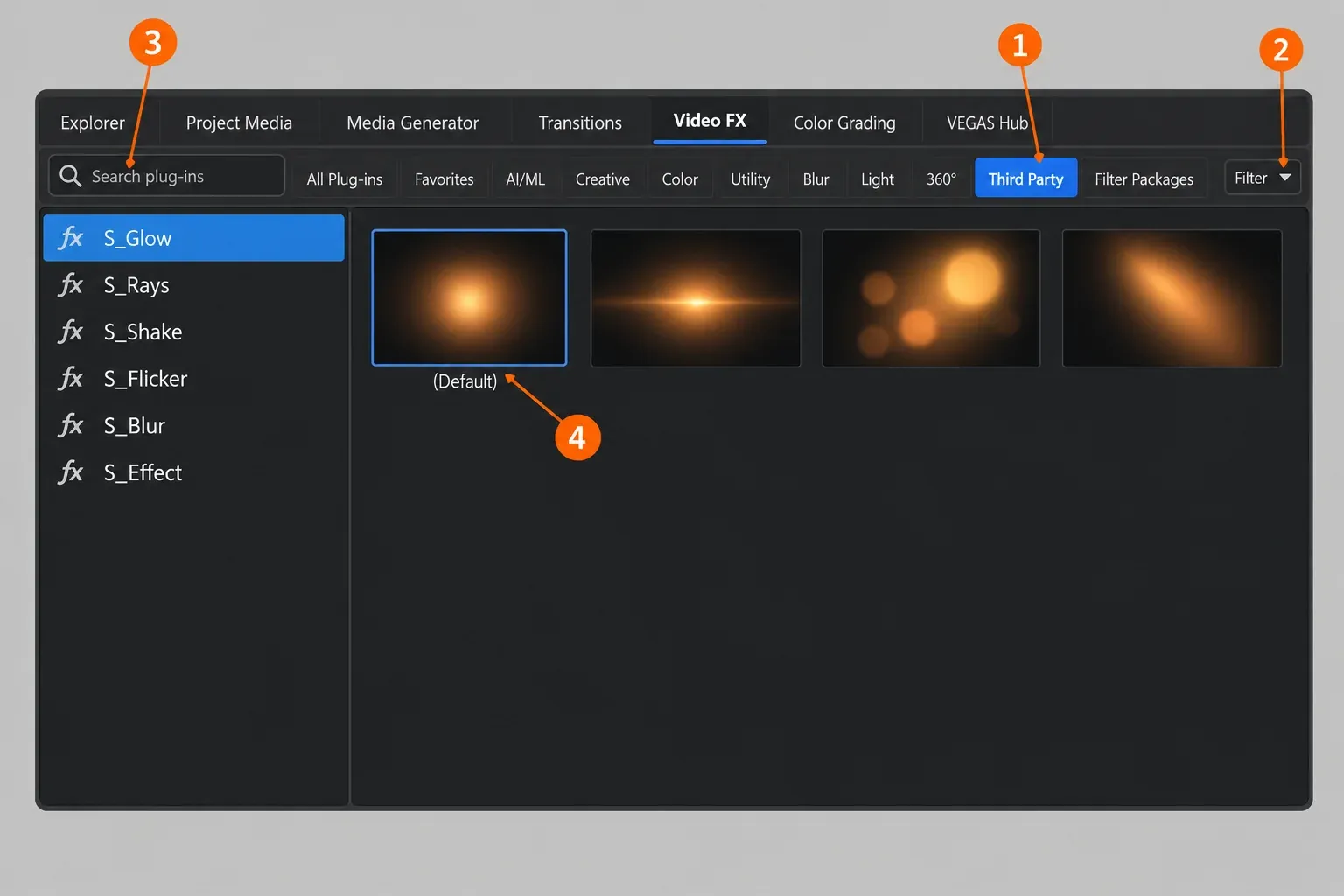
Open the Video FX window and click Third Party. The VEGAS Pro 2026 help page for the Video FX window describes Third Party as the category for additionally installed third-party plug-ins. When you select it, a Filter drop-down appears in the upper right corner so you can filter those plug-ins by provider. Boris FX's trial page gives the same route: the Video FX tab, then the third-party tab.
From there the workflow is short. Click an effect in the left pane, such as S_Glow, and the right pane shows a thumbnail for each of its presets. Hover over a thumbnail to see an animated example, then drag it onto an event, a track or the Video Preview window to apply it. The Search plug-ins box is faster than scrolling: VEGAS matches what you type against plug-in names, descriptions and group names, so a short term such as glow narrows the list at once.
The Plug-In Manager is the second place to look. The VEGAS Pro 2026 Plug-In Manager help opens it from View | Window | Plug-In Manager, and you can drag plug-ins and plug-in packages from it to events, tracks, buses, and the Video FX or Video Preview windows. For plugin folders, VST effects and other vendors, the VEGAS Pro plugins guide covers the general setup.
GPU requirements and Sapphire's own GPU switch
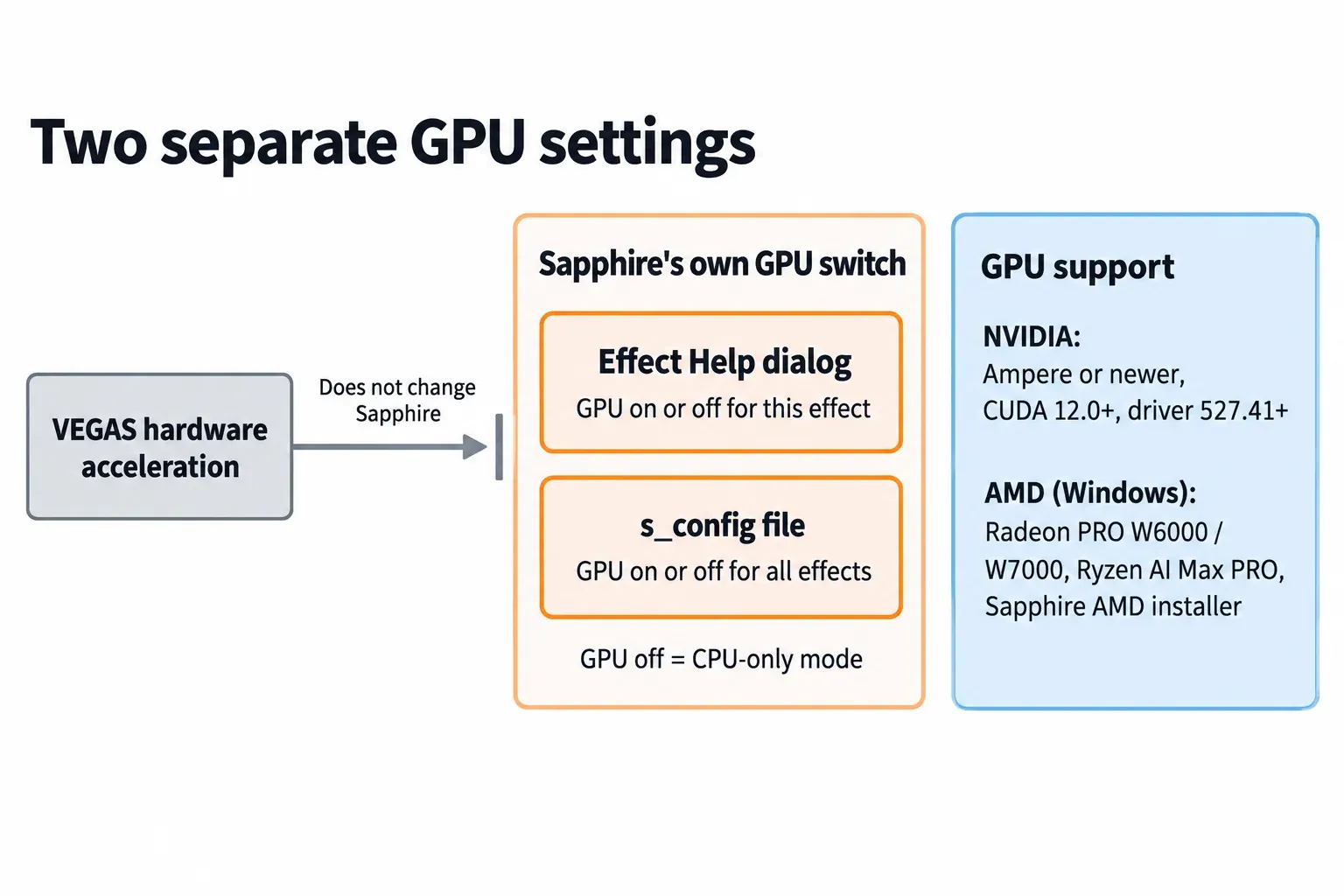
GPU acceleration for Sapphire in VEGAS needs a recent NVIDIA card or one of a short list of AMD chips, and Sapphire controls its GPU use itself, separately from VEGAS. The supported-hosts table and the product page set these requirements:
| Component | Requirement for Sapphire in VEGAS |
|---|---|
| NVIDIA GPU | Drivers capable of CUDA 12.0 or above, an Ampere-series or newer card, driver 527.41 or later |
| AMD GPU | Windows only: Radeon PRO W6000 and W7000 Series or Ryzen AI Max PRO Series, with the separate Sapphire AMD installer |
| Operating system | Windows 10 or 11 |
| CPU | 64-bit Intel or AMD with four or more cores |
| Memory | 8 GB minimum, 16 GB or more preferred |
The product page names a wider Radeon PRO range, W6000 through W9000. For VEGAS I go by the stricter host table, because that is the list written for the host. AMD users should also know one default: Boris FX's Sapphire 2026.5 release notes say FFT-based effects such as RackDefocus, Convolve, FlashBulbs and AdvancedDefocus are unstable in OFX hosts when rendering on AMD GPUs with HIP, so they are set to CPU mode by default.
The GPU matters because most of Sapphire uses it. AMD's case study on Boris FX says Boris FX's GPU code accelerates more than 80% of Sapphire's effects.
The switch that controls it lives in Sapphire, not in VEGAS. In a Boris FX forum thread about S_Glow showing static, a staff member explained that disabling hardware acceleration in VEGAS does not affect Sapphire, which has its own settings. You turn Sapphire's GPU off for one instance from that effect's Help button dialog, or for all of Sapphire by editing the s_config file. Disabling the GPU forces Sapphire into CPU-only mode, which is also the setting to fall back on if your NVIDIA card predates Ampere.
VEGAS versions and known issues
Boris FX's supported-hosts table lists VEGAS Pro 22, 21 and 20 for Sapphire. VEGAS Pro 2026 isn't on it. I read that as a table that lags behind the product, not as a block. The VEGAS Pro 2026 build 2026.0.3.189 release notes include improved startup stability while scanning OFX plug-ins and improved stability when deleting media while Sapphire Mocha is open, which points to Sapphire being used inside VEGAS 2026. Still, an official entry is missing, which is the main reason I would trial Sapphire in your exact build before you pay. VEGAS Pro 19 and earlier are not in the current table either.
The Sapphire 2026.5 release notes carry two VEGAS entries in their known issues:
- S_Effect and S_Transition presets are not loading correctly in Vegas. The entry is undated and no workaround is given.
- Vegas takes a long time to start the first time after Sapphire is installed, while it generates a plugin cache. Later launches are faster.
Sapphire not showing or misbehaving in VEGAS: fixes
Most Sapphire trouble in VEGAS has a documented first fix. Match the symptom, try the first step, and open a Boris FX support case if it does not help.
| Symptom | First thing to try |
|---|---|
| Sapphire missing from Third Party after an install, update or system restore | Purge the VEGAS plugin cache, using the steps below. |
| Static, glitches or a black background from one effect | Turn off Sapphire's GPU for that instance in the effect's Help dialog, or for all effects in s_config. |
| S_Effect shows no parameters | Its parameters live in Builder. Open the Configuration Editor from the Sapphire folder in the Windows Start menu and turn on the settings that expose Builder parameters. |
| S_Effect or S_Transition presets do not load | A listed known issue for VEGAS in the 2026.5 notes, with no published workaround. |
| VEGAS starts very slowly right after the install | Wait for the first launch to finish building the plugin cache. |
| Windows Script Host error in run-python.vbs, then a freeze | Open a Boris FX support case with your exact VEGAS and Sapphire builds. |
Purge the VEGAS plugin cache
This is the fix a Boris FX staff member gave in a forum thread about Sapphire 2021 not showing in VEGAS Pro:
- Close VEGAS. A community reply in the same thread adds a sensible check: confirm in Task Manager that VEGAS is no longer running.
- Open the VEGAS cache folder,
C:\Users\<your user name>\AppData\Local\Vegas Pro\<version>, for exampleVegas Pro\18.0. - Delete
svfx_plugin_cache.binandplugin_manager_cache.bin, then every file named likesvfx_Ofx*.log. - Start VEGAS. It rescans all plugins, so expect a slow first launch.
Keep its limits in mind. The answer dates from 2020, its example folder is the VEGAS 18 one while the poster ran VEGAS 15, and it did not fix the original poster's problem; staff then asked for a support case. Treat it as the first step, not a guaranteed cure.
Builder parameters and freezes
S_Effect is the effect that confuses VEGAS users most. In a thread about S_Effect parameters not showing in VEGAS, a forum regular explained that its parameters live in Builder, and Boris FX staff later pointed to the Configuration Editor app added with Sapphire 2024.5 to turn on the settings that expose Builder parameters. The user in that thread still saw none afterward, so the Configuration Editor is worth a try, not a promise.
One recent report has no answer yet. On October 11, 2026 a user on the Boris FX forum reported a run-python.vbs error and a freeze when selecting a Sapphire 2026.5 effect: line 40, code 80070002, in VEGAS Pro 19, 20 and 2026.0.3.189. The thread has no reply, so it stays one unresolved report rather than a confirmed bug, and a support case with your exact builds is the right route if you see the same error.
Test results: what published reports show for Sapphire in VEGAS
The composite result covers 17 published sources: 14 threads on the official Boris FX forum from 2018 to October 2026, the Sapphire 2026.5 release notes, the VEGAS Pro 2026 build 189 release notes and one YouTube tutorial chapter. None of them publishes a VEGAS render time or playback figure with stated conditions, so this is a counted summary of what users and Boris FX staff reported. A source counts in every finding it supports, so the rows add up to more than 17.
| Finding | Sources | What resolved it |
|---|---|---|
| Sapphire missing or not loading after an install, update or system change | 4 of 17 | Cache purge, the one staff answer; 3 of the 4 threads have no reply |
| Render-only or look differences | 4 of 17 | One traced to an older Sapphire version; one 2026 report could not be reproduced by staff |
| Glitches on Sapphire's GPU path | 3 of 17 | Sapphire GPU off, recommended by staff in 2 of the 3; only a partial fix in the 2022 thread |
| S_Effect and Builder parameters or presets | 3 of 17 | Configuration Editor; preset loading is still a listed known issue in 2026.5 |
| Crash or freeze when applying an effect | 2 of 17 | No confirmed fix in either thread |
| Slow first launch after install | 2 of 17 | Expected while VEGAS builds its plugin cache |
| Evidence of Sapphire working in VEGAS 2026 | 2 of 17 | Build 189 fixes and a user running the Render Unit, against 1 unresolved freeze report |
The detail behind the counts is consistent. Loading after a change is one of the two most common complaints, as in a Sapphire 2023.5 not detected in VEGAS 20 thread. The render-only differences are mixed: when a user reported S_CircleWipe placed differently in the final render in 2026, staff could not reproduce it with CPU or GPU rendering of a 4K 25p source in a 1080x1080 25p project. The GPU-path reports run from S_Flicker turning a title background opaque black on a GTX 1050 to the S_Glow static case above, and turning off Sapphire's own GPU eased each one.
The only speed figures come from Boris FX and were measured outside VEGAS. In AMD's Sapphire case study, a Boris FX lead software engineer puts Sapphire at about 30% faster on the GPU than the CPU on average, with some effects up to 400% faster, from internal testing with no host, resolution or hardware stated. That describes Sapphire's GPU code in general, not a VEGAS result, so it stays out of the composite and there is no median or range to report.
My verdict from the composite: Sapphire in VEGAS fails in predictable places rather than at random. Most reports trace to three causes with documented first fixes: a stale plugin cache, Sapphire's GPU path and S_Effect's Builder parameters. That is why the trial in your exact VEGAS build tells you more than any benchmark would.
Sapphire VST, Mac and the old Render Unit
Sapphire is not a VST. It is a video effects suite that installs in VEGAS as an OFX plugin, while a VST plugin is an audio plugin format for instruments and audio effects. The audio tools that come with VEGAS Pro Plus and Ultimate include the CrumplePop VST plugins and Sound Forge, and the Sound Forge and VEGAS Pro workflow guide shows how video editors split picture and audio work between them.
Sapphire in VEGAS is Windows only. The supported-hosts table lists VEGAS Pro with Windows 10/11 and no macOS entry. A Mac editor who wants Sapphire uses it in a host the same table lists for macOS, such as After Effects, Premiere Pro or DaVinci Resolve.
Long-time VEGAS users may already have part of Sapphire. VEGAS Pro Suite 15 came with a free Sapphire Render Unit of more than 30 effect plugins and hundreds of presets, and in June 2026 a forum user said they still have the Render Unit in VEGAS 2026. It is a small slice of the 270-plus effects in full Sapphire, not the current suite.
One name to skip: the Sapphire Nitro FX transition pack is made exclusively for Avid Media Composer, so it is not an option in VEGAS.
Verdict
Sapphire is worth buying for VEGAS if you cut paid work on Windows, your GPU is on the supported list, and the trial runs cleanly in your build. Here is how I would buy it:
- One project or a first look: run the watermarked trial, then pay $80 for the month you need it.
- Regular VEGAS work: the $545 annual plan is my default pick, because it costs the same as keeping a perpetual license current.
- VEGAS and Media Composer: Multi-Host at $985 a year is the license that covers both.
- One version for years: the $1,865 perpetual license pays off after about three and a half years without renewals.
- VEGAS Pro Ultimate owners: work through the bundled Continuum effects first, and add Sapphire only for effects Continuum does not give you.
- Older NVIDIA cards: set Sapphire to CPU mode and judge the speed in the trial before you pay.
Whichever license you choose, test the trial in your exact VEGAS build first. Boris FX's host table does not list VEGAS Pro 2026 yet, and that check costs nothing.