

VEGAS Pro 2026 has replaced VEGAS Pro 23, and it is the version to buy. In 10 published same-machine render comparisons, 2026 finished a median 21.4% faster than VEGAS Pro 23. VEGAS Pro Plus, at $299.95 perpetual or $149.95 a year (US store price on October 21, 2026), is the edition most Windows editors should choose. There is no Mac version.
I judge a VEGAS release on three questions. First: is the timeline still fast under its new owner? The published render numbers say yes, with two exceptions on very long projects that I show below. Second: which edition gives the best value? Plus is the first tier that adds Sound Forge and Mocha Vegas, and for anyone who edits audio or tracks shots, those two tools are worth far more than the step up costs. Third: which license? Offline speech-to-text, text-to-speech and Storyblocks come only with a subscription, so a perpetual buyer should decide whether they need them before paying.
What changed from VEGAS Pro 23 to VEGAS Pro 2026
VEGAS Pro 23 was the big engineering release. VEGAS Pro 2026 is the first version from a new owner. Most of its changes are in what each edition includes, plus a set of codec, AI and performance updates.
Boris FX announced on March 30, 2026 that it had bought VEGAS Pro, Sound Forge and ACID Pro from MAGIX. It also said the development teams in Madison, Wisconsin and in Germany stayed with the products. The VEGAS Pro 2026 release notes, dated March 16, 2026, describe it as the first VEGAS release engineered by Boris FX. Three updates have followed, all listed in the Boris FX release notes index: Build 105 on May 15, Build 143 on June 22, and 2026.0.3 Build 189 on August 24. On October 21, 2026, Build 189 is still the current build.
VEGAS now sits in the same family as Sapphire, Continuum and Mocha. The Boris FX product hub shows how those pieces fit together.
What VEGAS Pro 23 introduced
VEGAS Pro 23 shipped on September 9, 2025. The VEGAS Pro 23 "What's new" help page lists what it added:
- the VEGAS Core Engine;
- a redesigned, dockable Color Grading window;
- a rebuilt Render dialog, renamed from "Render As";
- Timeline OFX animation;
- VFX packages;
- the Modern Equalizer;
- VEGAS Capture.
It also took things away. Movie Studio Zen's VEGAS Pro 23 review notes that the bundled Mocha VEGAS tracker and 3D video editing were removed. It also lists the four ways 23 was sold:
- VEGAS Pro 23;
- VEGAS Pro Suite 23, with keep-for-life SOUND FORGE Pro 18 and ACID Pro 11;
- VEGAS Pro 365;
- VEGAS Pro Suite 365.
What VEGAS Pro 2026 adds
| Change | Arrived in | Condition |
|---|---|---|
| Core Engine, dockable Color Grading window, rebuilt Render dialog | VEGAS Pro 23 | All 2026 editions list Advanced Color Grading |
| Continuum Title Pack: 2D and 3D titles, 70 drag-and-drop presets | VEGAS Pro 2026 | All editions; applied as standard video effects |
| Offline Speech-to-Text, 100+ languages | VEGAS Pro 2026 | Subscription only |
| Offline Text-to-Speech, 9 languages, 54 voices | VEGAS Pro 2026 | Subscription only |
| Storyblocks stock media library | VEGAS Pro 2026 | Subscription only |
| Hardware AVC and HEVC 4:2:2 decoding | VEGAS Pro 2026 | NVIDIA Blackwell GPUs |
| Native ProRes RAW with color space, ISO and white balance controls | VEGAS Pro 2026 | Windows |
| Z-Depth 2.0 with a newly trained Boris FX depth model | VEGAS Pro 2026 | Listed in the 2026 release notes |
| Mocha Vegas planar tracking | Removed in 23, back in 2026 | Plus and Ultimate |
Boris FX's launch release also confirms native ProRes RAW and the subscriber-only Storyblocks library. The 2026 release notes add a general performance item: core engine optimizations, better GPU utilization and faster project loading. The next section shows how much of that reaches render times.
Your existing OFX and VST plug-ins are a separate question. The VEGAS Pro plugins guide covers which ones work and where they install.
Test results: VEGAS Pro 2026 vs 23 render speed
Across 10 published same-machine render comparisons, VEGAS Pro 2026 finished a median 21.4% faster than VEGAS Pro 23. The range runs from 57.2% faster to 7.4% slower. Eight comparisons favor 2026, one is a tie, and the only slower result is a 2-hour, three-camera 4K concert.
The composite has ten pairs from seven VEGAS users, published in two places:
- five pairs from the community benchmark sheet that Boris FX forum staff pinned in the VEGAS benchmarking projects thread;
- five reports in the forum's render-speed comparison thread for VP26, VP22 and VP23.
The conditions were the same for every pair:
- both versions ran on the same machine;
- the graphics were NVIDIA and the encoder NVENC (one Red Car rerun on an RTX 5080 answers an NVENC post without restating the encoder);
- VEGAS Pro 2026 was the launch build (66), measured in March and April 2026;
- VEGAS Pro 23 was builds 278 to 356, where the poster stated a build.
No later 2026 build has published paired times yet, so read these as launch-build results. Change is the difference in render time from 23 to 2026, so a negative number means 2026 was faster.
| Machine (CPU / GPU) | Project | VEGAS Pro 23 | VEGAS Pro 2026 | Change |
|---|---|---|---|---|
| Core i9-13900K / RTX 4080 Super | Shared 4K benchmark project | 2:32 | 1:05 | −57.2% |
| Core i9-13900K / RTX 4080 Super | Own 9:39 edit with titles, picture-in-picture and stabilization, AVC | 4:27 (54 fps) | 2:59 (81 fps) | −33.0% |
| Core Ultra 7 270K Plus / RTX 5080 | Shared 4K benchmark project | 1:27 | 0:59 | −32.2% |
| Core i5-14600K / RTX 4070 | Shared 4K benchmark project | 1:37 | 1:12 | −25.8% |
| Core i5-13600K / RTX 5070 | Shared 4K benchmark project | 1:27 | 1:07 | −23.0% |
| Intel NUC Ultra / RTX 5080 | Original "Red Car" benchmark | 20.28 s | 16.28 s | −19.7% |
| Core i9-13900H laptop / RTX 4060 | Shared 4K benchmark project | 2:03 | 1:41 | −17.9% |
| Hardware not stated | Original "Red Car" benchmark | 30.99 s | 26.05 s | −15.9% |
| Ryzen 7 5800X / RTX 4060 | Three HD projects (30 min, 45 min, 1 h 10 min), 1080i50 to HEVC 25p | about 146 fps | about 146 fps | 0.0% |
| Intel NUC Ultra / RTX 5080 | 2-hour concert: three 4K HEVC cameras, 32-bit full range, HEVC at 28 Mbps | 3:19:04 | 3:33:45 | +7.4% |
The five benchmark rows come from the shared VEGAS benchmark results sheet. In each one, the same submitter ran the same 4K ad project through the form's AVC template in both versions. On that project alone, the median is 25.8% faster (range 17.9% to 57.2%, five machines). The largest gain belongs to one user whose late VEGAS Pro 23 build was slower than his VEGAS Pro 22. Remove both of his results and the median is still 18.8% faster (eight comparisons).
The sheet also shows three secondary results:
- CPU encoding. Two machines submitted MainConcept CPU renders in both versions. They finished 22.9% and 45.2% faster in 2026.
- Timeline preview. Playback on the benchmark barely moved. The median preview frame rate rose 4.8% across five machines: 0% to 5.7% on four of them and 33% on one.
- Cause of the speed-up. The gain comes from rendering. A timeline that stutters in 23 will probably stutter in 2026 too.
The two non-wins matter more than the median if your work looks like them.
- The concert. A batch render with optical flow and color grading on adjustment tracks took 7.4% longer in 2026. The poster added that there were "no crashes or gotchas".
- The long HD projects. Three projects up to 70 minutes long rendered at the same speed in both versions.
- Reports without paired times. Two other owners in the render thread called their times "basically identical" or "near identical". In a separate thread on slow 4K renders, a user estimated that a four-hour 4K project with nested projects took about three and a half hours in 2026, against a maximum of two hours in 23. These reports sit outside the composite because they lack timed pairs, but they point the same way: long, heavy timelines gain least.
The VEGAS Pro product page carries its own headline figure. It says frame rate in "a typical Color Grading workflow" rises from 45 fps to 184 fps, adding "Results may vary." That figure compares the VEGAS Pro 23 Core Engine with VEGAS Pro 22 on hardware the page doesn't name. It measures preview playback, not render time, so it is not part of the composite.
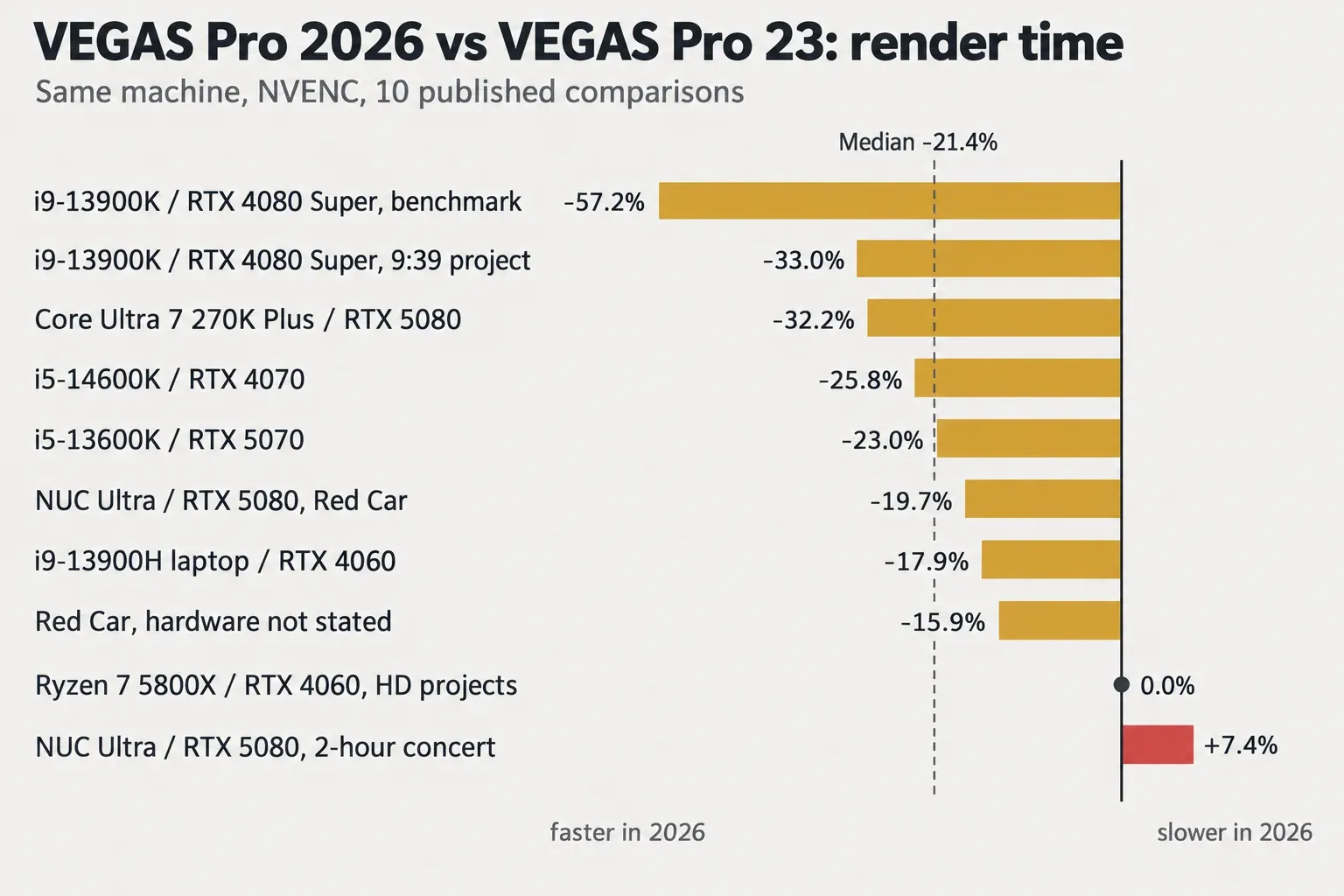
My verdict: on typical NVIDIA-encoded projects, VEGAS Pro 2026 renders about a fifth faster than VEGAS Pro 23, and it is clearly the better engine to buy into. If you mostly render long multicam concerts or heavily nested timelines, the gain shrinks to nothing and may reverse. In that case, render one real project in the trial before you pay.
VEGAS Pro, Plus or Ultimate: which edition to buy
Buy Plus unless you only cut picture. All three editions share the same editor. Plus adds the audio and tracking tools. Ultimate adds a large effects bundle and is sold subscription-first.
| Included | VEGAS Pro | VEGAS Pro Plus | VEGAS Pro Ultimate |
|---|---|---|---|
| GPU-accelerated timeline, AI tools, Advanced Color Grading, Multi-Cam, compositing, integrated audio tools | Yes | Yes | Yes |
| Continuum 2D and 3D Titling | Yes | Yes | Yes |
| Storyblocks media library | Subscription only | Subscription only | Subscription only |
| Mocha Vegas planar tracking | No | Yes | Yes |
| Particle Illusion | No | Yes | Yes |
| Sound Forge (standalone editor) | No | Yes | Yes |
| CrumplePop VST plug-ins | No | Yes | Yes |
| CrumplePop SoundApp standalone | No | No | Yes |
| Mocha Pro plug-in | No | No | Yes |
| Optics | No | No | Yes |
| Continuum VFX plug-ins | No | No | Yes |
| Sapphire | No | No | No |
The rows follow the VEGAS Pro plans and pricing comparison. The old names don't map one-to-one. Suite 23 owners bought it for the bundled Sound Forge Pro 18 and ACID Pro 11. In 2026, Plus is the tier that carries Sound Forge, and the plans page lists no ACID Pro in any edition. If you still build music from loops, the ACID Pro 2026 review covers the standalone price and the upgrade route from ACID Pro 11.
My pick for most editors is Plus. The perpetual step from VEGAS Pro to Plus is $80. A standalone Sound Forge perpetual license lists at $299.95 on its own, as the Sound Forge pricing guide shows.
- Sound Forge. This is the editor covered in the Sound Forge Pro 2026 review. Plus owners can send an event out to it and back through the Sound Forge and VEGAS Pro round trip. Not sure VEGAS's own audio tools fall short for your work? Sound Forge vs VEGAS Pro answers that first.
- CrumplePop VST plug-ins. These handle quick dialogue fixes inside the timeline. CrumplePop vs iZotope RX shows where they stop.
- Mocha Vegas. It restores the planar tracker that VEGAS Pro 23 dropped; Mocha VEGAS vs Mocha Pro shows which jobs still need Ultimate.
I would buy plain VEGAS Pro only if you cut picture, mix on the timeline and never track a sign or a screen.
Ultimate is for VFX work. If VEGAS is your only host, it is a cheaper route to Continuum effects, the full Mocha Pro plug-in and Optics than buying them separately. The Mocha Pro price guide shows what that plug-in costs on its own. One thing it doesn't include: Sapphire is in no edition. How Continuum and Sapphire differ matters if you are buying for effects, and Sapphire in VEGAS Pro covers adding it separately.
Price, licenses and the MAGIX upgrade
All prices below are the US store price on October 21, 2026:
- VEGAS Pro: $17.95 a month, $99.95 a year or $219.95 perpetual.
- VEGAS Pro Plus: $24.95 a month, $149.95 a year or $299.95 perpetual.
- VEGAS Pro Ultimate: $39.95 a month or $199.95 a year.
The full ladder is on Boris FX's VEGAS Pro store page.
| Licence | VEGAS Pro | VEGAS Pro Plus | VEGAS Pro Ultimate |
|---|---|---|---|
| Monthly subscription | $17.95 | $24.95 | $39.95 |
| Annual subscription | $99.95 | $149.95 | $199.95 |
| Perpetual (includes 1 year of upgrades and support) | $219.95 | $299.95 | $499.95 listed* |
| Upgrade and support renewal | $143.95 | $199.95 | $249.95 listed* |
| Upgrade and support reinstatement (lapsed) | $174.95 | $239.95 | $299.95 listed* |
| Upgrade from a MAGIX serial | $143.95 | $199.95 | No upgrade listed |
*The store lists these Ultimate perpetual items, but the launch release says "Vegas Pro Ultimate is available as a subscription plan". A Boris FX staff member also wrote in the forum that Ultimate is available as a subscription only. Treat Ultimate as a subscription product, and confirm the perpetual option at checkout before you plan around it.
Subscription or perpetual
If you want every update, subscribe. A perpetual license includes one year of upgrades and support. After that, staying current costs the renewal price each year.
- Plus. Renewal is $199.95 a year, which is more than the $149.95 annual subscription. The subscription also includes speech-to-text, text-to-speech and Storyblocks. Two years of Plus annual cost $299.90, five cents less than the perpetual. From the third year on, a perpetual you stop renewing is the cheaper option.
- Base VEGAS Pro. The same pattern holds: two annual years cost $199.90, against $219.95 perpetual.
So buy perpetual only if you plan to keep one build for three years or more and can live without the subscriber-only tools. A forum user also points out that there is no upgrade pricing on subscriptions. That matches the store, where upgrade items exist only for perpetual licenses.
Upgrading a MAGIX license
Owners of an earlier MAGIX VEGAS Pro can buy the "Upgrade from Magix Serial" item: $143.95 to VEGAS Pro or $199.95 to Plus. Boris FX's "new home" announcement for VEGAS Pro, Sound Forge and ACID Pro says this single upgrade price for MAGIX customers runs until Friday, December 5, 2026. The same page offers the premium download of the VEGAS Pro Essentials training series, a $49.95 value, free for a limited time; Boris FX's launch press release sets that offer's end at the same December 5 date.
If you bought VEGAS Pro 23 late in 2025, owner reports say you pay the normal upgrade price rather than moving free:
- One buyer was told the free window covered purchases in the last 30 days.
- Others report that support granted an extra 25% off the upgrade on request.
There is no published policy for either. Write to Boris FX support with your order date before you pay.
Steam and sales
Steam is the place to be careful. The VEGAS Pro 23 Steam Edition is still on sale for $199.99 from MAGIX, released October 23, 2025. That is the older version, about $20 below a 2026 perpetual license that includes a year of upgrades. If you search "vegas pro 23" and land there, know which version you are buying.
For discounts, the Boris FX deals page tracks current offers. The Boris FX Black Friday guide records how past November sales worked. Remember that the MAGIX upgrade price has a fixed end date.
Stability: what owners report
Most owners who give a verdict call VEGAS Pro 2026 usable for real work, and the current build is largely crash fixes. Crashes are the recurring complaint about 23. These counts were read on October 21, 2026:
| Where | Version | What owners say |
|---|---|---|
| Steam user reviews, all languages | VEGAS Pro 23 | 78 of 106 recommend it ("Mostly Positive") |
| English Steam reviews, October 2025 to October 2026 | VEGAS Pro 23 | 8 of 34 mention crashes (5 negative, 3 positive) |
| Boris FX forum: "Is VP 2026 ready for real work yet?" | VEGAS Pro 2026 | 6 of 8 users with a verdict call it stable or usable; 2 report crashes |
The details in that forum thread are practical:
- One of the two crash reports was cured by turning off GPU acceleration.
- Two users report slow launches; one measured about 32 seconds on average.
The updates since launch target those problems:
- The Build 189 release notes are mostly crash fixes: timeline trimming, Mocha export track options, Color Grading Panel actions and OFX plug-in scanning at startup.
- Build 143, according to Movie Studio Zen's VEGAS Pro 2026 update history, improved audio bitrate handling for AAC exports.
At launch, Movie Studio Zen called VEGAS Pro 23 the best version in many years, citing the new video engine and color-grading workflow. It is a VEGAS tutorial site that uses affiliate purchase links, so read that as an enthusiast's view.
My advice: install Build 189 before you judge stability. If 2026 crashes on your machine, toggle GPU acceleration as the first diagnostic, then update your graphics driver.
Should you upgrade from VEGAS Pro 22 or 23?
Yes for most VEGAS Pro 23 owners on NVIDIA. It is a clearer yes for VEGAS Pro 22 owners who skipped 23. Wait only if long multicam renders are your main job, or if you share projects with someone who stays on 23.
From VEGAS Pro 23
Here is what changes for a VEGAS Pro 23 owner:
- Speed. Renders get the median 21.4% gain shown above, while timeline preview stays about the same.
- Price. The MAGIX-serial upgrade costs $143.95 for VEGAS Pro or $199.95 for Plus, until December 5, 2026.
- Project files. A forum owner reports that projects saved in VEGAS Pro 2026 don't open in VEGAS Pro 23. Keep a copy of each 23 project before you resave it in 2026. Don't switch in the middle of a job with a collaborator who is still on 23.
From VEGAS Pro 22 or older
- Against VEGAS Pro 22. In four same-machine comparisons on the benchmark sheet and in the render thread, VEGAS Pro 2026 rendered a median 17.6% faster than VEGAS Pro 22 build 250 (range 15.3% to 27.8%). One of the four was an AMD VCE render.
- Against late VEGAS Pro 23 builds. Some owners saw them render slower than 22: a median 14.1% longer in three comparisons from two users. Forum staff add that 23 itself got slower over its lifetime, though another owner's machine ran 23 well. That split explains why many 22 owners waited.
- The result. 2026 is faster than 22 in all four timed pairs, so it is the version to move to.
On AMD graphics, the evidence is thin. All ten 23-to-2026 comparisons ran on NVIDIA graphics, nine of them with NVENC named. The AMD data is a single VCE pair against VEGAS Pro 22. AMD owners should judge with the trial.
New buyers
Start with the 15-day trial, which gives full access to all features. Render one of your own projects. Then buy Plus unless you know you will never open Sound Forge or Mocha.
System requirements, and is there a Mac version?
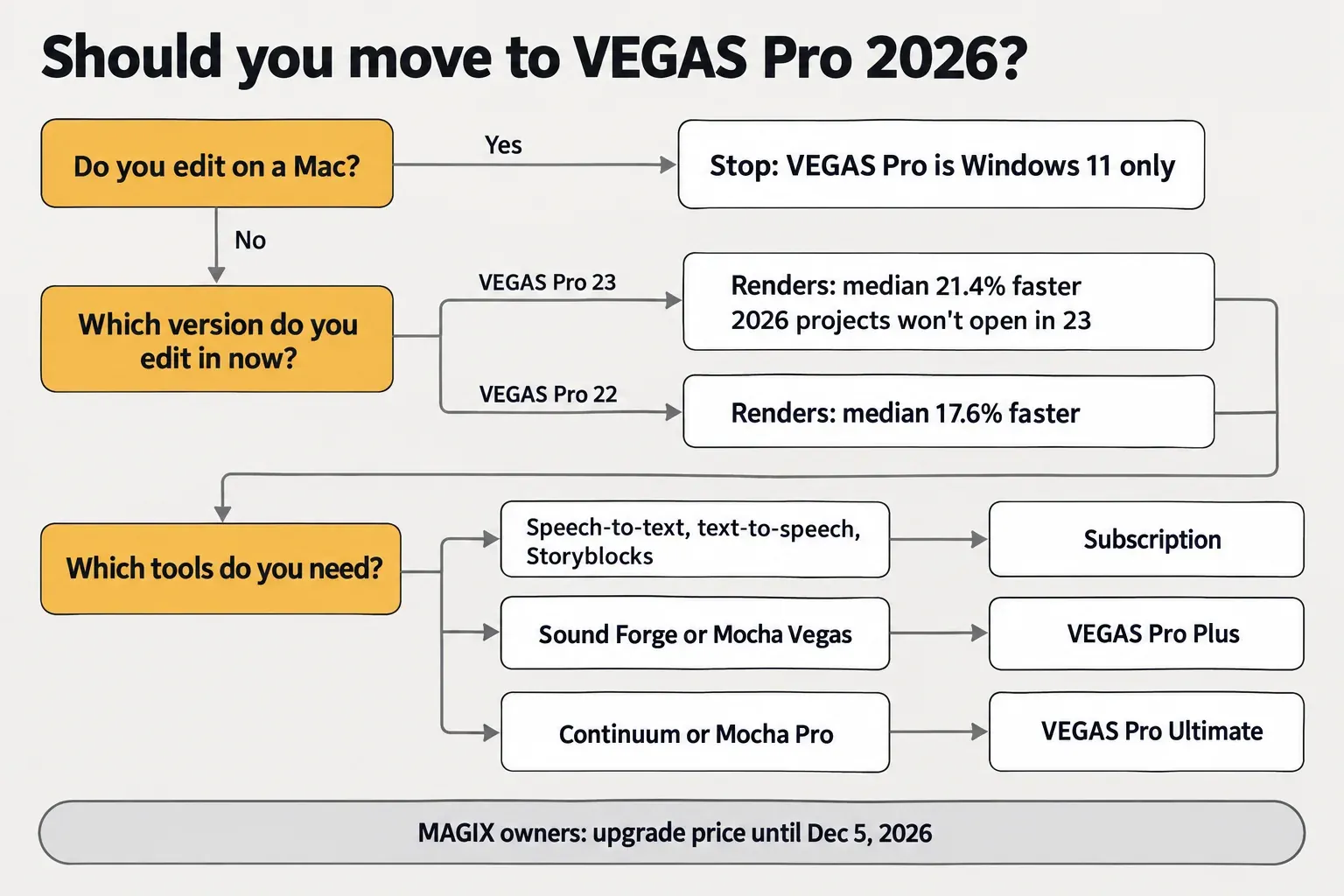
There is no Mac version: VEGAS Pro 2026 runs on Windows 11 only. For 4K editing, plan on a 12th-generation Core i7 or a Ryzen 7 5000, an RTX 30-class card and 32 GB of RAM. The tiers below are from the VEGAS Pro system requirements page.
| Tier | Processor | Graphics | VRAM | RAM |
|---|---|---|---|---|
| Minimum | Intel Core i5 8th gen or AMD Ryzen 5 1000 series | NVIDIA GeForce GTX 20 series, AMD Radeon with 8 GB, or Intel HD Graphics 630 | 8 GB | 16 GB |
| Recommended for 4K | Intel Core i7 12th gen or AMD Ryzen 7 5000 | NVIDIA RTX 30 series, AMD RX 5000 or Intel HD Graphics 770 | 8 GB (12 GB or more for 8K) | 32 GB |
| Recommended for AI tools | Intel Core i9 14th gen or AMD Ryzen 9 7000 | NVIDIA RTX 40 series or AMD RX 6000 | 16 GB or more | 32 GB |
The install needs 1.5 GB of free space, and an SSD is recommended. If you are buying hardware for VEGAS, the published render gains all come from NVIDIA cards. An RTX 50-series (Blackwell) card also adds hardware decoding of 4:2:2 AVC and HEVC, which suits 10-bit camera footage.
The license is a Boris FX account login, with no activation keys, and it works on up to two computers. A Boris FX staff member clarified in the MAGIX-to-2026 upgrade thread that the license is for one person at a time, not simultaneous use. Bundled add-ons move as a single bundle and can't be split across machines.
FAQ
Is Sony Vegas the same as VEGAS Pro?
Yes. Boris FX's acquisition announcement describes VEGAS Pro as "formerly Sony Vegas". The product passed to MAGIX and, in March 2026, to Boris FX, which now develops and sells it.
Is VEGAS Pro 23 still sold?
Yes, as the VEGAS Pro 23 Steam Edition on Steam ($199.99 from MAGIX). Boris FX's own store sells the 2026 editions: VEGAS Pro, Plus and Ultimate.
Can VEGAS Pro 23 open a project saved in 2026?
Not according to owner reports. Keep your VEGAS Pro 23 project files, and if a collaborator stays on 23, exchange media or rendered intermediates instead of project files.