

Buy Continuum first if you need one broad repair kit for one host: restoration, keying, titling, particles and machine-learning masks, from $325 a year on Adobe or OFX hosts. Buy Sapphire first if your work is finishing looks (glows, lens flares, defocus, light and stylized transitions), or if one license has to cover Premiere Pro, After Effects and DaVinci Resolve together, at $545 a year. On Avid Media Composer the two cost the same. On Final Cut Pro only Continuum is available.
I decide this by host before I compare a single effect. The two suites overlap more than their effect lists suggest, but they are licensed differently, and that changes the bill more than any feature does. Every price on this page is a US list price from the Boris FX store on October 20, 2026. Sale pricing is a separate question.
Sapphire or Continuum: the short answer
Sapphire is the finishing set. Boris FX's own FAQ files it under lens flares, glows, light effects, blurs, stylize, transitions and distortion. Continuum, in the same FAQ's words, is "a broader creative toolkit covering titling, motion graphics, particles, and image restoration." That split also shows up in independent reviews, as the test results section below shows.
| Question | Sapphire | Continuum |
|---|---|---|
| Main job | Finishing looks: glows, flares, light, defocus, stylize, transitions | Repair and utility: restoration, keying, titling, particles, ML masking |
| Size | 270+ effects and transitions, 3,000+ presets | 300+ effects, 40+ transitions, thousands of presets |
| Cheapest plan for Premiere Pro and After Effects | $545/year (Adobe/OFX license) | $325/year (Adobe license) |
| Premiere Pro plus DaVinci Resolve | One license, $545/year | Adobe + OFX licenses at $650/year, or multi-host at $765/year |
| Avid Media Composer | $545/year | $545/year |
| Final Cut Pro and Motion | Not supported | Supported; FCP license $215/year |
| Linux, Flame, Photoshop | Supported | Not on the host list |
| Listed memory | 8 GB minimum, 16 GB+ preferred | 32 GB or more |
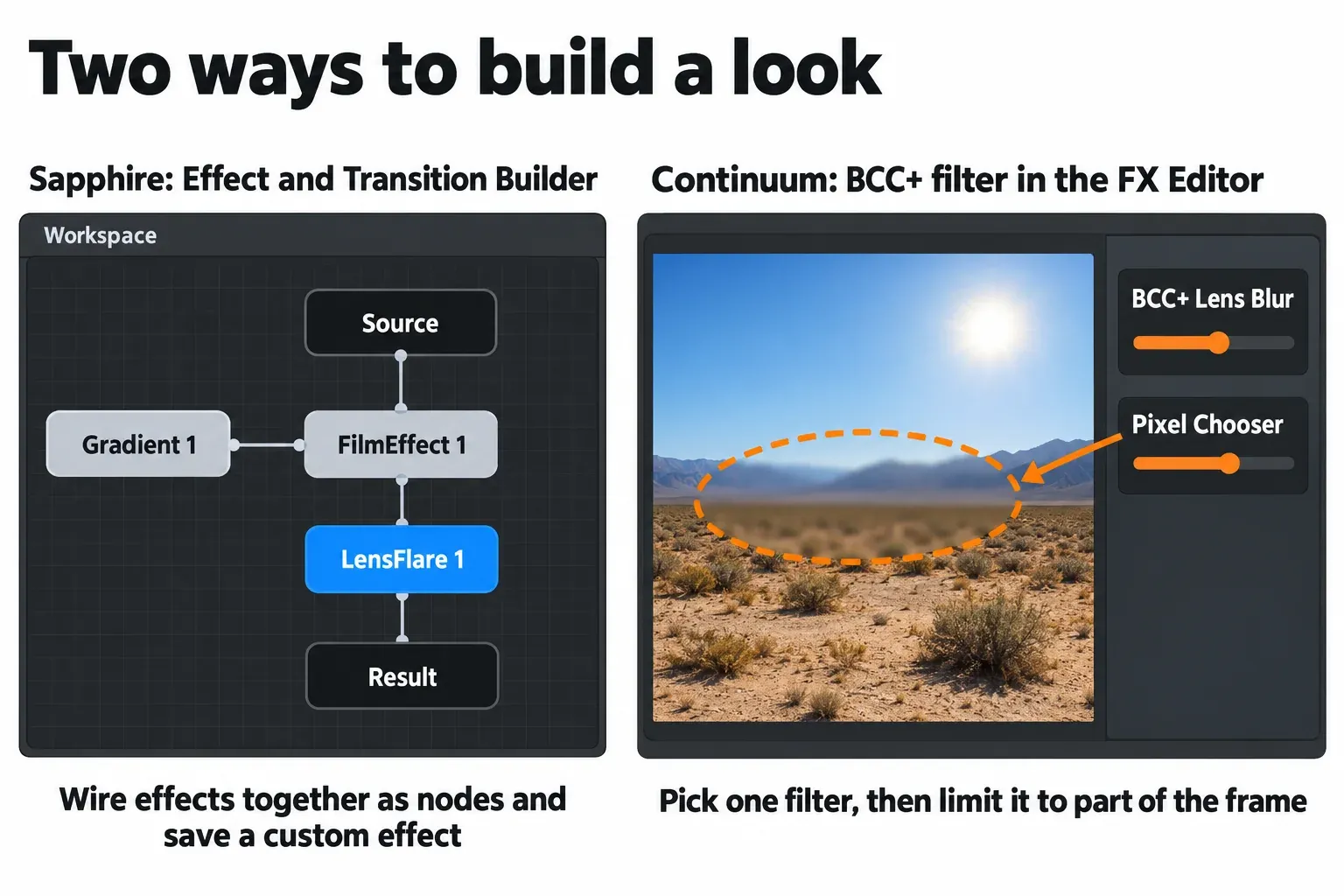
| Dedicated effect editor | Node-based Effect and Transition Builder for custom effects | FX Editor for BCC+ filters, with integrated Pixel Chooser |
Three host situations settle the choice before taste does:
- Final Cut Pro or Apple Motion: Continuum is the only option of the two.
- Linux, Autodesk Flame or Photoshop: Sapphire is the only option of the two.
- Premiere Pro or After Effects plus Resolve or Nuke: Sapphire covers everything on one $545 license. Continuum needs two single-host licenses or the multi-host one.
What each suite is for
Sapphire has been in development since 1996 and received a 2019 Primetime Engineering Emmy. It came to Boris FX when the company merged with its former rival GenArts. Today it ships more than 270 effects and transitions and more than 3,000 presets, and the emphasis is light and lens behavior: glows, glares, flares, defocus, film looks and distortions you drop on a finished edit. The part I would weigh most is the Effect and Transition Builder. It is node-based, comes with every Sapphire license, and lets you design, save and share your own custom effects and transitions.
Continuum (still often called BCC, for Boris Continuum Complete) is the toolbox. It counts 300+ effects, 40+ transitions and thousands of presets. Inside that count sit whole sub-products: Particle Illusion, Title Studio, Primatte Studio keying, Beat Reactor and Mocha tracking built into its effects. It also has two generations of filters. Original BCC filters use the FX Browser and mix GPU and CPU processing. Newer BCC+ filters use the FX Editor and are 100% GPU accelerated with a full CPU fallback. The machine-learning tools added in recent releases, such as BCC+ Face ML and BCC+ Deinterlace ML, are BCC+ filters, and Continuum picked up its own Engineering, Science & Technology Emmy in October 2025, as Digital Production noted in its Continuum 2026 report.
Both suites build Mocha planar tracking into their effects, so you only need the separate Mocha Pro license if you want its full standalone toolset. Sapphire and Continuum are two of many products in the lineup; the Boris FX hub maps how Mocha, Silhouette, Particle Illusion and the rest fit around them.
What the 2026.5 releases added
Boris FX ships major updates to its flagship products twice a year, with year-numbered versions and a ".5" release in between. The latest round shows how far apart the two roadmaps are.
- Sapphire 2026.5 (released in May 2026, per CG Channel) adds Advanced Defocus and Texture Ridges, a reimagined Glare, an updated Effect and Transition Builder, five new lens flares and more than 100 new presets. All of it is about how the image looks.
- Continuum 2026.5 adds the BCC+ Deinterlace ML effect, updated Face ML, License Plate ML, Motion Blur ML and UpRes ML models, and an FX Editor with an integrated Pixel Chooser. Most of it is about fixing or isolating parts of a shot.
Continuum 2026 (version 19.0) came out in October 2025, after Continuum 2025.5 in May 2025, and 2026.5 is the current version on the product page. Updates come with an active Upgrade & Support plan, covered in the price section.
Pick by host: what one license covers
Here is where the suites really differ. A Sapphire Adobe/OFX license covers After Effects, Premiere Pro and every OFX host Sapphire supports, including DaVinci Resolve, Nuke, Flame, Fusion Studio and VEGAS Pro. The Avid license covers Media Composer only, and the multi-host license covers all three groups. Continuum splits the same territory more finely. Its Adobe license covers Premiere Pro and After Effects, while OFX hosts are a separate license at the same price. Only the multi-host license combines Avid, Adobe, Apple and OFX.
| Host | Sapphire license | Continuum license |
|---|---|---|
| Premiere Pro, After Effects | Adobe/OFX, $545/year | Adobe, $325/year |
| DaVinci Resolve, Nuke (OFX) | Same Adobe/OFX license | OFX, $325/year |
| Flame, Fusion Studio (OFX) | Same Adobe/OFX license | Not on the host list |
| VEGAS Pro (OFX) | Same Adobe/OFX license | OFX, $325/year |
| Avid Media Composer | Avid, $545/year | Avid, $545/year |
| Final Cut Pro, Apple Motion | Not available | FCP, $215/year |
| Photoshop | On the host list | Not on the host list |
| Operating systems | macOS, Windows, Linux (RHEL 7–9 or compatible, such as Rocky Linux) | macOS, Windows |
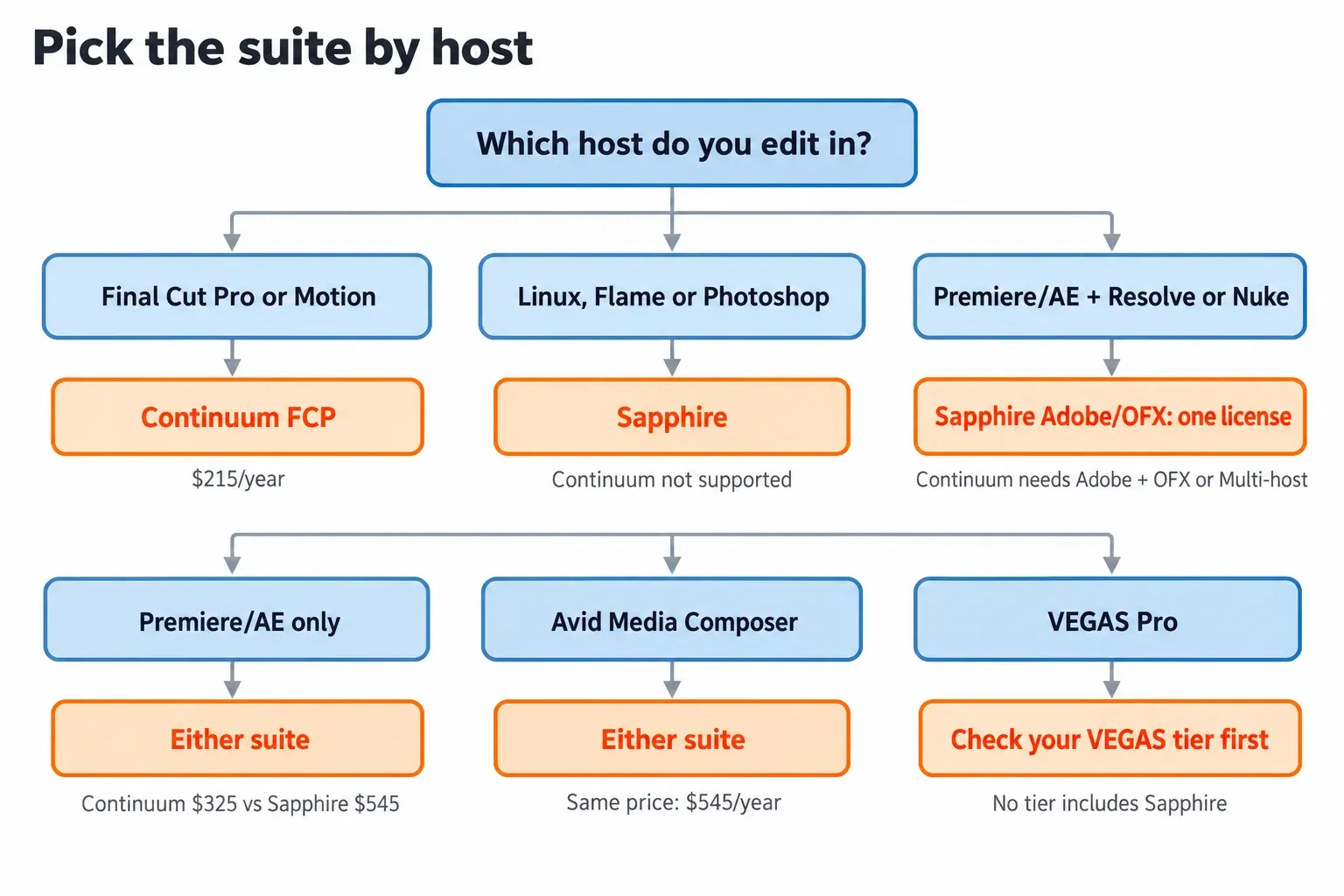
The practical cases:
- Premiere Pro or After Effects only: either suite works, and Continuum is $220 a year cheaper.
- Adobe plus Resolve or Nuke: Sapphire's single $545 license covers it. Continuum costs $650 a year as two licenses, or $765 as multi-host.
- Avid Media Composer: same price. Pick by job; ProVideo Coalition reviewer Kevin P. McAuliffe calls Continuum his go-to plug-in package in Media Composer.
- Final Cut Pro: Continuum at $215 a year or $365 perpetual is the only one of the two that installs.
- VEGAS Pro: check what your VEGAS tier already includes before buying anything (see the VEGAS section).
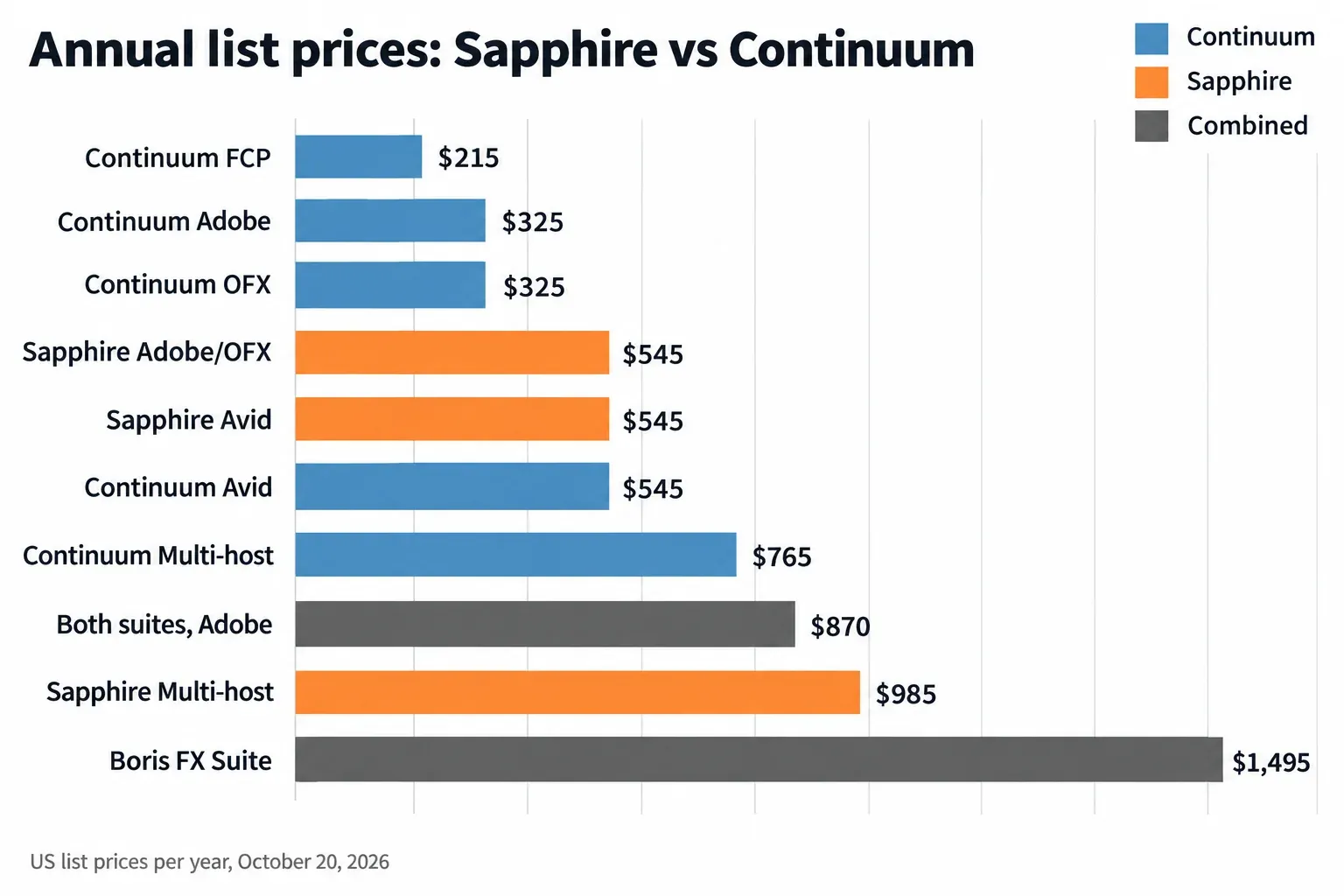
Prices on October 20, 2026
These are the current US list prices on the Boris FX store. If you find a 2024 price list or an older comparison post, treat its numbers as superseded. Some older Boris FX blog posts still quote earlier prices, and so does the structured data on one of the product pages.
| License | Monthly | Annual | Perpetual |
|---|---|---|---|
| Continuum FCP | $32 | $215 | $365 |
| Continuum Adobe | $48 | $325 | $1,095 |
| Continuum OFX | $48 | $325 | $1,095 |
| Continuum Avid | $80 | $545 | $1,865 |
| Continuum Multi-host | $112 | $765 | $2,195 |
| Sapphire Adobe/OFX | $80 | $545 | $1,865 |
| Sapphire Avid | $80 | $545 | $1,865 |
| Sapphire Multi-host | $144 | $985 | $3,075 |
| Boris FX Suite | $219 | $1,495 | Not offered |
A perpetual license is not frozen software, either. A Sapphire perpetual license includes a 12-month Upgrade and Support Plan that renews automatically by default, and Continuum perpetual licenses are sold with one year of Upgrade & Support included. After that first year you pay to stay current. If the plan lapses, getting back costs more:
| Upgrade & Support | Annual renewal | Reinstatement after a lapse |
|---|---|---|
| Continuum FCP | $215 | $315 |
| Continuum Adobe or OFX | $325 | $425 |
| Continuum Avid | $545 | $745 |
| Continuum Multi-host | $765 | $965 |
| Sapphire Adobe/OFX or Avid | $545 | $745 |
| Sapphire Multi-host | $985 | $1,185 |
Each renewal costs the same as the matching annual subscription. That makes a perpetual license a long-horizon purchase: it pays off only if you are willing to stop updating at some point and keep the last version you were entitled to. Continuum also has a cheaper partial route. Units are prepackaged groups of Continuum filters at a reduced price; filters outside your Unit stay installed but carry a watermark. Premium filters are single filters at a reduced price. Every figure here is a list price; Boris FX's seasonal sale pricing is tracked separately.
System requirements: Continuum asks for more machine
The listed hardware is the least-discussed difference, and it matters if you edit on a laptop. Continuum's requirements are much heavier. Sapphire still runs on Intel Macs, and it runs natively on Apple silicon with Metal GPU acceleration.
| Requirement | Sapphire | Continuum |
|---|---|---|
| macOS | Catalina 10.15 or later; Monterey 12.0+ for the ML tools in integrated Mocha | Monterey 12.7 or later; Final Cut Pro and Motion need macOS 13.4+ |
| Windows | Windows 10 or 11 | Windows 10 or 11 |
| Linux | RHEL 7–9 or a compatible distribution such as Rocky Linux | Not supported |
| Memory | 8 GB minimum, 16 GB+ preferred | 32 GB or more |
| Mac processor | Apple M-series or Intel | Apple M Pro, Max, Ultra or Intel |
| Windows CPU | 64-bit Intel or AMD, four or more cores | Intel or AMD with AVX2 instructions |
| Windows GPU | NVIDIA Ampere, Ada Lovelace, Hopper or Blackwell series; AMD Radeon PRO W6000 to W9000 series or Ryzen AI Max PRO | NVIDIA RTX 2000 or AMD Radeon RX 6000 or higher, with 6 GB VRAM |
Read the Mac row of the Continuum column carefully. A base M-series chip is not on the list; Boris FX names the Pro, Max and Ultra variants plus Intel. If you edit on a base-chip MacBook with 16 GB of memory, Sapphire sits comfortably inside its requirements and Continuum does not. Treat that as a reason to run the trial on your own machine before you pay.
Test results: what published reviews say
No outlet has published a same-machine speed benchmark of Sapphire against Continuum. Render speed would say little anyway, because the two suites rarely do the same job on the same shot. The useful evidence is the verdict working editors and trade reviewers reach after living with them. This composite counts those verdicts across eight independent pieces published between May 2020 and July 2026: postPerspective, RedShark News, two ProVideo Coalition articles, Digital Production, two CG Channel release reports and Maxon's After Effects plugin roundup. Not every piece covers every question, so each finding shows its own denominator.
| Finding | Sources that agree |
|---|---|
| Continuum is the broad utility kit (restoration, keying, masking, titling, particles, ML repair) | 7 of 7 that describe Continuum |
| Sapphire is the looks-and-light finishing set (glows, flares, lens effects, stylized transitions) | 5 of 6 that describe Sapphire |
| The two are complementary rather than either/or | 4 of 8 |
| Sapphire's entry plan costs more than Continuum's | 3 of 3 that publish prices |
| Recent Continuum releases center on AI/ML masking and keying | 3 of 3 that cover those releases |
| AI masks are strong but worth checking on your own footage before production | 2 of 3 that cover those releases |
| Continuum is the go-to package for Avid and broadcast editors | 2 of 8 |
| Overlap means the host and what you already own decide | 2 of 8 |
The division of labor is the most consistent result. In postPerspective's review of both suites, Brady Betzel, who uses both daily, calls Continuum "an image restoration, utility and online editor tool kit" and Sapphire "more 'video candy' than technical improvements," then adds, "Ideally both work together very well if you can afford it." RedShark News called Boris FX the "Swiss Army Knife" of plugins and credited Sapphire's reputation in TV to its light effects, flares and lens effects. Six years later the language has barely moved. Maxon's 2026 After Effects plugin roundup, written by the company behind the competing Red Giant line, says Sapphire "tackles high-end finishing," calls Continuum "the 'everything' box," and concludes that "the choice between them often comes down to which suite you already own."
On Avid the verdict tilts to Continuum. Kevin P. McAuliffe's in-depth look at Continuum 2025.5 for ProVideo Coalition calls it his "go to plug-in package in Media Composer", though he admits a soft spot for Sapphire's S_Glow. In July 2026, in his history of Boris FX, he writes that "Continuum alone has gotten me out of more jams than I care to count."
The release coverage shows where each suite is heading. CG Channel's Continuum 2026 report leads with the revamped Pixel Chooser and Primatte Studio and the new Face ML and Matte Refine ML tools. Its Sapphire 2026.5 report is about defocus, noise textures, flares and glare. The caution is consistent too: McAuliffe says Continuum's auto roto nailed his test shot on the first pass but notes he could have made very slight adjustments around the hands, and Digital Production says teams are "advised to test AI-masking accuracy and stability within their own workflows" before putting them into production.
Composite result: Continuum wins as the first purchase for an editor who repairs, keys, masks and titles on one Adobe or OFX host, because it covers more of that work and costs $220 a year less there. Sapphire wins for finishing and look design, and for anyone who needs Adobe and OFX hosts on one license. The editors who use both keep both.
Need both? Two licenses vs the Boris FX Suite
Buying both suites is common enough that the math is worth doing before checkout. Using annual list prices:
- Both for Adobe hosts: $545 + $325 = $870 a year.
- Both for Premiere or After Effects plus Resolve: $545 for Sapphire plus $650 for Continuum Adobe and OFX, $1,195 a year.
- Both for Avid: $545 + $545 = $1,090 a year.
- Both as multi-host: $985 + $765 = $1,750 a year.
- The Boris FX Suite: $1,495 a year, or $219 a month.
The Boris FX Suite gives members every Boris FX plugin and standalone application on any supported host: Continuum, CrumplePop, Mocha Pro, Music Studio, Optics, Samplitude, Sapphire, Sequoia, Silhouette and SynthEyes. On price alone, two single-host licenses still win. The Suite starts to make sense when you need both suites across host families, where two multi-host licenses cost $255 more than the Suite. It also makes sense if you would otherwise add Mocha Pro or Silhouette. VEGAS Pro itself and iZotope products are not among the included products (VEGAS appears on that page only as a supported host), so do not count on them.
If you edit in VEGAS Pro
VEGAS Pro users start with part of this question already answered. VEGAS Pro and Sound Forge are now sold by Boris FX, and ProVideo Coalition dates the purchase of VEGAS Pro, SOUND FORGE and ACID Pro from Magix to March 2026. According to the VEGAS Pro plans and pricing page:
- Every tier includes Continuum 2D+3D Titling (the Continuum Title Pack).
- VEGAS Pro Plus adds Mocha Vegas and Particle Illusion.
- VEGAS Pro Ultimate adds "Continuum VFX Plugins for Vegas Pro," the Mocha Pro plugin, Optics and SoundApp.
- No tier includes Sapphire.
Ultimate lists at $199.95 a year or $499.95 perpetual on the Boris FX store. That is less than the $325-a-year standalone Continuum OFX license, but the plans page does not spell out which Continuum filters the Ultimate bundle contains, so do not assume it equals the full product. If the filter you need is not in your tier, the OFX license is the complete route.
Sapphire is not in any VEGAS tier, but it loads through OFX; the guide to installing and using Sapphire in VEGAS Pro covers the setup. If you are weighing other effects packs alongside these two, the VEGAS Pro plugins guide lists what loads and where it installs. VEGAS editors who already send audio to Sound Forge can see the VEGAS Pro and Sound Forge workflow, now that both come from the same company.
Trials, Units and the "VST" mix-up
Neither suite has a free version, but both have free trials, and I would not buy either without running one on the actual machine and host first. Continuum installs through the Boris FX Hub and runs as a fully functional, watermarked trial. A red X over a shot means the filter is running unlicensed. Sapphire offers its own free trial from borisfx.com. Neither product page states the trial length, so have a real project ready before you start one. Trials for other tools that sit in this workflow are gathered in the free plugins and trials hub.
If you only need a slice of Continuum, the Units described in the price section are the budget route. Check the Unit's filter list against the filters you actually use before you buy it, because anything outside the Unit renders with a watermark.
Neither suite is a VST plugin
Searches like "Sapphire VST" or "Continuum VST free" mix up two worlds. Neither suite is a VST: that format is for audio, as explained in what a VST plugin actually is, while Sapphire and Continuum load as video effects inside editing and compositing hosts (Adobe, Avid, OFX hosts and, for Continuum, Final Cut Pro and Motion). No audio host appears on either product's host list.
Verdict
My recommendation follows the host, then the work:
- Buy Continuum first if you edit in one host and spend your time fixing shots: keying, masking, restoration, deinterlacing, titles and particles. It is the only choice on Final Cut Pro, and the cheaper entry on Premiere Pro, After Effects and OFX hosts.
- Buy Sapphire first if your job is the look: glows, flares, defocus and transitions on finished cuts. It is also the better buy when Adobe and Resolve or Nuke must share one license, and the only choice on Linux or Flame.
- Move to the Boris FX Suite once you would pay for both suites on more than one host family, or would add Mocha Pro or Silhouette anyway.
On Avid, where the price is identical, I would let the work decide; a common path is to start with Continuum and add Sapphire when finishing work demands it.
FAQ
Is Continuum included in VEGAS Pro?
Partly. Every VEGAS Pro tier includes Continuum 2D+3D Titling, and VEGAS Pro Ultimate adds a bundle the plans page calls "Continuum VFX Plugins for Vegas Pro." The full Continuum suite for VEGAS is the separate OFX license at $325 a year.
Does one Sapphire license work in DaVinci Resolve and Premiere Pro?
Yes. The Sapphire Adobe/OFX license covers After Effects, Premiere Pro and all supported OFX hosts, including Resolve, Nuke, Flame, Fusion Studio and VEGAS Pro. Avid Media Composer needs the separate Avid license or the multi-host one.
Does Continuum run on Linux?
No. Continuum lists macOS and Windows only. Sapphire is the one with a Linux build, for Red Hat Enterprise Linux 7–9 or a compatible distribution such as Rocky Linux.
Is Sapphire or Continuum better for After Effects motion graphics?
For light, glow, flare and stylized looks, Sapphire. For titling, particles and keying, Continuum, which bundles Title Studio, Particle Illusion and Primatte Studio. Both have deep transition and stylize libraries, which is why reviewers say the overlap is real.