
Quick answer: choose VEGAS Pro for a video edit or a multitrack audio mix. Choose Sound Forge for detailed work on an individual audio file: repair, measurement, processing and delivery. You do not need both for every project. Start with the tools you already own, then add the other application for a task your current workflow cannot handle comfortably.
This comparison belongs to the Sound Forge Comparisons hub. It covers the Boris FX 2026 products, not the contents of an old Sony or MAGIX bundle. The title illustration is conceptual; the two credited interface images below come from Boris FX's March 2026 press materials.
Sound Forge vs Vegas Pro: Feature Comparison
The distinction is files versus a production timeline. Sound Forge's product documentation explicitly says it is not a multitrack DAW, although it records and edits files with up to 32 channels. Those channels are not separate tracks with independently arranged clips. VEGAS Pro's current feature page lists unlimited audio and video tracks; real project capacity still depends on your computer and media.
On a narrow screen, scroll the comparison table sideways.
| Task | Sound Forge 2026 | VEGAS Pro 2026 |
|---|---|---|
| Main workspace | Individual audio-file editing, restoration and mastering | Video production and multitrack audio mixing |
| Detailed repair | Direct sample editing, Pencil and Interpolate | Event editing and effects; an external editor is available for file-level work |
| Non-destructive work | Event-based mode alongside default destructive editing | Timeline edits leave source media unchanged; external source edits are a separate risk |
| Audio processing | EQ, dynamics, metering, noise reduction and repair; third-party effects support | Track and bus processing for the mix; CrumplePop plug-ins in Plus and Ultimate |
| Video | Supports some video formats, but is not a multitrack video NLE | Picture editing, grading, titles, compositing and final video render |
| Current editions | Sound Forge and Sound Forge Plus | VEGAS Pro, Plus and Ultimate; Sound Forge included in Plus and Ultimate |
| Published OS requirement | Windows 11 | Windows 11 |
Both current requirements pages name Windows 11: Sound Forge specifications and VEGAS Pro specifications. Neither lists a current native macOS edition. VEGAS also publishes separate hardware recommendations for 4K and AI work. A machine suitable for basic file editing is not automatically suitable for demanding video projects.
What Vegas Pro Does That Sound Forge Doesn't
VEGAS keeps dialogue, music, effects and picture on one production timeline. Use it to arrange a scene, synchronize sound, automate the mix, grade footage and render the finished video. Sound Forge's ability to open or export certain video formats does not replace that editing environment.
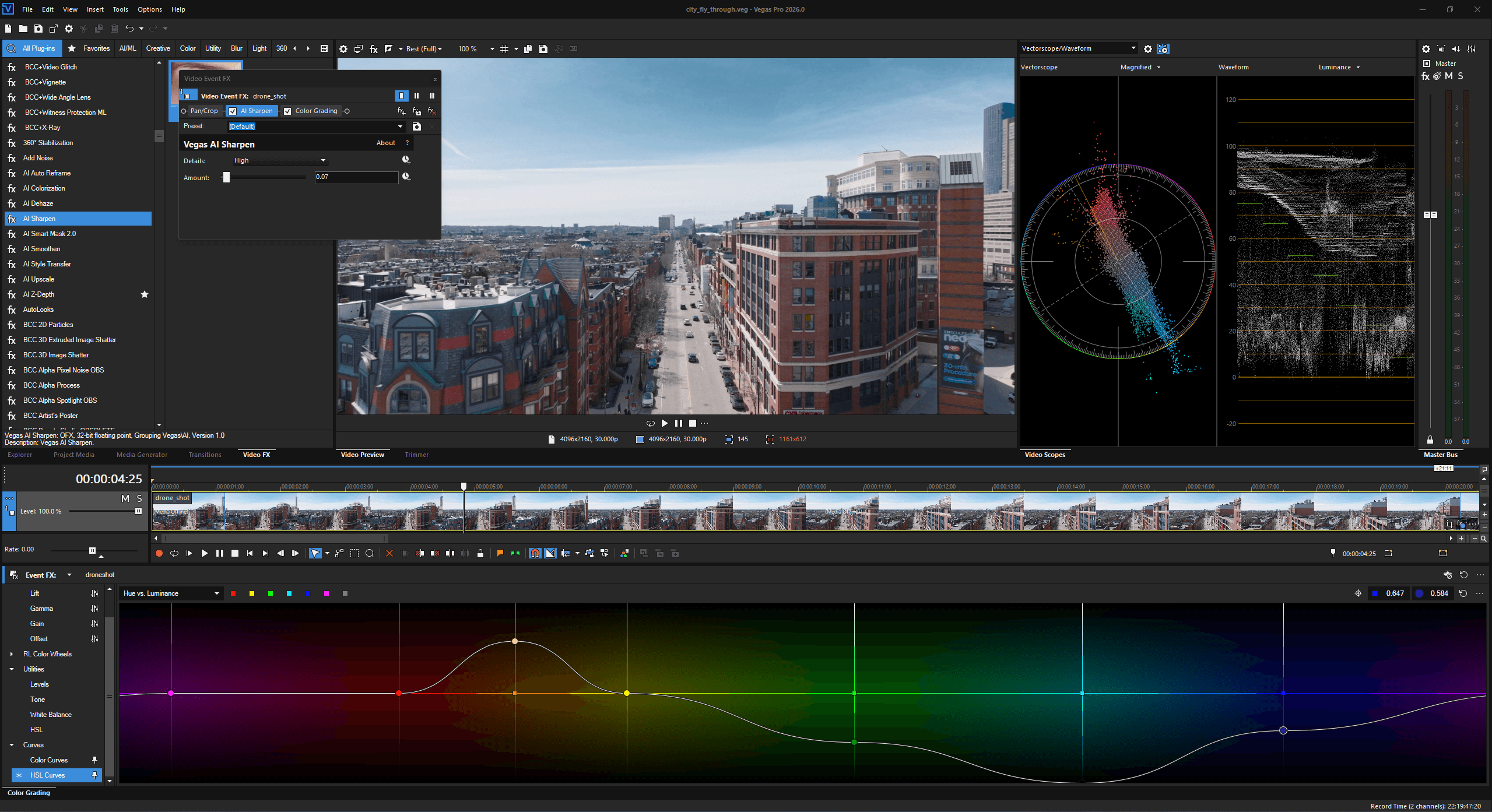
The 2026 release notes mark offline Speech-to-Text and Text-to-Speech as subscription only. Offline processing does not mean those features are included with a perpetual license. Sound Forge also advertises locally processed Text to Speech; voice generation alone is not the reason to choose a video editor.
For cleanup, Plus and Ultimate list CrumplePop VST plug-ins. Ultimate also lists the standalone CrumplePop SoundApp for audio cleanup and stem separation. These are different components, not different names for Sound Forge. Try processing a copy of your difficult recording before buying for a promised result. No cleanup tool can guarantee an undamaged voice or perfectly separated stems.
What Sound Forge Does That Vegas Pro Doesn't
Sound Forge provides direct waveform repair. Its Pencil tool redraws samples; Interpolate bridges a very short damaged selection. Those operations suit an isolated defect, not a long passage of missing speech. The click and pop repair guide explains the tool choice and why an over-wide repair can remove useful audio.
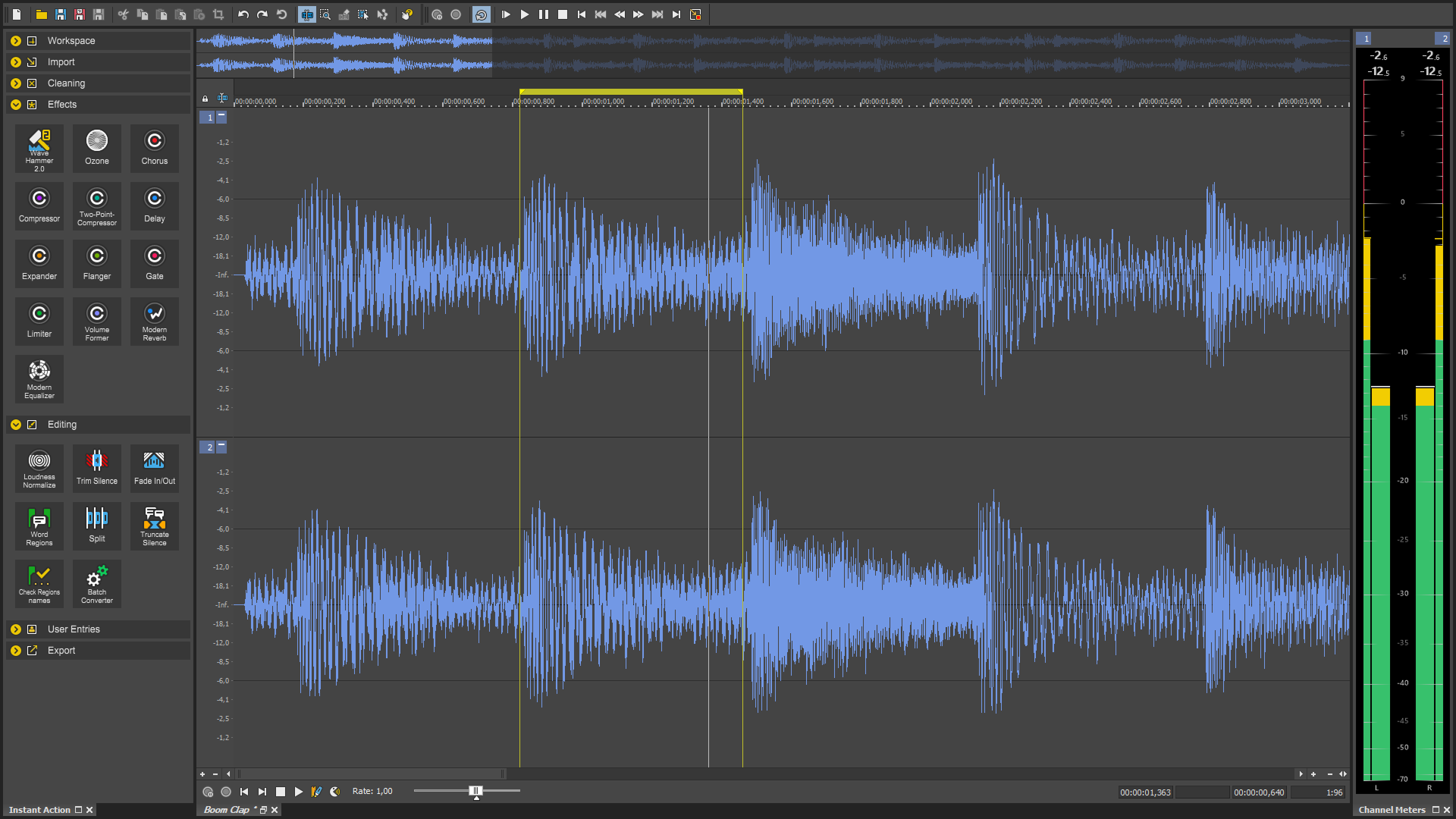
The current Sound Forge feature list includes broadband noise reduction, click/crackle removal, clipping repair, EQ, dynamics, peak/loudness metering and batch processing in the base editor. Plus is not required merely to get these tools. Restoration can introduce artifacts, so keep the source and compare the processed copy before committing.
For a finished stereo mix, a file editor is a practical place to inspect peaks, adjust processing and verify the exported master. That is a workspace preference, not proof of better sound or faster processing. VEGAS can finish a mix through its own processing chain. Use the Sound Forge mastering guide when you need the file-finishing steps rather than a second production timeline.
The Overlap: Audio Editing in Vegas Pro
Both applications can record, edit and process audio. VEGAS supports track and bus routing; Sound Forge supports multichannel files and third-party effects. Noise reduction is not exclusive to Sound Forge, and sample-accurate timing should not be confused with drawing the waveform's sample values.
Sound Forge is not always destructive: its current feature list includes an event-based non-destructive mode. Conversely, a non-destructive VEGAS timeline does not protect a source file you deliberately overwrite in an external editor. The command and save destination matter more than a blanket label attached to the application.
Keep a dialogue cleanup in VEGAS if an available effect does the job. Open a copy in Sound Forge when you need manual sample repair or a separately processed file. For a podcast with independently arranged speakers, music and effects, use a multitrack environment; Sound Forge is useful before or after that session, not as its replacement. If the real choice is audio-file editing versus music production, read Sound Forge versus REAPER.
How They Work Together
Save the VEGAS project and keep an untouched copy of the source media first. For an ordinary audio event, the safer external-edit route is Tools → Audio → Open Copy in [editor name]. Edit and save that copy. The documented result is a new file set as the event's active take, leaving the original source available. This is a documented workflow, not a round-trip test performed for this comparison.
If Sound Forge is not selected, use Options → Preferences → Audio → Preferred audio editor and browse to the installed editor's executable. Choose the actual application you intend to use, not an assumed version-specific installation path.
The separate Open in [editor name] command opens source media. Saving over it can affect every event that references the same file. Changing the name or location with Save As requires importing the new file yourself. Both external-editor help pages exclude audio events from nested projects; do not assume the same command works on every timeline item.
For a whole mix, render an audio file instead of treating an event copy as a complete mix export. The current VEGAS Pro 2026 rendering help uses File → Render; older guides call it Render As. Choose a suitable WAV output, confirm the range, sample rate and channel layout, and use a new filename. A 24-bit PCM WAV can be a working handoff when both applications and the delivery plan support it; it is not a universal requirement or a way to restore detail lost in the source.
After processing, keep the original render, import the finished copy and check its start position, duration, channels and sync against picture. Confirm that you are not playing both versions or applying the same processing twice. Listen to the final exported file too: VEGAS documents that its render-time loudness log measures before the codec, so a lossy deliverable needs a separate post-encode check. The dedicated VEGAS-to-Sound-Forge workflow guide covers the handoff in more detail.
Vegas Pro Tiers and Sound Forge Bundling
As checked September 15, 2026, the current VEGAS tier matrix includes Sound Forge in Plus and Ultimate, not base VEGAS Pro. It names Sound Forge, not Sound Forge Plus. Do not infer that the separate Plus-only Melodyne, Vandal, VariVerb II and 3D Reverb extras are included. The Sound Forge versus Sound Forge Plus comparison explains that separate edition choice.
The March 30 acquisition announcement is internally inconsistent: its Plus description includes Sound Forge, while its table marks Sound Forge only under Ultimate. That does not establish a later bundle change. Use the current product matrix and the exact purchase offer, not an old screenshot or the contents of a Sony/MAGIX-era suite.
The same announcement gives these historical US launch list prices: VEGAS Pro at $17.95 monthly, $99.95 annually or $219.95 perpetual; VEGAS Pro Plus at $24.95 monthly, $149.95 annually or $299.95 perpetual; Ultimate at $39.95 monthly or $199.95 annually, with no perpetual option listed. Standalone Sound Forge was $24.95 monthly, $149.95 annually or $299.95 perpetual. These are not verified September checkout quotes. Currency, tax, discounts, eligibility and the offer's bundle terms can change what you pay.
At those launch figures, VEGAS Pro Plus and standalone Sound Forge have the same listed subscription and new-perpetual prices. That makes the bundle worth checking before buying the editor twice, but it does not prove identical current prices or identical rights for every included component. Compare the live offer with your existing entitlements.
Boris FX offers subscription and perpetual licensing for VEGAS Pro and Plus, and subscription licensing for Ultimate. A perpetual license is not a promise of every future release. The general Upgrade and Support policy describes a separate renewable support/update term and says perpetual licenses remain functional after that term expires. It explicitly lists VEGAS Pro under automatic renewals; confirm the terms attached to your Sound Forge or bundle purchase rather than assuming every product has identical renewal conditions. The Boris FX license agreement ties the licensed product to the invoice. Check the license supplied with each bundled component before assuming it grants the same use, update or renewal rights as the host.
Which One First?
Choose VEGAS first for picture editing or a multitrack mix. Check whether your existing edition already supplies the cleanup tools you need. Buy Ultimate for a specific included application or feature you will use, not because its name implies every audio problem requires it.
Choose Sound Forge first when the job starts and ends with individual audio files: a voice recording, a transfer, a repair or a finished master. Follow the Sound Forge beginner workflow to learn the editor. For independent tracks or MIDI composition, investigate a DAW instead.
Use both when a video production needs file-level repair or a separate audio deliverable. Buy only after checking the bundle, and keep the handoff reversible. This comparison does not claim measured speed, listening-test results, paid activation testing or a verified checkout purchase.
Frequently Asked Questions
Is Sound Forge included in Vegas Pro?
The current VEGAS matrix checked September 15, 2026 includes Sound Forge in Plus and Ultimate, not base VEGAS Pro. It does not identify that inclusion as Sound Forge Plus. Confirm the exact offer and license terms before paying.
Do I need Sound Forge if I already have Vegas Pro?
Not automatically. Use the effects and mix tools you already own first. Add a file editor when you need direct waveform repair or a separately processed audio deliverable. Ordinary noise reduction alone does not establish a need for another application.
Can Vegas Pro do everything Sound Forge does for audio?
No. VEGAS offers a multitrack production timeline, while Sound Forge provides direct waveform editing and file-finishing tools. Their effects overlap. Choose by the operation, not an assumption that one always sounds better.
Are Sound Forge and Vegas Pro made by the same company now?
Yes. Boris FX announced its acquisition of VEGAS Pro, Sound Forge and Acid Pro from MAGIX on March 30, 2026. They remain separate applications with different editing roles.
Which is better for mastering audio: Sound Forge or Vegas Pro?
Sound Forge is a practical choice for inspecting and finishing an individual stereo file. VEGAS can process and render an existing mix without an external editor. Neither workspace alone guarantees a better-sounding master; the processing and verified deliverable determine the result.
What is the difference between Sound Forge and Vegas Pro for voice-over work?
Use VEGAS to place a voice against picture and mix it with other tracks. Use Sound Forge for direct file repair or a separate processed voice deliverable. For external edits, prefer a copy, preserve the original and check the returned file's timing.
Fact-checked September 15, 2026 against the current product matrices, Windows requirements, VEGAS Pro 2026 help and the dated Boris FX acquisition announcement. Launch prices are historical figures, not a current checkout quote.