

MIDI 1.0 provides 16 logical channels per port. Software usually displays them as channels 1 through 16, while the four-bit channel field in a Channel Message status byte uses values 0 through 15. Each independent MIDI port has its own set of 16. A DAW track can listen to one channel, every channel or a routed combination, so the limit does not mean 16 tracks or 16 devices for your entire setup.
What “16 MIDI channels” actually means
A channel is a logical address inside one MIDI 1.0 data path. It lets a receiver separate messages that travel through the same port. A keyboard part can use channel 1, a bass part channel 2 and a drum instrument another channel while all three message streams share one connection.
The important boundary is per port. The MIDI Association’s guide to MIDI messages describes 16 logical channels for Channel Messages. Add a second independent MIDI port and you add another channel namespace: port B channel 1 is distinct from port A channel 1.
“Channel 4” is incomplete when several ports exist. “Interface port B, channel 4” identifies the actual route.
That’s why the familiar number 16 is easy to misread. It isn’t a universal ceiling for a studio, a song or a computer. It describes the address space available inside one MIDI 1.0 port or equivalent stream context.
How the channel number fits inside a MIDI 1.0 message
A MIDI 1.0 Channel Message’s status byte identifies its message type and channel. The upper four bits identify the message type and the lower four bits carry the channel value. The official MIDI 1.0 message summary writes the channel field as nnnn.
Four bits can represent 16 values: decimal 0 through 15. Interfaces translate those values into the friendlier labels 1 through 16. That offset explains why technical tables may show zero-based values even though a controller display says channel 1.
The channel number travels with Channel Voice messages such as Note On, Note Off, Control Change, Program Change, Channel Pressure and Pitch Bend. That lets one port carry independent performance data for several receiving parts.
Channel Messages and System Messages use different scopes
Not every MIDI 1.0 message belongs to a channel. The MIDI Association’s message summary separates Channel Messages from System Messages. System Messages don’t contain a channel number in their status byte.
Notes, controllers and other performance data can be separated by the four-bit channel field.
Timing, synchronization, system-exclusive data and related functions use their own scopes and formats.
This difference matters when troubleshooting. Changing a track from channel 1 to channel 2 can redirect notes and controllers, but it doesn’t turn a channel-independent System Message into channel 2 data. The two categories solve different addressing problems.
Port, channel and DAW track are three separate layers
Most routing confusion comes from collapsing these layers into one word. Keep them separate:
The physical or virtual path. It defines which set of 16 channel addresses you are using.
The address carried by a Channel Message inside that port.
A software container that decides which port and channel input it accepts and where the result goes.
The MIDI Association’s connection overview covers the transport and connection layer. A current first-party DAW example makes the software layer visible: the Ableton Live routing manual documents separate input-type and input-channel selectors, including individual channels and an all-channels choice. The exact controls vary among DAWs, but the distinction remains useful.
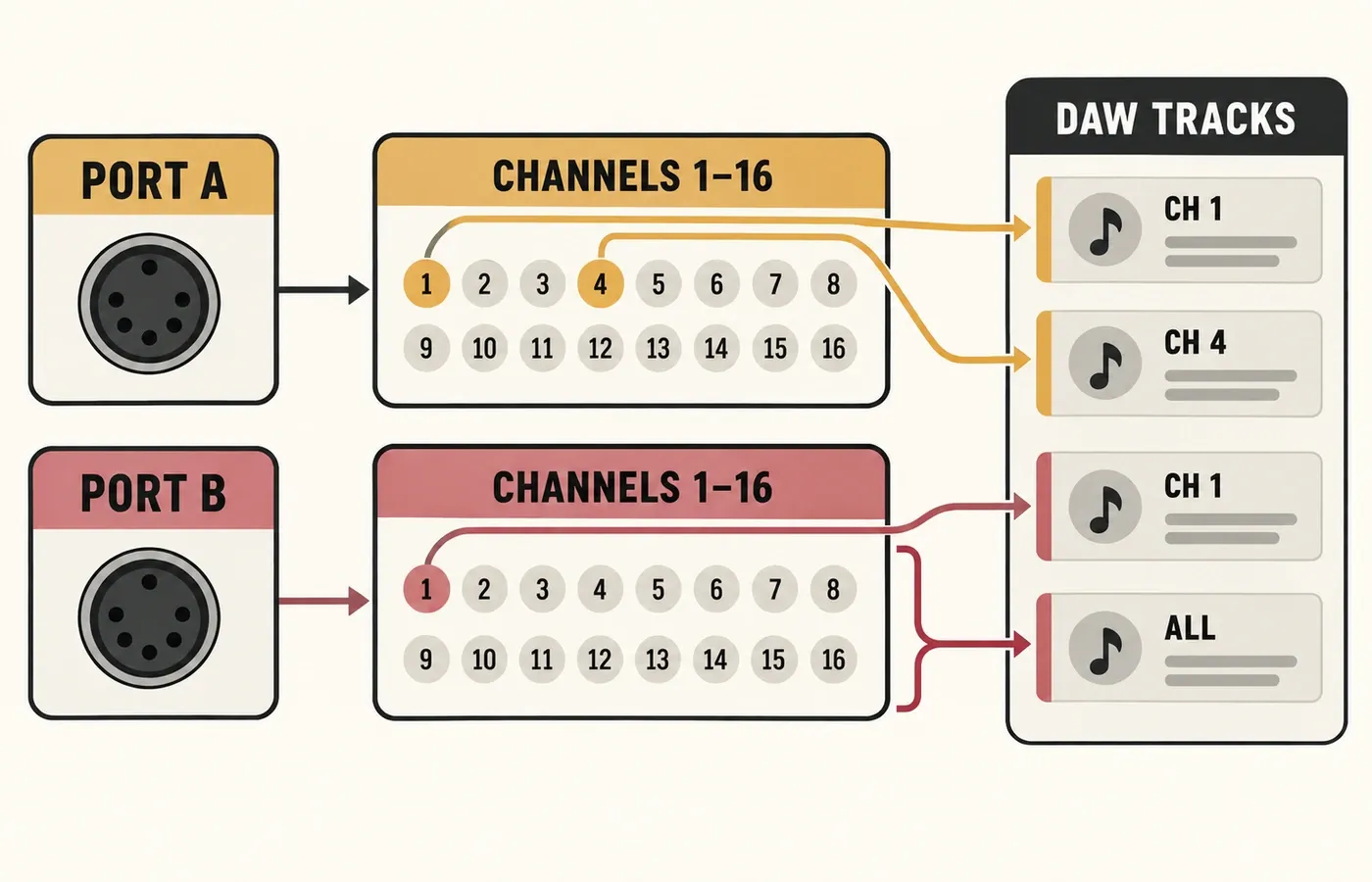
A practical two-port example
Imagine an interface with two independent MIDI inputs. A keyboard enters port A on channel 1. A pad controller enters port B on channel 1. The channel numbers match, but the complete addresses don’t.
Track 1 listens only to this address and plays a piano instrument.
Track 2 listens only to this address and plays a percussion instrument.
Track 3 would hear both controllers unless another filter or routing rule separates them.
The first two routes use different complete addresses because the port is part of the address. In this example, an overly broad track input or the wrong port or channel selection can still send the performance to the wrong destination.
My recommendation is to name the source as port + channel, then name the destination track before adding more complex routing. That description can expose a missing selection or an accidental “all inputs” setting.
When “all channels” helps—and when it hides a mistake
An all-channels input is useful when one controller is the only source on a port, when a performance intentionally spans several channels or when you need to confirm that messages are arriving at all. It removes one filter from the path.
It becomes risky when several controllers share the accepted input path. A track listening to everything may trigger from the wrong keyboard, duplicate a performance on two instruments or make a channel assignment look irrelevant. If broadening the input produces activity at the relevant input meter, that’s evidence that messages reach that point. Changing a selector alone proves nothing. Once you’ve identified the source, restore the intended port and channel selection.
Four channel myths that cause bad routing decisions
“One channel equals one physical device”
A channel is an address. One device may use several channels, and several receivers can be configured to respond to the same channel.
“A MIDI track consumes one of the 16 channels”
A track is a container and routing decision inside software. Many tracks can listen to the same incoming channel, and one track may accept more than one channel.
“Channel 1 is always the first byte value”
User interfaces label the first channel as 1, while the four-bit field encodes it as value 0. The display label and encoded value use different counting conventions.
“A MIDI system can only address 16 parts”
The sixteen-address set belongs to one port. Multiple independent ports provide multiple sets, as long as the sender, receiver and software preserve the port distinction.
DAW-neutral MIDI channel troubleshooting
The activity meter moves, but the instrument stays silent
Confirm the track is listening to the source’s exact port and channel. Then check the destination instrument and monitoring state. A visible message only proves that data reached the point where the meter sits.
The wrong instrument plays
Look for a track set to all ports or all channels. Also check whether two tracks are armed or monitored from the same address.
Changing the channel does nothing
The receiving track may accept every channel, or the receiver may be configured to ignore channel separation. Narrow the input first, then change one channel assignment at a time.
Two devices on channel 1 interfere
Check their ports before changing channel numbers. If they use separate ports, they already have separate complete addresses. If they share one port, assign deliberate channels or filters.
Only one part of a multitimbral instrument responds
Match each part’s receive channel to the transmitting route. Verify that the correct port reaches the device and that no software layer merges or rewrites channels.
Notes work, but synchronization behaves differently
Determine whether the missing data is a Channel Message or a System Message. Channel selection cannot repair a message that has no channel field.
What should you remember?
MIDI 1.0 gives each port 16 logical channel addresses. Channel Messages carry the address in four bits of the status byte, while System Messages don’t use a channel number. Ports, channels and DAW tracks remain separate layers. Once you describe a route as source port → channel → destination track, the 16-channel limit becomes a clear addressing rule instead of an arbitrary restriction.