
Start at 100 Hz, keep the level low and press Play lower step until the note fades, buzzes or stops sounding lower. The last clean step is where your speakers, subwoofer or headphones stop giving you usable bass at that seat and that volume. For a quick left/right channel check, the left and right speaker test is faster. For broadband room listening, use the pink noise generator.
Browser tool · no upload
Play bass test tones
Sine tones are made on this device. The page does not request a microphone, read a file or upload audio.
Lower system volume before Play. Tool level starts at 5%, caps at 25% and is not dB SPL. Stop at any buzz, rattle, knocking or discomfort; never turn up a tone you cannot hear.
Pick a step, then press Play tone.
Exact frequencyAny value from 20 to 200 Hz
Slow sweepGlide between two frequencies to find rattles
How to run a bass test
- Turn the physical volume down first. The tool level starts at 5% and stops at 25%, but it cannot see your amplifier, your subwoofer gain or your phone's volume buttons.
- Play 100 Hz for 5 seconds. This confirms the sound is going where you expect and gives you a reference note that almost any speaker can reproduce.
- Press Play lower step. The ladder runs 200, 160, 125, 100, 80, 63, 50, 40, 31.5, 25 and 20 Hz, about a third of an octave apart. Each step should be the same smooth hum, only lower.
- Note the last clean step. Stop when the tone disappears, buzzes, rattles, flutters or no longer sounds lower than the step before. Never turn the volume up to chase a tone you cannot hear.
- Sweep slowly through any problem area. Open Slow sweep, glide from 80 Hz down to 30 Hz over 30 seconds and press Stop the moment something rattles. The readout keeps the frequency where you stopped.
- Repeat with Output set to Left, then Right. If one side buzzes and the other does not, check that speaker, its position and its connection before blaming the room.
Space plays or stops the tone when focus is outside the controls, Escape always stops it, and playback ends when you switch tabs or leave the page.
Pressed Play but hear nothing?
Press Stop, select 100 Hz and set Output to Both. Check which device your computer or phone is sending sound to, and whether Bluetooth headphones grabbed the output. If 100 Hz is silent too, check the route, mute and level controls as well as the playback hardware; this check alone does not identify the cause. Confirm it with a 440 Hz tone in the online tone generator.
A Blocked status means the browser didn't start audio. Browsers only let a page start sound in response to a click, tap or key press, as MDN's autoplay guide for media and Web Audio describes, so press Play tone again. If 100 Hz plays but 25 Hz and 20 Hz don't, that's a result, not a fault.
How to read your bass test result
A bass test hears the whole chain at once: the source device, any processing, the amplifier, the speaker, the room, your seat and your ears. The result describes that setup at that position, not the speaker on its own.
| What you hear | Most likely cause | What to try next |
|---|---|---|
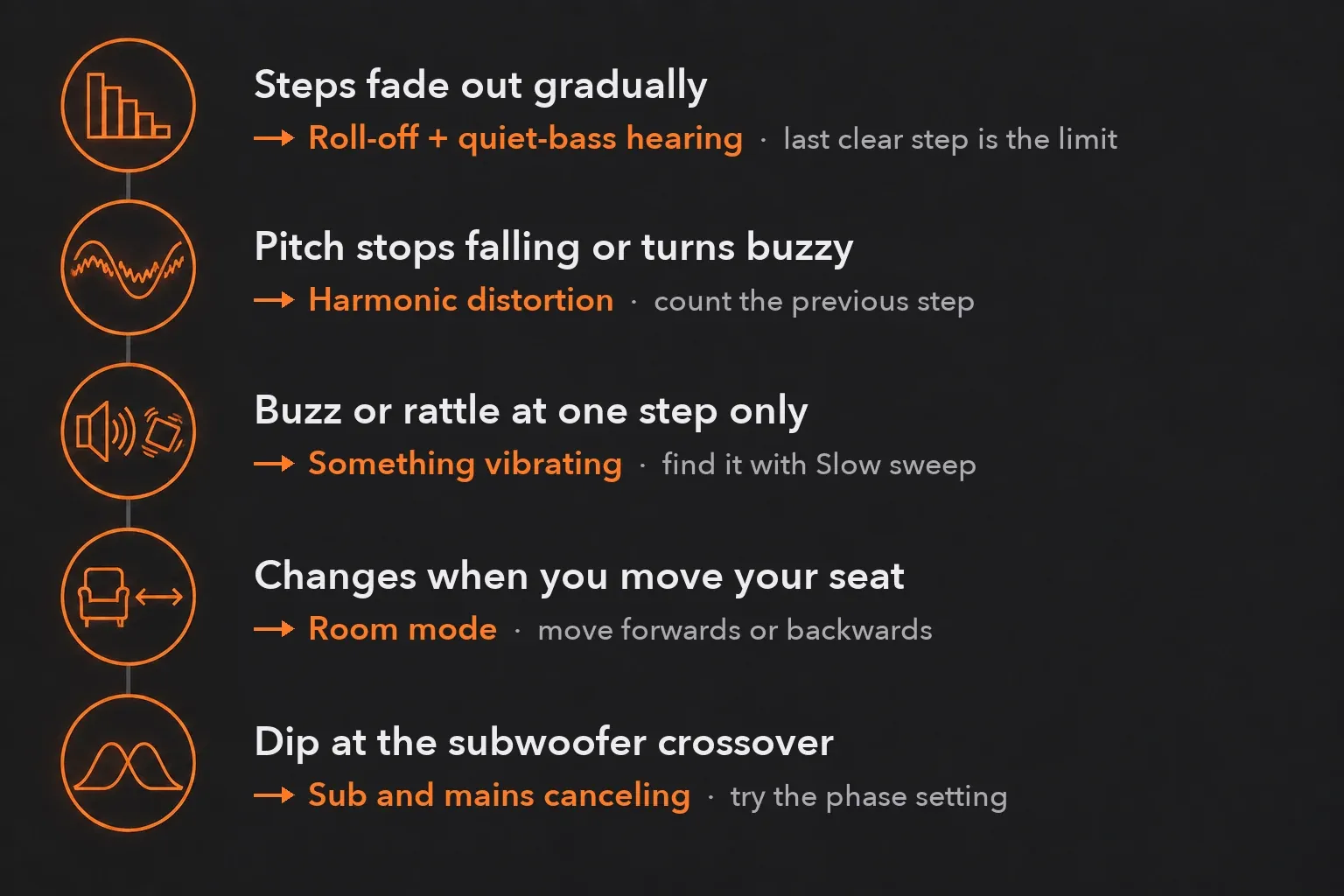
| Steps get gradually quieter, then fade out | The speaker's low-frequency roll-off, plus your ears' lower sensitivity to quiet bass | Treat the last clearly audible step as the practical limit at this level |
| The pitch stops falling, or the tone turns buzzy | Harmonic distortion: the speaker adds tones at 2× and 3× the step | Count the previous step and lower the level to confirm |
| A buzz or rattle at one step only | Something vibrating in sympathy: a loose object, panel, grille or cabinet part | Use Slow sweep to find the frequency, then touch or move nearby objects |
| Boom or silence at one step that changes when you move | A room resonance (room mode) at your listening position | Hold the step and move your head or chair forwards or backwards |
| Thin bass with speakers well out from the back wall | The wall reflection canceling the speaker's own bass | Try a different distance to the wall rather than more EQ |
| A dip around the subwoofer crossover | The subwoofer and main speakers partly canceling each other | Check the subwoofer's phase setting while a crossover step plays |
| Earbud or headphone bass comes and goes as you adjust them | A broken seal around or inside the ear | Reseat them or try a different ear-tip size |
Lowest clean step or harmonic distortion?
This is the trap in most bass tests. Sound On Sound's guide to reading speaker specifications explains that harmonic distortion changes with level and gets worse as a speaker approaches its limits, which "usually happens at low frequencies first". That distortion adds tones at two and three times the test frequency, so a small speaker playing 40 Hz can put out 80 Hz and 120 Hz instead. You hear something, and it feels like you're hearing 40 Hz. The AudioCheck low-frequency sweep makes the same warning about anyone who seems to hear tones below 20 Hz.
Two checks keep the result honest. First, each step should sound lower in pitch than the one above it; if 31.5 Hz sounds like the same note as 40 Hz, or higher, audible overtones may be dominating; that impression alone does not isolate the cause. Second, lower the tool level a little: distortion changes strongly with level, so a buzz that vanishes at a lower level may come from level-dependent distortion or a rattle in the speaker, playback chain or nearby objects. Record the last step that passes both checks.
Why bass gets quieter as you step down
Part of the fade is your hearing. Equal-loudness curves, summarized on HyperPhysics' equal-loudness curves page and standardized in ISO 226 (revised in 2023), show that the ear discriminates against low frequencies at soft levels and responds more evenly when sound is loud. A perfectly flat speaker would still make 31.5 Hz sound weaker than 100 Hz at a quiet setting.
So a gentle fade is normal. What deserves attention is a sudden drop between neighboring steps, a change in character, or a difference between the left and right speakers. Once a speaker passes its low-frequency limit, its output falls away quickly. Sound On Sound gives the roll-off as 12 dB per octave for a sealed cabinet and 24 dB per octave for a vented one. On this ladder that's roughly 4 or 8 dB per step once the slope is under way.
Room modes: why the result changes when you move
Low notes have long wavelengths, and a room reinforces some of them and cancels others. Genelec's monitor setup guide notes that if you sit in the null of a room resonance, that frequency drops a lot in level "and audio may appear to be missing". Hold the step that vanished, then move forwards or backwards; if it comes back, room response at the listening position is a likely contributor; this does not establish that the speaker is fault-free. The same guide suggests sitting at least 1 meter (about 3 ft) from the walls and avoiding the exact center of the room. The speaker placement calculator helps you plan the triangle once you have a better spot.
Wall distance: boom or missing bass
Walls change bass in two opposite ways. According to Genelec, a speaker placed against a wall gets about 6 dB more bass level, a corner raises that to 12 dB, and three close surfaces can add up to 18 dB. Sound On Sound notes that most studio monitors offer simple low-frequency EQ for exactly this reason, so you can match the bass to the placement.
Pull the speaker away from the back wall and a different problem appears. The reflection from the wall arrives out of phase and cancels part of the bass. Genelec's table puts the lowest canceling frequency at 86 Hz for a speaker 1 meter from the wall and 429 Hz at 0.2 meters. The same table says EQ doesn't help, because the reflection grows along with the speaker's output. How deep the dip is depends on how much bass the wall reflects. Genelec's answer is to keep the distance from the speaker front to the wall behind it under 0.6 meters (2 ft), with at least 50 mm (2 in) of clearance for a rear port, and to trim the extra boost with the speaker's low-frequency control. A desk or console in front of desktop monitors can also raise the 160 Hz and 200 Hz steps.
Subwoofer test
Find your crossover frequency first. It's where the subwoofer takes over from the main speakers. Genelec subwoofers cross over at 85 Hz by default, with 50 to 120 Hz selectable on its SAM models. Sound On Sound describes bass management as typically rolling the main speakers off at 80 to 100 Hz. What counts is the setting on your own receiver or subwoofer.
- Play the steps around the crossover. For an 80 Hz crossover that means 63, 80 and 100 Hz. Listen for an abrupt local dip; room response and hearing sensitivity can make these steps differ in perceived strength even with a well-integrated crossover.
- If the crossover step is weaker, check phase. Set Length to Hold, play that step and have someone switch the subwoofer's phase between 0 and 180 degrees while you stay in your seat. Keep whichever setting sounds fuller. Genelec describes subwoofer phase as being set to maintain the level through the crossover range.
- Step below the crossover. Below the crossover, the subwoofer usually contributes more, but the main speakers may still play because crossover slopes and routing vary. Its last clean step is the useful low limit of your system at that seat.
Placement matters as much as settings. Genelec notes that a corner maximizes subwoofer output, but the flattest response is usually somewhere else. A single subwoofer usually goes along the front wall, slightly off-center, and two subwoofers can be flatter still. Sound On Sound also warns that unless a subwoofer is very large and not working hard, its distortion "will be much higher than from the loudspeaker", so the harmonic check above matters even more on the lowest steps.
This page outputs a stereo signal, not a dedicated LFE channel. If your subwoofer stays silent at 40 Hz, check that your receiver or audio interface sends bass from the main channels to it (the speaker-size or bass-management setting), and check the subwoofer's own low-pass and level controls.
Headphones and earbuds
Headphone bass depends on the seal. AudioCheck explains that sealing your ear canal creates a volume that acts as a pressure chamber. If the low steps come and go when you move your head, reseat the earbuds, try another tip size, or check for hair or glasses arms breaking the seal of over-ear pads. Switch off bass boost, preset EQ and spatial audio before you compare results. For channel, balance and phase checks on headphones, use the online headphone test.
Phones, laptops, speakers and subwoofers: what to expect
I'd avoid any chart that promises a cut-off for a whole category of devices. Small devices such as phones, laptop speakers and compact Bluetooth speakers usually run out of bass several steps earlier than full-size speakers or a subwoofer, and that isn't a fault. For your own model, look up the maker's stated low-frequency figure and check that it comes with a tolerance. Sound On Sound's guide shows why a bare range tells you nothing: "40Hz-25kHz" means little until you know whether that point is 3, 6 or 10 dB down. Even then, your room and seat can move the result by more than the spec sheet suggests.
Bass test songs or test tones?
Use both, for different jobs. Tones isolate one frequency at a time, which is what you need to find the limit, a rattle or a room null. Music shows timing, texture and balance, which tones can't. For songs, pick tracks you already know well from a system you trust and play them at a normal level. Skip "bass boosted" uploads. They're processed to exaggerate low end and can push small speakers into distortion. If the question is really about balance rather than extension, bass vs treble explains what each band does.
Keep bass tests quiet and short
Low tones invite you to turn up, because the ear hears quiet bass less well than the midrange. The tool starts at 5%, caps at 25% and stops by itself after 2 or 5 seconds unless you choose Hold. A browser percentage isn't a sound pressure level. The real loudness depends on your amplifier, speakers and room. Stop at any buzz, rattle, knocking sound or discomfort, and use Hold only while you're adjusting something.
What this bass test cannot tell you
- It does not measure sound pressure level, frequency response or distortion. There is no microphone and no calibration.
- It cannot separate the speaker from the room, the seat and your hearing; it only reports what reaches you.
- It is not a hearing test.
- Processing in your operating system or player app, such as bass boost, loudness, EQ or spatial audio, changes the result.
- It plays a stereo signal only. It does not send a dedicated LFE or surround channel.
To see which low frequencies are inside a recording rather than in your playback system, open the file in the audio spectrum analyzer.
How the page makes the tones
The tones come from a Web Audio OscillatorNode set to a sine wave. A gain stage fades each tone in and out to avoid clicks, and a ChannelMergerNode sends it to the left channel, the right channel or both. The sweep uses an exponential frequency ramp, which MDN recommends for frequency changes "because of the way the human ear works". The tool offers sine only. Other waveforms carry harmonics of their own that would hide the distortion you're listening for. Nothing is recorded or uploaded.
Bass test FAQ
What is a bass test?
A bass test plays low-frequency tones, usually from about 200 Hz down to 20 Hz, so you can hear where your speakers, subwoofer or headphones fade, distort or rattle. It checks the whole playback chain at your listening position.
What frequency should I start a bass test at?
Start at 100 Hz, which nearly every speaker can play, then step down. On the audio frequency chart, bass covers roughly 60 to 250 Hz and sub-bass 20 to 60 Hz; the sub-bass steps are where speakers usually reach their limits first.
Why can I hear a tone lower than my speaker should play?
Usually because of harmonic distortion: the speaker adds tones at two and three times the test frequency, and you hear those instead. If a step does not sound lower than the one above it, or its buzz disappears when you lower the level, count the previous step as your limit.
Is a bass test safe?
Keep it quiet and brief. The tool starts at 5% and caps at 25%, but it cannot see your amplifier or volume buttons, so set those low first. Stop at any buzz, knocking sound or discomfort, and never turn up a tone you cannot hear.
Does the bass test use my microphone?
No. The page generates the tones on your device and does not request microphone access, read files or upload audio.
What is a good bass test song?
A track you already know well from a system you trust, played at a normal level. Skip "bass boosted" uploads; they exaggerate the low end and make small speakers distort.
Will my subwoofer play these tones?
Only if your receiver, interface or subwoofer routes bass from the main left and right channels to it, usually through bass management or the subwoofer's own crossover. The page sends stereo, not an LFE channel.