
SOUND FORGE Audio Cleaning Lab 4 is no longer on sale. MAGIX's US order box still shows it at $99.99 but marks buying and upgrading "Not available", the old product page redirects to the MAGIX homepage, and Boris FX, which announced in April 2026 that Sound Forge had joined its product family, doesn't list it. Reviews liked it as an easy LP and cassette cleaner, so a working copy is worth keeping, while anyone buying now needs Sound Forge, RX 12 Elements or Audacity instead.
My rule is simple. Keep Audio Cleaning Lab while it installs and runs, because the job reviewers praised hasn't changed and what you lose is fixes and support, not features. Replace it the day it stops activating or you move to a Mac. For the replacement I'd pick by the job: Sound Forge to record, clean and split LP sides on Windows, RX 12 Elements to repair voice inside a program you already own, and Audacity when the budget is zero.
Is Audio Cleaning Lab still sold?
No. The order box on MAGIX's vinyl-to-digital how-to page still names SOUND FORGE Audio Cleaning Lab 4 at $99.99, but the buy and upgrade options both read "Not available". The former product page now forwards to the MAGIX US homepage, and no product page for it remains in MAGIX's menus or site maps. Version 4.0 is the last release, and KVR's product database flags it "No Longer Available" and lists online activation.
Boris FX hasn't picked it up. Its April 2026 announcement brought Vegas Pro, Sound Forge and Acid Pro into the Boris FX family, and the Pro Audio division it describes holds Sequoia, Samplitude, CrumplePop and Music Studio, with no Audio Cleaning Lab. There is no product page or store item for it on borisfx.com. The Boris FX audio hub on this site maps the current line by job.
The plainest word on the product's future comes from MAGIX's user forum, not from MAGIX. In January 2026 a volunteer moderator answered an upgrade question about Cleaning Lab 4 with "There is no update to Sound Forge Cleaning Lab 4; it seems that Magix has decided to discontinue the product." Read that as an informed forum answer. Neither company's site carries a formal notice, so there's no end-of-life date to plan around, only the fact that you can't buy or upgrade it.
What Audio Cleaning Lab 4 includes
Audio Cleaning Lab 4 is a Windows project editor built around restoration presets, with a small mastering rack and iZotope extras on top. It hosts VST and VST3 plug-ins, and there has never been a Mac version. MAGIX lists four cleaning effects, DeClicker/DeCrackler, DeNoiser, DeHisser and DeClipper, plus bundled RX 8 DeHum, RX 8 DeClick and eFX DeEsser plug-ins. A spectral display shows the recording by frequency, so a stray noise can be spotted and removed.
Mastering covers parametric and graphic EQ, Dynamics and Multimax, the Brilliance enhancer, Sound Cloner and Ozone 9 Elements. Vocal Strip handles voice recordings, Videosound Optimizer targets video soundtracks, and reverb, echo, chorus/flanger and a free VST slot round out the effects. KVR's version 4 highlights add ModernEQ, track controls, preset search, loudness visualization, an audio engine with ARA2 support, SpectraLayers Elements 8, RX 8 Elements and Ozone 9 Elements.
Sources differ on the iZotope versions. MAGIX and KVR name RX 8 Elements, while an owner posting in 2025 reports RX 10 Elements, so the bundle seems to have changed during the sales run. Go by the serials in your order email rather than the box copy. On MAGIX's forum, a regular describes the program as a special version of Samplitude Pro Suite that borrows only the Sound Forge name; that's a user's view, not a vendor statement.
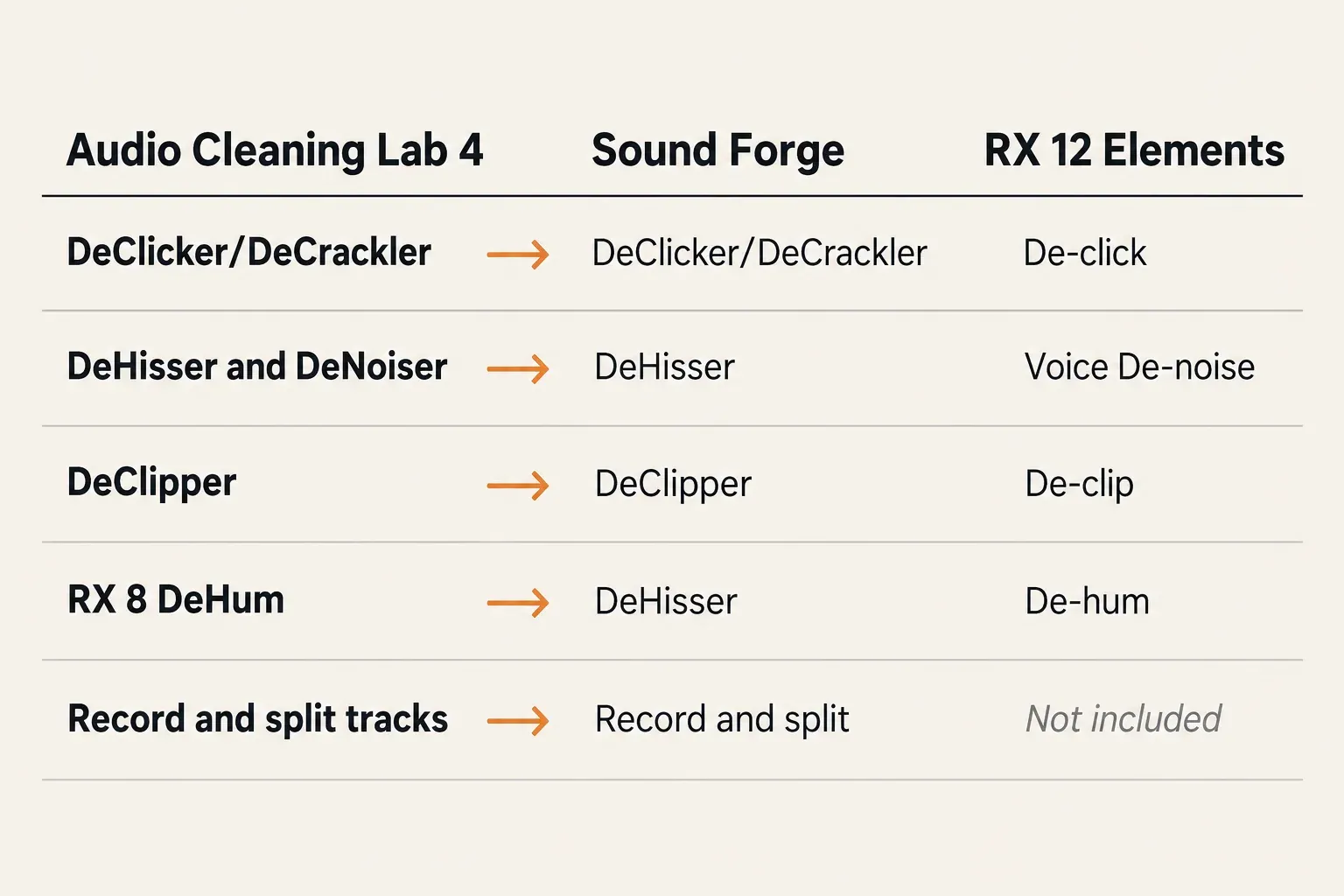
| ACL 4 module | Job | Closest in Sound Forge | Closest in RX 12 Elements |
|---|---|---|---|
| DeClicker/DeCrackler | LP clicks and surface crackle | DeClicker/DeCrackler | De-click; no De-crackle |
| DeHisser | Tape and cassette hiss | DeHisser | Voice De-noise for speech; no Spectral De-noise |
| DeNoiser | Steady noise learned from a noise sample | DeHisser, listed for hiss and hum | Voice De-noise for speech |
| DeClipper | Flattened, distorted peaks | DeClipper | De-clip |
| RX 8 DeHum (bundled) | Mains hum | DeHisser | De-hum |
| Vinyl recording and track split | The whole LP or tape transfer | Record, then split into tracks | Not included: plug-ins only, no editor |
How the vinyl, tape and voice workflow works
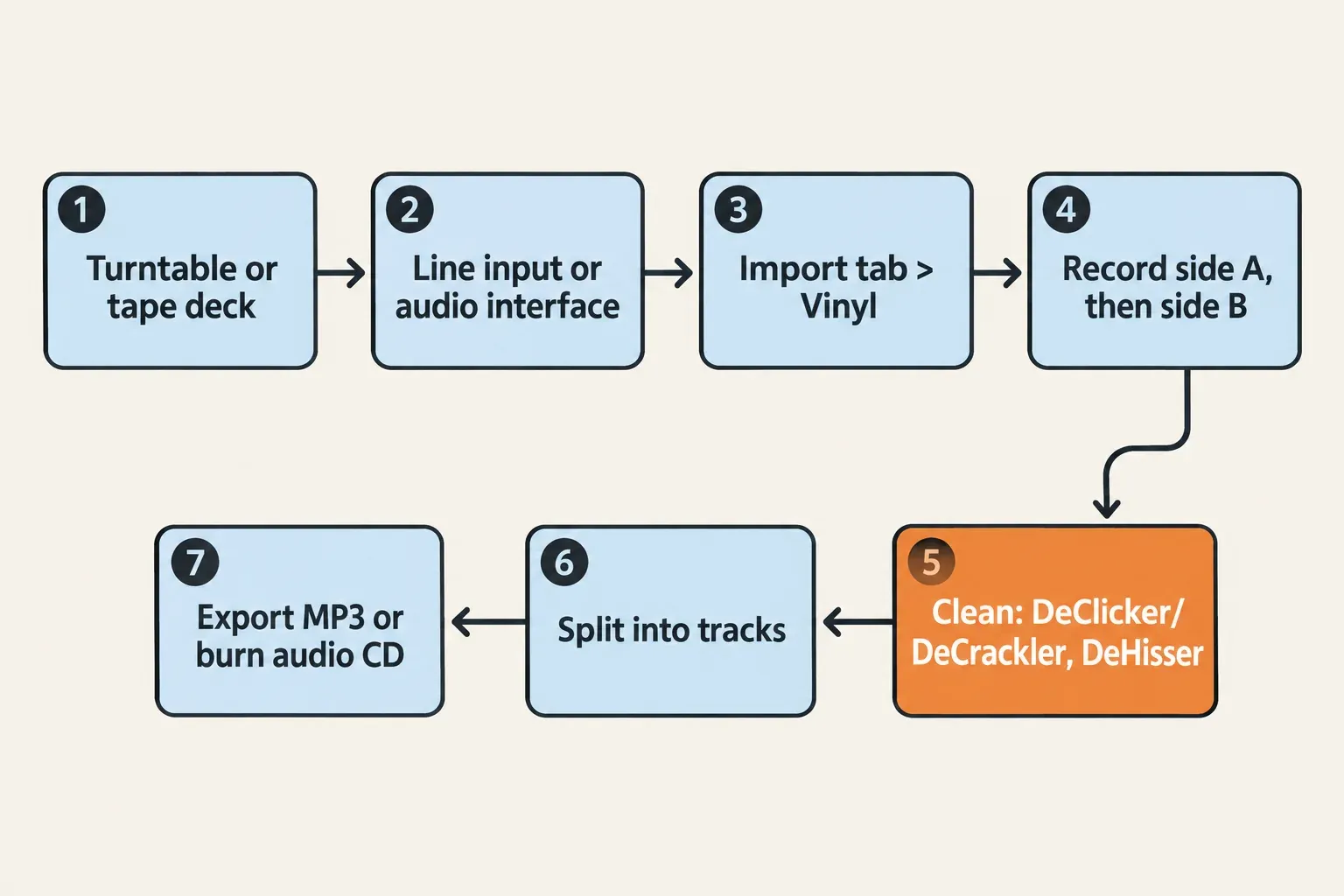
The transfer runs in five steps inside one program, and that convenience is what reviewers praised. The order follows MAGIX's own vinyl how-to for version 4:
- Connect the turntable or tape deck to the PC's line input or audio interface. A turntable without a built-in preamp needs a phono stage first.
- Open the Import tab, switch to Vinyl and press the red record button. Press Stop at the end of side one, then record side two the same way. Files are saved as WAV unless you pick OGG or MP3 in Settings.
- Clean the recording: DeClicker/DeCrackler for clicks and crackle, DeHisser for hiss, and the spectral display for whatever is left.
- Split each side into tracks.
- Export the tracks as MP3 or burn an audio CD.
Voice recordings take a shorter chain: DeNoiser for steady background noise, then Vocal Strip for the voice itself. The DeNoiser is also where version 4's best-known bug sits, covered in the Windows 11 section below.
Moving the same LP transfer to Sound Forge is laid out step by step in the vinyl digitizing and restoration guide. Splitting a side into tracks has its own walkthrough, splitting a long recording into tracks in Sound Forge.
What reviews and owners say
Reviewers and owners agree on two things: Audio Cleaning Lab was an easy, effective LP and tape cleaner, and version 4 is now an orphan. The evidence behind that is thin. Across 11 sources there are 0 numeric review scores and one editorial review, which covers the 2019 release rather than version 4; the rest are owner and forum posts, several about older versions. So this is a summary of verdicts with counts, not an average.
| Finding | Sources |
|---|---|
| LP click, crackle and tape cleanup is the strong point | 4 of 11 |
| Easy, preset-driven tool for non-specialists; detailed edits belong in a fuller editor | 2 of 11 |
| Version 4 owners positive overall | 4 of 4 owner posts; 2 of the 3 from 2024 mention annoying issues |
| Reported as discontinued or out of development | 3 of 11 |
| Reaction to the 2019 SOUND FORGE rebrand | 2 buy, 3 avoid, 2 confused, of 7 posters |
Vinyl and tape cleanup is the praised job in 4 of the 11. RedShark News's 2019 review called LP click and crackle recovery "the star of the show" and said it worked "without unduly affecting high-frequency detail". It also found the auto-analysis "a little heavy-handed, but there are sliders to rein it in", and pointed detailed editing to Sound Forge Audio Studio. That preset-first character is the second finding, in 2 of 11: a 2013 KVR forum thread about an older MAGIX version calls it a basic editor "with lots of noise removal presets" and recommends it to friends digitizing old vinyl or tapes.
Owners of version 4 are positive in all 4 posts read, with a catch. Two of the three 2024 owners in a MAGIX forum purchase thread mention issues, one calling them "not serious, just annoying", and the bundled SpectraLayers Elements has to run standalone because of a bug. The fourth, replying in 2026 in the upgrade thread quoted above after almost 20 years with Cleaning Lab, keeps it for speed, per-part normalize, easy markers, the tag editor and the CD list. Two more verdicts seen only as short descriptions are positive too, including a YouTube review and demo whose description calls it "a great tool well worth $99".
The 2019 rebrand split opinion. In the rename thread on MAGIX's forum, 2 of 7 posters wanted it, one for the four extra tracks, 3 gave reasons to avoid it, and 2 were confused about the product line. Separately, 3 of the 11 sources report the product as discontinued or out of development.
What the composite supports is narrow and useful. ACL did one job well for people who didn't want to learn an editor, and owners who still have it running are happy with that job. It doesn't support paying for a copy today, because the fixes, the support and the upgrade path have gone.
Known problems on Windows 11
Expect no fixes. Replying to a bug report in July 2025, a forum regular wrote: "The app is out of development. There will be no fix." On MAGIX's user forum, 13 thread titles between June 2023 and July 2025 report version 4 problems, and at least 12 more concern installing or activating older versions on Windows 10 and 11. These four issues have a reported answer or a clear status:
- "Error While Writing Noise Sample File." DeNoiser presets in version 4 can throw this error. The reported workaround is to dismiss the message and reopen the DeNoiser, or to run the 32-bit build, where the error doesn't appear.
- iZotope plug-ins open as "not signed in". The bundled iZotope serials sit in your order confirmation email and have to be registered at iZotope before the plug-ins activate.
- Installing on a new Windows 11 PC. Reports are mixed and come only from forum users. In May 2025 a forum member replied that version 4 can be installed on Windows 11 24H2, while a buyer who purchased in January 2025 couldn't install it on a new Windows 11 PC, and that thread ended unresolved. MAGIX's Windows 11 support page lists Audio Cleaning Lab among usable products without guaranteeing older versions.
- Older versions that stop after a Windows update. Earlier editions such as Audio Cleaning Lab 16 Deluxe can break after Windows 11 updates. Compatibility mode is the community's first step, not a guaranteed fix.
I'd do two things now, while the copy still works: register the bundled iZotope serials, and keep the order confirmation email somewhere safe. A product that's off sale can't be bought again if a reinstall goes wrong.
Audio Cleaning Lab vs Sound Forge, RX Elements and the rest
Sound Forge is the closest replacement for LP and tape work, and RX 12 Elements is the cheaper pick for voice repair inside another program. The table puts the options you can still buy beside the Audio Cleaning Lab row, which is there for owners comparing what they have.
| Option | US store price, October 24, 2026 | Runs on | Restoration tools the vendor names | Pick it when |
|---|---|---|---|---|
| Audio Cleaning Lab 4 | Not available (order box shows $99.99) | Windows | DeClicker/DeCrackler, DeNoiser, DeHisser, DeClipper; bundled RX 8 DeHum and DeClick | You already own a working copy |
| Sound Forge | $299.95 perpetual, $149.95 per year or $24.95 per month; Plus $399.95 perpetual | Windows | DeHisser, DeClicker/DeCrackler, DeClipper | You want to record, clean and split LP or tape sides in one editor |
| RX 12 Elements | $99 | macOS and Windows, as AU, AAX and VST3 plug-ins | De-click, De-clip, De-hum, De-reverb, Voice De-noise, Repair Assistant | You repair voice or music inside a host you own, or you work on a Mac |
| Samplitude / Samplitude Suite | $395 / $495 perpetual | Windows | DeHisser, DeClipper, DeNoiser; Suite adds track spectral cleaning and the Cleaning & Restoration Suite | You already work in Samplitude |
| Audacity | Free, open source | Windows, macOS, Linux | Built-in effects, applied by hand | The budget is zero |
For LPs and cassettes I'd buy Sound Forge, because it keeps the record, clean and split routine in one Windows editor, and its click tool carries the same DeClicker/DeCrackler name ACL owners know. The Sound Forge product page lists DeHisser for hiss and hum, DeClicker/DeCrackler for clicks and crackle, and DeClipper. The cleanup steps have their own guides, one on removing clicks and pops in Sound Forge and one on removing hiss and hum, and the Sound Forge pricing breakdown compares the perpetual, yearly and monthly plans. Expect a different way of working: in the 2019 rename thread, a longtime forum member described ACL as a 64-bit, VST3-capable rename of Audio & Music Lab Premium with 8 tracks instead of 4, built on non-destructive projects, unlike Sound Forge's destructive file editing.
The cheaper MAGIX editor RedShark pointed to for detailed edits, Sound Forge Audio Studio, isn't in the Boris FX catalog either. The Audio Studio vs Sound Forge comparison explains what exists now.
RX 12 Elements works differently. iZotope's RX Elements page lists six plug-ins and no standalone editor, and the edition lacks De-crackle, Spectral De-noise and the Spectral Editor, so it can't record a turntable or split a side by itself. For voice I'd start with it anyway, because Voice De-noise is built for speech and all six plug-ins run in any host that loads AU, AAX or VST3, on Windows or a Mac. The RX Elements vs Standard vs Advanced comparison shows what the bigger editions add.
Only buy Samplitude if you already work in it. Boris FX's Samplitude page lists DeHisser, DeClipper and DeNoiser in both editions and keeps track-level spectral cleaning and the Cleaning & Restoration Suite for Suite. Audacity sits at the other end: free and open source for Windows, macOS and Linux, according to the Audacity project's site, with more of the work done by hand. The Audacity vs Sound Forge comparison covers what the free route gives up.
One thing not to count on: the same Boris FX announcement carries an upgrade offer for MAGIX customers, open until December 5, 2026, that names owners of earlier Vegas Pro and Sound Forge versions. It doesn't mention Audio Cleaning Lab, so ask Boris FX before you price Sound Forge as an upgrade.
Who should keep it and what to buy instead
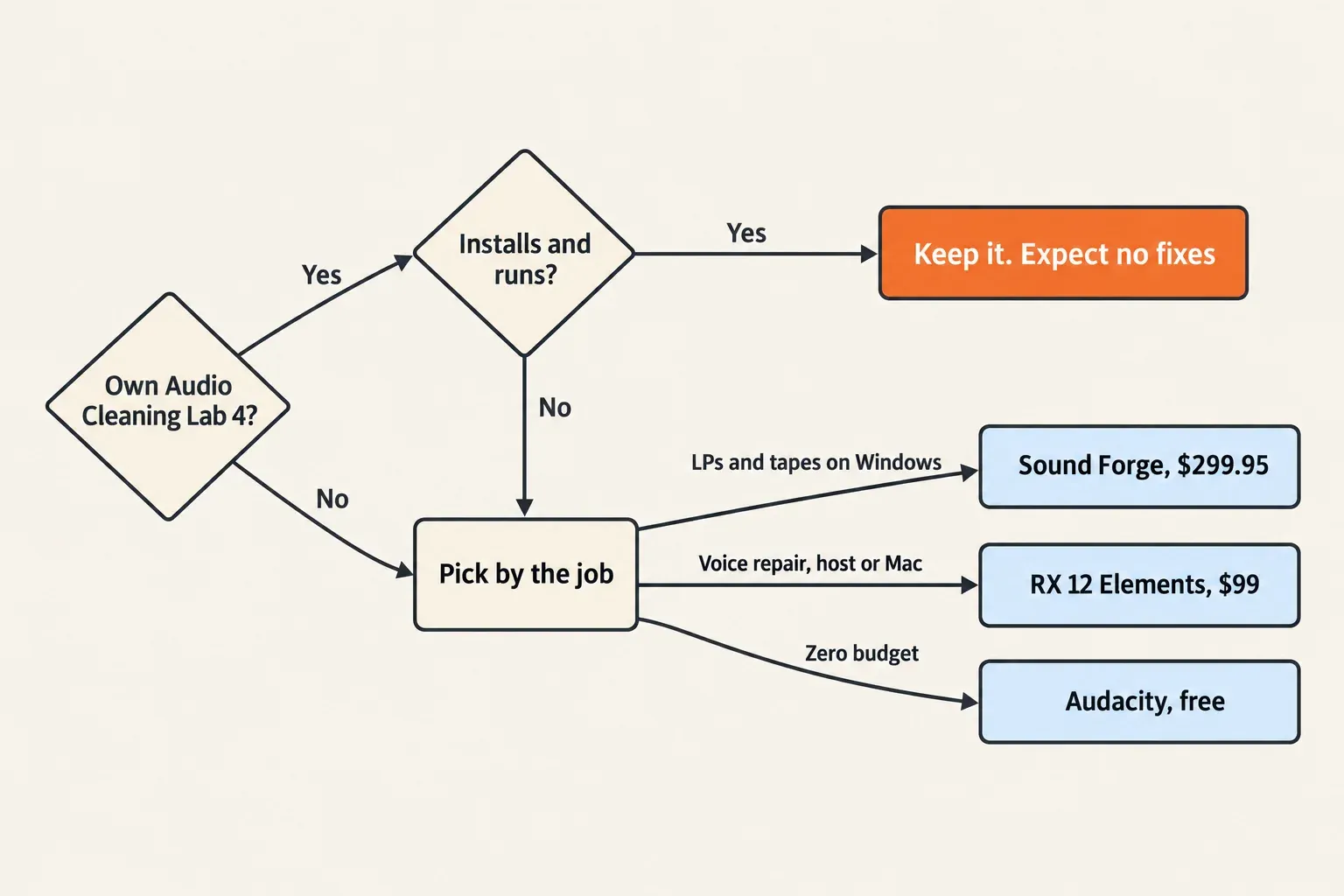
Keep Audio Cleaning Lab 4 if it installs, activates and handles your LP or tape transfers today. Nothing in the reviews or owner posts says the cleaning got worse; what changed is support.
- Owner, copy runs: keep it, note the DeNoiser workaround and register the iZotope serials.
- Owner of an older version on Windows 11: try compatibility mode once. If it still fails, move on, because MAGIX no longer offers an upgrade.
- Buying for LPs or cassettes on Windows: Sound Forge.
- Buying for voice repair, or working on a Mac: RX 12 Elements in a host you already own.
- Already working in Samplitude: Samplitude Suite for the Cleaning & Restoration Suite.
- Zero budget: Audacity.
I wouldn't buy a leftover copy from a reseller. A third-party storefront still lists a 2019 build, not version 4, and an unsupported program with online activation is the wrong place to spend money. For other kinds of damage, the restoration software round-up matches eight tools to the problem.
My verdict: Audio Cleaning Lab 4 was a fair buy for easy LP and cassette cleanup, and it's still worth keeping on a PC where it runs, but it's no longer something to buy or build a workflow around. Owners should register their iZotope extras and keep using it until activation or Windows gets in the way. Everyone else should buy by the job: Sound Forge for whole transfers on Windows, RX 12 Elements for voice repair in a host or on a Mac, and Audacity when the budget is zero.
FAQ
Is there an Audio Cleaning Lab 5?
No. Version 4.0 is the last release. Owners have asked about a version 5 in a MAGIX forum thread since December 2023, and the latest reply, from September 2025, says it looks discontinued.
Is Video Sound Cleaning Lab or Audio Cleaner Pro the same product?
No. MAGIX still lists Video Sound Cleaning Lab, but it's a separate product, and Audio Cleaner Pro is a different name that turns up in search results and video reviews. Reviews of either don't describe Audio Cleaning Lab 4.