
Sound Forge Audio Studio 17 and Sound Forge 2026 are products from different eras. Audio Studio 17 was released by MAGIX in 2023. The current Boris FX catalog sells Sound Forge and Sound Forge Plus. Audio Studio isn’t in that catalog, which makes this a legacy-versus-current decision rather than a comparison between two current tiers.
I'd keep Audio Studio 17 if you already own it, it activates, and it completes your recording, trimming, cleanup, and export work. Sound Forge 2026 makes sense when you need a supported installation, batch processing, documented restoration tools, current plug-in support, or up to 32-channel files. And if the real requirement is multitrack arrangement, buses, instruments, or a layered mix, what you actually want is a DAW.
Do not buy an old Audio Studio key without verifying the exact edition, authorized installer and refund terms. Ask Boris FX to confirm upgrade eligibility for your purchase before paying.
What exists now?
Boris FX acquired Sound Forge from MAGIX on March 30, 2026. Its current range has two editions: Sound Forge is the core editor, while Sound Forge Plus contains the same editor and adds Melodyne 5 Essential, Vandal, VariVerb II, and 3D Reverb.
Audio Studio 17 belongs to the previous MAGIX consumer line. A 2023 release announcement from authorized Japanese publisher SourceNext names Sound Forge Audio Studio 17 alongside Pro 17 and Pro 17 Suite. MAGIX forum release notes also identify the 17.0.0.84 initial build and later 17.0.2.109 update. That is enough to verify the product and year without relying on reseller box copy.
No Audio Studio 18 is announced in the current Boris FX product catalog or support transition material reviewed for this guide. That supports calling Audio Studio 17 the latest confirmed release, and one that sits outside the current lineup. It doesn’t prove that Boris FX can never reuse the Audio Studio name.
Audio Studio 17 vs Sound Forge 2026 at a glance
| Decision point | Audio Studio 17 | Sound Forge 2026 |
|---|---|---|
| Product era | MAGIX release from 2023 | Current Boris FX release |
| Current official sale | No current Boris FX product page | Official subscription, plan, and perpetual options |
| Best fit | Existing owner with a stable basic single-file workflow | Current single-file editing, repair, mastering, and repeatable processing |
| Batch processing | Not included in the documented Audio Studio edition matrix | Advertised and documented |
| Channel support | Up to 6 channels; 32-bit float / 384 kHz in the documented matrix | Up to 32 channels |
| Plug-in platform | VST2 and VST3; individual compatibility still needs testing | VST2, VST3, and ARA |
| Downloads | Previous releases remain hosted by MAGIX | Installed through Boris FX Hub |
| Account records | Retain original MAGIX purchase and registration | Boris FX account and Hub trial |
| Update path | No current development promise found | Current Boris FX development and support |
The authorized SourceNext Audio Studio 17 matrix documents six-channel editing, 32-bit-float/384 kHz formats and VST2/VST3. It marks Pro scripting, batch processing and RMS/loudness normalization as absent. Those are real edition differences, but they don't mean any microphone will record at the format limit. The page mixes older Pro labels with later bundle names, so rely on the dated release notes for launch extras and on your purchase record for entitlements.
What Audio Studio 17 still does well
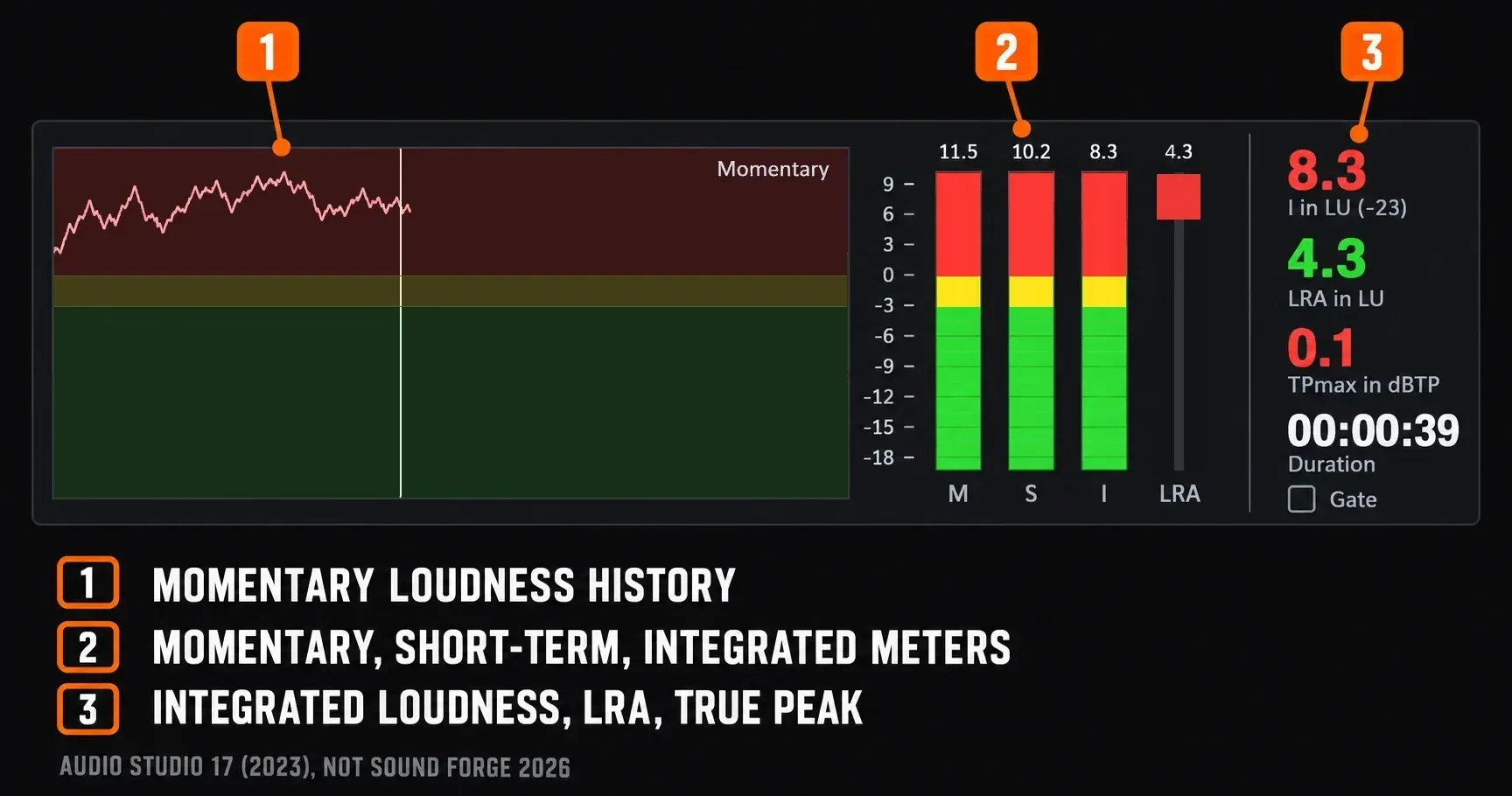
Audio Studio 17 has more than a basic peak display. The 2023 launch announcement names loudness visualization and a mono-compatibility meter. Release notes preserved by a MAGIX forum moderator also describe true-peak display, coreFX Utility and Ozone 10 Elements in the initial release. Measuring loudness and automatically normalizing to a loudness target are different jobs, and an old bundle announcement doesn't create an entitlement today.
For stereo editing with an existing VST2 or VST3 chain, you don't automatically need a newer version. The sharper upgrade questions are whether you need Pro batch processing, more than six channels, ARA, or a specific repair tool Audio Studio lacks. Check plug-in recall and the exported file; a plug-in showing up in a menu tells you much less.
Owning a purchased version doesn't guarantee a working installation forever. Windows updates, audio drivers, installer access and third-party authorization are all separate dependencies. Keep the working system as it is and try copies of representative files before you replace it.
What Sound Forge 2026 adds
Sound Forge 2026 continues the professional editor line rather than the old lower-cost Audio Studio tier. The current product page documents batch processing, noise reduction, clipping repair and recording up to 32 channels. The edition matrix lists VST2, VST3 and ARA support. Those are good reasons to try the current editor, but they don't prove your plug-in library will work without changes.
Move for a specific capability. A newer version number on its own isn't a reason:
- Batch work: apply repeatable processing and output settings across folders of files.
- Restoration: use the currently documented DeClicker, DeCrackler, DeClipper, DeHisser, and broadband noise tools.
- Current plug-ins: work with the advertised VST2, VST3, and ARA platform after testing your own library.
- Multichannel files: open and process material with up to 32 channels when the file-based workflow requires it.
- Current support: use the Boris FX account, Hub installer, and current support documentation.
Sound Forge Plus doesn’t unlock a stronger core editor; it adds four named tools. I'd start with base Sound Forge unless Melodyne 5 Essential, Vandal, VariVerb II, or 3D Reverb has a defined place in the workflow. The detailed Sound Forge vs Sound Forge Plus comparison separates the editor from the bundle. The current Sound Forge 2026 review covers the practical strengths and limits of the core editor.
What Sound Forge 2026 does not solve
Sound Forge is still a specialist editor built around a single audio file. It handles events and multichannel files, but arranging a song or podcast across many tracks with buses, sends, instruments, comping and project-wide automation is a different kind of work.
If Audio Studio feels limited because you are building layered sessions, the direct upgrade may preserve the category mismatch. Compare Sound Forge with REAPER for multitrack production or choose another DAW. If the work is a finished WAV that needs an exact cut, repair, level change, batch process, or delivery conversion, Sound Forge fits the job it was designed to do.
Windows and Mac compatibility
The 2023 Japanese Audio Studio 17 release announcement lists 64-bit Windows 10 and 11. That's a historical regional specification, and it doesn't promise compatibility with every later driver or Windows update. The current Sound Forge 2026 requirements list Windows 11. Neither source offers a current native Mac edition of these two products. A Mac-first buyer is better off comparing native alternatives by workflow than treating an old Windows license as a Mac upgrade.
For the broader buying decision, the Sound Forge comparisons hub separates edition changes from alternatives to the editor. Use this comparison when you already own Audio Studio; the Pro 18 and Plus comparisons start with different editions.
Keep, move, or choose another editor
Keep Audio Studio 17
Keep it when you already own a legitimate license, the current machine is stable, and a representative file moves from recording through export without a workaround. Archive the installer, serial, purchase record, presets, and a note with the working Windows and driver versions.
Move to Sound Forge 2026
Move when a current support path, batch processing, restoration, 32-channel file support, or a required plug-in workflow solves a real job. Run the official trial with the exact interface, driver, VST folder, source files, output formats, and batch preset you expect to use.
Choose another editor
Choose a DAW for multitrack production. If the job is occasional trimming or conversion and the current Sound Forge price can’t be justified, a simpler editor covers it. The Sound Forge alternatives guide compares Audacity, Acoustica, REAPER, Audition, RX, and WaveLab by work rather than feature count.
License options and March 2026 price reference
The March 30, 2026 acquisition announcement lists these US launch prices. Treat them as a historical reference; a current checkout quote may differ. Monthly and annual subscriptions are separate from the perpetual purchase and from the eligibility-dependent Upgrade & Support offer. Check tax, currency, renewal settings and support terms in the offer you actually get.
| License at launch | Sound Forge | Sound Forge Plus |
|---|---|---|
| Monthly subscription | $24.95 | $33.95 |
| Annual subscription | $149.95 | $199.95 |
| Upgrade & Support Plan | $189.95 | $249.95 |
| Perpetual license | $299.95 | $399.95 |
Check the live Sound Forge pricing page immediately before purchase. The Sound Forge pricing guide explains what the subscription, perpetual license, and Upgrade & Support Plan mean. A cheap legacy key carries different risks, so its sticker price isn’t a clean substitute for a current license.
Does Audio Studio qualify for the upgrade price?
Boris FX announced that MAGIX customers who own any previous version of Sound Forge could use a simplified upgrade price through December 5, 2026. The public wording is broad, yet the transition FAQ reviewed for this guide doesn't name Audio Studio separately.
Use the MAGIX purchase email when creating or checking the Boris FX account. Boris FX says previous registrations using the same email can appear in the account to streamline upgrade eligibility. A transferred registration doesn’t convert an Audio Studio serial into a current Sound Forge license, though.
Before paying, ask Boris FX sales to confirm eligibility for your exact Audio Studio purchase, and save the answer. The registration-transfer guidance explains why old serials may show up in the current account. It doesn't show that every Audio Studio order qualifies for every current offer.
Downloads, activation, and support for Audio Studio 17
Boris FX says that versions released before its 2026 line continue to be hosted by MAGIX. Sign in to the MAGIX account that owns the serial and look under registered products or downloads. Stay away from random installer mirrors: a modified package is a security problem, and it still won't give you a valid license.
Keep the original Audio Studio purchase record and registered email. The current trial instructions, by contrast, use a Boris FX account and Boris FX Hub. A trial account or a transferred old registration doesn't prove you've bought a 2026 license. Follow the instructions that came with your exact purchase.
The current catalog shows an actively sold Sound Forge edition. It doesn't commit anyone to new maintenance for Audio Studio 17. Don't buy a legacy copy expecting its bugs to get a fresh patch. Ask support about the exact version and problem before you replace a working setup.
Should you buy an Audio Studio 17 key in 2026?
My default is no unless the seller can prove a complete, transferable purchase. A marketplace listing can outlive the vendor catalog. A serial in a photo, a download link, or a sealed-looking box does not prove that the license is unused, transferable, compatible with the installer, or recoverable in a MAGIX account.
Require all four items before considering payment:
- The exact product name and edition: Sound Forge Audio Studio 17, not Pro 17 or a bundled voucher.
- A legitimate serial with a documented transfer or unused registration state.
- Access to the official MAGIX-hosted installer for that SKU and language.
- A refund path if activation fails on the intended machine.
Don’t value the listing by bundled plug-in names until those entitlements appear in the account. Old promotions changed by country, retailer, and date. If a working editor matters more than collecting a legacy license, test current Sound Forge or a current alternative instead.
A low-risk migration test
The official Sound Forge trial offers 15 days on Windows, so prepare a test pack before you start it. Work on copies, write outputs to a different folder, and keep the working Audio Studio installation until the replacement has proved itself.
- One file recorded through the interface and driver you use every day.
- One damaged or noisy file for the restoration tools you actually need.
- One VST2 or VST3 chain with saved presets and a known reference render.
- One folder for batch processing with the required naming and output formats.
- One multichannel file if channel count is part of the reason for moving.
- One final export checked for sample rate, bit depth, metadata, loudness, and playback.
If the paid entitlement, installer, or upgrade state contradicts the account, capture the receipt, serial or order reference, account email, product listing, and exact message. Send that evidence through Boris FX technical support instead of changing a known-good legacy installation.
Frequently Asked Questions
Is Sound Forge Audio Studio discontinued?
Audio Studio is absent from the current Boris FX lineup, and version 17 is the latest confirmed release found in official and authorized release material. Calling it a legacy product is supported. A permanent end to the name has not been formally announced in the sources reviewed.
Is there a Sound Forge Audio Studio 18?
Boris FX has announced no Audio Studio 18 in its current catalog or transition documentation. Sound Forge Pro 18 was a separate MAGIX professional product. The current Boris FX editor is Sound Forge 2026.
Can I still use Sound Forge Audio Studio 17?
Yes, if the legitimate license activates and the installed build works with the current Windows system, interface driver, and plug-ins. Back up the installer, serial, purchase record, and presets before moving to another computer.
Can I still download Audio Studio 17?
Boris FX says releases before the 2026 line continue to be hosted by MAGIX. Use the MAGIX account that owns the product. Avoid unofficial installer mirrors and contact support if the registered download is missing.
Is Audio Studio 17 the same as Sound Forge 2026?
No. Audio Studio 17 was the MAGIX consumer edition. Sound Forge 2026 continues the current professional single-file editor with documented batch processing, restoration, VST2, VST3, ARA, and support for files with up to 32 channels.
Does Audio Studio qualify for the Sound Forge upgrade?
The public offer says owners of any previous Sound Forge version can upgrade through December 5, 2026, but Audio Studio is not named separately in the reviewed support wording. Ask Boris FX sales to confirm the exact serial before relying on the price.
Should an Audio Studio owner buy Sound Forge or Sound Forge Plus?
Start with base Sound Forge unless Melodyne 5 Essential, Vandal, VariVerb II, or 3D Reverb is required. Plus adds those four tools to the same core editor.
Will Sound Forge 2026 replace a multitrack DAW?
No. Sound Forge is built around precise file editing, repair, mastering, and repeatable processing. Use a DAW for layered tracks, buses, instruments, comping, and project-wide mixing.