
Choose Audacity 4 for a free multitrack project on Windows, macOS or Linux. Choose Sound Forge on Windows for detailed work on individual audio files, dedicated batch processing, analysis or ARA integration. Neither is automatically better-sounding: the useful question is which one fits the session you need to finish.
For the wider product overview, see our Sound Forge guide.
Need a different kind of editor? The Sound Forge comparisons hub separates multitrack production, mastering and specialist audio repair.
This is a documentation-based comparison of Sound Forge 2026, Audacity 4.0.0 and the older Audacity 3.7.9 workflow—not a timed benchmark or a listening test. Audacity 4 is the current stable release, but some 3.x features are missing. The distinctions below matter before you migrate an existing project.
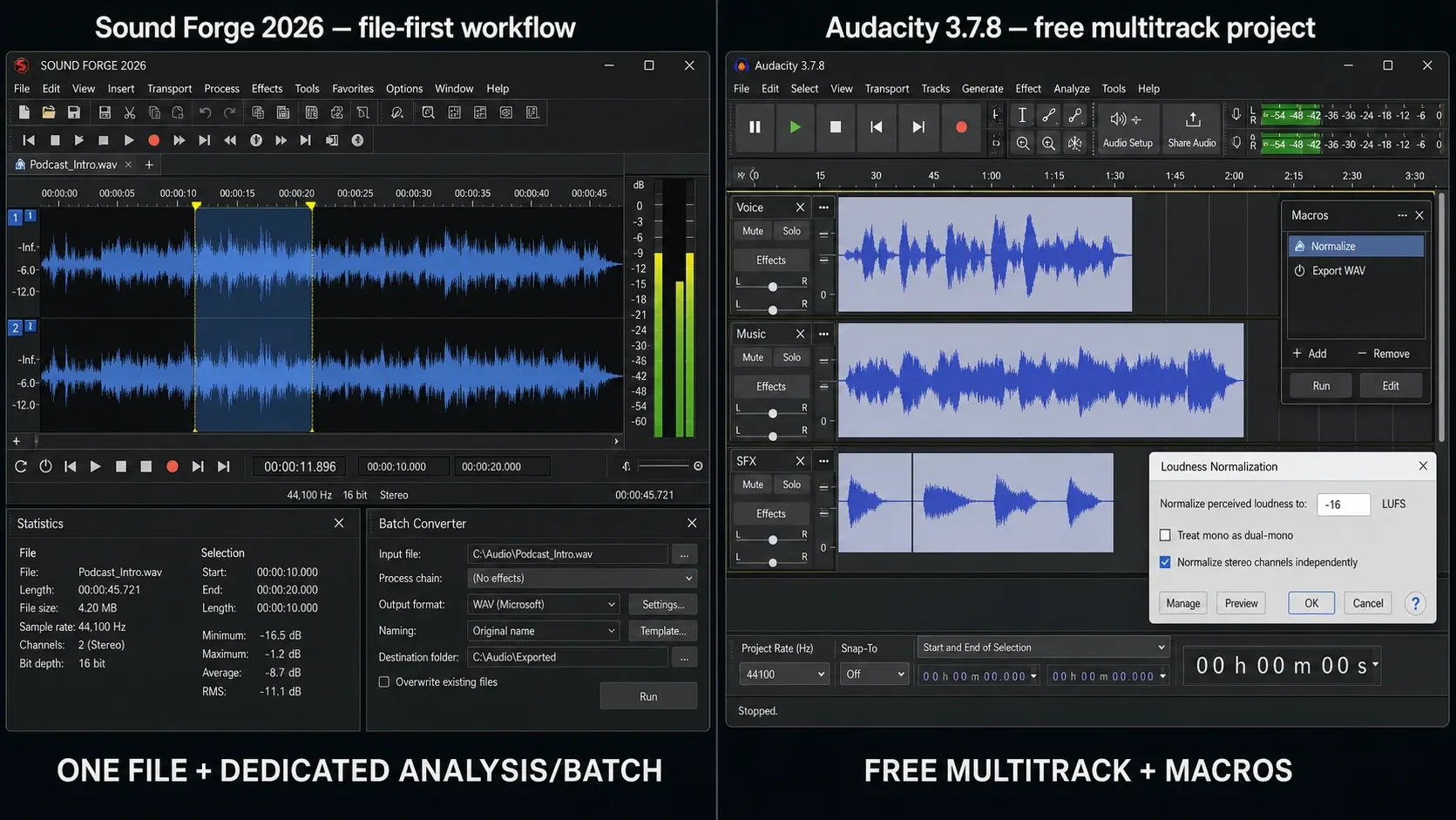
The Macros workflow illustrated above refers to Audacity 3.x. The 4.0.0 release notes list Macro Manager and the scripting pipe as unavailable; do not plan a 4.0 batch job around that illustration.
Quick Comparison Table
| Decision point | Sound Forge 2026 | Audacity 4.0.0 |
|---|---|---|
| Cost (Sound Forge launch prices) | Announced from $24.95/month, $149.95/year, or $299.95 perpetual | Free and open source |
| Desktop platforms | Windows 11 | Windows, macOS, Linux |
| Project model | File-first waveform editor; mono, stereo, and multichannel files | Multitrack AUP4 project; AUP3 converts one way to AUP4 |
| Sample-level editing | Yes | Yes, with context-sensitive sample drawing and Repair |
| Windows ASIO in official build | Yes | Yes |
| Multichannel capture | Up to 32 channels in one file | Depends on interface, driver, exposed channels, and mapping |
| Loudness workflow | Statistics, Loudness Normalize, peak/loudness metering | EBU R128 Loudness Normalisation; compatible meter plug-ins |
| Restoration | Broadband noise reduction, click/crackle and clipping repair in current plans | Noise Reduction, Click Removal, Repair, filters, and spectral tools |
| Batch processing | Dedicated Batch Converter | Macro Manager is absent in 4.0; 3.7.9 retains the older Macros workflow |
| Plug-ins | VST2, VST3, ARA | VST3; LV2 on Linux and Audio Units on macOS. Nyquist and legacy-format documentation conflict; see the plug-in section |
| ACX tools | Built-in ACX Check and Export Instant Actions | Manual or third-party checking workflow |
Sound Forge prices are the figures Boris FX announced for the 2026 launch; verify the live checkout because taxes, currency, promotions, and terms can change. Features can differ by operating system, driver, hardware, plan, and plug-in architecture.
The Real Difference: File Editor vs Multitrack Project
Sound Forge is a file-first waveform editor. It opens mono, stereo, and multichannel files and can record a multichannel file, but Boris FX explicitly says it is not a multitrack DAW. That makes it a strong fit for editing a mix, master, sample, interview, voice-over, transfer, or deliverable after the arrangement already exists.
Audacity 4 stores multiple tracks and clips in an AUP4 project. You can record, overdub, arrange and group clips, pan tracks, use realtime effects on tracks or the master, and export a mix. For an interview with separate guest tracks and a music bed, this is the more suitable project model. The 4.0 release does not provide MIDI tracks or virtual-instrument production; choose a DAW if those are essential.
Platform Support
Audacity 4.0.0 is available for Windows, macOS, and Linux. The official downloads include Windows x64 and ARM64, a universal macOS build for Intel and Apple Silicon, and Linux AppImages for x86_64 and ARM64. Audio-device access, package integration, and plug-in availability can still vary by operating system and architecture.
Sound Forge 2026 is Windows-only. The current Boris FX requirements page lists Windows 11 and does not list Windows 10; there is no current macOS or Linux edition on the official product pages. If your editing machine is a Mac or Linux system, Audacity wins this comparison before features or price enter it.
Audio Editing Depth
Sample-level precision
Sound Forge is designed around sample-accurate waveform work. You can zoom to individual samples, place edits at zero crossings, repair short faults, and inspect exact amplitude values. That direct file view is the reason to consider it for surgical cleanup; it is a workflow advantage, not a claim that its math sounds better by default.
Audacity also supports sample-level editing. Audacity 4 removes the separate Draw tool: zoom until individual samples are visible and the pointer becomes a pencil near a sample point. Repair and spectral tools handle other short defects. Both editors can change individual samples. Compare the selection and repair workflow on a copy of your own file; this comparison does not establish that one is faster.
Destructive vs non-destructive
Audacity mixes destructive and non-destructive operations. Clip trimming remains adjustable, and realtime effects stay editable on a track or the master stack until export. In Audacity 4, the bundled Compressor, Limiter, and Reverb can run realtime; other bundled effects applied from the Effect menu rewrite the selected audio. Save the AUP4 project and keep an untouched source rather than assuming every edit remains live.
Sound Forge's default Process commands change the selected waveform when you apply them, while its event-based mode provides a non-destructive editing route. Preview, Undo, plug-in chains, and Save As further reduce risk, but this remains a file-first workflow. Work on a copy and keep the original separately from the processed file.
Noise Reduction and Restoration
Current Sound Forge plans list broadband noise reduction plus tools for clicks, crackles, and clipped audio. Older MAGIX bundles sometimes included third-party iZotope products, but that does not prove they are included in a current Boris FX purchase. Check the current plan matrix before buying.
Audacity's built-in Noise Reduction learns a noise profile and is intended for steady sounds such as hiss, hum, or an air conditioner. The current manual distinguishes these from one-off sounds such as a door slam. Preview the result and use Noise Only to check whether wanted speech or music is being removed; watery artifacts are a reason to reduce the processing. For short clicks, consider Click Removal or Repair instead. This comparison does not include a matched-file listening test, so it cannot establish which editor produces cleaner restoration.
Recording: Tracks, Channels, and ASIO
Audacity is the better choice here for recording and arranging multiple tracks in one project. The Windows caveat changed in September 2026: official Audacity 4.0.0 and 3.7.9 builds include ASIO playback and recording. The usable input count still depends on the interface, its driver, the channels it exposes, and Audacity's channel mapping; the ASIO label alone does not guarantee a particular multichannel setup.
Sound Forge supports ASIO and the current product page specifies recording and editing files with up to 32 channels. That is useful for a concert, location recorder, or surround capture destined for file-based editing. It does not create a multitrack arrangement with independent clips, automation, buses, and virtual instruments. Use Audacity for a simpler multitrack edit or a DAW for deeper production.
Loudness, Metering, and Mastering
Sound Forge 2026 provides peak and loudness metering, Tools → Statistics, three Normalize modes, effect chains, coreFX and essentialFX processing, and dynamic EQ. Select the measurement your delivery specification actually requires; peak level, average level and integrated loudness are not interchangeable.
Audacity has EBU R128-based Loudness Normalization, realtime track and master effects, a limiter, compressor, EQ, and third-party meter plug-ins. Loudness Normalization is an effect rather than an export-only switch. Sound Forge exposes more dedicated file-analysis controls, but Audacity can produce a compliant master when you use the required meter, dynamics chain, and final verification.
Both export common formats including WAV, FLAC, and MP3. Current Audacity builds include MP3 support; FFmpeg is needed for additional formats such as M4A. Exact codecs, metadata, bit depths, channel layouts, and dithering choices still differ, so compare the required deliverable rather than a generic “supports audio export” checkbox.
Batch Processing
Audacity 4.0 does not include the Macro Manager or scripting pipe, so the old Macros batch workflow is not available in the current major release. Audacity 3.7.9 remains downloadable and retains Macros; its older manual recommends no more than 500 files in one batch. If automation is essential, test 3.7.9 on copies or wait for the feature to return to 4.x, and remember that an AUP4 project cannot be saved back to AUP3.
Sound Forge's Batch Converter provides input lists, processing chains, output formats, naming and destination controls. Test a few representative files before processing an archive. For the Windows workflow, follow the Sound Forge batch-processing guide: run a small pilot, check the exported files and keep the originals out of the destination folder.
VST Plugins
Audacity's current launch pages agree on VST3, with LV2 on Linux and Audio Units on macOS; the FAQ and current manual also describe Nyquist plug-ins. The transition guide lists VST and LADSPA but says Nyquist and VAMP are not yet supported. The 4.0 changelog instead lists Nyquist as supported and LADSPA/VAMP as unavailable. Those are contradictory claims, not interchangeable format names. Before migrating, check the exact plug-in in Plugin Manager and run a short processing test on the target build and operating system. A format listed on one launch page is not enough to promise compatibility.
The current Sound Forge plan matrix explicitly lists VST2, VST3, and ARA support. Audacity supports effect plug-ins but is not a virtual-instrument production environment; Sound Forge is not one either. ARA remains a meaningful Sound Forge distinction. Before switching, test the exact plug-in version, architecture, user interface, preset recall, and ARA workflow you depend on.
Audacity 4.0 Is Stable—and Some 3.x Features Are Missing
Audacity 4.0.0 became the stable release on September 3, 2026. It rebuilds the interface on Qt, changes clip selection and editing, adds workspaces, revises recording, includes ASIO in official Windows builds, and saves local projects as AUP4. An AUP3 project opens and converts without changing the original, but the converted project cannot be saved back to AUP3.
The first 4.0 release does not include Time Tracks, Note/MIDI tracks, Mixer, Macro Manager, the scripting pipe, or play-at-speed, and the changelog warns that some export/render features, analyzers, and effects are still missing. Audacity 3.7.9 is therefore a defensible temporary choice when a missing 3.x function is essential. Test migration on copies, inventory plug-ins first, and do not assume a converted AUP4 project can return to the older format.
Pricing and Licensing
Audacity is free and open source under the GPL. There is no paid feature tier required to edit, record, use local plug-ins, or export. Optional cloud services are separate from the desktop editor and are not required for a local project.
Boris FX announced the base Sound Forge 2026 plan at $24.95 monthly, $149.95 annually, $189.95 for Upgrade & Support, or $299.95 perpetual when the 2026 editions launched. The current product page is the place to check the available purchase options. The figures here are launch prices, not a live checkout quote: taxes, currency, promotions and terms can change. The announced legacy upgrade offer runs through December 5, 2026.
A perpetual license is not the same as an annually renewed support plan. Boris FX's Upgrade & Support policy includes 12 months of upgrades and support with a perpetual purchase and uses automatic renewal, which you can cancel in your account. The perpetual license continues to work when support expires; later reinstatement can cost more. Check the renewal terms at checkout and use the Sound Forge pricing breakdown to compare the plan types.
If you are undecided, use the official 15-day Sound Forge trial on a copy of the same short project you can finish in Audacity. Check selection, cleanup, required plug-ins and export. Buy only if the difference matters to your work, rather than assuming a paid editor must produce better audio.
Which One to Use
Use Audacity 4 if: you need Windows, macOS, or Linux support; a multitrack project; free local editing; official Windows ASIO; realtime track or master processing; or a straightforward podcast and voice workflow. Use 3.7.9 temporarily only when a missing 4.0 feature such as Macro Manager is essential, and keep project copies because AUP4 does not save back to AUP3.
Use Sound Forge if: you are on Windows and work mainly on finished files, need to record or edit one file with up to 32 channels, want integrated Statistics and Normalize controls, depend on ARA or VST2/VST3 processing, or prefer its dedicated Batch Converter and restoration tools. Check the current plan contents instead of relying on older MAGIX bundle lists.
Use both if: you want Audacity for recording and arranging, then Sound Forge for file-based cleanup, analysis, or delivery. Keep the original project and an unprocessed export, document the sample rate and bit depth, and verify the final encoded file. The handoff is useful only when each application has a defined job.
Frequently Asked Questions
Is Sound Forge Pro better than Audacity?
Neither is universally better. Audacity 4 is the stronger choice for free cross-platform multitrack projects and now includes ASIO in its official Windows build. Sound Forge is the stronger choice for a Windows file-first workflow with up-to-32-channel file handling, dedicated analysis, ARA, restoration, and batch tools.
Can Audacity replace Sound Forge Pro?
Yes for many podcast, voice, conversion, multitrack, and basic mastering jobs. Audacity 4 includes official Windows ASIO, but its multitrack project is a different workflow from Sound Forge's single-file editor. ARA and the dedicated Batch Converter are separate reasons to choose Sound Forge. Do not read its 32-channel specification as a claim that Audacity is limited to stereo: Audacity's recording inputs depend on the device, driver, and channel mapping.
Does Audacity support VST plugins?
Yes. Audacity 4 supports VST3 effects and additional formats by platform. Its official pages disagree about Nyquist and some legacy formats, so verify the exact plug-in on your operating system before moving a production project. It is not a virtual-instrument host.
Is Audacity good enough for podcast editing?
Yes. Audacity can record and arrange tracks, edit dialogue, apply Noise Reduction and realtime effects, normalize loudness, and export common delivery formats. Verify the host's current loudness, peak, channel, bitrate, and metadata requirements before publishing.
Does Sound Forge Pro run on Mac?
No current macOS edition is listed. Sound Forge 2026 currently lists Windows 11 as its supported operating-system baseline. Audacity is the option in this comparison if you need a current native Mac build.
Is Audacity 4.0 the stable release?
Yes. Audacity 4.0.0 became the stable release on September 3, 2026. It uses AUP4 projects and official Windows builds include ASIO, but Macro Manager, the scripting pipe, MIDI tracks, Mixer, and several other 3.x functions are absent in the first 4.0 release. Test migration and plug-ins on copies.
Which is better for ACX audiobook standards?
Both can prepare compliant files. The current ACX audio submission requirements specify -23 to -18 dB RMS, peak values no higher than -3 dB, and a noise floor no higher than -60 dB RMS. They also require 44.1 kHz MP3 at 192 kbps or higher CBR, with consistent mono or stereo across the book. These are separate checks, not a single loudness preset. Sound Forge 2026 includes ACX Check and Export Instant Actions. Audacity workflows use its meters and effects plus optional third-party checking tools, so verify every exported chapter against ACX before upload.
Does Audacity work well on Linux?
Yes. Audacity provides official Linux AppImages. Audio-device access, desktop integration, architecture, and plug-in availability can vary by distribution, so test recording and plug-ins on the target system before a critical session.
If Audacity's free multitrack model is right but you need deeper DAW routing, compare Sound Forge with Reaper. If the missing feature is spectral repair, use the iZotope RX comparison. For a subscription multitrack editor tied to Premiere, see Adobe Audition versus Sound Forge.