
The best sampler software depends on what you need to do with audio. Serato Sample fits fast chopping and flipping, Kontakt 8 fits detailed multisampled instruments, Groove Agent 6 fits drum-centered work, Waves CR8 fits layered creative sampling, Koala fits mobile capture, and Decent Sampler fits free library playback. Before buying anything, check whether your DAW already covers the job.
Start with the sampling job, not the product list
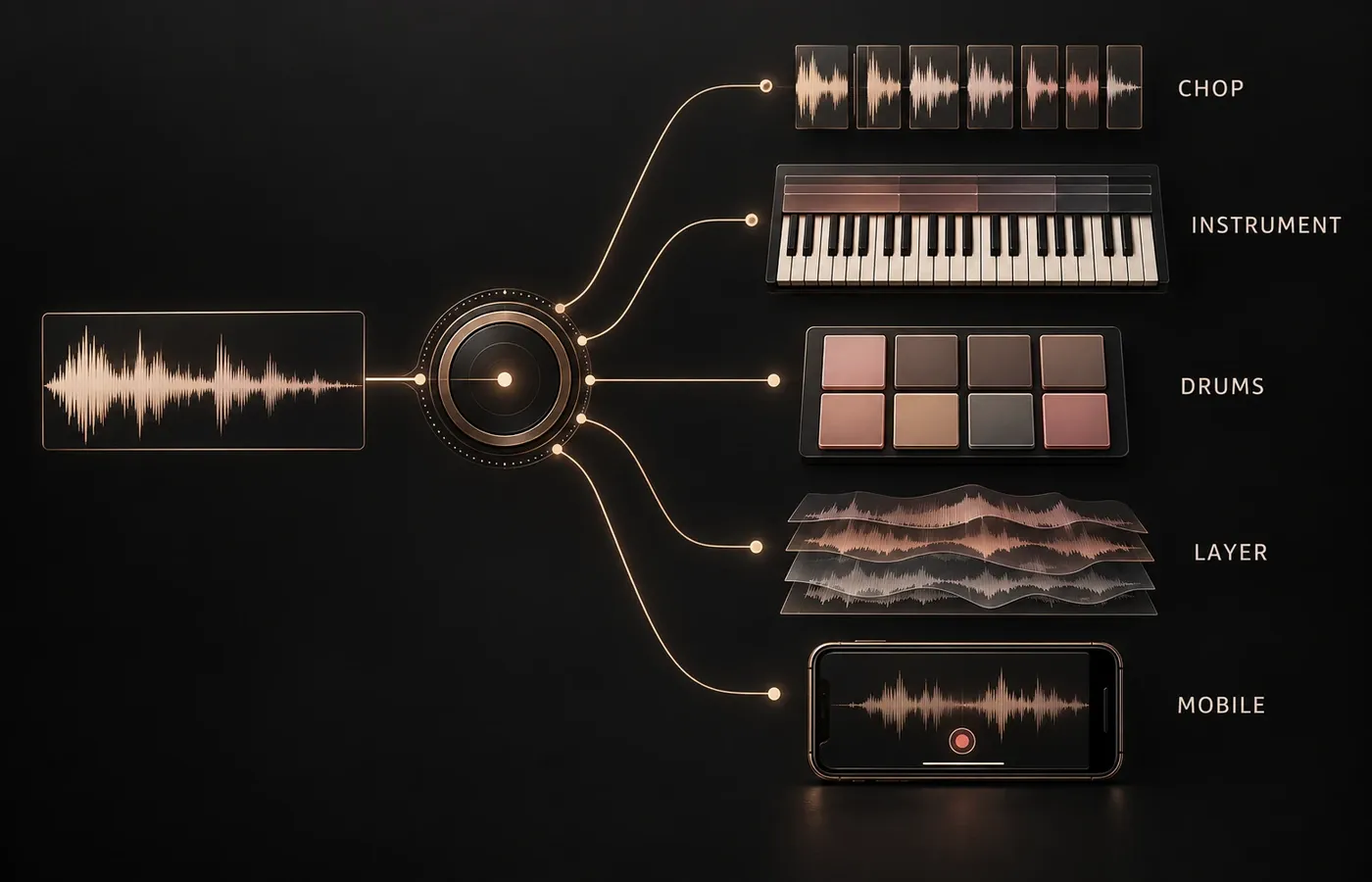
“Sampler” describes several different tools. One turns a four-bar loop into playable slices. Another maps hundreds of recordings across notes and velocities. A drum sampler organizes pads, patterns and kit pieces. A mobile sampler prioritizes immediate recording and resampling. A library player may load finished instruments but offer little authoring depth.
That’s why a single numbered ranking is misleading. A producer who wants to flip a vocal phrase shouldn’t judge software by the same criteria as a sound designer building a chromatically sampled instrument. Define the job first, then compare products inside that category.
Chopping and flipping
Fast slicing, tempo sync, pitch control, stem separation and pad triggering.
Multisampled instruments
Key and velocity mapping, zones, groups, looping and detailed sample editing.
Drum sampling
Pad layout, kits, pattern editing, groove libraries and separate mixer routing.
Creative layering
Several sample layers, keyboard zones, modulation and effects inside one instrument.
Mobile capture
Recording, sequencing, resampling and practical export from a phone or tablet.
Do you need another sampler at all?
Check whether your DAW already includes a sampler that fits the job. That built-in option has a practical advantage: it follows the DAW’s browser, automation, routing and project-saving conventions. If it already imports your audio, creates the required slices or zones, and recalls the project reliably, another plug-in may add choice without removing a real bottleneck.
- Can it import your own recordings and the formats you actually keep?
- Can it slice, map or layer samples in the way the project requires?
- Can you route pads or groups separately when the mix needs it?
- Does the project reopen correctly on every computer you use?
- Is the missing feature worth adding another license, installer and dependency?
A third-party sampler makes sense when the missing capability is specific: stem-based chopping, deep instrument construction, a drum-pattern environment, cross-platform mobile capture or access to a particular library ecosystem. Buy for that gap rather than for the longest feature list.
Sampler software comparison by workflow
| Sampler | Best fit | Why it belongs in that category | Check before choosing |
|---|---|---|---|
| Serato Sample | Fast chopping and flipping | Sync, slicing, stem isolation, pitch/time processing, cue pads | Plug-in format and host support |
| Kontakt 8 | Multisampled instruments | Zones, MIDI and pitch mapping, Group, Mapping and Wave editors | Authoring depth, library requirements and project portability |
| Groove Agent 6 | Drum sampling | Acoustic and electronic kits, pattern editor, MIDI grooves, personal samples | Host compatibility and whether you need its pattern environment |
| Waves CR8 | Creative layered sampling | Up to eight layers, loops or one-shots, keyboard zones | Current supported hosts and how collaborators will recall it |
| Koala Sampler | Mobile capture and beat making | Mic recording, sequencing, resampling, effects, MIDI and WAV export | Platform-specific export features |
| Decent Sampler | Free library playback | Free player for dspreset and dslibrary instruments | Whether playback is enough or you need deep instrument authoring |
These are job-based recommendations. They don’t claim that one product sounds better or performs more efficiently than another. Vendor documentation can establish formats and functions, but it can’t establish a universal winner for every producer, computer and project.
Best for chopping and flipping: Serato Sample
Serato Sample is the clearest fit when the source is an existing track or loop and the goal is to find pieces, rearrange them and keep the result in time. The current Serato Sample product page lists sync, chopping, stem isolation, pitch shifting and time stretching. It also supports up to 32 cue points mapped to pads, with triggering from a computer, MIDI hardware or a piano roll.
The per-pad output option starts to matter once the idea moves into the mix. Individual pads can go to different channels for separate EQ, effects and level control. Serato supplies Sample as a VST, AU and AAX plug-in, so it’s a host-based choice rather than a standalone instrument-building environment.
Best for building multisampled instruments: Kontakt 8
Kontakt 8 fits the opposite end of the spectrum: turning many recordings into a structured playable instrument. In Native Instruments’ Classic view documentation, a Zone wraps one sample with information about the MIDI data that triggers it and the pitch at which it was recorded. The same documentation describes the Group, Mapping and Wave editors used to organize and shape that structure.
Kontakt can run standalone or as a plug-in. Current Kontakt compatibility information lists VST3, AU and AAX on macOS where applicable, and VST3 and AAX on Windows. When loaded as a plug-in, it receives MIDI from the DAW and sends audio to the DAW mixer.
That depth is useful only if the project needs it. If all you’re doing is slicing one loop into pads, a large instrument-authoring environment can slow the decision down rather than improve it. Kontakt belongs on the shortlist when mappings, groups, zones and reusable instruments are the work.
Best for drum-centered sampling: Groove Agent 6
Groove Agent 6 combines sampling with a drum and beat-making environment. Steinberg describes acoustic kits, electronic sounds and percussion, five acoustic kits, a pattern editor, more than 1,000 MIDI grooves and patterns, and support for personal samples in Beat Agent.
That makes it more than a grid that fires one-shots. The pattern and groove layer can be valuable when drum programming is part of the same decision. It’s less compelling if you already prefer your DAW’s sequencer and just need a lightweight pad instrument.
Best for creative layering: Waves CR8
Waves CR8 sits between a simple slicer and a deep library platform. The CR8 manual documents up to eight sampler layers made from one-shots or loops. Those layers can be mixed together or spread across MIDI keyboard zones. Samples can be dragged from a DAW or computer and played from a MIDI keyboard.
That design suits one-off playable textures, layered hits and evolving patches built from personal audio. It’s a practical candidate when several samples need to behave as one instrument, but a full library-authoring system would be more than the job needs.
Check the current host list before you commit a project to it. Compatibility tables change. For dependable recall, a collaborator also needs the same plug-in and access to the same source files.
Best for mobile sampling: Koala Sampler
Koala prioritizes capture and immediacy. Its official description covers recording through a phone microphone, loading personal sounds, sequencing beats, adding effects and resampling the app’s output. It also lists MIDI control, Ableton Link and WAV export.
The current Koala manual lists iOS, Android, Mac and Windows availability. One export detail is platform-specific: Koala lists Ableton Live Set export as iOS only. If the mobile project has to move into a particular desktop session, treat that as a compatibility condition, not a minor footnote.
Koala is the strongest choice here when the phone or tablet is part of the instrument. It isn’t a substitute for detailed multisample mapping. Temporary desktop offers also shouldn’t be mistaken for permanent pricing.
Best free option for playing libraries: Decent Sampler
Decent Sampler is a free player for libraries in the dspreset and dslibrary formats. Its current download page provides plug-in and standalone options across Windows, macOS and Linux, plus AUv3 and standalone operation on iOS.
The word “player” sets the expectation. It’s useful when the target library already exists in the Decent Sampler ecosystem and you need a no-cost way to play it. It shouldn’t be presented as a feature-for-feature replacement for Kontakt’s deeper instrument-authoring workflow.
Free software also doesn’t make every downloadable library free for every use. Read the library’s own license before you assume you can redistribute its samples, use them in templates or package them inside another instrument.
Compatibility checks that prevent broken projects
A sampler can fit the musical job and still be wrong for the production setup. Run these checks before building a project around it.
- Operating system and processor. Use the current vendor requirements for every computer that must open the project.
- Plug-in format. Confirm that the host loads the supplied VST3, AU, AAX or other required format. The product name alone does not prove host compatibility.
- Standalone operation. Decide whether you need the sampler outside a DAW for performance, library work or sound preparation.
- Personal sample import. Check the exact file types, channel formats and length limits used by your archive. Use the WAV, FLAC and MP3 format guide when deciding what to keep editable, lossless or compact. Do not assume every sampler accepts every file.
- Project recall. Keep the original recordings, note the plug-in version and test how the project locates moved files before collaboration or archiving.
- Export path. Confirm whether you need stems, MIDI, a DAW-specific project, a reusable instrument or only a rendered WAV.
Plan project portability before the sampler becomes essential
Sampler sessions depend on more than the plug-in file. They can depend on external recordings, library folders, expansion licenses, plug-in versions and paths that exist on only one machine. A project that opens today may fail after a drive move or on a collaborator’s computer.
When the license permits it, keep a project-local copy of recordings. Preserve the original file names and render important parts to audio before archiving. Large uncompressed libraries grow quickly, so estimate their storage with the audio file size calculator before copying them across several machines or backup drives. For an instrument you expect to revise later, also keep notes about root pitches, mappings and processing. Printed audio is the fallback. It shouldn’t be the only surviving record of how the instrument was built.
Sampler software and sample rights are separate decisions
Buying a sampler doesn’t clear the audio you load into it. There are at least three separate permissions to check: the software license, the license for any included library, and the rights to recordings you import yourself.
The US Copyright Office explains that a musical work and a sound recording are separate works that may be owned and licensed separately. Its guidance on sound recordings also states that copyright in a recording is not a substitute for copyright in the underlying composition.
This is a practical checking framework, not legal advice. When the source is commercially released music or the planned use is unclear, get advice for that specific recording and use.
Which sampler should you choose?
| Your situation | Start with | Reason |
|---|---|---|
| You want to chop and rearrange tracks or loops | Serato Sample | Its documented workflow centers on sync, slicing, stems, cue pads and pitch/time changes. |
| You are constructing a detailed playable instrument | Kontakt 8 | Zones and dedicated mapping, group and wave editors match that job. |
| You want drums, patterns and grooves together | Groove Agent 6 | The drum environment includes kits, pattern editing, grooves and personal samples. |
| You want layered playable textures from personal audio | Waves CR8 | Eight-layer stacking and keyboard zones fit compact creative instruments. |
| You capture ideas on a phone or tablet | Koala Sampler | Recording, sequencing, resampling and export are built around an immediate mobile workflow. |
| You need to play compatible free libraries | Decent Sampler | It is a free player for the Decent Sampler library formats. |
My decision rule is to name the finished result before naming the product. “I need to turn this loop into 16 playable slices” is useful. “I need the most powerful sampler” isn’t. Once the job is concrete, the unnecessary products fall away quickly.
Start with the sampler already in your DAW. Move to a third-party option only when a documented feature removes a real limitation. Make compatibility, project recall and sample rights part of the choice from the beginning.