
Choose Adobe Audition for a podcast assembled from several recordings, a Premiere soundtrack, or detailed spectral repair. Choose Sound Forge when you mainly edit finished audio files on Windows and want its analysis, batch-processing tools, or perpetual license. Audition also edits individual files, so Sound Forge is not an automatic upgrade for that job. The useful question is whether you need an adjustable session or a dedicated file editor.
If neither fits your budget or workflow, the Sound Forge comparisons hub separates free editors, multitrack DAWs and specialist restoration tools.
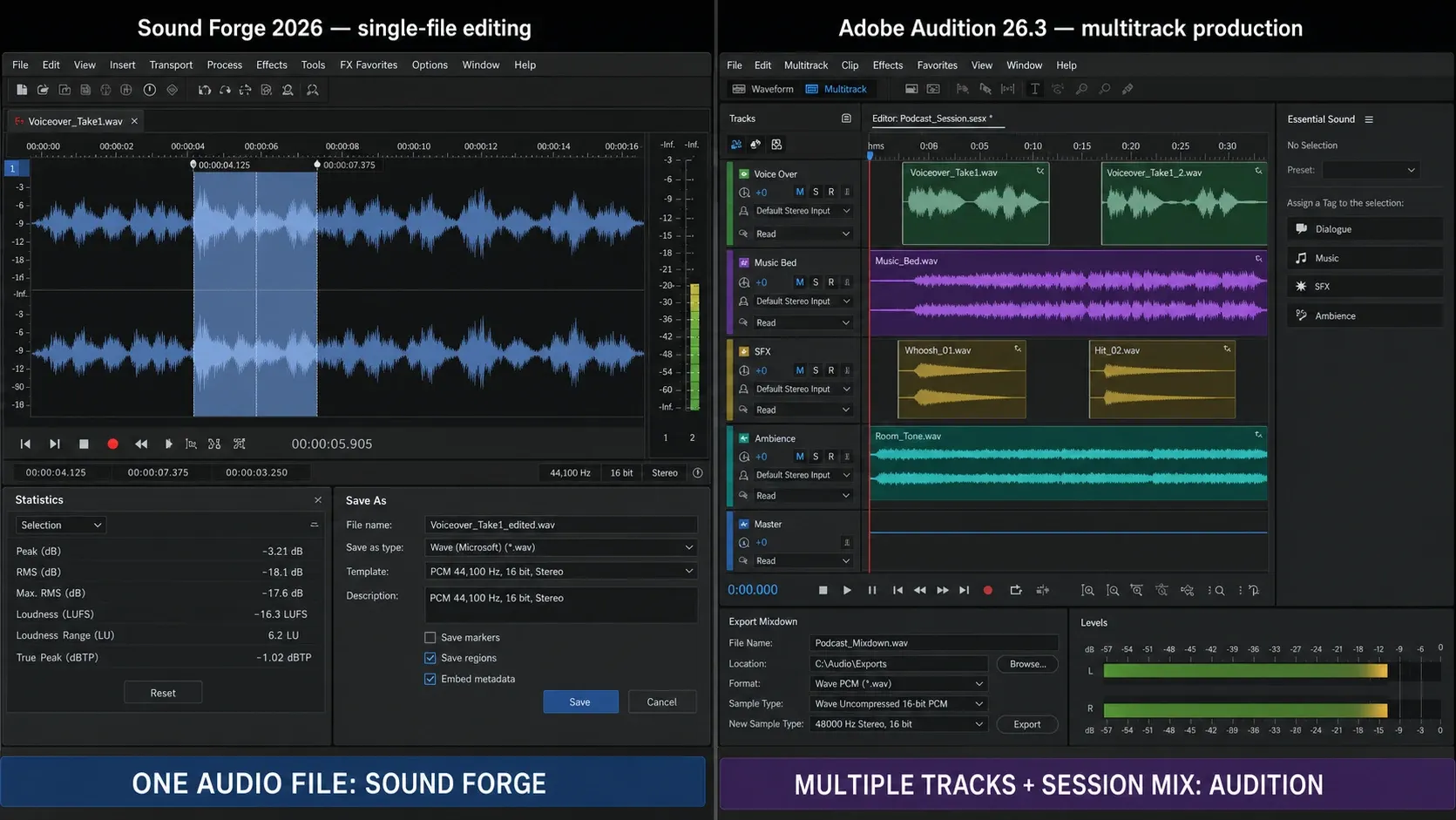
This is a comparison of documented features and licensing, not a measured speed test or blind listening test. The trial checklist below gives you a way to judge both on your own recording. The workflow illustration retains Audition 26.3 labels; it is not a reference for the 26.5 interface. The text and table compare the current releases.
Audition 26.5 is the September 2026 release; version 26.0 introduced native Windows on Arm support in January. Boris FX acquired Sound Forge from MAGIX on March 30, 2026. This comparison uses the current Sound Forge 2026 line, not the plug-in bundles sold with older Pro 18 packages.
Quick Comparison Table
| Decision point | Sound Forge 2026 | Adobe Audition 26.5 |
|---|---|---|
| Current platform | Windows 11 | Windows 11 24H2, Windows on Arm, macOS Sonoma+ |
| Project model | File-first waveform editor; mono, stereo, multichannel files | Waveform Editor plus non-destructive Multitrack Editor |
| US price reference | Boris FX launch figures: $24.95/month, $149.95/year, or $299.95 perpetual; verify checkout | $22.99/month, annual plan billed monthly |
| Perpetual license | Yes | No |
| Trial | 15 days listed by Sound Forge | 7 days; billing begins on day 8 in the displayed US signup flow |
| Multitrack arrangement | No | Yes |
| Windows audio-driver support | ASIO | ASIO or Microsoft Windows Driver Model |
| Multichannel capture | Record and edit one file with up to 32 channels | Multitrack or multichannel workflows; count depends on device, driver and mapping |
| Spectral selection | No equivalent to Audition's lasso/paintbrush spectral selections | Yes |
| Loudness workflow | Statistics, Peak/RMS/Loudness Normalize, meters | Match Loudness, meters, effect racks, analysis |
| Batch workflow | Batch Converter | Batch Process and Match Loudness |
| Premiere integration | Standard-file external edit/import workflow | Native clip and sequence exchange |
| Current plug-in headline | VST2, VST3, ARA | VST/VST3; Audio Units on macOS. Check plug-in architecture. |
Adobe version, requirements, US list price, and trial were checked on September 12, 2026. Sound Forge prices are the Boris FX 2026 launch figures; verify checkout because regional pricing, promotions, plan contents, drivers, and operating-system support can change.
The Core Difference: Multitrack Session vs File Editor
Adobe calls Audition a professional audio workstation. It has two distinct environments: a destructive Waveform Editor for individual files and a non-destructive Multitrack Editor for clips, tracks, routing, effects, automation, and mixdown. That makes it suitable for building a podcast, dialogue edit, soundtrack, or other session from multiple sources.
Sound Forge is a file-first waveform editor. Boris FX documents recording and editing one file with up to 32 channels, but explicitly says Sound Forge is not a multitrack DAW. Its natural jobs are a mix, master, sample, transfer, interview, voice-over, or deliverable that already exists as a file.
Use Audition when the deliverable depends on the relationship between many clips and tracks. Use Sound Forge when the deliverable is one file and you want its editing, analysis, capture, and batch tools in one Windows application. Audition's Waveform Editor can also finish single files, so Sound Forge must earn the purchase through the exact controls and license model you need.
Platforms and Current System Support
Audition 26.5 requires Windows 11 24H2 or macOS Sonoma 14 or later. Adobe also lists native Windows on Arm support on Snapdragon X hardware. Check your processor, audio driver and plug-ins against the requirements; an Intel plug-in is not automatically compatible with an Arm-native host.
Sound Forge 2026 lists Windows 11, with no current native Mac edition. That decides this pair for a Mac owner. It does not mean an older Windows installation can never launch Sound Forge; it means Windows 10 is not the published support baseline for this release.
Waveform and Spectral Editing
Both applications provide detailed waveform editing. Sound Forge emphasizes a direct file view and sample-level operations. Audition adds a spectral frequency display and selection tools inside its Waveform Editor. Neither product page proves that one produces higher-fidelity cuts; the useful difference is how you locate and select the problem.
Sound Forge can zoom to individual samples, snap edits to zero crossings, repair short faults, and work directly on a selection. WaveColor adds a visual layer: hue represents pitch range, while saturation separates more tonal or harmonic content from more noise-like content. It's an orientation aid rather than a spectral-selection tool, and it isn't evidence that an edit is correct before listening.
Audition provides rectangular, lasso and paintbrush spectral selections, plus a Spot Healing Brush. Its spectral display plots time against frequency, with color indicating amplitude. That lets you target a brief whistle without processing every frequency in the same time range. If the whistle overlaps a vocal harmonic, the selection can remove wanted sound too.
For a short click between words, either editor may be enough. For a moving whistle under speech, Audition gives you more control over the shape of the selection. Listen to the consonants and the ends of words after repair, not just the quieter gap between sentences.
Multitrack Recording and Mixing
Audition's Multitrack Editor records and arranges multiple tracks, applies clip and track effects, routes buses, automates mix parameters, and exports a mix or stems. The number of simultaneous inputs depends on the audio interface, driver, channel mapping, storage, and system performance.
Sound Forge doesn't provide a multitrack arrangement timeline. It can record and edit one file with up to 32 channels, but that isn't the same as independent tracks, clips, buses, and automation. Both programs support ASIO on Windows, so the useful distinction is the project structure: choose Audition or another DAW when the mix must stay adjustable as a session.
Premiere Pro Workflow and Adobe Ecosystem
Premiere can send a sequence to Audition with keyframes, effects, Essential Sound settings, markers and other audio metadata. Audition opens it in the Multitrack Editor. For a single clip, Edit in Adobe Audition opens a rendered audio copy; saving the edit updates the Premiere timeline. Returning a session uses Audition’s export-to-Premiere command, with a mixdown or separate track/bus stems. Check effect transfer on your own sequence instead of assuming every third-party effect will travel intact.
If you don't use Premiere, the integration has no value. Audition still offers multitrack and spectral tools on its own, but it remains subscription-only. Sound Forge offers subscription and perpetual choices; a perpetual license covers the purchased version, while access to future updates follows the current Boris FX plan terms.
Audition's Essential Sound panel groups task-oriented controls around Dialogue, Music, SFX, and Ambience. That is useful for editors who want a guided starting point, especially across Premiere and Audition. Treat its presets as a first pass, then listen and measure; a preset does not guarantee a clean or compliant mix.
Loudness, Metering, and Mastering
Sound Forge combines peak and loudness meters with Tools → Statistics, Peak/RMS/Loudness Normalize modes, coreFX, essentialFX and dynamic EQ. These are useful when a finished file needs analysis and a delivery pass. Peak normalization and loudness normalization solve different problems; use the measurement named in the delivery specification and check the exported file.
Audition's Match Loudness panel scans one or more files and applies a selected standard, target loudness, tolerance, and maximum true-peak limit. Audition also has realtime effect racks, meters, dynamics, EQ, and analysis panels, so Match Loudness is not its only mastering method. Automatic correction still needs a final measurement of the exported deliverable.
A practical distinction is recall: an Audition session keeps the source clips, routing and mix adjustable. A processed audio file does not preserve all those decisions. Keep the session and an unprocessed export if you plan to finish it in Sound Forge, so a later dialogue change does not force you to rebuild the mix.
Noise Reduction and Audio Restoration
The current Sound Forge feature list includes broadband noise reduction and click, crackle and clipping repair. Do not count an old iZotope bundle as part of a new purchase unless the plan explicitly includes it. For repetitive conversions, the Sound Forge Batch Converter workflow is useful, but a noise profile that suits one recording may damage another.
Audition’s noise-reduction and restoration effects include profile-based Noise Reduction, Adaptive Noise Reduction, DeNoise, Automatic Click Remover and DeHummer. Its Diagnostics panel adds DeClicker and DeClipper. Noise Reduction is an offline Waveform process; other effects can run in the rack. When available, preview the removed noise in isolation: recognizable words or music mean the settings are taking too much.
Audition is the more flexible choice here for hand-selected spectral repair. That is not a promise of a cleaner result on every file. If restoration rather than editing is the whole job, compare Sound Forge with iZotope RX before paying for another general-purpose editor.
Pricing, Trial, and License Terms
Adobe’s US page lists Audition at $22.99 per month, annual billed monthly, checked September 12, 2026. This is an annual commitment, not a cancel-anytime monthly plan. Creative Cloud Pro is listed at $69.99 per month on the same billing basis before promotions. Audition is subscription-only. The displayed seven-day trial starts at checkout and converts to paid membership unless canceled; the page says billing begins on day 8 and describes a further 14-day refund window. Read the terms shown for your region before signing up.
Boris FX’s launch announcement listed base Sound Forge at $24.95 monthly, $149.95 annually, $189.95 for Upgrade & Support, or $299.95 perpetual. Those are launch figures, not a verified checkout quote for today. Upgrade & Support is not interchangeable with a new perpetual license. The announced legacy upgrade offer runs through December 5, 2026; confirm eligibility, tax and the chosen edition through the Sound Forge pricing guide and vendor checkout. Under the Boris FX support-plan terms, an owned perpetual version continues working after support expires, but future updates are a separate consideration.
For a budget example, 36 payments of $22.99 total $827.64 before tax. That assumes the rate stays unchanged; it is not a three-year quote. If you already pay for Creative Cloud Pro, first check whether Audition is included in your account rather than budgeting for it twice.
Current Version and Known-Issue Check
Audition 26.5 fixes several issues, including a Windows crash on quitting after importing media. Adobe’s known-issues page still documents Arm effect-window flicker and APE import restrictions, Dolby decoding on fresh Windows 11 24H2 installations, and Sequoia permission prompts. That page is dated March 27, so treat it as a compatibility checklist, not proof that every issue affects your 26.5 installation. Since 26.3 removed CD authoring, do not choose current Audition for CD Layout, ISRC/UPC entry or pre-gap authoring. Exporting audio for separate disc software does not restore those controls.
Before changing either editor on a working machine, try a copy of a project with your interface and essential plug-ins. Check opening, playback, processing, export and reopening the result. Keep the original project, media and presets; a supported operating system alone does not validate the rest of that chain.
Who Should Use Which
Use Adobe Audition if: you need macOS, a multitrack session, spectral selections, Essential Sound, Match Loudness, or direct Premiere clip and sequence exchange. It is easiest to justify when these session and video workflows matter more than perpetual ownership.
Use Sound Forge if: you are on Windows, work mainly on finished files, need to record or edit one file with up to 32 channels, prefer its Statistics/Normalize/Batch Converter workflow, use its ARA workflow, or want a perpetual-license option. Don’t buy it merely for ASIO—Audition also supports ASIO on Windows—or for an old iZotope bundle unless the current checkout explicitly includes that product.
Use the trials on one real job. Open the same source, make the edit you actually need, export it and reopen the result. For a podcast, include a music bed and one later dialogue correction. For restoration, compare the repaired passage at matched playback loudness and listen for damaged speech. For batch work, start with a few copies and inspect every output. Use both applications only if the second saves a specific step that matters to you.
Frequently Asked Questions
Is Sound Forge Pro better than Adobe Audition?
Neither is universally better. Audition is stronger for multitrack sessions, macOS, spectral editing, and Premiere exchange. Sound Forge is stronger as a focused Windows file editor with up-to-32-channel file handling, dedicated analysis and batch tools, ARA support, and a perpetual-license option. Both support ASIO on Windows.
Does Adobe Audition have a perpetual license?
No. Audition requires a subscription. Its US individual plan was listed at $22.99 per month, annual billed monthly, on September 12, 2026. A single-app subscription does not require buying Creative Cloud Pro, but it is still a Creative Cloud membership. Regional prices and cancellation terms vary.
Can Adobe Audition open Sound Forge Pro files?
Audition can open common audio exports such as WAV, FLAC, and MP3, subject to codec and format details. It cannot open a Sound Forge workspace or reproduce a Sound Forge plug-in chain from the audio file. Export an interoperable audio master and document sample rate, bit depth, channels, and metadata.
Does Sound Forge Pro integrate with Premiere Pro?
Not with Adobe's native Edit in Audition clip/sequence exchange. A Sound Forge workflow normally sends and returns a standard audio file through Premiere's external-edit or import workflow. Audition can preserve and transfer more Premiere sequence metadata because both applications share an Adobe integration path.
Which is better for podcast editing?
Audition is usually the better all-in-one choice when a podcast uses multiple hosts, music, inserts, clip effects, routing, and mix automation. Sound Forge is a good final-file editor and can check or correct a finished episode. Either can meet a delivery spec when you verify the exported file.
What happened to Sound Forge Pro in 2026?
Boris FX announced its acquisition of Sound Forge, Vegas Pro, and Acid Pro from MAGIX on March 30, 2026. Current Sound Forge 2026 product, pricing, requirements, and documentation pages are on SoundForge.com and Boris FX domains; older MAGIX-era packages must be treated as version-specific.
Is Audition worth buying as a single app?
It can be if you need its multitrack, spectral editing or restoration tools without the other Adobe apps. You do not need to use Premiere to benefit from Audition. Compare the annual commitment with the cost of the Sound Forge edition and any extra plug-ins you need; if you only trim occasional files, a paid editor may be unnecessary.
For that occasional-editing case, see what Sound Forge adds over free Audacity. If your project instead needs a full DAW, the Reaper comparison covers that different buying decision.