
Count the sources you need to record at the same time. One mono source uses one input, and a stereo analog source normally uses two. Then check whether those channels provide the right mix of microphone preamps, line inputs and instrument/Hi-Z inputs. Do not choose an interface from the biggest I/O number on the product page.
Audio interface input planner
Build your largest likely session
Enter only sources that must be captured at the same time. A device you record later does not need a permanent channel in this count.
- Mic preamps
- 1
- Instrument / Hi-Z
- 1
- Line channels
- 2
A four-input interface is the first standard size that fits this session. Confirm that two channels accept line level and one accepts an instrument signal.
The total is a target, not a product recommendation. A four-channel result does not prove that every four-input interface has the required preamps or input modes. Check the channel-by-channel specification.
The five-step way to count inputs
Write down the one setup you reasonably expect to record in a single pass.
Each microphone, direct guitar, direct bass or mono line output takes one channel.
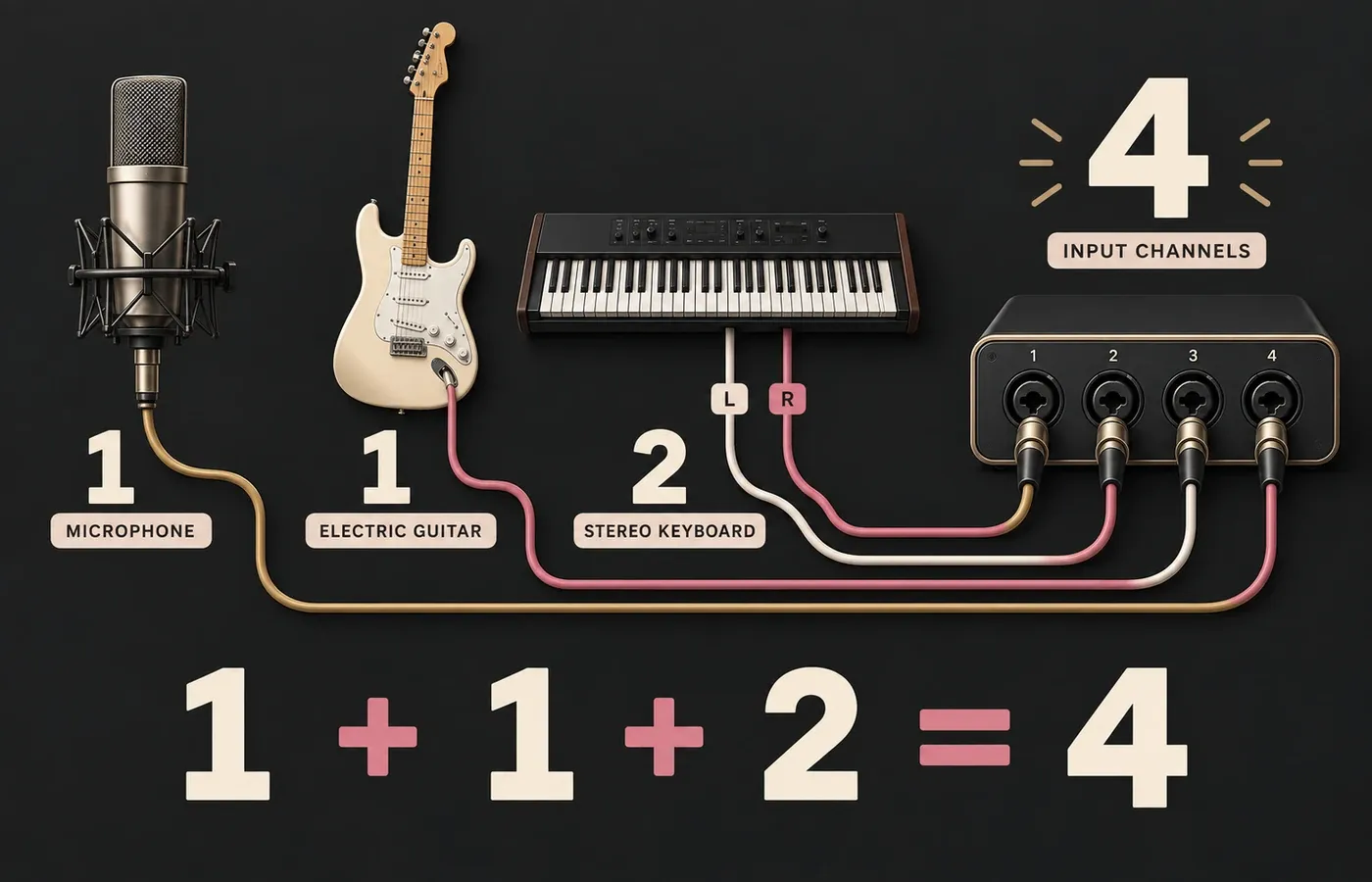
A keyboard using left and right outputs takes two line-input channels.
Mark how many channels need mic preamps, line mode or instrument/Hi-Z mode.
Add a spare channel for a source you are likely to record soon, not for every device you might someday own.
Largest simultaneous session:
Microphones: __ × 1 = __
Direct guitar/bass: __ × 1 = __
Mono line sources: __ × 1 = __
Stereo analog sources: __ × 2 = __
Drum microphones: __ × 1 = __
Needed now: __ channels
Specific near-term spare: __ channels
Target total: __ channels
Required mic preamps: __
Required instrument/Hi-Z inputs: __
Required line-input channels: __
Headphone feeds: __
Independent monitor pairs: __
Count the session first; compare products second.
Common recording setups and their arithmetic
| Session | Channel arithmetic | Minimum used | Practical target |
|---|---|---|---|
| One vocal | 1 microphone | 1 | 2 inputs |
| Vocal + direct guitar | 1 mic + 1 instrument | 2 | 2 inputs |
| Stereo keyboard | Left + right line outputs | 2 | 2 inputs |
| Vocal + stereo keyboard | 1 mic + 2 line channels | 3 | 4 inputs |
| Vocal + guitar + stereo keyboard | 1 + 1 + 2 | 4 | 4 inputs |
| Four-person podcast | 4 microphones | 4 | 4 mic preamps |
| Small drum setup | 4 microphones | 4 | 4 mic preamps |
| Expanded drum setup | 8 microphones | 8 | 8 mic preamps |
| Band with four drum mics | 2 vocals + 2 guitars + 1 bass + 2 keyboard + 4 drums | 11 | 12 or more inputs |
The “practical target” rounds up only where a common hardware size is needed to fit the minimum. It doesn’t mean spare channels are always better. If your largest real session uses two channels, paying for eight unused analog inputs may add cost and desk space without improving the recording.
Mono versus stereo: the easiest place to miscount
A microphone is normally recorded to one mono channel. So is a guitar or bass connected directly to an instrument input. Focusrite’s channel examples show a microphone or direct guitar as one mono source, while a guitar and vocal recorded together use two separate channels.
A keyboard or synthesizer is different when you want its stereo output. Its left and right analog outputs feed two inputs, which Focusrite also explains in its guidance on recording stereo line-level equipment through two mono interface inputs. If the instrument has a dedicated mono output and you’re happy to record it in mono, it uses one channel instead.
A MIDI controller doesn’t use an analog audio input just because it controls a software instrument. Count analog inputs only when you record audio from the keyboard’s own outputs or another hardware sound source.
Four sockets can still be the wrong four sockets
After calculating the channel total, label every channel by source type:
Needed for microphones connected at mic level. Four podcast microphones require four simultaneous microphone preamps, not one preamp and three line-only channels.
Used for keyboards, synthesizers, external preamps and other line-level sources. A stereo keyboard usually needs two line channels.
Used for a passive guitar or bass connected directly. A socket that accepts line level does not automatically provide the appropriate high-impedance mode.
Manufacturers may place XLR and quarter-inch connectors in one combo socket. That provides connector and mode flexibility, but it remains one simultaneous channel. You can’t record an XLR microphone and a quarter-inch guitar through the same combo socket at the same time.
Why advertised I/O is not the mic-preamp count
A large headline number can combine several categories. Focusrite’s current Scarlett 18i20 specifications, for example, list 26 simultaneous inputs while separately listing eight microphone preamps, eight line inputs, instrument inputs, ADAT, S/PDIF and loopback channels. Audient’s iD24 specifications describe ten input channels as two analog plus eight digital.
Neither example means there are 26 or ten microphone sockets. Read the specification in this order:
- Simultaneous analog input channels — the sources you can physically connect and record at once.
- Mic preamps — how many microphones can run without external preamps.
- Instrument/Hi-Z channels — how many guitars or basses can connect directly.
- Digital inputs — ADAT or S/PDIF paths that require compatible external hardware.
- Loopback channels — internal routing paths, not extra physical sockets.
When two, four or eight inputs make sense
Enough for one vocal plus one direct instrument, a stereo keyboard, or two microphones. It fits well when parts are recorded one after another.
Useful for vocal plus stereo keyboard, a four-mic podcast, or a compact drum setup. Check that the four channels include the modes you need.
Useful when several microphones must remain separate, such as an eight-mic drum session or a small band tracked together.
Relevant when a band’s vocals, instruments, stereo sources and drum microphones must all be recorded in one pass.
Choose the smallest arrangement that handles your largest realistic session cleanly. If an eight-channel drum recording is a real plan for next month, expansion matters. If it’s only a vague possibility, a smaller interface may be the better purchase.
ADAT and S/PDIF can expand a system, with conditions
An interface with digital input can accept channels from a compatible external preamp or converter. That can be a sensible path when you need two channels today and more microphone inputs later. But the connector alone doesn’t guarantee a fixed number of added channels.
Channel capacity can fall as sample rate rises. Current examples show the dependency clearly: the Scarlett 18i20 lists 16 ADAT channels at 44.1/48 kHz and up to eight at 96 kHz, while Audient documents eight ADAT channels at 44.1/48 kHz and four at 88.2/96 kHz for the iD24. These are model-specific examples, not a universal ADAT promise.
Before counting digital expansion, verify the interface, external device, optical-port mode, supported sample rates and clocking arrangement. If the future setup requires eight additional preamps at 96 kHz, check that exact condition rather than relying on the number printed beside “ADAT.”
Inputs are only half of the hardware check
The recording count answers how many sources enter the interface. It doesn’t answer how many people can hear independent mixes or how many speaker systems can remain connected.
- Monitor outputs: count the speaker pairs or external destinations you need connected.
- Headphone outputs: one socket may be insufficient for two performers, even when the interface has enough inputs.
- Independent cue mixes: two headphone sockets do not necessarily mean two separately routable mixes.
- Direct monitoring: Focusrite defines direct monitoring as routing an input directly to headphone or line outputs while it is also sent to the recording software. Check how the chosen hardware handles mono, stereo and mix control.
- Application limits: some conferencing and streaming software accepts only mono or stereo input even when the hardware exposes more channels. Focusrite documents this constraint for some Windows video-call applications.
The final purchase check
Write one sentence: “My largest likely session is…” List the sources, add the channels, and label each as mic, line or instrument. Then compare interfaces against that finished requirement.
“Four channels: one mic preamp, one instrument input and two line inputs for a stereo keyboard” is a useful requirement. “As many inputs as possible” is not.