
Sound Forge 2026 and WaveLab Pro 13 can both edit a single audio file. The buying decision changes when the job grows beyond that file. Sound Forge keeps recording, repair, waveform editing and batch work direct. WaveLab Pro adds Audio Montage for sequencing titles, comparing references, managing metadata, analyzing a whole project and delivering DDP or Dolby Atmos masters.
Quick answer: choose Sound Forge when most jobs begin and end with one file. Choose WaveLab Pro when the deliverable is an album, a set of related titles, a DDP image, a Dolby Atmos master, or a project that must move between Windows and macOS. The higher price doesn't make WaveLab automatically sound better; what it buys is project-level mastering infrastructure.
Still choosing between an audio editor, a DAW and a repair suite? The Sound Forge comparisons cover those different buying decisions. This comparison focuses on file editing versus album mastering.
WaveLab 13 vs Sound Forge 2026 at a Glance
This comparison was rechecked September 12, 2026 against current product pages, manuals and system requirements. WaveLab 13.0.30, released July 22, remains the latest maintenance version on Steinberg's current WaveLab 13 release-notes page. The table separates documented capabilities from buying judgment.
| Decision point | Sound Forge 2026 | WaveLab Pro 13 |
|---|---|---|
| Primary job | Precise file editing, recording, repair and batch work | Project and album mastering, analysis and delivery |
| Editing model | Direct waveform editing plus non-destructive event mode | Audio Editor plus non-destructive Audio Montage |
| Album-wide timeline | No documented Audio Montage equivalent | Yes: clips, tracks, references, metadata and output processing |
| DDP delivery | Not documented in the current export list | Yes: write DDP from Audio Montage |
| Dolby Atmos mastering | No dedicated Atmos montage documented | Yes: Master and Album montages |
| Spectral repair | Waveform repair and broadband tools | Built-in Spectrum Editor |
| Loudness scope | Precise peak and loudness metering | File, montage, title, clip and reference analysis with reports |
| Batch processing | Yes | Pro Batch Processor; not included in Elements |
| Platform | Windows 11 | Windows 10/11 and macOS |
| Trial | 15 days | 60 days for Pro 13 |
| Best fit | Dialogue, transfers, samples, cleanup and repeatable file jobs | Albums, DDP, references, cross-platform studios and Atmos mastering |
What Sound Forge Pro Does Better
Sound Forge stays close to the waveform. The current Boris FX feature matrix documents sample-level editing, familiar cut/copy/paste operations, precise peak and loudness meters, and an event-based mode for non-destructive edits. That is a good fit when the work is a dialogue take, a transfer, a sample, a finished mix or a folder of files rather than an album project.
The same matrix documents broadband noise reduction, click and crackle removal, clipping repair, VST2/VST3 and ARA support, and batch processing. Boris FX also states that Sound Forge can record and edit files with up to 32 channels. Those are concrete reasons to choose it for file preparation; they aren't proof that it replaces a multitrack DAW or a montage-based mastering system. For repeated folder work, the batch processing guide shows the safer preset-and-audit workflow.
WaveLab also opens and renders files directly in its Audio Editor; a montage is optional. For a one-file job, compare navigation, repair and export in both editors. Sound Forge’s file-focused design is a buying preference here, not a measured speed advantage.
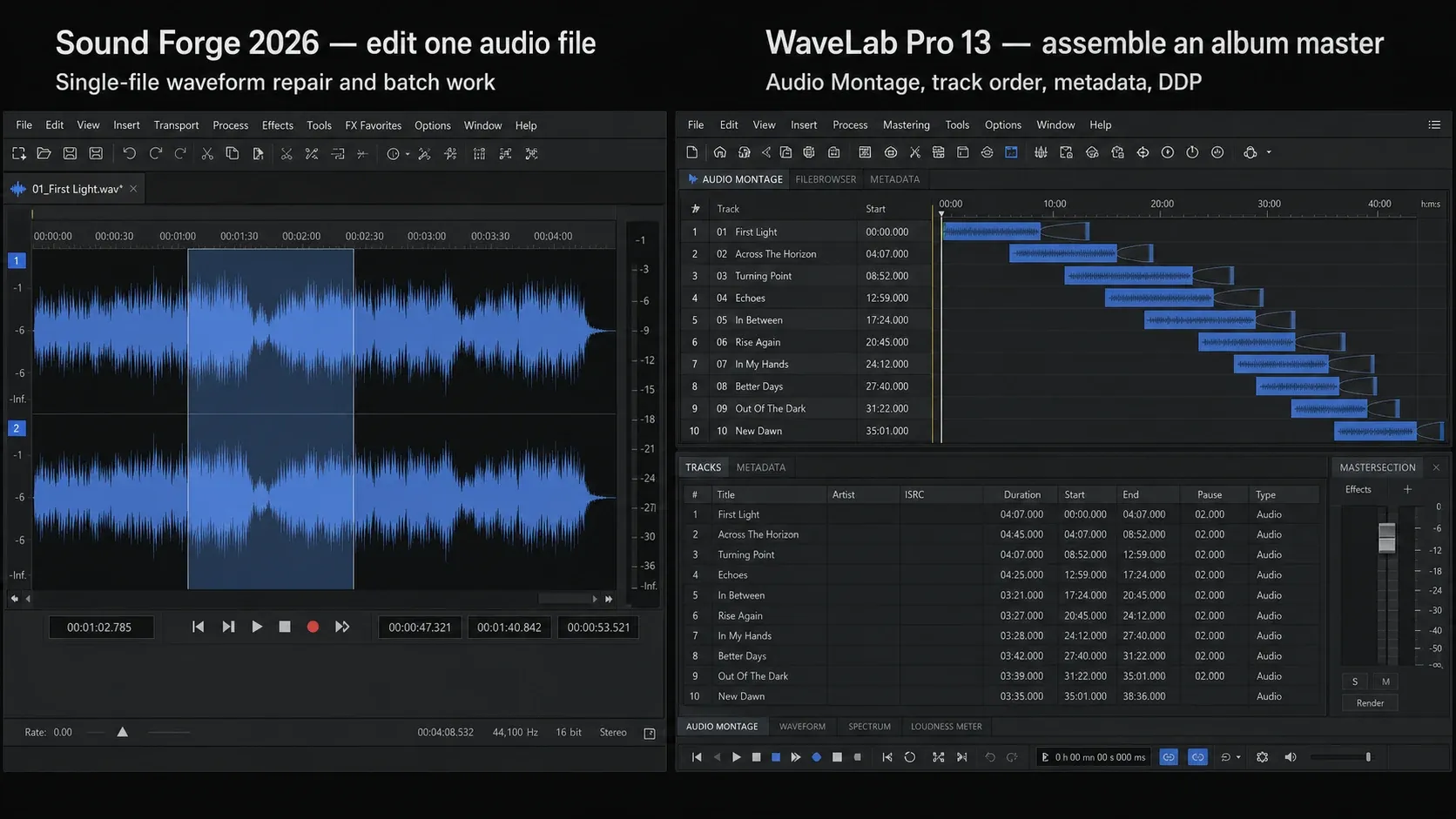
Editorial note: the comparison above is an illustrative workflow diagram, not an authenticated capture of every current control. Use the linked Boris FX and Steinberg documentation for exact interface paths.
What WaveLab Pro Does Better
Audio Montage is WaveLab Pro's defining advantage. Steinberg describes it as a multitrack and multichannel non-destructive environment. Clips reference source files, so montage edits, clip effects, track effects, fades and automation can remain attached to the project without changing those originals.
That scope matters for an album or a group of related masters. Title order, gaps, crossfades, reference tracks, metadata, markers, processing and rendering live together. Sound Forge has non-destructive event editing, but current Boris FX material still presents it as a specialist for one audio file. What separates them is project organization rather than a simplistic destructive-versus-non-destructive split.
WaveLab Pro 13 also provides a Spectrum Editor. It is the more capable built-in choice when a fault must be isolated by time and frequency. Sound Forge keeps routine clicks, crackles, clipped peaks and broad noise problems inside its direct waveform workflow; the noise reduction guide covers that file-centered route.
DDP, Albums and Dolby Atmos
WaveLab Pro 13 has an exact, current procedure for writing an Audio Montage to a DDP image: open the Album window, choose Functions > Write Audio CD or DDP, select DDP Image, set the destination and write the package. Sound Forge's current export-format list does not list DDP export.
That makes WaveLab the defensible choice when a replication plant specifically requests DDP. It doesn't make DDP a universal requirement, though. If the client wants final WAV files for digital distribution, judge the editors by the actual delivery specification instead of paying for an unused format.
WaveLab Pro 13 also adds Dolby Atmos Master and Album montages, ADM rendering and dedicated Atmos analysis and album tools. Those features matter only when the input and deliverable are part of an Atmos workflow; they're not generic evidence that a stereo file will sound better.
Metering, Analysis and Reference Tracks
Sound Forge documents precise peak and loudness metering for its editing workflow. WaveLab Pro can analyze an audio file or a whole montage, including selected clips, titles, title groups and reference tracks, then return a report. Its reference-track system supports A/B comparison with up to three stereo references.
This is where WaveLab earns its extra complexity. Several titles, their references and their measurements can stay attached to one project. Sound Forge is still sufficient when the delivery is one file and the required values are checked there. For a practical single-file chain, use the Sound Forge mastering workflow.
For broadcast work, EBU R 128 specifies a programme target of -23 LUFS and treats true peak as a separate measurement. That doesn't turn -23 LUFS into a universal music-streaming target. In either editor, use the values in the broadcaster, label or platform specification you were actually given.
Platform and System Requirements
Boris FX lists Windows 11 for Sound Forge 2026. Steinberg's current WaveLab Pro 13 table lists 64-bit Windows 11 version 24H2 or later, Windows 10 version 22H2 or later, and macOS Tahoe, Sonoma or Sequoia. It lists both native Apple silicon and Rosetta 2 applications.
The practical result is simple: a current Mac purchase points to WaveLab. On Windows, test the actual audio driver, plug-ins, display scaling and session files on the machine you'll use. A supported operating system is necessary, but it won't guarantee that every third-party plug-in or interface driver in an old setup behaves correctly.
Price, Trials and WaveLab Elements
For a dated US price reference, Boris FX's March 30, 2026 launch announcement listed Sound Forge at $299.95 perpetual, $149.95 per year or $24.95 per month. Steinberg's WaveLab product listing advertises Pro 13 at $499.99 and Elements 13 at $99.99. Treat these as reference prices, not a checkout quote: the Steinberg prices were available through its indexed product pages, while the current Sound Forge page did not expose a numeric offer in this check. Compare region, tax, upgrade eligibility and any promotion in the final cart. The Sound Forge license guide explains the plans.
WaveLab Elements is not a cheap substitute for every Pro workflow. Steinberg's current edition comparison marks its Audio Montage as limited and omits DDP support, Project Manager, reference-track automatic loudness compensation, offline loudness reports and the Pro Batch Processor. Elements can be sensible for lighter file and montage work, but those omissions remove several reasons this comparison recommends WaveLab Pro.
Don't buy from a table alone. WaveLab Pro 13 has a 60-day trial; Sound Forge offers a 15-day fully functional trial. Use one real source and one real deliverable. In Sound Forge, time navigation, repair, plug-in preview and batch or single-file export. In WaveLab, import several titles, set gaps and metadata, add a reference, run loudness analysis and create the delivery files the client requires.
Which One Should You Buy?
When using both editors, decide the intermediate precision and final dither stage before the handoff. A floating-point intermediate can avoid an unnecessary integer quantization between processing stages.
Buy Sound Forge 2026 if most work is file-centric: recording a take, trimming and repairing dialogue, preparing samples, cleaning transfers, finalizing one mix or processing a folder. Its documented perpetual launch price is below the WaveLab Pro reference price; use the trial to decide which editor feels easier for your actual work.
Buy WaveLab Pro 13 if the deliverable is project-centric: an album sequence, shared processing, title metadata, reference comparison, project-wide loudness analysis, DDP, Dolby Atmos, or a workflow that must run on macOS. Its advantage is the managed mastering environment around the files.
If restoration is the main job, compare the same damaged passage with iZotope RX. If the missing requirement is multitrack production rather than mastering delivery, the REAPER comparison is the more relevant next decision.
Frequently Asked Questions
Is WaveLab Pro better than Sound Forge Pro for mastering?
WaveLab Pro 13 is the stronger choice for an album or multi-title master because Audio Montage keeps sequencing, crossfades, metadata, reference tracks, loudness analysis and DDP delivery in one project. Sound Forge 2026 is the leaner choice for mastering or repairing individual files. The better tool depends on whether the deliverable is one file or a managed set of titles.
Can WaveLab run on Mac if Sound Forge cannot?
Yes. Steinberg lists WaveLab Pro 13 for Windows and macOS, including native Apple silicon support. Boris FX lists Windows 11 for Sound Forge 2026. A current Mac workflow therefore points to WaveLab or another supported Mac editor.
What is Audio Montage in WaveLab, and does Sound Forge have it?
Audio Montage is WaveLab's non-destructive multitrack and multichannel mastering environment. It can hold clips, processing, fades, references, metadata, title markers, analysis and project output without altering the source files. Sound Forge has non-destructive event editing, but its current documentation does not describe an equivalent album-wide montage.
Does Sound Forge Pro have DDP export?
The current Sound Forge 2026 export-format list does not document DDP output. WaveLab Pro 13 has an explicit procedure for writing an Audio Montage to a DDP image. If a replication plant requests DDP, verify that requirement before buying and use a documented DDP-capable delivery tool.
Which is cheaper: Sound Forge Pro or WaveLab Pro?
At the documented US reference prices, Sound Forge's $299.95 perpetual launch price is lower than WaveLab Pro 13's $499.99 listing. WaveLab Elements 13 is listed at $99.99 but omits several Pro mastering features. Sound Forge's figures come from the March 2026 launch announcement; these are not guaranteed current checkout prices. Compare the final regional cart and the cost of the license type you need.
Can Sound Forge Pro and WaveLab be used together?
Yes. A sensible handoff is to edit, repair, record or batch-process individual files in Sound Forge, then assemble the approved files in WaveLab for sequencing, shared processing, metadata, loudness reports and DDP delivery. Use an uncompressed PCM or floating-point WAV intermediate that both setups support, keeping the source sample rate unless the project requires conversion. After processing, choose suitable intermediate precision rather than automatically returning to the original integer depth. Plan dither once at the final integer quantization.
Which has better restoration tools: Sound Forge Pro or WaveLab?
Sound Forge 2026 documents broadband noise reduction, click and crackle removal, and clipping repair in a direct waveform workflow. WaveLab Pro 13 adds a Spectrum Editor for frequency-specific repair. Sound Forge is a practical fit for routine file cleanup; WaveLab has the built-in advantage when the fault needs spectral selection or must stay inside a larger mastering project.
Fact-checked September 12, 2026 against current Boris FX Sound Forge pages, WaveLab 13.0.30 documentation and release notes, Steinberg's edition and trial pages, and EBU R 128.