

If Sound Forge installation failed, save the exact error before retrying. A stalled Boris FX Hub download, a Windows Installer error and an activation refusal need different fixes. Identify where setup stopped, check the matching branch below, then make one controlled retry. Keep your firewall and antivirus enabled.
This guide covers current Sound Forge 2026 on Windows 11, plus clearly marked Sony/MAGIX legacy cases. If you haven't started setup yet, use the normal Sound Forge installation walkthrough. If the application opens but refuses a license, treat that as an activation problem instead of reinstalling. For other symptoms, start with the Sound Forge troubleshooting hub.
Diagnose the failed layer before retrying
| What happened | What to check |
|---|---|
| Sound Forge is missing from Hub | Account, edition and standalone versus bundle route. Absence does not prove corrupt installation. |
| Download stalls or the package cannot open | Official source, package access and the documented Hub network destinations. |
| HRESULT -2147024769 or sfvstwrap.dll failed to register | The Sound Forge redistributable repair procedure. Identify the required package before changing it. |
| An MSI error number appears | The exact code and log. Error 1603 alone does not identify a cause. |
| Setup finishes, but the program crashes | Startup diagnostics rather than another installation. |
Take a screenshot or copy the whole message, including the DLL filename, progress stage and time. Record the product edition, installer source and Hub version if visible. Keep account email, serial numbers and logs out of public posts.
Check Windows, storage and restart state
The current vendor requirements list Windows 11, a 1.4 GHz processor, 2 GB RAM with 8 GB recommended, and 1,100 MB for Sound Forge or 1,400 MB for Sound Forge Plus installation. Those are application specifications. They aren't the complete requirements for a Windows PC, so check the Windows and Sound Forge requirements comparison before you decide an older machine qualifies.
Leave extra space for temporary extraction, updates, plug-ins and audio files. The vendor's program-size figure doesn't promise that an almost-full system drive can finish setup. If storage is tight, move your own backed-up files and leave the installer caches alone.
On Windows 11, open Start > Settings > Windows Update, check the update state and complete a requested restart after saving your work. Microsoft documents that path in its Windows Update instructions. Record your exact Windows version with Windows+R > winver.exe; Microsoft's version-identification instructions explain that check. A Windows version number matters particularly for legacy .NET prerequisites.
Choose the current or legacy installation route
For current standalone Sound Forge, use the official Sound Forge trial and Hub page or your official purchase download. The trial page routes installation through Boris FX Hub and offers a 15-day Windows trial without a credit card. You don't need to buy a license just to diagnose a failed trial installation.
For an eligible Samplitude Suite bundle, check the Samplitude product entry in Hub and Manage Extras. Boris FX documents bundled content under the host product in its audio-product installation instructions. The Sound Forge in Samplitude Suite guide covers that separate workflow. Do not assume every Samplitude edition includes Sound Forge or substitute a standalone trial for a missing purchased bundle.
If a purchased product is absent, compare the signed-in account and exact edition with your receipt. Ask Boris FX to resolve a missing purchase record. Do not change license assignments, create duplicate accounts or paste an old serial into unrelated software as an installation test.
For Sony or MAGIX releases, identify the exact version and get its matching installer through the vendor's legacy support route. A current Hub download won't stand in for the installer of every historical edition. I'd keep a working older installation until you know whether setup reports a specific conflict.
Handle a stalled or damaged download
First distinguish downloading from an installer that has already launched. If setup or Windows Update is still working, let it finish. Do not force-stop Windows Installer to reset a progress bar.
For a failed download with no active setup, note the state, close Hub normally and reopen it for one attempt from the official source. If you downloaded a separate package, get a fresh copy from the vendor, never from a DLL site or a repackaged installer. Try a normal browser download without an optional download accelerator. This is a controlled download check; it doesn't show that the network caused your error.
If Windows reports an unknown publisher, a security detection or a policy block, stop and verify the download with the vendor or your administrator. Do not override the warning merely because a forum says to run setup as administrator.
Check Hub networking without disabling security
Boris FX says Hub needs an internet connection. Its Hub firewall reference, updated June 30, 2026, specifies domain-based rules because service IP addresses change:
borisfx.com, TCP 443: product metadata.borisfxdownloads.comandcdn.borisfx.com, TCP 443: product installers.backend.borisfx.com, TCP 443: authentication and account management.bfxlive.borisfx.comandbfxlivefrontend.borisfx.com, TCP 443: login-license communication.activation.genarts.com, TCP 80: the license-activation destination in the general Hub reference.borisfx-com-res.cloudinary.com, TCP 443: Hub images.
This is the vendor's general Hub list, and it doesn't prove every Sound Forge installation uses every licensing endpoint. Give it and the failure time to your network administrator so they can check the relevant outbound access. Google sign-in also needs Google's resources, as the same reference explains. Do not open inbound ports, remove a managed proxy or bypass workplace filtering yourself. A browser reaching the website doesn't mean Hub can reach its download service.
Handle administrator prompts and policy blocks
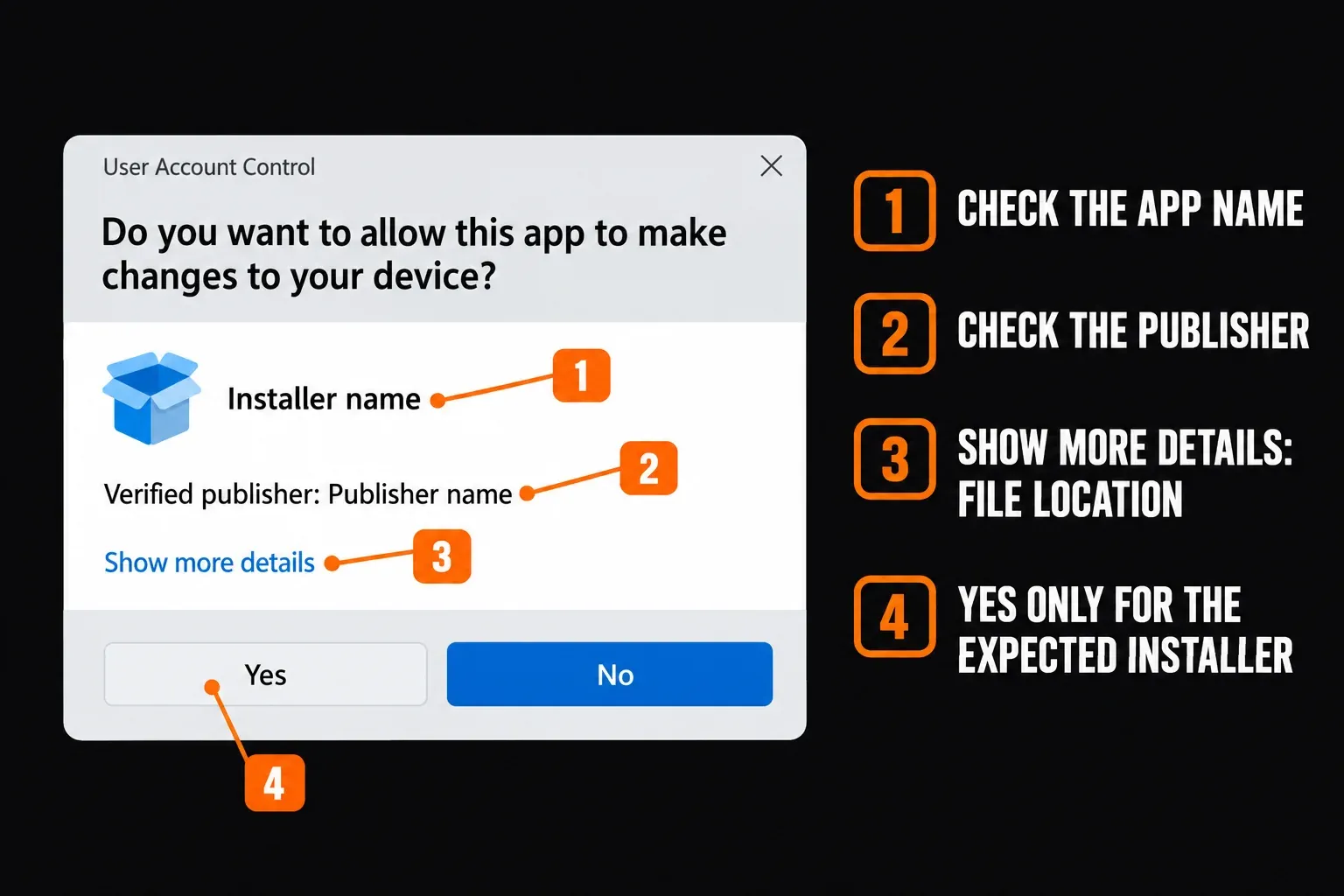
Microsoft explains that User Account Control requests approval when an action needs administrator-level permissions. Approve only an expected installer from a source you have verified. If you cannot provide the required authorization on a managed PC, ask its administrator to perform the installation.
Keep UAC enabled. Elevation is not a repair for a damaged package, an unsupported Windows version or missing account entitlement. Likewise, do not give Everyone full control of a drive to work around an access error. An administrator should investigate permissions on the exact failing location, using the installer log.
Repair HRESULT -2147024769 or sfvstwrap.dll registration errors
Boris FX has a Sound Forge-specific redistributable repair procedure for these messages. It says to install the correct Microsoft redistributable if missing, then open Control Panel > Programs and Features, select that redistributable and choose Change > Repair. The article notes that uninstalling and reinstalling may not correct this particular problem.
The error title doesn't point to one universal Visual C++ year or architecture. I'd note the installed Sound Forge version and check its log or support before choosing the package. Boris FX mentions VS2012 and VS2008 as examples of dependencies some features use; that isn't an instruction to install both for every 2026 failure.
Microsoft's Visual C++ Redistributable guidance says the package architecture must match the application target. Its current v14 package does not replace every older runtime generation; older packages can coexist. Do not remove all Visual C++ entries to make the list look tidy.
If Windows names a missing DLL instead, copy its exact filename. A missing runtime file and an application DLL that failed registration are two different diagnoses. Do not download a loose DLL, copy one into System32, or run registration commands at random. Repair only the dependency or product that reliable evidence points to, and escalate if it's unclear.
Legacy installers asking for .NET Framework
A 2022 Sound Forge 10 forum report describes setup stopping while it tried to install .NET Framework 2.0. That's historical evidence of one legacy failure. It isn't a prerequisite list for current Sound Forge. Microsoft's .NET Framework 3.5 instructions explain that .NET Framework 4 doesn't support applications built for Framework 1.1 through 3.5.
Use this branch only when the legacy installer or vendor identifies that dependency. On Windows 11 25H2 and earlier, Microsoft provides .NET Framework 3.5 as an optional Windows component. Search Start for Windows Features, open Turn Windows features on or off, select .NET Framework 3.5 (includes .NET 2.0 and 3.0) and follow the prompts. Restart if requested. Do not select unrelated WCF features.
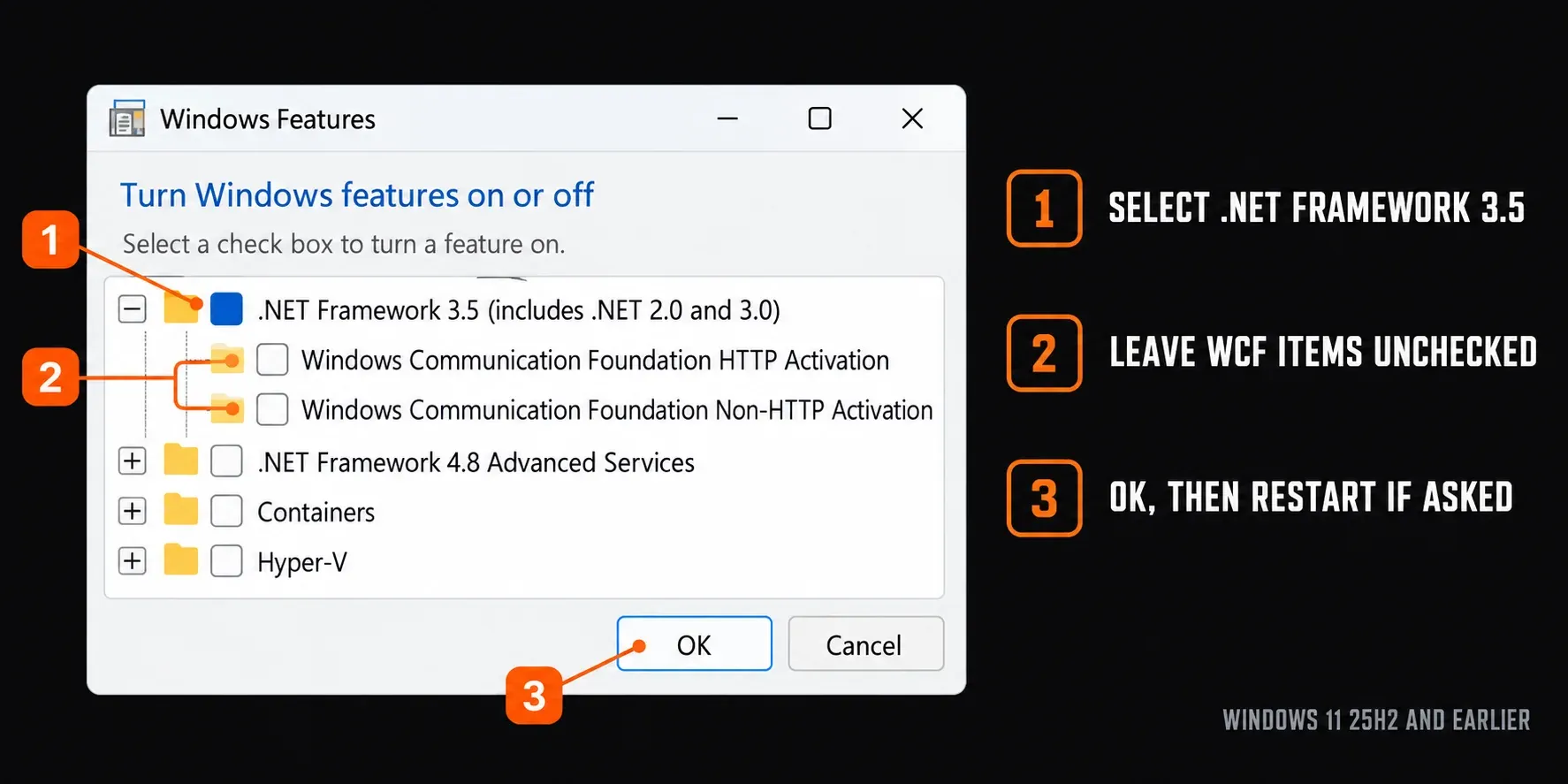
Windows 11 26H1, build 28000, and later use a different route. Microsoft says .NET Framework 3.5 is available only as a standalone installer there. Follow its version-specific Windows 11 instructions; the installer works only with the Windows version specified. Do not reuse old Windows Features or DISM instructions on that branch. Installing a prerequisite does not certify Sound Forge 10 as supported on a modern Windows release.
Read the Windows Installer code
The following meanings come from Microsoft's MsiExec error-code reference. Use them when the number is actually a Windows Installer result, not merely a similarly numbered Hub message.
| Code | Meaning | Next action |
|---|---|---|
| 1603 | Fatal installation error | Keep the log and identify the failing action; the code alone is not a diagnosis. |
| 1612 | Installation source unavailable | Ask the vendor for the matching source or recovery procedure; do not fabricate a cache file. |
| 1618 | Another installation is in progress | Let it complete. Finish any requested restart before the next attempt. |
| 1619 | Package could not be opened | Verify the package exists and is accessible; obtain a valid copy from the vendor. |
| 1622 | Installation log could not be opened | Choose an existing, writable log location. |
| 1625 | Installation forbidden by system policy | Contact the administrator; do not bypass policy. |
| 1632 | Temp folder full or inaccessible | Check available space and access to that temporary location. |
| 1633 | Package unsupported on this platform | Check the OS, architecture and installer generation with the vendor. |
| 1638 | Another version of this product is installed | Identify the conflicting product before choosing its supported repair or removal route. |
| 3010 | Success; restart required | Save work and restart to complete installation. |
Microsoft's 1603 troubleshooting article lists possible conditions, including an already-installed application, an encrypted destination, a substitute drive and insufficient SYSTEM permissions. Its stated scope is Windows 10. Treat those as questions for an administrator reading the log. They don't prove the cause on your Windows 11 machine, and they're no reason for broad permission changes.
Keep installer caches and existing work intact
Microsoft explicitly says not to delete C:\Windows\Installer. Its Windows Installer cache guidance explains that these files are needed for later repair, removal and updates, and cannot simply be copied from another computer.
Do not erase ProgramData, AppData, registry branches or all temporary folders to fix an unnamed failure. Do not treat a Hub cache and the Windows Installer cache as interchangeable. If support requests a reset, get the exact product, folder and procedure, preserve the relevant files, and wait for active setup to finish before resetting anything. Back up presets and your own work before any approved product removal.
If setup reports success, check whether Sound Forge shows up in Start. If it launches, I wouldn't reinstall just because a Hub display looks stale. If it crashes at launch, move to the Sound Forge startup-crash guide. A license refusal after launch belongs with activation support, and this installer sequence won't fix it.
Collect Hub logs or a vendor-requested MSI log
With the Hub window active on Windows, press Control+Shift+L. Boris FX's Hub diagnostic instructions say this saves logs to the desktop. Include the reproduction steps with a private support ticket.
If support gives you an actual .msi package and asks for a verbose log, Microsoft documents /i for installation and /L*V for logging. This MsiExec command syntax is not a logging switch for a Hub .exe:
msiexec.exe /i "C:\path\vendor-package.msi" /L*V "C:\path\install.log" /norestartThis command starts an installation. Replace both example paths with the vendor-approved package and an existing writable log destination; do not run it alongside Hub setup or extract an MSI from a bundle without instructions. /norestart prevents an automatic restart, but a requested restart still needs completing later. Keep the normal installer prompts visible. If you are unsure which package to use, send Hub logs instead.
Your support ticket should contain the product version and edition, Windows version, failure time, exact message, official download source, and the result of the one targeted retry. Attach logs privately after checking them for personal information. State what changed and what didn't; that helps support far more than saying you tried everything.
The safe retry sequence
- Save the exact error, product edition, Windows version and failure time.
- Check the supported platform, available storage and pending restart state.
- Confirm the matching standalone, bundle or legacy installer route.
- Use the relevant error branch; obtain administrator help for policy or permission blocks.
- Make one targeted correction without disabling security or deleting shared caches.
- Retry once after other setup has finished, then send Hub logs to support if the same failure returns.
Frequently asked questions
Does error 1603 mean Sound Forge is already installed?
No. Windows Installer defines 1603 as a fatal installation error. An existing installation is one possible condition in Microsoft's troubleshooting guidance, but the exact failing action and log are needed to investigate your case.
Should I run everything as administrator?
No. Approve expected permission requests only for verified installers. Elevation cannot fix a corrupt package or missing purchase entitlement. If a managed PC blocks installation, ask its administrator rather than disabling UAC or changing broad permissions.
Should I remove all Visual C++ Redistributables?
No. For HRESULT -2147024769 or sfvstwrap.dll registration failures, Boris FX documents repairing the correct redistributable through Programs and Features, Change, Repair. Identify the required version and architecture rather than removing shared packages.
Does current Sound Forge require .NET Framework 3.5?
This guide does not establish that as a current requirement. The .NET branch addresses a dependency identified by a legacy installer or vendor. Windows 11 25H2 and earlier use an optional component; 26H1 and later require Microsoft's version-specific standalone installer.
Can I delete the Windows Installer folder to retry?
No. Microsoft says not to delete C:\Windows\Installer because its cached files are needed for repair, updates and removal. For a missing installation source, ask the application vendor for the matching recovery procedure.
Can I use Boris FX Hub on an offline workstation?
Boris FX says Hub requires an internet connection. Ask the vendor about an approved installation and licensing arrangement for your exact edition before isolating the workstation. Do not assume a legacy offline activation procedure applies to current Sound Forge.
What should I send support when the same error returns?
Send the product edition and version, Windows version, exact error, failure time, reproduction steps and result of one targeted retry. Export Hub logs with Control+Shift+L while Hub is active and attach them privately to the support ticket.