
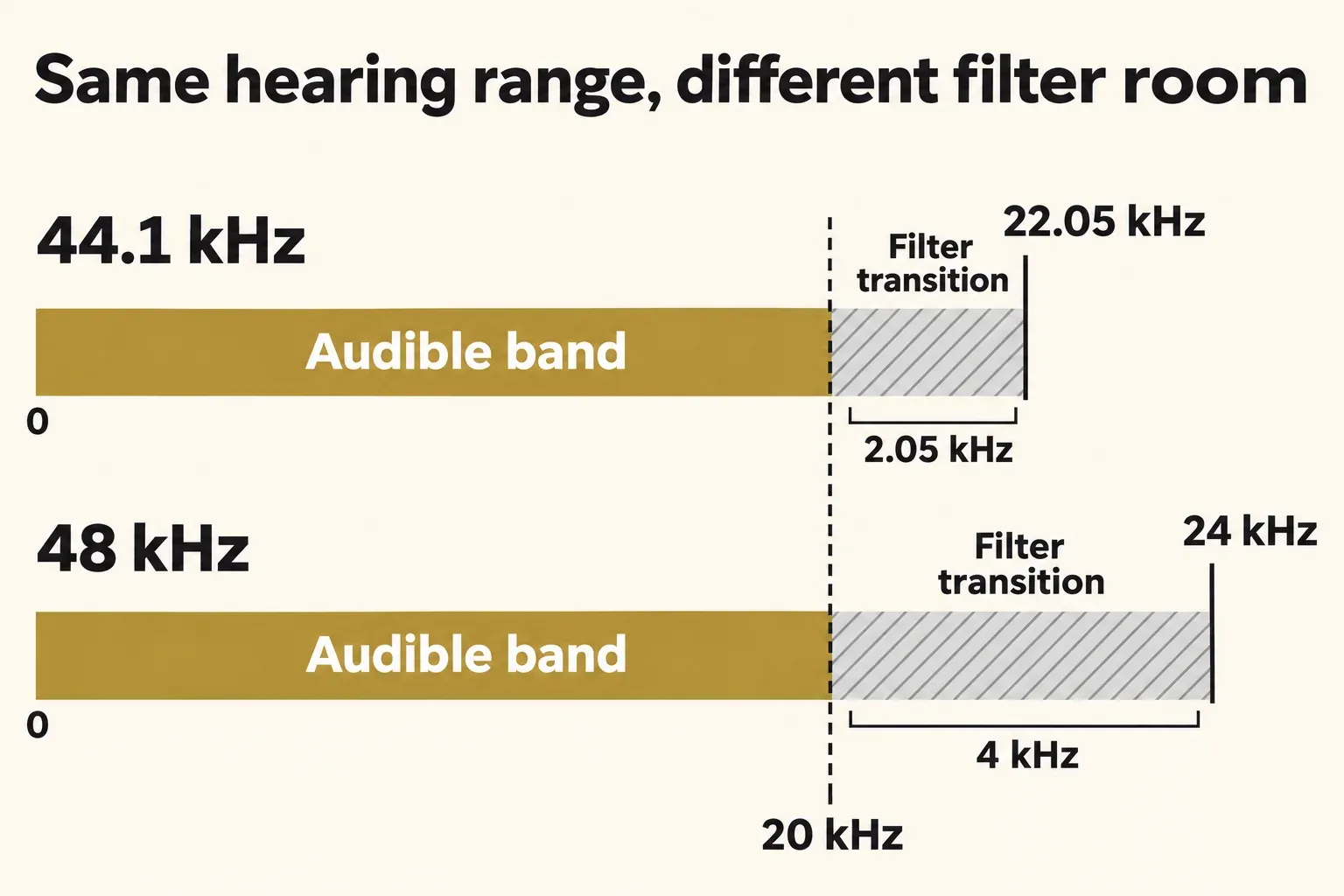
Use 48 kHz for anything with picture (YouTube, film, broadcast) and for new recordings whose destination isn't settled yet; 44.1 kHz is fine for music going to CD, Spotify or an ACX audiobook. Both rates have Nyquist limits above 20 kHz; changing the rate alone does not guarantee better sound. The practical difference is the room the converter's filter gets above 20 kHz: 2.05 kHz at 44.1 kHz and 4 kHz at 48 kHz. Pick one rate per project and convert once, at export.
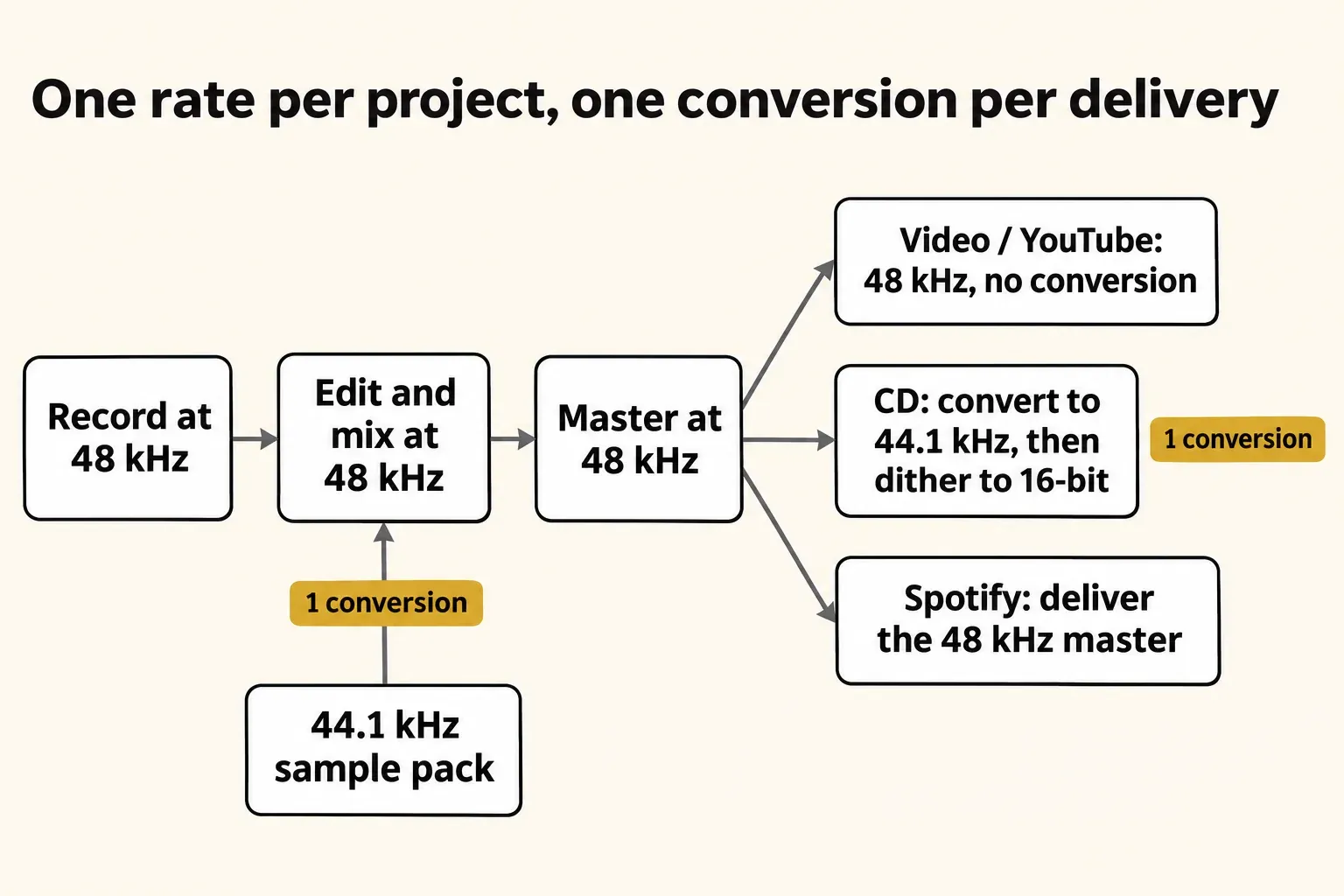
My rule is simple. Record at 48 kHz unless every place the audio will end up is a 44.1 kHz music release, and keep the session at the rate it started with until the final export. A song that has to live on a CD and inside a video gets one master at the session rate and one conversion per delivery, never a chain of them. Use a high-quality resampling mode for each delivery and keep the original master.
Each destination already has a rate on paper:
| Destination | What to deliver | Who sets it |
|---|---|---|
| Audio CD | 44.1 kHz, 16-bit | Red Book CD format |
| Spotify | Your native master at 44.1 kHz or higher; Spotify downsamples 48 and 96 kHz files itself | Spotify for Artists file requirements |
| Apple Music | Either rate; Lossless plays up to 24-bit/48 kHz | Apple's Lossless and Hi-Res Lossless tiers |
| YouTube | 48 kHz | YouTube's recommended upload settings |
| Film, TV, broadcast | 48 kHz | AES5 recommendation; ATSC A/53 for US digital TV |
| Podcast (Apple Podcasts) | 44.1 or 48 kHz for recording; RSS also supports 22.05/24 kHz; subscriber uploads require at least 44.1 kHz | Apple Podcasts audio requirements |
| Audiobook (ACX) | 44.1 kHz MP3, 192 kbps or higher CBR | ACX audio submission requirements |
Why both rates reach past 20 kHz
Both rates reach past the top of human hearing. A digital recording can hold frequencies up to half its sample rate, the Nyquist limit: 22.05 kHz at 44.1 kHz and 24 kHz at 48 kHz. Both sit above the 20 kHz usually quoted as the ceiling of hearing, and a hearing frequency test shows where your own range stops.
For a correctly reconstructed, band-limited signal, a higher rate does not draw a 1 kHz tone more smoothly. As iZotope's sample rate explainer describes, it raises the highest frequency the format can capture and reproduce. Real converter filters and plug-in processing can still behave differently at different rates.
The real difference sits between 20 kHz and that ceiling. A converter has to remove everything above Nyquist, because anything left there folds back down into the audible band as aliasing. The filter that does it needs room to go from passing to blocking. At 44.1 kHz it gets 2.05 kHz of room; at 48 kHz it gets 4 kHz, nearly twice as much, so the filter can be gentler or pass higher before it starts to cut.
Converter filters are specified as fractions of the sample rate, and Cirrus notes in its CS5381 data sheet that the filter response "scales precisely with Fs." The same chip therefore passes higher frequencies at 48 kHz. Low-delay filter modes are the exception to the 20 kHz picture: TI's PCM4222 data sheet ends the passband of its low group delay mode at 0.4167 fs, which is 18.4 kHz at 44.1 kHz. The often repeated claim that 44.1 kHz trims a little above 18 kHz holds for modes like that one, not for the typical converter filter in the test results below.
Who asks for 44.1 kHz and who asks for 48 kHz
Music formats grew up at 44.1 kHz, and picture formats run at 48 kHz. The CD is 44.1 kHz/16-bit, the Red Book quality named for CD audio in the Library of Congress recommended formats statement for audio. So "44.1 kHz, 16-bit" in a spec means the CD format, and "48 kHz, 24-bit" pairs the professional AES rate with 24-bit words.
That professional rate comes from the Audio Engineering Society. The AES5 recommendation quoted by the Library of Congress sets 48 kHz "for all applications of program origination, processing, and interchange," because it's compatible with television and motion picture systems and carries full 20 kHz bandwidth. The same text allows 44.1 kHz "for an application directly related to certain consumer products," which means the CD.
Broadcast follows it. In US digital TV, the ATSC A/53 Part 5 audio standard carries audio sampled at 48 kHz, and an encoder fed digital audio at another rate has to convert it to 48 kHz. Online video points the same way: YouTube's recommended upload encoding settings list a 48 kHz sample rate. That's a recommendation rather than a rejection rule, and it's the reason I'd keep anything bound for YouTube at 48 kHz from the first take.
The frame-rate argument doesn't hold
You'll often read that video uses 48 kHz because 48,000 divides evenly by 24 frames per second. It does, at 2,000 samples per frame. But 44.1 kHz divides evenly at 25 fps (1,764 samples) and 30 fps (1,470), and neither rate gives whole samples per frame at 29.97 fps: 1,471.47 at 44.1 kHz and 1,601.6 at 48 kHz, which AES5 handles as 8,008 samples over every five frames. Video runs at 48 kHz because AES5 and the broadcast standards set it there.
Streaming, podcasts and audiobooks
Spotify's audio file requirements for artists accept masters at 44.1 kHz or higher and ask you to keep the original sample rate and bit depth. Spotify downsamples 48 and 96 kHz masters itself, and a master delivered below 44.1 kHz gets upconverted to 44.1 kHz/16-bit and loses lossless eligibility. On the listener side, Spotify Lossless plays music at up to 24-bit/44.1 kHz for Premium subscribers. I wouldn't convert a 48 kHz master to 44.1 kHz for Spotify: the platform asks for the native file and does that conversion on its own end.
Apple Music's Lossless tier holds either rate. Apple's lossless audio settings give Lossless a maximum of 24-bit/48 kHz and Hi-Res Lossless up to 24-bit/192 kHz, and listening above 48 kHz needs an external digital-to-analog converter on most devices.
For podcast recording and editing, 44.1 or 48 kHz is a practical choice. Apple Podcasts audio requirements separate two delivery routes: RSS feeds accept MP3 or AAC and include 22.05/24 kHz as well as 44.1/48 kHz settings; subscriber audio uploaded through Apple Podcasts Connect requires at least 44.1 kHz. The 24-bit WAV/FLAC recommendations up to 192 kHz apply to that subscriber route, not ordinary RSS delivery. Keep the recording rate through the edit, then choose the final encoding for the route; the podcast editing workflow in Sound Forge picks up from there. A show that also goes out on YouTube as video is the case for 48 kHz.
Audiobooks are the strictest case. ACX's audio submission requirements want every file as a 44.1 kHz MP3 at 192 kbps or higher constant bit rate, all in the same channel format. Recording at 48 kHz is fine as long as the final export converts once.
Test results: converter filters, conversion and blind listening
Published converter specifications describe different parts of performance. The hardware data sheets below report THD+N; the software documentation reports rejection or signal-to-noise ratio. Those figures need separate comparisons, not one conversion-error score or a claim about audibility. Converter filter specs, three blind-test papers and one review fill in the rest of the picture.
THD+N measures distortion plus noise relative to the test signal. Rejection describes suppression of unwanted frequency components; SNR compares signal and noise. The hardware figures are typical data-sheet values with different word widths and test conditions, so they stay separate too. The filter numbers are data-sheet specs converted from fractions of the sample rate into kHz.
| Evidence | What it compares | Result | n |
|---|---|---|---|
| Converter filter passband edge | ADC and DAC filter modes in TI and Cirrus data sheets | Median 0.454 fs: 20.0 kHz at 44.1 kHz, 21.8 kHz at 48 kHz (ranges 18.4–20.7 and 20.0–22.6 kHz) | 8 modes, 5 data sheets |
| Lowest alias landing point | Calculation from ADC stopband edges | Median 18.5 kHz at 44.1 kHz vs 20.1 kHz at 48 kHz | 6 modes |
| TI SRC4192 | THD+N, 24-bit, 1 kHz at 0 dBFS, unweighted | -140 dB for 44.1 to 48 kHz and for 48 to 44.1 kHz | 2 directions, 1 chip |
| Cirrus CS8421 | THD+N, 32-bit, 1 kHz at 0 dBFS | -171 dB for 44.1 to 48 kHz; -160 dB for 48 to 44.1 kHz | 2 directions, 1 chip |
| SoX rate effect | Rejection, 95% bandwidth setting | 125 dB in High; 175 dB in Very High | 2 quality settings |
| libsamplerate best sinc | Worst-case SNR, 97% bandwidth | 97 dB | 1 converter setting |
| Meyer and Moran, 2007 | 16-bit/44.1 kHz loop inserted into high-resolution playback | 49.82% correct identifications | 554 trials |
| Pras and Guastavino, 2010 | 88.2 kHz vs 44.1 kHz, ABX | Downsampled versions told apart overall; native recordings only in the orchestral excerpt | 16 expert listeners |
| Reiss, 2016 meta-analysis | High resolution vs 44.1 or 48 kHz | Small, significant effect; about 60% correct with training | 18 experiments, over 12,500 trials |
Converter filters: about 20 kHz vs 21.8 kHz
Across eight filter modes in five data sheets (TI's PCM1808, PCM1863, PCM4222 and PCM5102A, and Cirrus's CS5381), the passband edge has a median of 0.454 fs. That's 20.0 kHz at 44.1 kHz and 21.8 kHz at 48 kHz. The range runs from 0.4167 fs in a low-delay mode to 0.47 fs: 18.4–20.7 kHz at 44.1 kHz and 20.0–22.6 kHz at 48 kHz. These are selected ADC/DAC modes with different ripple limits, not a population estimate or a ranking of converter quality. The median describes this set; each device's filter specification controls its actual passband.
Aliasing shows the same headroom from the other side. An ADC's stopband begins between 0.546 and 0.583 fs (the classic filter in TI's PCM1863 data sheet starts it at 0.583 fs), so content above Nyquist that the filter only partly attenuates can fold down into the space just below the passband edge. Across six ADC modes, the median lowest landing point is 18.5 kHz at 44.1 kHz and 20.1 kHz at 48 kHz. Four of the six let partly attenuated aliases start at 18.4–18.5 kHz at 44.1 kHz, while all six keep that zone at or above 20.0 kHz at 48 kHz.
That second figure is a calculation from published stopband edges, not a measured alias level. It needs source content above Nyquist to matter (cymbals, bright synths, heavy saturation), and the data sheets don't specify the attenuation inside the transition band. Read it as a headroom indicator.
Sample-rate conversion: read each specification on its own terms
TI's SRC4192 data sheet lists typical THD+N of -140 dB in both directions between 44.1 and 48 kHz, using a full-scale 1 kHz tone, 24-bit resolution and unweighted measurement from 20 Hz to half the output rate. The Cirrus CS8421 data sheet lists typical THD+N of -171 dB going up to 48 kHz and -160 dB coming down to 44.1 kHz, with a full-scale 1 kHz input, 32-bit words and the same stated measurement bandwidth. That part is now discontinued. These are specifications for those chips and conditions, not a performance ranking of software converters.
SoX's rate quality table gives High 125 dB of rejection and Very High 175 dB, both at its 95% bandwidth setting. It labels those modes for 16-bit mastering with dither and 24-bit mastering respectively. Separately, libsamplerate's converter specs give its best sinc converter a worst-case SNR of 97 dB at 97% bandwidth. The SNR value cannot be ranked against SoX's rejection figures, and none of these figures alone establishes whether a conversion will be audible.
Blind listening studies
The published blind studies compare standard 44.1 or 48 kHz audio with high-resolution audio, not the two rates with each other, so the papers below frame the question from above.
Meyer and Moran's 2007 double-blind test in the AES Journal inserted a 16-bit/44.1 kHz conversion loop into high-resolution playback. Listeners identified the loop correctly in 49.82% of trials, 276 of 554, which is coin-toss territory; the audiophiles and recording engineers in the group scored 52.7% over 467 trials. The loop's added noise became easy to hear only with the gain raised more than 14 dB above the reference listening level.
A 2010 ABX study by Pras and Guastavino found the opposite result for a different comparison: 16 expert listeners told 88.2 kHz recordings apart from their 44.1 kHz downsampled versions overall, and told native 88.2 kHz from native 44.1 kHz recordings only for the orchestral excerpt.
Joshua Reiss's 2016 meta-analysis pooled 18 experiments with over 400 participants and over 12,500 trials. It found a small but statistically significant ability to tell high-resolution audio from standard 44.1 or 48 kHz audio, and the effect grew sharply with training: trained listeners were right about 60% of the time, according to Queen Mary University of London's announcement. A 2019 review by Melchior names the filtering chains used in sampling and reconstruction as the most likely technical difference between digital formats.
For a new project, I would choose between 44.1 and 48 kHz by delivery requirements first. The cited listening studies do not isolate that pair, and converter design can affect the top of the audible band. What 48 kHz clearly adds is filter room; how much that matters depends on the filter mode and the source. Match the destination and use a documented high-quality conversion setting rather than treating the rate alone as a quality grade.
What converting between 44.1 and 48 kHz costs
Use the converter's high-quality setting for the final delivery. SoX lists about 30 dB of rejection at Fs/4 for Quick mode, compared with 125 dB for High. Those are rejection specifications within one quality table. libsamplerate describes its zero-order-hold and linear converters as poor quality and says they need anti-alias filtering. Fast preview settings are a poor default for an export you intend to keep.
In Sound Forge the conversion lives under Process > Resample, and the steps for changing sample rate without a pitch shift cover the Phase Setting choice and what "Set the sample rate only" does instead. Relabeling a file instead of converting it is the classic mistake: 48 kHz audio read as 44.1 kHz plays 8.1% slow and 1.47 semitones flat, and the reverse plays 8.8% fast and 1.47 semitones sharp.
I'd convert from the master every time, never from another delivery file. A 96 kHz master goes to 48 kHz for the video and to 44.1 kHz for the CD in two separate single passes, not 96 to 44.1 to 48 kHz, because every extra pass adds another filter and another chance to hit a low-grade setting.
Keep one rate per project
Set the rate when you create the session and keep it until the last export. Every conversion in the middle of a project is one more filter pass, and mixed rates are where relabeling mistakes creep in. This order keeps conversions to one per delivery:
- Set the project rate when the session is created, and run the audio interface at the same rate.
- Convert imports once, on the way in: a 44.1 kHz sample pack entering a 48 kHz project gets a proper rate conversion, never a relabel.
- Bounce stems, edits and printed effects at the session rate.
- Master at the session rate.
- Make each delivery from the master with one conversion, or none if the rate already matches.
Video work stays at 48 kHz end to end. A song mixed inside a 48 kHz video project gets a 48 kHz master, and rendering music in VEGAS Pro covers the export settings. When a video's audio goes out to Sound Forge for repair and comes back, the Sound Forge and VEGAS Pro workflow for video editors returns it without a conversion as long as both sides stay at 48 kHz.
The CD branch has one more rule. For a CD master, convert the rate first and reduce bit depth with dither as the very last step.
When 88.2 or 96 kHz is worth it
Higher rates earn their cost in a few specific jobs, but they are not an automatic sound-quality upgrade. The same AES5 text names 96 kHz for audio bandwidth above 20 kHz or for a wider transition region in the anti-alias filter. The blind studies above found only a small effect against standard rates, and one that leans heavily on listener training.
Heavy pitch-down sound design is the clearest case. Dropping a sound an octave halves every frequency in it, so a 44.1 kHz recording keeps nothing above about 10 kHz after the shift. Sonarworks' sample rate guide notes that 96 kHz can keep some high-frequency content through an octave drop, provided the microphone and recording chain capture up to at least 40 kHz.
Saturation is a weaker reason, because nonlinear plug-ins can alias at any base rate and many already raise the rate inside the plug-in: FabFilter's Saturn 2 manual lists 8 times oversampling for its Good mode and 32 times for Superb, so the session rate can stay where it is.
Delivery and archive are the remaining cases. Apple Music's Hi-Res Lossless tier goes up to 192 kHz, so a release meant for it needs a master recorded at a high rate in the first place. The same Library of Congress statement prefers archive files "in native resolution rather than up-sampled resolution," and upsampling 44.1 kHz audio to 48 or 96 kHz adds nothing above its original 22.05 kHz limit. Archive the master at its native rate in a lossless format; WAV vs FLAC vs MP3 for editing, mastering and archive covers which container to keep.
Each doubling of the rate doubles the storage and the samples to process: a 24-bit stereo minute at 96 kHz is 34.56 MB, twice the 17.28 MB at 48 kHz. I'd go to 96 kHz only when a deliverable asks for it or the sound design needs the headroom.
What sample rate should I record at?
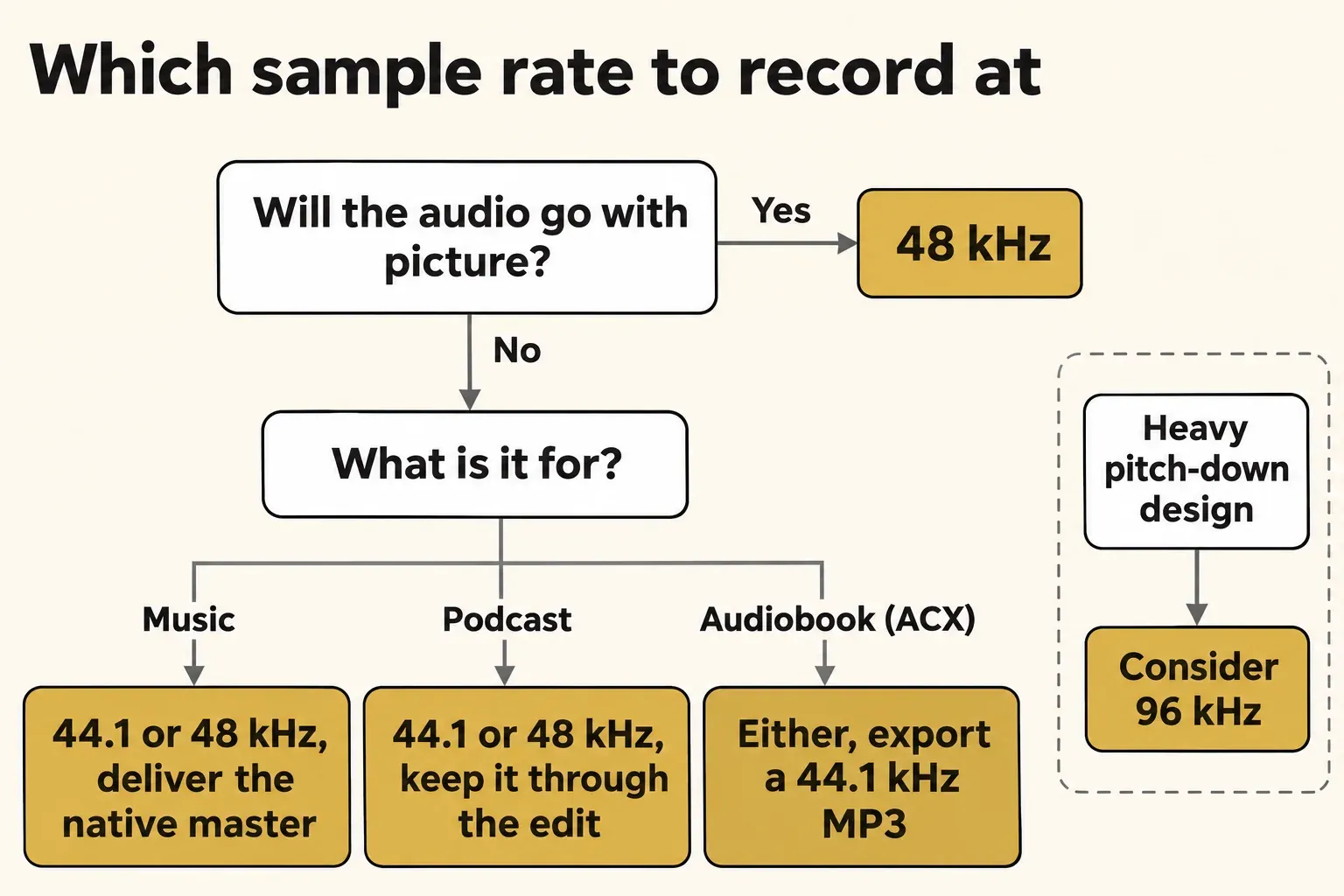
Record at 48 kHz unless you already know the audio will only ever be a 44.1 kHz music release. Starting at 48 kHz keeps video open for about 9% more storage than 44.1 kHz. Starting at 44.1 kHz saves the CD conversion and costs one conversion if the song later ends up in a video.
- Audio with picture (YouTube, film, event video): 48 kHz.
- Music for CD first: 44.1 kHz, or 48 kHz if a video version is likely.
- Music for streaming: either rate; deliver the native master.
- Podcast: 44.1 or 48 kHz, kept through the edit; 48 kHz if the show also goes out as video.
- Audiobook for ACX: either rate; export each file as a 44.1 kHz MP3 at the end.
- Heavy pitch-down sound design: consider 96 kHz, with a microphone that reaches well above 20 kHz.
CPU, storage and latency: the cost of 48 kHz
48 kHz carries 8.84% more samples per second than 44.1 kHz. Uncompressed storage grows by that percentage at the same bit depth and channel count; a fixed-size buffer lasts less time. Actual CPU load does not have a universal percentage increase.
Storage first. A stereo minute of 24-bit PCM takes 17.28 MB at 48 kHz (2,304 kbps) and 15.88 MB at 44.1 kHz (2,116.8 kbps), and a 16-bit/44.1 kHz CD-format minute takes 10.58 MB (1,411.2 kbps). The audio file size calculator runs the numbers for your own format and length.
Latency moves slightly in favor of 48 kHz, because the same buffer holds less time. A 128-sample buffer lasts 2.90 ms at 44.1 kHz and 2.67 ms at 48 kHz, and a 256-sample buffer 5.80 ms against 5.33 ms. Those are durations of one buffer, not measured input/output or round-trip latency; driver buffering, converters and plug-ins add their own delays, and the audio latency calculator converts any buffer size.
48 kHz supplies about 9% more samples to process every second, but the CPU difference depends on the plug-ins, their oversampling settings, the driver and the buffer size. More frequent buffer deadlines can reduce real-time headroom. Keep a stable session at its current rate unless the delivery or processing task calls for a change; a rate switch is not a guaranteed CPU optimization.
FAQ
Is 48 kHz better quality than 44.1 kHz?
Not automatically. Both Nyquist limits sit above 20 kHz, but actual converter filters can affect the top of the audible band. What 48 kHz adds is filter room: 4 kHz above 20 kHz instead of 2.05 kHz. The cited blind studies do not establish a universal audible benefit or a universal absence of difference between these two rates.
Can you hear the difference between 44.1 and 48 kHz?
Published blind studies don't isolate that pair. They compare standard rates with high-resolution audio, and the meta-analysis of 18 experiments found a small effect that reached about 60% correct only with trained listeners.
Should I convert a 48 kHz song to 44.1 kHz for Spotify?
No. Spotify asks for the native master at 44.1 kHz or higher and downsamples 48 kHz files itself, so a 48 kHz master goes to your distributor as it is.
Why is CD audio 44.1 kHz?
It came from early digital audio stored on video recorders. Three samples per video line fit both NTSC and PAL: 3 × 245 × 60 and 3 × 294 × 50 both come to 44,100. DAT launched in 1987 at 48 kHz, the rate the AES now recommends for professional work.
Verdict: which sample rate to use
My verdict: 48 kHz is the default for new recordings and for anything with picture, because AES5, broadcast TV and YouTube's recommended settings all point there, and it gives the converter's filter almost twice the room. Choose 44.1 kHz for a music-only project aimed at CD or an ACX audiobook, where it saves a conversion. Either way, set one rate per project, master at that rate and make each delivery with one high-quality conversion from the master.