

You can't get a SpectraLayers edition for free on its own, but two legitimate routes cost nothing: Steinberg's 60-day trial of SpectraLayers Pro 13, with every Pro feature and only a Steinberg ID required, and SpectraLayers Go, which comes bundled with Cubase Pro or Artist 14 and 15, Nuendo, and Pro Tools subscriptions or active Upgrade Plans. Cubase Elements, AI and LE don't include Go. Past those routes, Elements 13 at $89.99 is the cheapest paid edition and Pro 13 costs $359.99 on the SpectraLayers product page (US prices on October 23, 2026, no sale running).
My rule is simple. I'd request the trial only when a real job is waiting, because the 60 days start the moment you ask for it, not when you install. If Go already came with your DAW, use it first, but I wouldn't buy Cubase to get it: the cheapest Cubase that carries Go costs about $330, against $89.99 for Elements 13. For noise, hum or clicks, I'd treat Elements as the real entry point, because Go has no Noise Reduction, Hum Reduction or Click Repair.
What you can get for free, and what you can't
Three routes cost nothing, and only one of them is open to everyone. Steinberg doesn't sell Go on its own, so it reaches you only through a host you already own, and Steinberg's SpectraLayers trial page offers a Pro 13 trial and nothing else. There is no Elements trial and no permanent free tier.
| Route | Who qualifies | What you get | Term and conditions |
|---|---|---|---|
| SpectraLayers Pro 13 trial | Anyone with a Steinberg ID and an internet connection | Pro 13 with all features and no restrictions | 60 days counted from the request; the licence deactivates itself at the end and nothing is billed |
| Go with Cubase or Nuendo | Cubase Pro or Artist 15 and 14, Nuendo | SpectraLayers Go: stereo, 96 kHz, vocal-only Unmix Song | Cubase owners find it under the Cubase entry in Steinberg Download Assistant; forum answers tie the Go licence to the host licence |
| Go with Pro Tools | All Pro Tools subscriptions and active Upgrade Plans for perpetual licences | SpectraLayers Go | Use as an ARA 2 plug-in needs Pro Tools 2024.10 or later |
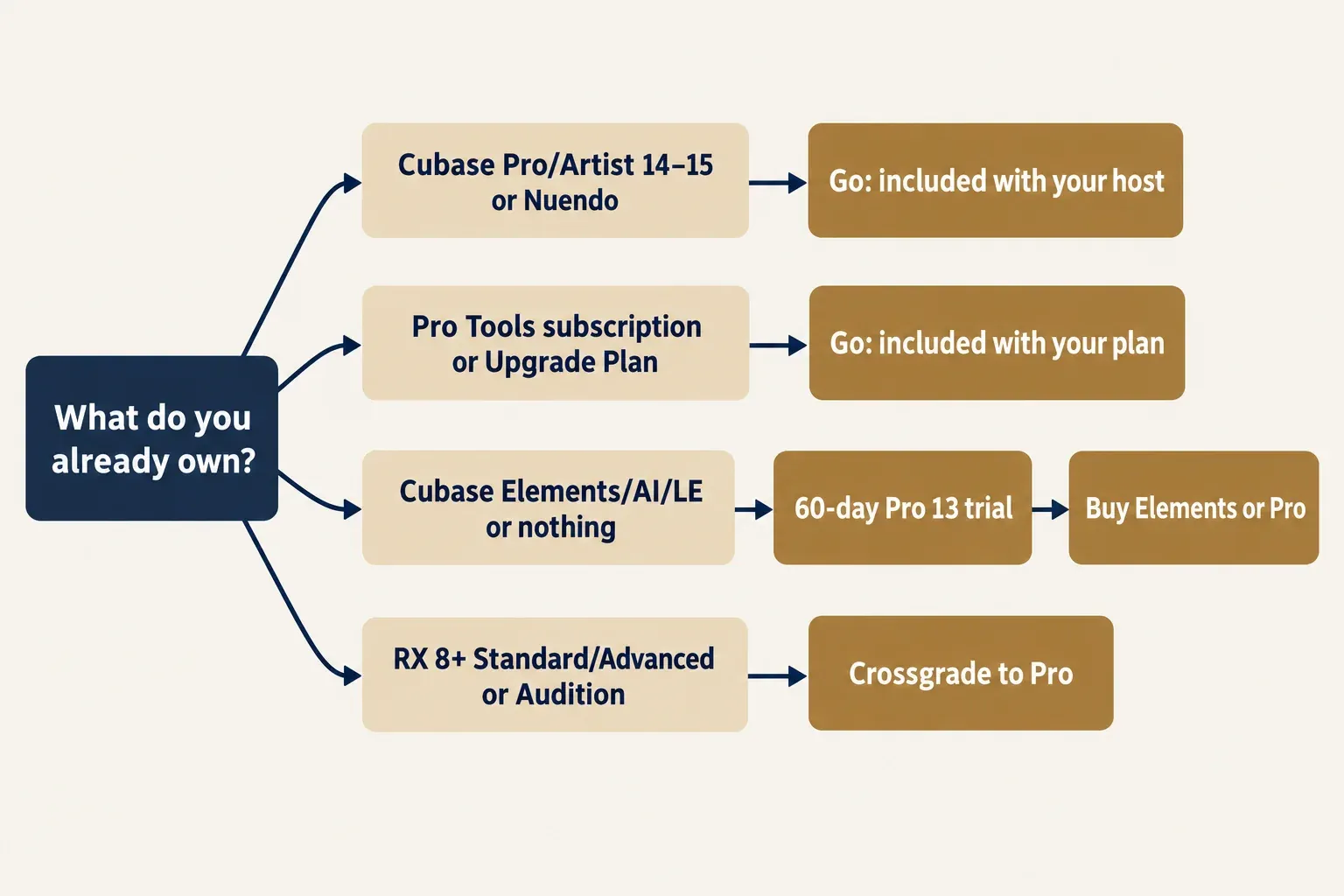
Every working copy needs a licence in a Steinberg account. SpectraLayers runs on Steinberg Licensing; the older eLicenser was discontinued on May 20, 2025, and SpectraLayers 8 was the last version that used it. The trial and the bundled Go are the only licences that cost nothing, so an installer offered anywhere outside Steinberg's own routes isn't one of them. For other no-cost tools and time-limited trials around Sound Forge, the free plug-ins and trials hub keeps them in one place.
How the 60-day SpectraLayers Pro 13 trial works
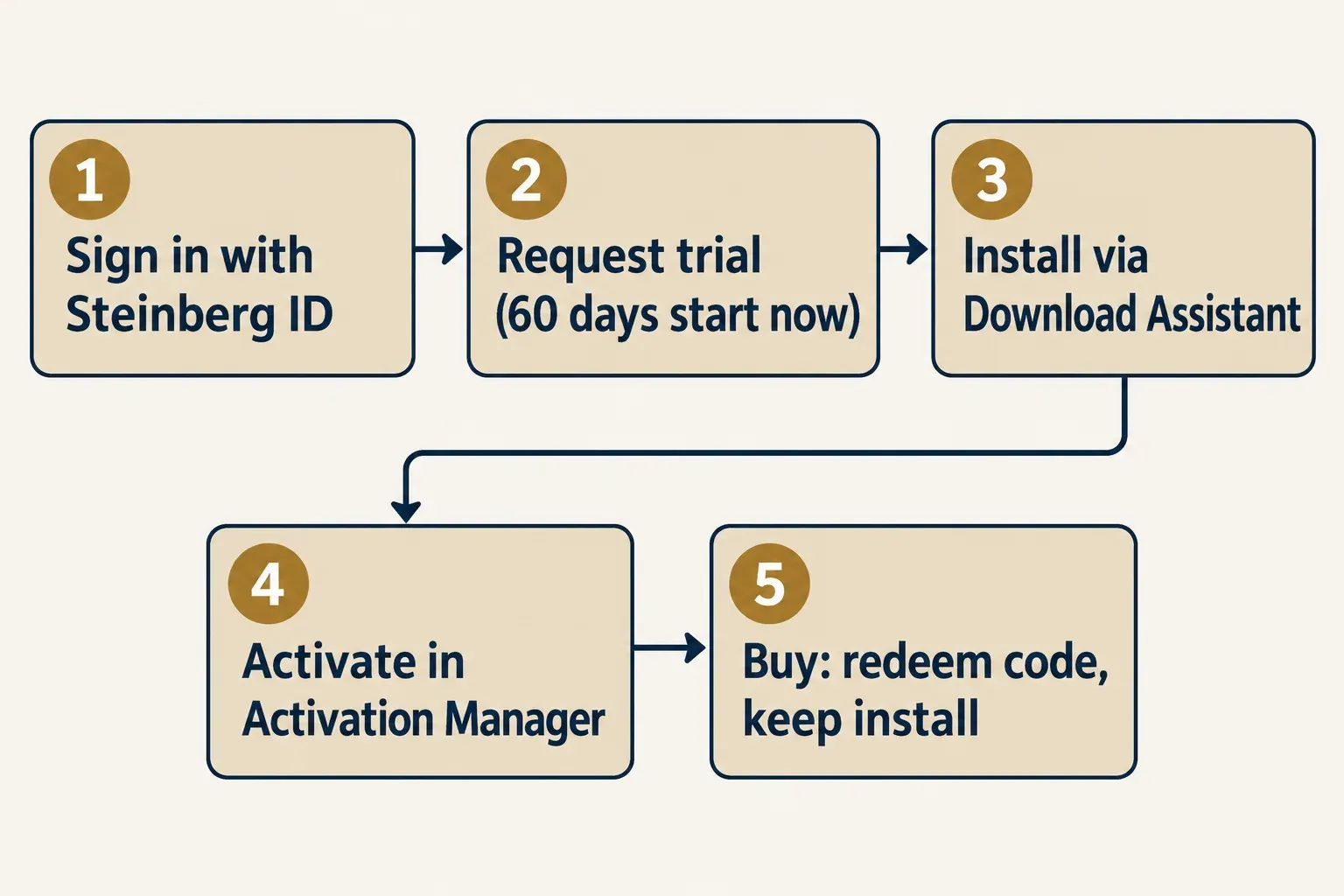
The trial is SpectraLayers Pro 13 with every feature for 60 days, and the clock starts when you request it on Steinberg's site, not when you install or first open the program. Steinberg's Trials FAQ covers the request, the install and the backup advice, and forum fixes add the activation step:
- Sign in with your Steinberg ID and request the trial. The licence lands in your account automatically, with no Download Access Code to redeem.
- Install SpectraLayers Pro 13 from the My products section of Steinberg Download Assistant. Steinberg staff noted in the Pro 12 trial announcement thread that the Download Assistant is optional and the installers are also on Steinberg's downloads page.
- Activate the trial licence in Steinberg Activation Manager.
- If an earlier SpectraLayers version is installed, back up its projects first, as Steinberg advises before trying a newer version.
Four rules shape how you plan around those 60 days:
- No billing. There's no subscription, renewal or automatic purchase. At the end of the term the licence deactivates itself.
- Online only. A trial licence can't be activated offline, and the account, the installer download and activation all need an internet connection.
- Buying keeps your work. Buy during the trial, redeem the Download Access Code and carry on: no reinstall, and your projects and settings stay as they are.
- Back up first. Owners of an earlier version should save copies of their projects before the newer version opens them.
Timing is the part to plan for. Steinberg's FAQ says trials usually appear shortly after a release rather than on launch day. SpectraLayers 13 shipped on July 1, 2026, and an SL12 Pro owner reported the SpectraLayers 13 trial e-mail about three weeks later. The length has changed between versions too: the Pro 12 trial ran 30 days, so 60 days is this version's term rather than a fixed rule. Owners of the previous version have been able to trial each new major version, from an SL8 owner who got the SL9 trial in 2022 to SL12 owners who received the SL13 offer, but that's a pattern in forum threads, not a published policy.
SpectraLayers Go: free only if you own the right host
Go is free only as part of a qualifying host licence. Steinberg's Cubase edition comparison lists it in Cubase Pro 15 and Cubase Artist 15 and leaves it out of Cubase Elements 15, AI 15 and LE 15. Cubase Pro 14 and Artist 14 owners have it too: Steinberg's Go-to-Pro upgrade names those licences as qualifying products, and forum answers find Go under the Cubase 14 section of Download Assistant. Nuendo's feature list includes Go as well.
For Pro Tools, Avid sets the terms. Avid's SpectraLayers Go page states two conditions: Go is included with all Pro Tools subscriptions and with active Upgrade Plans for perpetual licences, and using it as an ARA 2 plug-in needs Pro Tools 2024.10 or later.
Cubase owners find Go under the Cubase entry in Steinberg Download Assistant, not under SpectraLayers. A forum answer for Cubase 15 gives the path My products > Cubase 15 > Tools > SpectraLayers. The licence leans on the host. In one forum thread, Go stopped working after a Cubase 15 trial expired, and the explanation given was that the Go licence depends on an owned qualifying Cubase licence. A Cubase trial, in other words, isn't a way to keep Go.
Buying a host only to get Go doesn't add up. Cubase Artist 15, the cheapest edition that carries Go, costs about $330, and Cubase Pro 15 costs $579.99 on Steinberg's Cubase page. Elements 13 costs $89.99 and adds the noise, hum and click repair that Go lacks. Cubase Elements 15 is cheaper at $99.99, but it has no Go at all.
What happened to SpectraLayers One
SpectraLayers One is the older bundled edition, and Go is its successor: Nuendo's new-features page describes Go as an evolution of SpectraLayers One. Cubase 13 and older still map to One. In a thread from a Cubase Pro 13 owner, Go wouldn't open for lack of a licence, and the answer was the bundled version listed for that Cubase, which forum replies identify as SpectraLayers One 10. Go needs Cubase Pro or Artist 14 or 15, so install the SpectraLayers version that Download Assistant lists under your own Cubase entry.
SpectraLayers Go vs Elements vs Pro: what each one can do
Go and Elements share the same ceiling, stereo audio at up to 96 kHz with 8 undo levels, so the difference between them is the repair toolset. Pro lifts that ceiling and adds the full song split. Steinberg's edition comparison is the basis for every row below. There's no "SpectraLayers Artist" either: Artist is a Cubase edition, and the three SpectraLayers editions are Go, Elements 13 and Pro 13.
| Limit or tool | Go | Elements 13 | Pro 13 |
|---|---|---|---|
| Maximum sample rate | 96 kHz | 96 kHz | 384 kHz |
| Channels | Stereo | Stereo | Up to 16 |
| Undo levels | 8 | 8 | 64 |
| Unmix Song | Vocals only | Vocals only | Full stem separation |
| Other unmix modules (Drums, Two Voices, Noisy Speech, Crowd Noise, Multichannel and more) and Components | No | No | Yes |
| Noise Reduction, Hum Reduction, Click Repair | No | Yes | Yes |
| EQ Match, VST 3 plug-in support, Frequency Repair, Noise Spray, Modules Chain | No | Yes | Yes |
| Reverb Reduction, De-Bleed, De-Esser, Clip Repair, DePlosive, Voice repair modules, Reconstruct, Batch Processing | No | No | Yes |
| Lasso, Magic Wand, Frequency/Harmonics and Transient selection, Clone Stamp, Heal, Transform, measurement tools | No | No | Yes |
| External editors | None | 1 | Up to 3 |
| Plug-in formats | ARA2 VST, ARA2 AAX, AAX | ARA2 VST, ARA2 AAX, AAX | ARA2 VST, ARA2 AAX, AAX |
| macOS | 12 or later | 14 or later | 14 or later |
| Windows | 64-bit Windows 10 or 11, 21H2 or later | 64-bit Windows 10 or 11, 21H2 or later | 64-bit Windows 10 or 11, 21H2 or later |
| Minimum hardware | 8 GB RAM (16 GB recommended), 8 GB free disk space, 1920 x 1080 display | ||
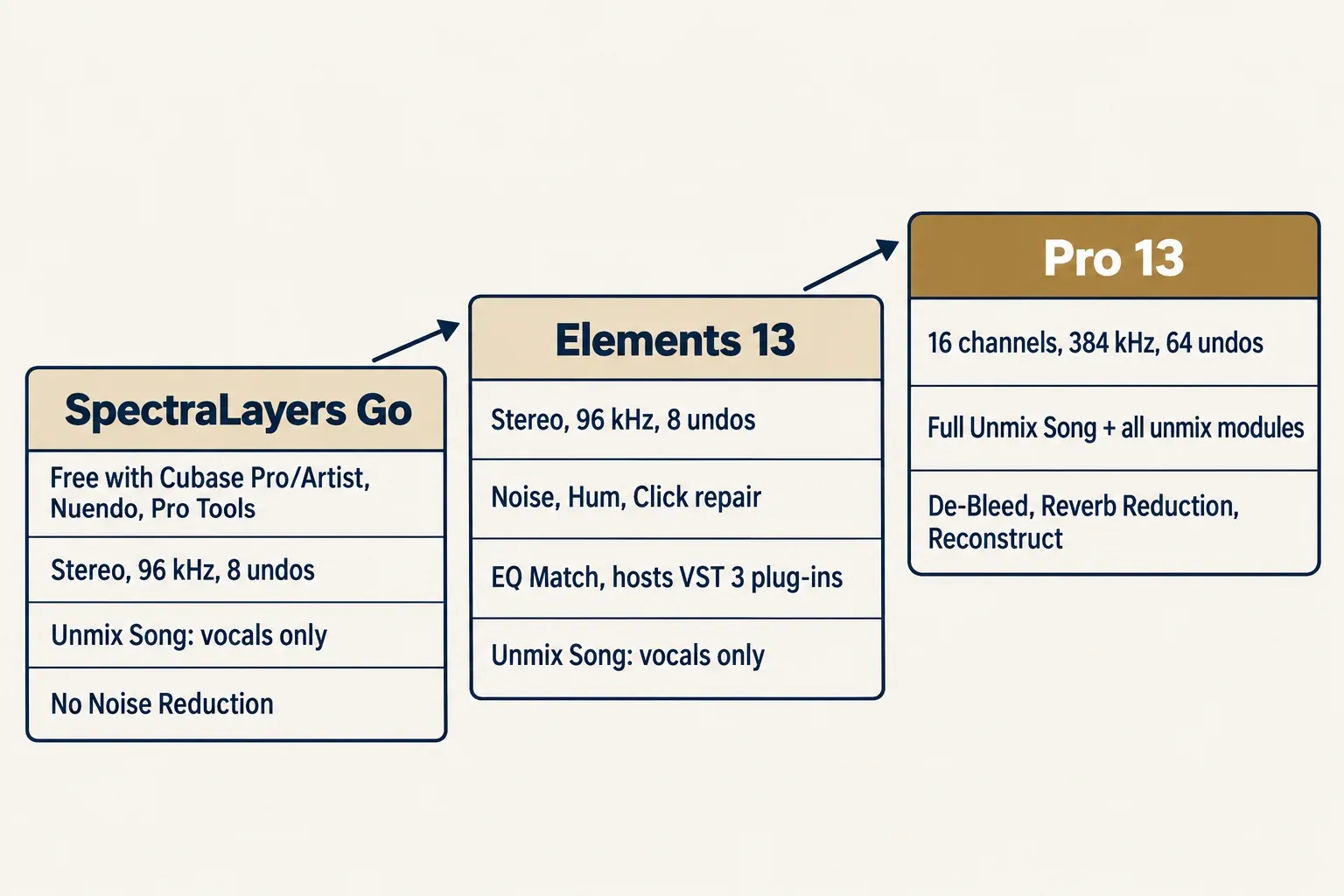
Read the table by job. Go handles spectral edits and pulls a vocal out of a stereo mix, with no cleanup modules. Elements adds the everyday repair set of noise, hum and clicks, plus EQ Match and VST 3 plug-in support, which makes it the sensible first purchase for restoration. Pro is the edition for full stems, files beyond stereo or 96 kHz, and dialogue problems such as bleed, reverb, plosives and clipped peaks. For a vocal-removal job inside the host instead, the guide to removing vocals in Sound Forge covers what Sound Forge can do without SpectraLayers.
SpectraLayers prices and upgrade paths: three US sellers compared
The composite result is short: three US sellers list identical SpectraLayers prices. Pro 13 comes to a median of $359.99, with a range of $359.99–$359.99 across n = 3 sellers: Steinberg's own store, Plugin Boutique's SpectraLayers Pro 13 listing and JRRshop's SpectraLayers Pro page. The same three agree to the cent on Elements 13 at $89.99, the Pro 13 Education licence at $199.99 and the competitive crossgrade at $279.99. Pro 365, a 365-day licence, lists at $169.99 at both sellers that carry it, and its education version at $89.99. None of them showed a sale price.
| Route to Pro 13 or Elements 13 | Who qualifies | US price |
|---|---|---|
| Pro 13, new licence | Anyone | $359.99 |
| Elements 13, new licence | Anyone | $89.99 |
| Pro 13 Education | Buyers eligible for education pricing | $199.99 |
| Pro 365 (365-day licence) | Anyone | $169.99 |
| Pro 365 Education | Buyers eligible for education pricing | $89.99 |
| Upgrade from Go to Pro 13 | SpectraLayers Go, or Cubase Pro or Artist 14–15, or Nuendo 14–15 | $319.99 |
| Upgrade from Elements 13 to Pro 13 | Elements 13 owners | $279.99 |
| Upgrade from Elements 9–12 to Pro 13 | Elements 9–12 owners | $289.99 |
| Competitive crossgrade to Pro 13 | iZotope RX 8 or later Standard, Advanced or Post Production Suite (not RX Elements); Adobe Audition; Acoustica 7 or later Premium or PPS (not Standard) | $279.99 |
| Update from Pro 12 | Pro 12 owners | $89.99 |
| Update from Pro 9–11 | Pro 9–11 owners | $129.99 |
| Update from Pro 6–8 | Pro 6–8 owners | $149.99 |
| Update from Elements 9–12 to Elements 13 | Elements 9–12 owners | $34.99 |
Only Steinberg's store lists the upgrade and update prices. Some owners pay nothing: under Steinberg's grace-period rules, a licence for SpectraLayers 6 or later redeemed on or after June 3, 2026 includes a free update to SpectraLayers 13. Whatever you buy, Steinberg's activation-limit article allows one licence to be active on up to three computers at the same time.
The seller matters far less than the route. Owning Go or a qualifying Cubase or Nuendo licence turns $359.99 into $319.99, and owning Elements 13, RX Standard or Advanced, or Audition turns it into $279.99.
What goes wrong with trials and bundled Go
In the problem threads on Steinberg's forum, the trouble came down to which licence was active or which installed edition the host loaded. Across 16 SpectraLayers threads on that forum, the counts below are threads, not a share of users, and each outcome is the one stated in the thread.
| What users reported | Threads | Outcome | Fix given in the thread |
|---|---|---|---|
| Trial or paid Pro opens with Go's limits | 4: a Pro 12 trial running as Go, a paid Pro 12 upgrade showing Go, a paid Pro 13 upgrade stuck on Go after an unknown error, a Pro 12 trial in Pro Tools with only vocal unmix | 2 resolved, 2 unconfirmed | Activate the licence in Steinberg Activation Manager; in Pro Tools, load the correct ARA extension |
| Host keeps loading Go instead of Pro | 1: choosing between Go and Pro 11 | Resolved by Steinberg staff | Reinstall SpectraLayers Pro so it takes priority as the ARA plug-in |
| Expired trial blocks the bundled version | 1: an SL12 trial that wouldn't uninstall | Unconfirmed | Steinberg's cleanup utility, then delete the leftovers |
| Bundled Go stops or won't come back | 3: Go stopped after a Cubase 15 trial expired, a Cubase Pro 13 owner without a Go licence, no way back to Go after deactivating Pro | 1 explained, 1 partly resolved, 1 unresolved | Go needs an owned Cubase Pro or Artist 14 or 15 licence; Cubase 13 owners use the version listed for their Cubase |
| "Is SpectraLayers free with Cubase?" | 3: Cubase 15, Cubase 14, Cubase Pro 14 | All answered | Go sits under the Cubase entry in Download Assistant and opens through ARA |
| When the trial arrives and who gets it | 4: a trial question after the 13.0.10 update, the SL13 trial e-mail, a "recently launched 60 days trial" reply, the SL9 trial for an SL8 owner | All answered | Trials came a few weeks after launch, and owners of the previous version could use them |
Two habits match the fixes given in those threads. Activate the trial in Activation Manager before opening it from a host that also has Go, and if the host still loads Go, reinstall Pro so it takes priority. Keep the host licence in mind as well: when bundled Go stops working, check the Cubase or Nuendo licence before reinstalling SpectraLayers.
Using SpectraLayers from Sound Forge Pro
Sound Forge Pro 14 or later can open SpectraLayers Pro as an ARA plug-in, and the Pro trial is enough to try that route before you pay. The SpectraLayers 13 manual's ARA host list names Sound Forge Pro 14 and later next to Pro Tools 2024.10 and later and Cubase and Nuendo 10.0.30 and later, and its Sound Forge Pro page gives the command: Tools > Edit in SpectraLayers (ARA)...
None of the current Sound Forge plans bundles SpectraLayers. Sound Forge's plan page lists VST2, VST3 and ARA support but no SpectraLayers edition, so the licence has to come from Steinberg. The manual documents this route with SpectraLayers Pro, which is exactly what the trial gives you. It doesn't cover Go or Elements in Sound Forge, so I'd confirm the route with your own files during the trial before buying Elements for Sound Forge.
Two related guides cover the host side. To see a spectrum rather than edit inside it, Sound Forge's own spectral analysis tool does that without SpectraLayers. If you don't own Sound Forge yet, the guide to what Sound Forge's free trial includes covers the host half of this route.
Which route I would take
My verdict: start with the free route that matches what you already own, and pay only for the edition limit your work runs into.
- Cubase Pro or Artist 14–15, Nuendo, or Pro Tools with a subscription or Upgrade Plan. Use Go first. For noise, hum or click repair, Elements 13 at $89.99 covers it. If Pro is where you're heading anyway, the $319.99 upgrade from Go costs less than Elements plus a later $279.99 upgrade, which comes to $369.98.
- No qualifying host. Spend the 60-day Pro 13 trial on a real job, then buy Elements 13 if the work was noise, hum and clicks, or Pro 13 if it needed full stems or the dialogue repair modules.
- Music stems. Pro 13 is the only edition with the full Unmix Song; Go and Elements stop at vocals.
- Education buyers. Pro 13 Education costs $199.99, a little over half the regular Pro 13 price.
- One project with an end date. Pro 365 at $169.99 runs for 365 days and costs less than half of Pro 13.
- iZotope RX 8 or later Standard or Advanced, or Adobe Audition. The $279.99 competitive crossgrade is the shortest way into Pro, and RX Elements doesn't qualify. The RX 12 vs SpectraLayers 13 comparison shows where each editor is stronger before you add the second one.
Still deciding whether SpectraLayers is the right spectral editor at all? The roundup of iZotope RX alternatives by repair job and budget sets it next to the other options.
SpectraLayers free and trial questions
Is SpectraLayers Go free?
Only as part of a host licence. Go isn't sold separately; it comes with Cubase Pro or Artist 14 and 15, Nuendo, and Pro Tools subscriptions or active Upgrade Plans.
Does Cubase Elements, AI or LE include SpectraLayers?
No. Steinberg's Cubase comparison lists Go only in Cubase Pro and Artist. Elements, AI and LE owners can use the Pro 13 trial and then buy Elements 13 or Pro 13.
Can I use the SpectraLayers trial offline?
No. A trial licence can't be activated offline, and the account, the download and activation all need an internet connection.
What happens when the trial ends?
The licence deactivates itself after 60 days, with no subscription or automatic charge. Buy before then and you redeem the code and keep the same installation, projects and settings.
Is there a SpectraLayers Elements trial?
No. Steinberg's trial page offers SpectraLayers Pro 13 only. Every Elements tool is also in Pro, so note which tools your job used during the trial before choosing between the two.
Will there be a trial for the next version?
Steinberg hasn't promised one. Forum threads show earlier major versions getting their own trials, open to owners of the previous version too, and the SpectraLayers 13 trial arrived about three weeks after release. That's a pattern, not a policy.