
This MIDI CC chart lists every MIDI 1.0 Control Change number from 0 to 127. Search by controller number, name or hex value, then narrow the table to common controls, MSB/LSB pairs, switches, RPN/NRPN or Channel Mode messages. The assignments come from the current MIDI Association Control Change reference. The receiving instrument still decides which messages it supports.
Use CC64 for a decimal number and 0x40 for hex. A plain value such as 40 can match both decimal CC40 and hexadecimal 0x40, which is CC64.
Common MIDI CC numbers
These are the controls musicians reach for most often. Select one to jump to its full row in the chart.
Complete MIDI CC chart: 0–127
Find a controller number
Search names, decimal CC numbers or hex. Filters and search work together.
In this chart, MSB/LSB labels are reserved for defined controller pairs and parameter-number fields. Other controls are labeled by function so an overview-table label is not mistaken for a controller pair.
| CC | Hex | Binary | Standard function | Value / behavior | Type / pairing |
|---|---|---|---|---|---|
| CC00 | 0x00 |
00000000 |
Bank Select | 0-127 | MSB · paired with CC32 |
| CC11 | 0x01 |
00000001 |
Modulation Wheel or Lever | 0-127 | MSB · paired with CC33 |
| CC22 | 0x02 |
00000010 |
Breath Controller | 0-127 | MSB · paired with CC34 |
| CC33 | 0x03 |
00000011 |
Undefined | 0-127 | MSB · paired with CC35 |
| CC44 | 0x04 |
00000100 |
Foot Controller | 0-127 | MSB · paired with CC36 |
| CC55 | 0x05 |
00000101 |
Portamento Time | 0-127 | MSB · paired with CC37 |
| CC66 | 0x06 |
00000110 |
Data Entry MSB | 0-127 | MSB · paired with CC38 |
| CC77 | 0x07 |
00000111 |
Channel Volume (formerly Main Volume) | 0-127 | MSB · paired with CC39 |
| CC88 | 0x08 |
00001000 |
Balance | 0-127 | MSB · paired with CC40 |
| CC99 | 0x09 |
00001001 |
Undefined | 0-127 | MSB · paired with CC41 |
| CC1010 | 0x0A |
00001010 |
Pan | 0-127 | MSB · paired with CC42 |
| CC1111 | 0x0B |
00001011 |
Expression Controller | 0-127 | MSB · paired with CC43 |
| CC1212 | 0x0C |
00001100 |
Effect Control 1 | 0-127 | MSB · paired with CC44 |
| CC1313 | 0x0D |
00001101 |
Effect Control 2 | 0-127 | MSB · paired with CC45 |
| CC1414 | 0x0E |
00001110 |
Undefined | 0-127 | MSB · paired with CC46 |
| CC1515 | 0x0F |
00001111 |
Undefined | 0-127 | MSB · paired with CC47 |
| CC1616 | 0x10 |
00010000 |
General Purpose Controller 1 | 0-127 | MSB · paired with CC48 |
| CC1717 | 0x11 |
00010001 |
General Purpose Controller 2 | 0-127 | MSB · paired with CC49 |
| CC1818 | 0x12 |
00010010 |
General Purpose Controller 3 | 0-127 | MSB · paired with CC50 |
| CC1919 | 0x13 |
00010011 |
General Purpose Controller 4 | 0-127 | MSB · paired with CC51 |
| CC2020 | 0x14 |
00010100 |
Undefined | 0-127 | MSB · paired with CC52 |
| CC2121 | 0x15 |
00010101 |
Undefined | 0-127 | MSB · paired with CC53 |
| CC2222 | 0x16 |
00010110 |
Undefined | 0-127 | MSB · paired with CC54 |
| CC2323 | 0x17 |
00010111 |
Undefined | 0-127 | MSB · paired with CC55 |
| CC2424 | 0x18 |
00011000 |
Undefined | 0-127 | MSB · paired with CC56 |
| CC2525 | 0x19 |
00011001 |
Undefined | 0-127 | MSB · paired with CC57 |
| CC2626 | 0x1A |
00011010 |
Undefined | 0-127 | MSB · paired with CC58 |
| CC2727 | 0x1B |
00011011 |
Undefined | 0-127 | MSB · paired with CC59 |
| CC2828 | 0x1C |
00011100 |
Undefined | 0-127 | MSB · paired with CC60 |
| CC2929 | 0x1D |
00011101 |
Undefined | 0-127 | MSB · paired with CC61 |
| CC3030 | 0x1E |
00011110 |
Undefined | 0-127 | MSB · paired with CC62 |
| CC3131 | 0x1F |
00011111 |
Undefined | 0-127 | MSB · paired with CC63 |
| CC3232 | 0x20 |
00100000 |
LSB for Control 0 (Bank Select) | 0-127 | LSB · paired with CC0 |
| CC3333 | 0x21 |
00100001 |
LSB for Control 1 (Modulation Wheel or Lever) | 0-127 | LSB · paired with CC1 |
| CC3434 | 0x22 |
00100010 |
LSB for Control 2 (Breath Controller) | 0-127 | LSB · paired with CC2 |
| CC3535 | 0x23 |
00100011 |
LSB for Control 3 (Undefined) | 0-127 | LSB · paired with CC3 |
| CC3636 | 0x24 |
00100100 |
LSB for Control 4 (Foot Controller) | 0-127 | LSB · paired with CC4 |
| CC3737 | 0x25 |
00100101 |
LSB for Control 5 (Portamento Time) | 0-127 | LSB · paired with CC5 |
| CC3838 | 0x26 |
00100110 |
LSB for Control 6 (Data Entry) | 0-127 | LSB · paired with CC6 |
| CC3939 | 0x27 |
00100111 |
LSB for Control 7 (Channel Volume, formerly Main Volume) | 0-127 | LSB · paired with CC7 |
| CC4040 | 0x28 |
00101000 |
LSB for Control 8 (Balance) | 0-127 | LSB · paired with CC8 |
| CC4141 | 0x29 |
00101001 |
LSB for Control 9 (Undefined) | 0-127 | LSB · paired with CC9 |
| CC4242 | 0x2A |
00101010 |
LSB for Control 10 (Pan) | 0-127 | LSB · paired with CC10 |
| CC4343 | 0x2B |
00101011 |
LSB for Control 11 (Expression Controller) | 0-127 | LSB · paired with CC11 |
| CC4444 | 0x2C |
00101100 |
LSB for Control 12 (Effect control 1) | 0-127 | LSB · paired with CC12 |
| CC4545 | 0x2D |
00101101 |
LSB for Control 13 (Effect control 2) | 0-127 | LSB · paired with CC13 |
| CC4646 | 0x2E |
00101110 |
LSB for Control 14 (Undefined) | 0-127 | LSB · paired with CC14 |
| CC4747 | 0x2F |
00101111 |
LSB for Control 15 (Undefined) | 0-127 | LSB · paired with CC15 |
| CC4848 | 0x30 |
00110000 |
LSB for Control 16 (General Purpose Controller 1) | 0-127 | LSB · paired with CC16 |
| CC4949 | 0x31 |
00110001 |
LSB for Control 17 (General Purpose Controller 2) | 0-127 | LSB · paired with CC17 |
| CC5050 | 0x32 |
00110010 |
LSB for Control 18 (General Purpose Controller 3) | 0-127 | LSB · paired with CC18 |
| CC5151 | 0x33 |
00110011 |
LSB for Control 19 (General Purpose Controller 4) | 0-127 | LSB · paired with CC19 |
| CC5252 | 0x34 |
00110100 |
LSB for Control 20 (Undefined) | 0-127 | LSB · paired with CC20 |
| CC5353 | 0x35 |
00110101 |
LSB for Control 21 (Undefined) | 0-127 | LSB · paired with CC21 |
| CC5454 | 0x36 |
00110110 |
LSB for Control 22 (Undefined) | 0-127 | LSB · paired with CC22 |
| CC5555 | 0x37 |
00110111 |
LSB for Control 23 (Undefined) | 0-127 | LSB · paired with CC23 |
| CC5656 | 0x38 |
00111000 |
LSB for Control 24 (Undefined) | 0-127 | LSB · paired with CC24 |
| CC5757 | 0x39 |
00111001 |
LSB for Control 25 (Undefined) | 0-127 | LSB · paired with CC25 |
| CC5858 | 0x3A |
00111010 |
LSB for Control 26 (Undefined) | 0-127 | LSB · paired with CC26 |
| CC5959 | 0x3B |
00111011 |
LSB for Control 27 (Undefined) | 0-127 | LSB · paired with CC27 |
| CC6060 | 0x3C |
00111100 |
LSB for Control 28 (Undefined) | 0-127 | LSB · paired with CC28 |
| CC6161 | 0x3D |
00111101 |
LSB for Control 29 (Undefined) | 0-127 | LSB · paired with CC29 |
| CC6262 | 0x3E |
00111110 |
LSB for Control 30 (Undefined) | 0-127 | LSB · paired with CC30 |
| CC6363 | 0x3F |
00111111 |
LSB for Control 31 (Undefined) | 0-127 | LSB · paired with CC31 |
| CC6464 | 0x40 |
01000000 |
Damper Pedal on/off (Sustain) | ≤63 off, ≥64 on | Switch / pedal |
| CC6565 | 0x41 |
01000001 |
Portamento On/Off | ≤63 off, ≥64 on | Switch / pedal |
| CC6666 | 0x42 |
01000010 |
Sostenuto On/Off | ≤63 off, ≥64 on | Switch / pedal |
| CC6767 | 0x43 |
01000011 |
Soft Pedal On/Off | ≤63 off, ≥64 on | Switch / pedal |
| CC6868 | 0x44 |
01000100 |
Legato Footswitch | ≤63 Normal, ≥64 Legato | Switch / pedal |
| CC6969 | 0x45 |
01000101 |
Hold 2 | ≤63 off, ≥64 on | Switch / pedal |
| CC7070 | 0x46 |
01000110 |
Sound Controller 1 (default: Sound Variation) | 0-127 | Sound controller |
| CC7171 | 0x47 |
01000111 |
Sound Controller 2 (default: Timbre/Harmonic Intens.) | 0-127 | Sound controller |
| CC7272 | 0x48 |
01001000 |
Sound Controller 3 (default: Release Time) | 0-127 | Sound controller |
| CC7373 | 0x49 |
01001001 |
Sound Controller 4 (default: Attack Time) | 0-127 | Sound controller |
| CC7474 | 0x4A |
01001010 |
Sound Controller 5 (default: Brightness) | 0-127 | Sound controller |
| CC7575 | 0x4B |
01001011 |
Sound Controller 6 (default: Decay Time – see MMA RP-021) | 0-127 | Sound controller |
| CC7676 | 0x4C |
01001100 |
Sound Controller 7 (default: Vibrato Rate – see MMA RP-021) | 0-127 | Sound controller |
| CC7777 | 0x4D |
01001101 |
Sound Controller 8 (default: Vibrato Depth – see MMA RP-021) | 0-127 | Sound controller |
| CC7878 | 0x4E |
01001110 |
Sound Controller 9 (default: Vibrato Delay – see MMA RP-021) | 0-127 | Sound controller |
| CC7979 | 0x4F |
01001111 |
Sound Controller 10 (default undefined – see MMA RP-021) | 0-127 | Sound controller |
| CC8080 | 0x50 |
01010000 |
General Purpose Controller 5 | 0-127 | General-purpose control |
| CC8181 | 0x51 |
01010001 |
General Purpose Controller 6 | 0-127 | General-purpose control |
| CC8282 | 0x52 |
01010010 |
General Purpose Controller 7 | 0-127 | General-purpose control |
| CC8383 | 0x53 |
01010011 |
General Purpose Controller 8 | 0-127 | General-purpose control |
| CC8484 | 0x54 |
01010100 |
Portamento Control | 0-127 | Portamento control |
| CC8585 | 0x55 |
01010101 |
Undefined | — | Undefined |
| CC8686 | 0x56 |
01010110 |
Undefined | — | Undefined |
| CC8787 | 0x57 |
01010111 |
Undefined | — | Undefined |
| CC8888 | 0x58 |
01011000 |
High Resolution Velocity Prefix | 0-127 | High-resolution velocity prefix |
| CC8989 | 0x59 |
01011001 |
Undefined | — | Undefined |
| CC9090 | 0x5A |
01011010 |
Undefined | — | Undefined |
| CC9191 | 0x5B |
01011011 |
Effects 1 Depth (default: Reverb Send Level – see MMA RP-023) (formerly External Effects Depth) | 0-127 | Effects control |
| CC9292 | 0x5C |
01011100 |
Effects 2 Depth (formerly Tremolo Depth) | 0-127 | Effects control |
| CC9393 | 0x5D |
01011101 |
Effects 3 Depth (default: Chorus Send Level – see MMA RP-023) (formerly Chorus Depth) | 0-127 | Effects control |
| CC9494 | 0x5E |
01011110 |
Effects 4 Depth (formerly Celeste [Detune] Depth) | 0-127 | Effects control |
| CC9595 | 0x5F |
01011111 |
Effects 5 Depth (formerly Phaser Depth) | 0-127 | Effects control |
| CC9696 | 0x60 |
01100000 |
Data Increment (Data Entry +1) (see MMA RP-018) | N/A | Data increment |
| CC9797 | 0x61 |
01100001 |
Data Decrement (Data Entry -1) (see MMA RP-018) | N/A | Data decrement |
| CC9898 | 0x62 |
01100010 |
Non-Registered Parameter Number (NRPN) – LSB | 0-127 | NRPN · LSB |
| CC9999 | 0x63 |
01100011 |
Non-Registered Parameter Number (NRPN) – MSB | 0-127 | NRPN · MSB |
| CC100100 | 0x64 |
01100100 |
Registered Parameter Number (RPN) – LSB* | 0-127 | RPN · LSB |
| CC101101 | 0x65 |
01100101 |
Registered Parameter Number (RPN) – MSB* | 0-127 | RPN · MSB |
| CC102102 | 0x66 |
01100110 |
Undefined | — | Undefined |
| CC103103 | 0x67 |
01100111 |
Undefined | — | Undefined |
| CC104104 | 0x68 |
01101000 |
Undefined | — | Undefined |
| CC105105 | 0x69 |
01101001 |
Undefined | — | Undefined |
| CC106106 | 0x6A |
01101010 |
Undefined | — | Undefined |
| CC107107 | 0x6B |
01101011 |
Undefined | — | Undefined |
| CC108108 | 0x6C |
01101100 |
Undefined | — | Undefined |
| CC109109 | 0x6D |
01101101 |
Undefined | — | Undefined |
| CC110110 | 0x6E |
01101110 |
Undefined | — | Undefined |
| CC111111 | 0x6F |
01101111 |
Undefined | — | Undefined |
| CC112112 | 0x70 |
01110000 |
Undefined | — | Undefined |
| CC113113 | 0x71 |
01110001 |
Undefined | — | Undefined |
| CC114114 | 0x72 |
01110010 |
Undefined | — | Undefined |
| CC115115 | 0x73 |
01110011 |
Undefined | — | Undefined |
| CC116116 | 0x74 |
01110100 |
Undefined | — | Undefined |
| CC117117 | 0x75 |
01110101 |
Undefined | — | Undefined |
| CC118118 | 0x76 |
01110110 |
Undefined | — | Undefined |
| CC119119 | 0x77 |
01110111 |
Undefined | — | Undefined |
| CC120120 | 0x78 |
01111000 |
All Sound Off | 0 | Channel Mode |
| CC121121 | 0x79 |
01111001 |
Reset All Controllers (See MMA RP-015) | 0 | Channel Mode |
| CC122122 | 0x7A |
01111010 |
Local Control On/Off | 0 off, 127 on | Channel Mode |
| CC123123 | 0x7B |
01111011 |
All Notes Off | 0 | Channel Mode |
| CC124124 | 0x7C |
01111100 |
Omni Mode Off (+ all notes off) | 0 | Channel Mode |
| CC125125 | 0x7D |
01111101 |
Omni Mode On (+ all notes off) | 0 | Channel Mode |
| CC126126 | 0x7E |
01111110 |
Mono Mode On (+ poly off, + all notes off) | Note: This equals the number of channels, or zero if the number of channels equals the number of voices in the receiver. | Channel Mode |
| CC127127 | 0x7F |
01111111 |
Poly Mode On (+ mono off, +all notes off) | 0 | Channel Mode |
An undefined number is unassigned in the standard table. A manufacturer can still use it for a product-specific function, and a controller preset can already map it. Check both ends of the connection before treating an undefined CC as conflict-free.
What a Control Change message contains
A MIDI 1.0 Control Change message identifies three things: the MIDI channel, the controller number and a value. The channel is encoded in the status byte, and the two data bytes carry the CC number and its value. Standard data bytes stay in the 0–127 range, as shown in the MIDI 1.0 message summary.
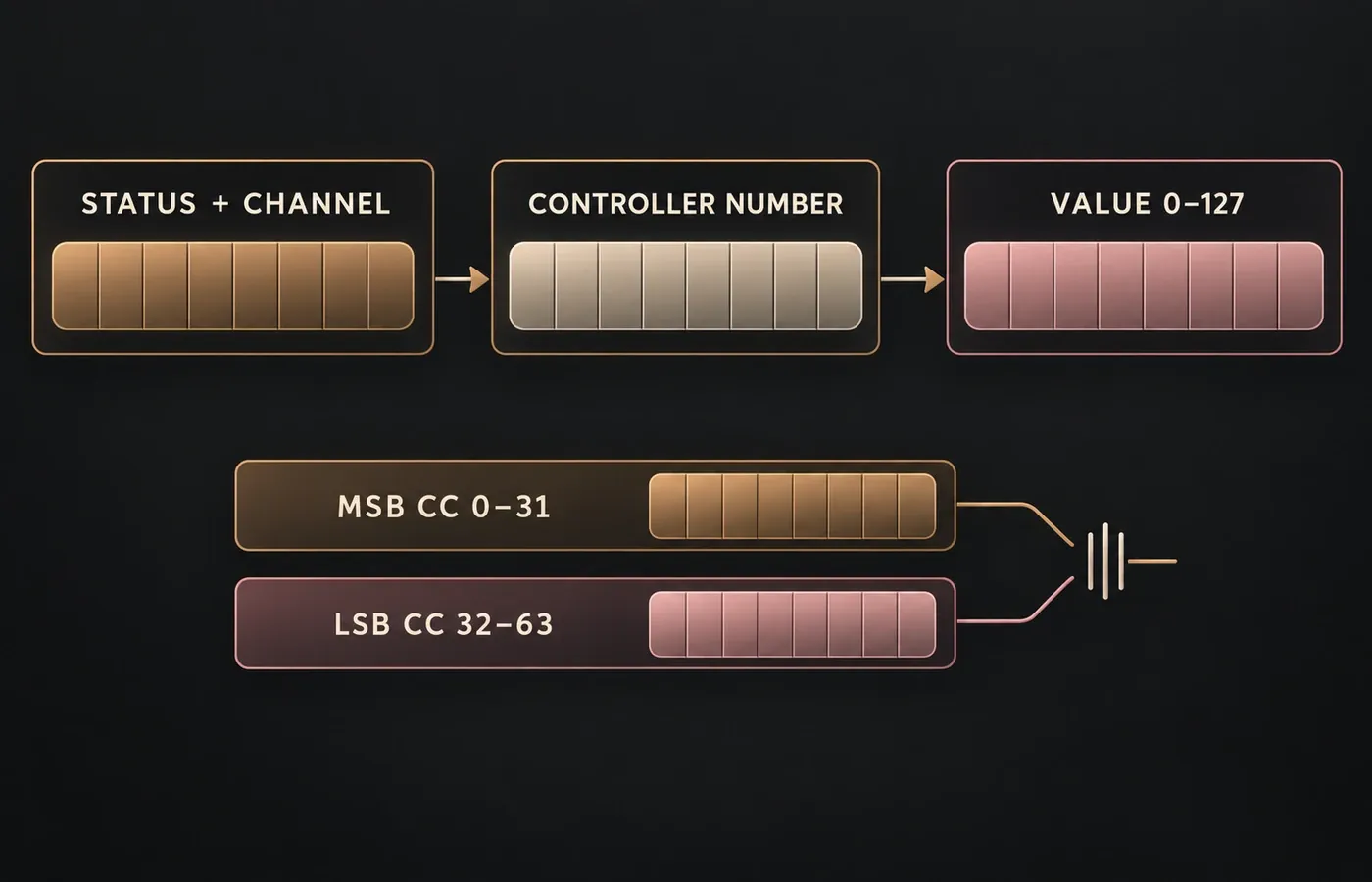
That distinction matters when a device appears to ignore a knob. The number may be correct while the transmitter and receiver are on different channels. A DAW may also remap the message before it reaches the instrument.
MSB, LSB and optional 14-bit control
CC0–31 form the most-significant-byte side of defined controller pairs, while CC32–63 carry the matching least-significant byte. For example, Channel Volume uses CC7 as the MSB and CC39 as its LSB partner. A receiver that implements both can interpret the pair as a finer value. A receiver that implements only the MSB still gets an ordinary 7-bit control.
One message gives one of 128 possible values.
The defined MSB/LSB pair can express a finer combined value when the receiver supports it.
Do not assume that every named MSB entry has active 14-bit support on every instrument. The table defines the pair. The receiving product’s implementation chart tells you whether it listens to both messages and in what order.
Switch controllers and Sustain CC64
CC64 is the Damper Pedal or Sustain switch. Values 0–63 mean off and 64–127 mean on in the standard table. The same threshold pattern appears on several nearby switches. A pedal may send only 0 and 127, but intermediate values are still interpreted by the threshold unless the product documents a different or extended behavior.
RPN and NRPN are sequences, not single controls
Registered Parameter Number and Non-Registered Parameter Number messages use controller pairs to select a parameter, followed by Data Entry to change it. The official table defines RPN selection with CC101 and CC100, NRPN selection with CC99 and CC98, and Data Entry with CC6 plus optional CC38. CC96 and CC97 increment or decrement the selected value.
- Select the parameter family.Send CC101/100 for RPN or CC99/98 for NRPN.
- Choose the parameter number.The MSB and LSB values identify the selected parameter.
- Send the value.Use CC6 for Data Entry MSB and CC38 when the implementation accepts the LSB.
- Optionally clear the RPN selection.For RPN, CC101 = 127 and CC100 = 127 is the documented null selection.
The selected parameter can remain active, so a later Data Entry message may alter it unintentionally. That’s why the null RPN step is useful in streams that continue carrying unrelated controller data. NRPN meanings are manufacturer-defined, so use the product documentation for the parameter numbers.
CC120–127 are Channel Mode messages
The last eight numbers are reserved for channel-level behavior. Treating them as spare assignable knobs can create abrupt or confusing results.
All Sound Off versus All Notes Off
All Sound Off (CC120) tells the receiver to silence sound promptly. All Notes Off (CC123) behaves like note releases, so a sustain state or an instrument’s release stage can allow sound to continue. The official message summary keeps these behaviors separate. If the goal is recovery from a stuck note, check sustain and controller state rather than assuming CC123 is an instant mute.
Why a MIDI CC may not work
The controller number can be right while the receiver listens on another channel. Confirm transmit, track and receive channels.
Standard assignments are not a promise that every product responds to every number. Check the manufacturer chart.
Software can translate, consume or reassign incoming controller messages before they reach the instrument.
With a keyboard connected through software, local sound plus returned MIDI can trigger the same instrument twice. Review Local Control and monitoring.
A note-off message can arrive correctly while CC64 remains on. Send sustain off and then resolve any remaining stuck-note state.
RPN, NRPN, Bank Select and some high-resolution controls depend on ordered messages rather than one isolated CC.
Use the device’s MIDI implementation chart
The universal table tells you what a CC means in the MIDI 1.0 overview. It can’t tell you whether a specific synthesizer, pedal, controller or plug-in receives it. Search the product manual for “MIDI implementation,” then check:
- the supported receive and transmit channels;
- whether the CC is received, transmitted or both;
- the documented value range and switch threshold;
- whether MSB/LSB pairs, RPN or NRPN are supported;
- any product-specific use of numbers marked undefined in the standard table.
Bank Select is a good example. The standard uses CC0 and optional CC32 before Program Change, but bank numbering and byte requirements vary by product. The MIDI Association’s message guide explains the standard mechanism. The instrument manual supplies the actual bank map.