
MIDI aftertouch is pressure data produced after the initial key strike, while a key or pad is still held. It can apply one pressure value to an entire MIDI channel or address pressure to individual notes. Nothing audible happens until the receiving instrument maps that data to a destination such as vibrato, filter movement or level.
Aftertouch starts where velocity stops
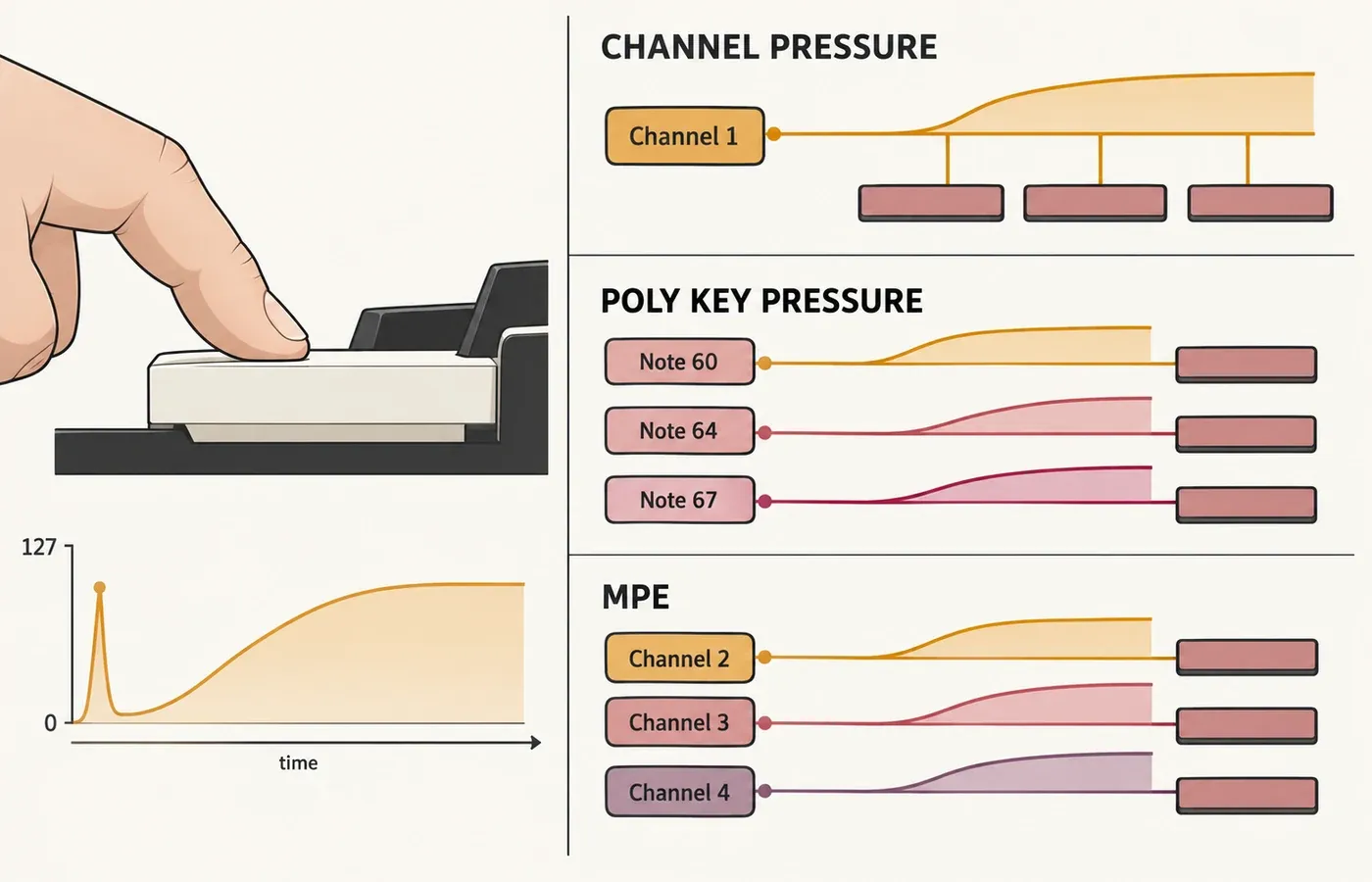
Velocity describes the attack gesture that begins a note. Aftertouch describes continued pressure after that attack. The simplest way to hear the distinction is to imagine one sustained synth note:
- 01Strike the key
The Note On message carries the note number and its velocity.
- 02Hold the note
The note continues without needing a new Note On event.
- 03Apply more pressure
A pressure message can change while the note is already sounding.
- 04Release the key
Releasing the key sends a Note Off message. This is separate from the pressure messages sent while the key is held.
This timing makes aftertouch useful for shaping a sustained sound without moving a wheel, pedal or knob. It doesn’t replace velocity. A performer can strike a note softly, then increase pressure to bring in vibrato or brightness after the tone begins.
Velocity tells the instrument how the note begins. Aftertouch gives the instrument changing pressure information during the held portion of the note.
Channel Pressure and Polyphonic Key Pressure
The MIDI Association’s guide to MIDI messages separates two pressure-message types. They differ in what the pressure value addresses, not merely in how sensitive the keyboard feels.
| Message | Addressing | Data carried | Musical consequence |
|---|---|---|---|
| Channel Pressure | One value for the MIDI channel | Pressure value | Held notes on that channel generally receive the same pressure control at the receiver |
| Polyphonic Key Pressure | A specific note | Note number plus pressure value | One held note can carry a different pressure value from another |
The official MIDI 1.0 message summary shows the structural difference clearly: Polyphonic Key Pressure includes both a key number and a pressure amount, while Channel Pressure carries a single pressure data value. The summary recommends sending the greatest pressure value among the currently depressed keys as Channel Pressure. It isn’t an average, and the message contains no note number.
Channel Pressure and Polyphonic Key Pressure are dedicated MIDI messages, not MIDI CC numbers. In the MIDI Association’s message guide, Control Change carries a controller number and a control value. The two pressure-message types use their own message formats.
Where MPE fits—and where it does not
MPE can also provide per-note pressure, but it reaches that result through a different architecture. The MIDI Association’s MPE specification overview explains that MIDI Polyphonic Expression assigns individual MIDI 1.0 channels to notes so each note can receive its own pitch, timbre and pressure-related expression.
The pressure message carries one value for the channel and does not identify an individual note.
Pressure can be addressed directly to a particular note while notes share a MIDI channel.
Per-note expression comes from channel allocation and a coordinated set of messages.
These mechanisms can serve similar musical goals, but they aren’t interchangeable names. A controller may support polyphonic aftertouch without operating as an MPE controller. An MPE performance may carry per-note pressure through channel-based messages rather than Polyphonic Key Pressure. Compatibility depends on what the controller sends and what the receiving instrument understands.
What can aftertouch control?
Aftertouch is a source of modulation, not a fixed sound command. The instrument or patch decides the destination and the response curve. Common choices include:
- Vibrato depthIncreasing pressure can introduce or intensify pitch modulation after the note starts.
- Filter movementPressure can brighten or darken a sustained sound without retriggering it.
- AmplitudeA patch can use pressure to swell a note, although pressure does not contain a universal gain value.
- Timbre or wavetable positionPressure can move through tonal states or layers when the sound engine exposes a suitable destination.
- Effect amountPressure can change an effect parameter where the instrument exposes that route. Per-note pressure does not guarantee independent effect control for each note.
Check whether the destination belongs to one voice or the whole sound. The Surge XT manual’s explanation of voice and scene modulation gives a concrete example: a voice modulator can control filter cutoff for each voice, but can’t control shared scene parameters such as FX levels. Its pressure-source definitions classify Poly AT as a voice modulator. Channel AT operates at scene level with MPE disabled and at voice level in MPE mode. These are Surge XT’s documented limits, so check the equivalent routing rules in your own instrument.
I prefer one clearly audible destination before adding a second. If pressure opens a filter, increases vibrato and raises level at once, it becomes hard to tell whether the gesture is expressive or simply unstable. Start with a modest range, then add another destination only when it solves a musical need.
The full path from finger pressure to sound
Aftertouch can appear to “do nothing” even when one part of the setup supports it. The entire chain has to preserve and interpret the data:
The keybed or pad must measure pressure after the initial strike.
The controller must transmit Channel Pressure, Polyphonic Key Pressure or an MPE-compatible stream.
The connection and software path must pass the message without filtering or remapping it incorrectly.
The instrument must recognize the incoming data and assign it to a destination.
The chosen patch needs enough modulation depth for the listener to hear the change.
That sequence is more useful than asking whether a keyboard or synth “has aftertouch” in isolation. A controller can send pressure that a patch ignores. A compatible instrument can wait for a message that the controller never produces. Notes passing through a route don’t prove that pressure survives it. For example, the Midihub Filter documentation lists Channel Pressure and Poly Aftertouch among the event types it can discard independently of Note On and Note Off. Check any event filters between the controller and instrument.
How to choose a controller or patch
Product pages often use the word aftertouch without making the scope obvious. Before buying or configuring anything, check five details:
- Which pressure type does the controller send?Look for explicit wording: Channel Pressure, Polyphonic Key Pressure, polyphonic aftertouch or MPE. A generic “aftertouch” label may not answer the question.
- Which keys or pads sense it?Some products apply pressure sensing to a keyboard, others to pads, and some to both. Confirm the playing surface you plan to use.
- Can the receiver read the same form?A patch that accepts Channel Pressure is not automatically a polyphonic-pressure destination, and the reverse is also true.
- Is pressure already mapped?Preset designers may leave aftertouch unassigned. Support in the instrument does not guarantee that every preset uses it.
- Can you shape the response?A curve, threshold or modulation-depth control can matter more in practice than a long list of possible destinations.
A controller’s pressure settings can also belong to a particular playing surface. In the Launchkey 37 settings documented by Novation, Pad Aftertouch can be Off, Channel or Poly, while Pad AT Threshold sets when pressure begins to register on the pads. The key and pad velocity curves are separate settings. So a velocity-curve option doesn’t tell you whether held pressure can be adjusted.
For a monophonic lead or a pad where every held note should swell together, Channel Pressure may be enough. If you want to lean on one note inside a chord while the others remain stable, you need a genuinely per-note route such as Polyphonic Key Pressure or a compatible MPE path.
DAW-neutral aftertouch troubleshooting
Notes play, but pressure changes nothing
Confirm that the patch maps the received pressure source to an audible destination. Increase the modulation depth temporarily so a subtle mapping cannot hide the result.
Every held note changes together
The setup may be using Channel Pressure. Check the controller’s transmitted message and the receiver’s expected source before assuming per-note pressure is broken.
Only some presets respond
The instrument may support pressure globally while individual patches use different mappings. Compare modulation assignments rather than treating preset behavior as a hardware test.
Pressure appears in a monitor but not in the instrument
The data reaches the monitor, but that does not confirm the route from the monitor to the instrument. Check downstream filters and routing, then receiver support, message type, channel arrangement and the patch’s modulation matrix.
The response jumps too quickly
Reduce modulation depth or adjust the pressure curve where the controller or instrument allows it. Change one stage at a time so stacked curves do not obscure the cause.
MPE mode makes routing confusing
Remember that MPE coordinates multiple channels. Check the documented zone and channel arrangement for the controller and receiver rather than treating it like one ordinary channel.
What should you remember?
Aftertouch is a second gesture that begins after the note attack. Channel Pressure sends one pressure stream for a channel. Polyphonic Key Pressure addresses a note number. MPE creates per-note expression by assigning notes to separate channels. Whichever route you use, the data becomes musical only when the controller, message path, receiver and patch agree on what pressure should do.