
MIDI 2.0 builds on MIDI 1.0. Its Channel Voice messages offer finer resolution and expanded control of individual notes. The broader MIDI 2.0 architecture also includes Universal MIDI Packet (UMP) and MIDI Capability Inquiry (MIDI-CI). These are separate pieces: UMP can carry either protocol, and MIDI-CI features can work with MIDI 1.0. Before buying around any feature, check that the complete path from controller to destination supports it.
Compact byte-stream messages, familiar channel architecture and broad support across existing equipment.
Higher-resolution Channel Voice messages and expanded per-note control, carried in UMP.
Translation is a design priority, but not every MIDI 2.0 message has a MIDI 1.0 equivalent.
A logo on one product does not prove that the feature reaches your software or destination.
MIDI 1.0 vs MIDI 2.0 at a glance
| Layer | MIDI 1.0 | MIDI 2.0 | Why it matters |
|---|---|---|---|
| Core role | Performance and control protocol | Extends the familiar musical model | Choose by the performance data you need |
| Message packaging | Traditional byte stream or MIDI 1.0 messages in UMP | MIDI 2.0 Protocol messages in UMP | UMP itself does not identify the performance protocol |
| Channel Voice data | Commonly 7-bit; defined 14-bit cases include Pitch Bend | 16-bit note/release velocity; relevant controller and pitch values use 32 bits | Useful resolution depends on the complete path |
| Per-note expression | Includes polyphonic key pressure for individual notes | Adds per-note controllers and per-note pitch messages | MIDI 1.0 already has some note-specific expression |
| Device discovery | MIDI-CI can work while using MIDI 1.0 Protocol | MIDI-CI is part of the broader architecture; UMP also has discovery mechanisms | Discovery and performance protocol are separate capabilities |
| Configuration | Profiles and Property Exchange can work with MIDI 1.0 | Profiles and Property Exchange are included in the broader architecture | Check the exact Profile or supported resource at both ends |
The MIDI Association’s protocol specification distinguishes UMP from the messages it carries. Its MIDI-CI documentation confirms that Profiles and Property Exchange can operate with MIDI 1.0. The MIDI 1.0 message summary also defines polyphonic key pressure.
The table separates performance messages from packet format and device configuration. A MIDI 2.0 label can cover different feature sets. Check the specific capability in the product documentation, then confirm support throughout your connection.
MIDI 2.0 is an extension, not a reset
The MIDI Association’s current MIDI 2.0 overview is explicit: MIDI 2.0 builds on MIDI 1.0 architecture and semantics rather than replacing them. Notes remain notes. Channels, controllers and program changes still describe recognizable musical jobs.
That choice protects a huge installed base. A musician shouldn’t have to discard a dependable keyboard, sound module or controller because a newer protocol exists. Translation between MIDI 1.0 and MIDI 2.0 was given high priority in the design, so mixed systems are expected rather than treated as a temporary failure state.
Higher-resolution performance messages and automatic configuration solve different problems. A destination still needs to implement each feature it is expected to use.
Universal MIDI Packet changes the container
UMP is the common packet format at the center of modern MIDI transport. The official Universal MIDI Packet and MIDI 2.0 Protocol specification page describes a format that can carry messages from both the MIDI 1.0 Protocol and the MIDI 2.0 Protocol and can be adapted to standardized or proprietary transports.
These numbers describe the size of the UMP message. They do not mean every controller has 128-bit precision.
The distinction matters because “128-bit MIDI” sounds more dramatic than what the standard claims. According to the MIDI Association’s February 2026 implementation overview, UMP messages are fixed multiples of a 32-bit word and may occupy 32, 64, 96 or 128 bits. The payload and meaning depend on the message type.
Where MIDI 2.0 adds useful precision
MIDI 1.0 Channel Voice messages commonly use 7-bit data, giving 128 possible values. Defined exceptions include 14-bit Pitch Bend and paired controller messages. Resolution describes the available values. Audible stepping also depends on the receiving instrument and its parameter handling.
MIDI 2.0 extends the resolution of Channel Voice data. The same February 2026 official overview documents 16-bit Note On velocity, 16-bit release velocity, 32-bit controller data and 32-bit pitch values in the relevant MIDI 2.0 messages. It also adds richer per-note control, so a gesture can affect one note rather than every note sharing a channel.
More values are available to describe attack and release data.
Continuous controls can carry finer values when every stage preserves them.
Documented MIDI 2.0 pitch messages provide a much larger value space.
New messages target individual notes instead of treating the channel as one block.
More numbers don’t automatically produce a better performance. The instrument has to generate meaningful detail, the path has to preserve it and the destination has to use it. A high-resolution message translated into a MIDI 1.0-only section may be reduced to the closest representation available there.
MIDI-CI, Profiles and Property Exchange solve different problems
MIDI-CI discovers compatible devices and supports configuration features. Profiles define behavior. Property Exchange communicates documented resources. Neither requires the performance messages to use the MIDI 2.0 Protocol.
MIDI-CI discovers capabilities
MIDI Capability Inquiry provides bidirectional discovery and configuration mechanisms. Compatible devices can establish shared support before using a Profile or exchanging properties.
Profiles define known behavior
A Profile is a behavior contract for a device type or task. When both sides support the Profile, they can agree on a predictable response instead of relying entirely on manual mapping.
Property Exchange moves structured resources
Property Exchange lets compatible devices inquire about, retrieve and set supported resources. These can describe configuration or device properties such as controller and patch names. Access depends on the resources and operations the device implements.
The MIDI Association’s MIDI-CI, Profiles and Property Exchange details also records an important terminology change: the older MIDI-CI Protocol Negotiation mechanism was deprecated and replaced by protocol-selection mechanisms in the UMP architecture. A current guide shouldn’t present the older term as the active design.
The weakest link sets the usable feature
A MIDI connection is a chain, not a badge. Consider a controller sending high-resolution per-note data to an instrument inside music software. The feature may pass through several layers:
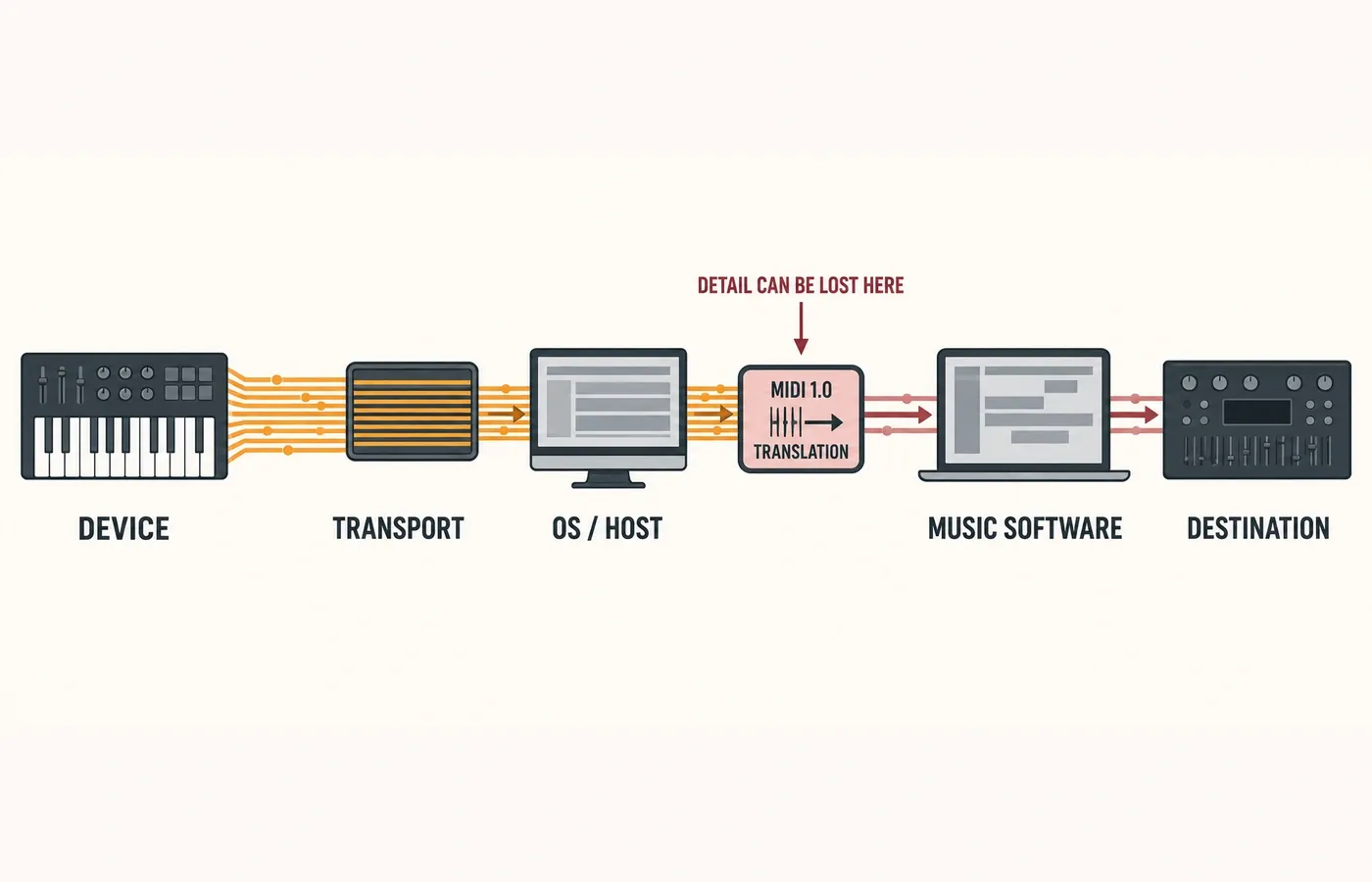
If one stage supports only MIDI 1.0, translation may keep notes, ordinary controllers and other shared semantics moving. A MIDI 2.0-only per-note message with no MIDI 1.0 equivalent can’t survive unchanged through that section. That’s why compatibility and full feature preservation are two different claims.
What happens in a mixed MIDI 1.0 and MIDI 2.0 setup?
A mixed setup can remain completely useful. The expected behavior falls into three broad cases:
The message can be translated, possibly with lower resolution. Notes and common performance data are the obvious examples.
Use the documented fallback or common feature set supported by both products. Do not assume that a Profile or property is available when one side does not expose it; discovery cannot add missing support.
The unique MIDI 2.0 behavior may be dropped, simplified or unavailable across the MIDI 1.0-only section.
A mixed connection can preserve useful musical data while losing detail that has no equivalent in the older protocol. Check the translation and routing behavior documented for the products in that path.
How to decide whether MIDI 2.0 matters for your setup
Start with the job. “MIDI 2.0 support” is too broad to guide a purchase because one product may support UMP transport, another may add Profiles, and another may expose high-resolution Channel Voice data.
High-resolution velocity, per-note control, a specific Profile, Property Exchange or another documented capability.
Confirm that the sending and receiving products document the same feature, not just generic MIDI 2.0 compatibility.
Verify the transport, operating system or host and music software preserve that message or capability.
If part of the chain is MIDI 1.0-only, determine what remains equivalent and what is reduced or unavailable.
Implementation changes. Use current first-party documentation for each product before buying around one promised workflow.
I’d pay for MIDI 2.0 because a documented feature solves a real control problem, not because the number is newer. A stable MIDI 1.0 path remains the better choice when it already carries everything the workflow needs.
Four claims to treat carefully
“MIDI 2.0 gear makes MIDI 1.0 obsolete”
The standard was designed as an extension with translation compatibility. Existing equipment can remain useful inside a mixed chain.
“UMP means every control is 128-bit”
UMP supports several message widths. Packet size and the resolution of one musical value are separate facts.
“One MIDI 2.0 device upgrades the studio”
The required feature has to survive the controller, transport, host, software and destination path.
“Backward compatible means lossless translation”
Shared semantics can be translated. A MIDI 2.0 message with no MIDI 1.0 equivalent cannot be preserved unchanged.
Which protocol should you use?
Use MIDI 1.0 when it already supports the performance data and routing you need. Choose MIDI 2.0 Protocol support for a documented requirement such as finer velocity resolution or expanded per-note control, with support across the full path.
If the benefit you want is a Profile or Property Exchange, check that capability separately. It can work with MIDI 1.0, so you may not need to change the performance protocol.